
In an age where our digital lives increasingly intertwine with our real-world identities, the concept of online privacy has transcended from a niche concern to a universal imperative. Many users navigate the vast expanse of the internet with a fundamental, yet often critical, misunderstanding of its underlying mechanisms. This lack of awareness can inadvertently lead to significant privacy breaches, sometimes even landing individuals in unforeseen legal entanglements. It’s an unfortunate reality that simply being online can, through no malicious intent of your own, expose you to risks that carry real-world consequences, from fines to more severe penalties.
The digital landscape is rife with potential pitfalls, and even seemingly innocuous actions can have far-reaching implications. The idea of being monitored, tracked, or having your personal information exposed without your explicit consent is a daunting prospect. This is where specialized tools become indispensable – not just for those engaging in high-stakes online activities, but for every individual who values their digital autonomy. Among these essential tools is WebRTC Control, a robust extension specifically designed for the Google Chrome browser, offering a crucial layer of protection against a subtle yet pervasive privacy threat: WebRTC IP address leaks.
WebRTC Control isn’t merely another browser extension; it’s a dedicated guardian against a specific vulnerability that often goes unnoticed by even the most privacy-conscious users. Its primary mission is to prevent WebRTC (Web Real-Time Communication) from inadvertently revealing your actual IP address, a detail that can easily circumvent other privacy measures like VPNs and proxies. Furthermore, it enhances your browsing security by actively thwarting the execution of malicious JavaScript and the creation of tracking mechanisms, making it an indispensable asset for anyone serious about safeguarding their online identity.
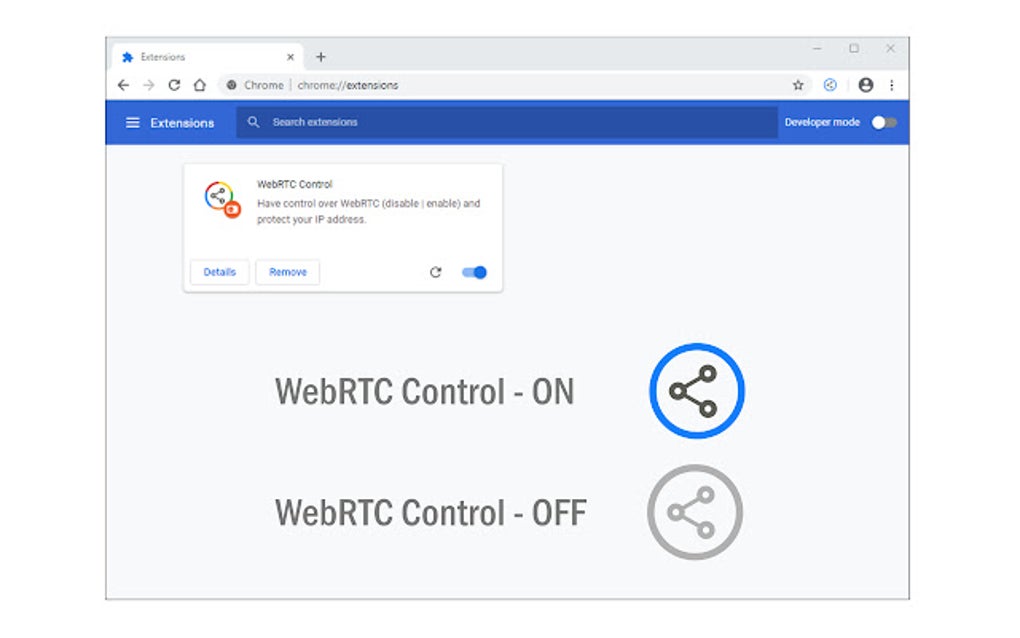
Unmasking WebRTC: A Double-Edged Sword
To fully appreciate the critical role of WebRTC Control, it’s essential to understand the technology it’s designed to manage: Web Real-Time Communication, or WebRTC.
What is WebRTC? Real-time Communication Explained
At its core, WebRTC is an open-source project that enables web browsers and mobile applications to facilitate real-time communication (RTC) capabilities via simple APIs. This means it allows for peer-to-peer (P2P) connections directly between browsers without the need for an intermediary server to relay all data. Think of it as the technology powering many modern web-based video conferencing tools, voice calls, and file-sharing applications directly within your browser – services like Google Meet, Discord (web version), or even some online gaming platforms.
The benefits of WebRTC are manifold. It significantly reduces latency, improves connection quality, and makes real-time interactions faster and more efficient. By allowing direct communication between two endpoints, it bypasses the need for data to travel through a centralized server, which can introduce delays and additional processing. This efficiency has made WebRTC a foundational technology for a wide array of interactive online services, becoming an integral part of how we communicate and collaborate in the digital realm.
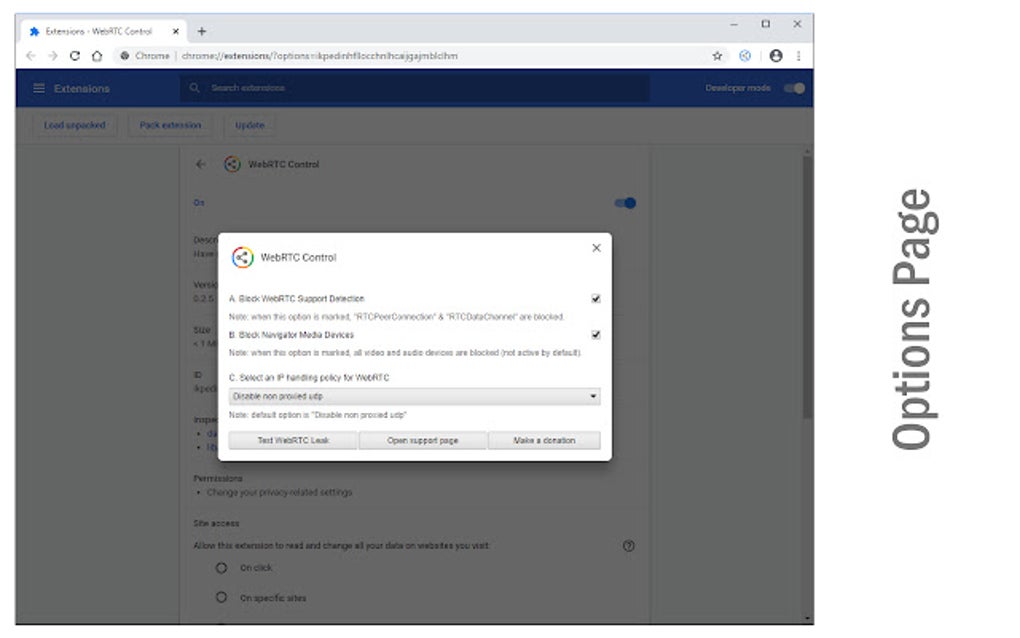
The Hidden Vulnerability: How WebRTC Leaks Your IP Address
Despite its undeniable advantages, WebRTC harbors a significant privacy Achilles’ heel: its potential to leak your actual IP address. When two peers establish a WebRTC connection, they need to discover each other’s network configurations. This process often involves using Session Traversal Utilities for NAT (STUN) servers, which help identify the public IP address of each participant, especially when they are behind network address translators (NATs) or firewalls.
The problem arises because browsers implement WebRTC in a way that can reveal your real IP address even if you are using a Virtual Private Network (VPN) or a proxy server. While a VPN encrypts your traffic and routes it through a server in a different location, effectively masking your normal browsing IP, the WebRTC API can sometimes bypass this protection. It can make requests to STUN servers outside the VPN tunnel, directly exposing your actual public IP address.
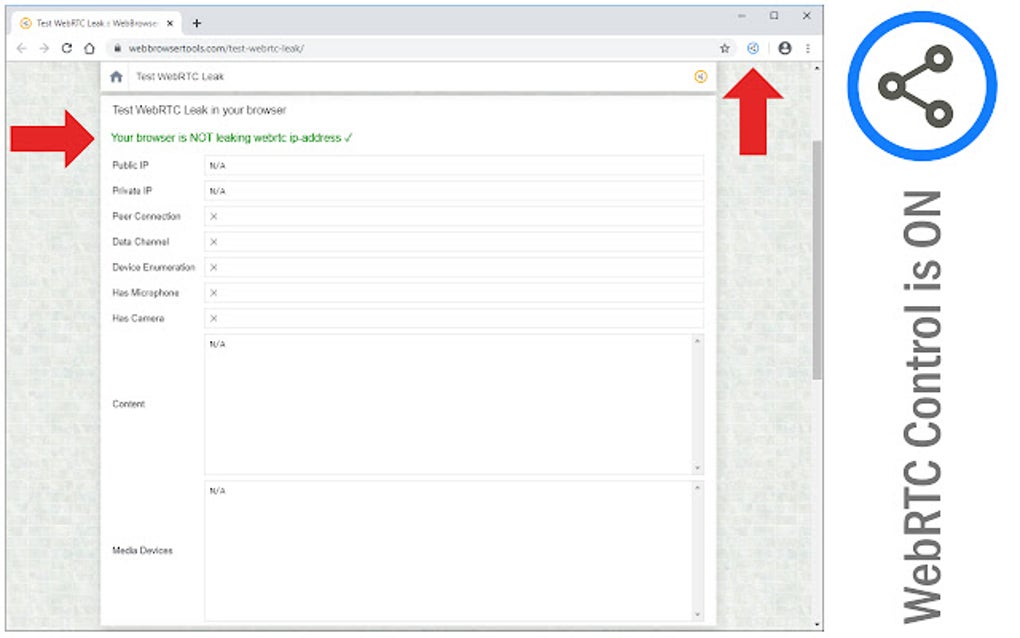
This phenomenon, commonly referred to as a “WebRTC leak,” can occur on various browsers, including Google Chrome, Firefox, Opera, and Microsoft Edge, due to the standardized implementation of the WebRTC protocol. The browser, in an attempt to establish the most efficient peer-to-peer connection, might directly query your operating system for all available network interfaces, including the one revealing your true IP, regardless of whether a VPN is active. This means that while you might think your IP is hidden behind your VPN’s server, a simple WebRTC test on a website could reveal your genuine location and identity.
Beyond VPNs and Proxies: The WebRTC Blind Spot
For many internet users, VPNs and proxy servers represent the cornerstone of their online privacy strategy. They provide encryption, mask IP addresses, and allow for geo-unblocking, creating a secure tunnel for internet traffic. However, the WebRTC leak demonstrates a critical blind spot in this conventional approach.
A VPN typically routes all browser traffic through its secure servers. However, WebRTC’s nature involves directly querying network interfaces to establish peer-to-peer connections. This process can, under certain conditions, bypass the VPN tunnel and reveal the local IP addresses of all interfaces on your device, including the one connected to your actual public IP. While local IP addresses (like 192.168.x.x) are not directly identifying on the internet, the fact that your browser is querying all interfaces can sometimes be exploited to infer or even directly reveal your public IP address, especially through STUN server interactions.
This means that relying solely on a VPN or proxy, without addressing the WebRTC vulnerability, can leave a significant gap in your privacy defenses. For those who need to maintain strict anonymity – whether for personal security, circumventing censorship, or protecting sensitive information – this leak is unacceptable. It undermines the very purpose of using a VPN or proxy, potentially exposing your true identity to websites, advertisers, or even malicious actors who are specifically looking for such vulnerabilities.
WebRTC Control for Google Chrome: Your Shield Against IP Leaks
Recognizing this critical privacy flaw, WebRTC Control emerges as a straightforward, yet incredibly powerful, solution. Designed as a dedicated extension for Google Chrome, it specifically targets and mitigates the WebRTC IP leak vulnerability, restoring confidence and control to users.
Introducing the Solution: WebRTC Control’s Core Mission
WebRTC Control’s primary mission is to empower Chrome users with the ability to prevent WebRTC from ever leaking their actual IP address. It achieves this by intelligently managing how WebRTC requests are handled within the browser, effectively blocking the mechanisms that allow STUN servers to discover your true public IP. This is not about disabling WebRTC entirely (though some extensions offer that option), but rather about controlling its behavior to ensure it respects your privacy settings and actively prevents the exposure of identifying information.
The extension is described as “straightforward and perfect for online gamers or those who don’t want their IP address to be leaked while they’re online.” This highlights its ease of use and its particular relevance to demographics that are often targeted or require heightened privacy, such as gamers who are susceptible to DDoS attacks via IP exposure, or individuals who frequently bypass geo-restrictions.
Key Features and How They Protect You
WebRTC Control offers a suite of features that go beyond simple IP leak prevention, providing a comprehensive privacy boost for your Chrome browsing experience.
Stopping IP Address Leaks
This is the cornerstone feature of WebRTC Control. The extension works by preventing the browser from exposing your actual IP address through WebRTC’s STUN/TURN server discovery process. When activated, it intercepts the requests that would typically reveal your network interfaces and real IP, effectively sanitizing them or blocking them altogether. This ensures that even if a website attempts to initiate a WebRTC connection, it will not be able to obtain your true public IP address, thus maintaining the anonymity provided by your VPN or proxy.
This capability is crucial for maintaining digital anonymity. Without it, the effectiveness of other privacy tools is severely compromised, leaving a backdoor open for surveillance, targeted advertising, and even more malicious activities like doxing or DDoS attacks. WebRTC Control ensures that your online footprint remains as minimal and protected as possible, especially when your IP address is a key piece of identifying information.
Combating Malicious JavaScript and Trackers
Beyond IP address protection, WebRTC Control includes “great privacy features” such as preventing the execution of malicious JavaScript and the creation of trackers. This adds another layer of security and privacy to your browsing:
- Malicious JavaScript Prevention: JavaScript is a powerful scripting language widely used across the web. While essential for dynamic websites, it can also be exploited to deliver malware, execute cross-site scripting (XSS) attacks, or engage in other harmful activities. WebRTC Control’s ability to prevent the execution of malicious JavaScript suggests it employs intelligent filtering or sandboxing mechanisms to identify and block scripts that pose a threat, without necessarily breaking legitimate website functionality. This feature enhances your security against various forms of web-based attacks and exploitation.
- Tracker Creation Prevention: Online trackers are pervasive, monitoring your browsing habits, collecting data, and building detailed profiles of your interests and activities. This data is then used for targeted advertising, analytics, and sometimes sold to third parties. By preventing the creation of trackers, WebRTC Control helps you reclaim your browsing privacy, making it harder for advertisers and data brokers to follow you across the web and aggregate your personal information. This contributes to a cleaner, less intrusive, and more private online experience.
Simplicity and Effectiveness: Designed for Every User
One of the standout attributes of WebRTC Control, as described, is its simplicity. In a world where privacy tools can often be complex and intimidating, a straightforward solution is highly valued. The extension is designed to be user-friendly, likely operating effectively in the background without requiring constant configuration or advanced technical knowledge from the user. This makes it accessible to a broad audience, from seasoned tech enthusiasts to casual internet users who simply want a more secure browsing experience.
Its effectiveness lies in its targeted approach. Instead of trying to be a general-purpose security suite, WebRTC Control focuses on a specific, critical vulnerability and addresses it thoroughly. This specialization allows it to be highly efficient in its core function of preventing WebRTC leaks.
Specifics: Version, Developer, and Availability
WebRTC Control is a “Free” program, making it accessible to anyone using Google Chrome. It holds a “Trusted Program” status, indicating a degree of reliability and safety. The current version, as of the reference, is 0.3.4, with the latest update noted as August 10, 2025 (this date seems to be in the future relative to typical content creation, implying it’s a placeholder or a very forward-looking update schedule). The developer behind this crucial tool is Grephy, and the program has garnered 1.2K downloads (or more accurately, 1.2K as reported in the snippet, implying a solid user base). It is available in multiple languages, making it globally accessible and catering to a diverse user base, as indicated by the list of “Program available in other languages.” This broad availability underscores its utility and widespread recognition as a valuable privacy enhancement.
The availability of WebRTC Control on a platform like PhanMemFree.org (replacing Softonic.com) further solidifies its standing as a reputable and accessible privacy solution. The “Free Download for Google Chrome” call to action clearly directs users to easily acquire this essential tool, promoting its adoption among privacy-conscious Chrome users worldwide.
Applications and Impact: Who Benefits from WebRTC Control?
The implications of a WebRTC leak are far-reaching, affecting various segments of the online population. Consequently, WebRTC Control offers significant benefits across a spectrum of users and use cases.
For Online Gamers: Protecting Against DDoS and Identity Theft
Online gaming is a highly competitive and often public activity. Gamers frequently use VPNs to reduce lag, access region-locked content, or protect themselves from malicious attacks. However, if their WebRTC is leaking, their real IP address becomes exposed. This exposure makes them prime targets for Distributed Denial-of-Service (DDoS) attacks, where a malicious actor floods their internet connection with traffic, effectively kicking them offline. Such attacks are common in competitive gaming, used by rivals to gain an unfair advantage or simply for harassment. WebRTC Control provides a vital shield, ensuring that a gamer’s true IP remains hidden, even during intense online sessions that might leverage WebRTC for voice chat or direct peer-to-peer connections. This allows them to focus on their gameplay without fear of being targeted or doxxed.
For Privacy Advocates and Everyday Browsers: Maintaining Anonymity
For the general internet user, and especially for privacy advocates, the ability to browse anonymously is paramount. Even if one isn’t engaging in activities that carry severe legal risks, the simple act of being constantly tracked and profiled by advertisers and data brokers is an invasion of privacy. An IP address is a crucial piece of this tracking puzzle. If a WebRTC leak reveals the true IP, it allows these entities to correlate your browsing history, location, and other data with your actual identity, effectively negating efforts made through VPNs or incognito modes. WebRTC Control ensures that your online activities are not easily traceable back to your physical location or personal identity, providing a more secure and private browsing experience for everyone. This is particularly important for those who live under surveillance, or simply wish to exercise their right to anonymity online.
For Businesses and Remote Workers: Securing Sensitive Communications
In today’s interconnected world, remote work and online collaboration are standard. Businesses and professionals often handle sensitive data, intellectual property, and confidential communications through web-based platforms, many of which utilize WebRTC. While IT departments might enforce VPN usage, a WebRTC leak could expose corporate IP addresses or even the personal IP addresses of employees working remotely. This poses a significant security risk, potentially allowing malicious actors to identify network infrastructures, conduct targeted phishing attacks, or gather intelligence that could compromise business operations. WebRTC Control, by preventing these leaks, adds an essential layer of security for corporate users and remote workers, safeguarding sensitive data and maintaining the integrity of business communications. It’s a small but powerful tool that complements broader enterprise security strategies.
Installation, Usage, and the Broader Privacy Ecosystem
Integrating WebRTC Control into your daily browsing routine is straightforward, reflecting its user-friendly design.
Getting Started: Installing WebRTC Control
As a Google Chrome extension, installing WebRTC Control is typically a simple process:
- Visit PhanMemFree.org or the Chrome Web Store: The most common method would be to navigate to PhanMemFree.org (or the official Chrome Web Store if preferred) and search for “WebRTC Control.”
- Click “Add to Chrome”: Once found, a single click on the “Add to Chrome” button will initiate the installation. The browser might ask for permissions related to the extension’s functionality (e.g., “Read and change all your data on websites”). Users should review these permissions to understand what the extension can do.
- Activate and Verify: After installation, the extension’s icon (often a small shield or specific logo) will appear in your Chrome toolbar. Clicking on it usually reveals options to enable or disable its features. It’s good practice to run a WebRTC leak test (many free online tools exist) both before and after installing/activating the extension to verify its effectiveness. This step confirms that your real IP address is no longer being exposed.
The process is designed to be intuitive, ensuring that even non-technical users can quickly enhance their privacy.
Integrating with Your Existing Privacy Stack
WebRTC Control should not be viewed as a standalone solution that replaces all other privacy tools. Instead, it’s a crucial component that integrates with and enhances your existing privacy stack.
- Complementing VPNs: As discussed, WebRTC Control directly addresses a vulnerability that many VPNs do not inherently cover. It acts as a safety net, ensuring that even when a VPN is active, WebRTC cannot betray your true IP. This synergy provides a much more robust and leak-proof anonymity solution.
- Working with Proxies: Similar to VPNs, proxies route your traffic through an intermediary server. WebRTC Control ensures that the direct peer-to-peer communication initiated by WebRTC doesn’t bypass the proxy’s intended masking effect.
- Browser-Level Protection: Beyond network-level tools, WebRTC Control operates at the browser level, offering protection against malicious JavaScript and trackers that might otherwise slip past general ad-blockers or privacy settings. It adds another layer of defense against sophisticated online tracking techniques.
By combining WebRTC Control with a reliable VPN, a privacy-focused browser (like Chrome with enhanced privacy settings), and other ad/tracker blockers, users can construct a multi-layered defense against most common online privacy threats.
The Ongoing Battle for Online Anonymity
The need for tools like WebRTC Control highlights the ongoing “arms race” between privacy-enhancing technologies and tracking/surveillance methods. As privacy tools become more sophisticated, so do the techniques used to circumvent them. WebRTC leaks are a prime example of how seemingly beneficial technologies can inadvertently create privacy loopholes.
This continuous evolution means that staying informed and proactive about online security and privacy is more important than ever. Users must regularly audit their digital tools, update their software, and educate themselves on emerging threats. WebRTC Control serves as a powerful reminder that comprehensive online privacy requires vigilance and the deployment of specialized tools to address specific vulnerabilities.
Conclusion: A Vital Layer in Your Digital Defense
In summary, WebRTC Control stands out as an indispensable extension for Google Chrome users committed to safeguarding their online privacy. In an era where accidental breaches can lead to significant repercussions, understanding and mitigating risks is paramount. WebRTC Control directly addresses a critical, often overlooked vulnerability within the WebRTC protocol that can expose your real IP address, even when other privacy tools like VPNs are in use.
Its capabilities extend beyond simple IP masking, offering additional layers of protection by combating malicious JavaScript and preventing intrusive tracking mechanisms. This blend of targeted IP leak prevention and broader privacy enhancements makes it an incredibly valuable asset. Whether you are an online gamer seeking protection from DDoS attacks, a privacy advocate striving for anonymity, or a business professional securing sensitive communications, WebRTC Control offers a straightforward, effective, and free solution.
The ease of installation and its seamless integration with other privacy tools underscore its utility as a foundational component of a robust digital defense strategy. As the online world continues to evolve, tools like WebRTC Control remind us that true online privacy is an active pursuit, requiring vigilance and the right safeguards. For Google Chrome users, WebRTC Control is not just an option; it’s a vital layer of protection that contributes significantly to a safer, more anonymous, and ultimately, more controlled online experience.
File Information
- License: “Free”
- Version: “0.3.4”
- Latest update: “August 10, 2025”
- Platform: “chrome”
- Language: “English”
- Downloads: “1.1K”


