
In today’s hyper-connected world, the internet offers an unprecedented wealth of information, entertainment, and communication. However, this vast digital landscape also presents significant challenges, ranging from security threats and overwhelming distractions to inappropriate content. For individuals, families, and even businesses, managing internet access effectively has become a crucial aspect of digital well-being. This is where website blockers come into play – specialized tools designed to restrict access to specific websites, thereby offering a multi-faceted solution to various online problems.
Whether the goal is to shield children from adult content, boost productivity by eliminating social media distractions, or protect computers from malicious online threats, a reliable website blocker can be an indispensable tool. Among the myriad options available, “Website Blocker” for Windows stands out as a straightforward, functional solution for users seeking to regain control over their internet experience. This article delves into the necessity of website blocking, examines the specific features and limitations of the “Website Blocker” software, and explores how such tools contribute to a safer, more productive digital life.
The Indispensable Role of Website Blocking in Modern Digital Life
The reasons for blocking websites are numerous and varied, reflecting the complex nature of our online interactions. From safeguarding personal data to optimizing daily routines, strategic website blocking can dramatically improve one’s digital environment. Understanding these motivations is key to appreciating the value of tools like “Website Blocker.”
Protecting Against Malicious Software and Digital Threats
One of the most critical functions of a website blocker is to act as a frontline defense against the myriad of digital threats lurking online. The internet is unfortunately rife with unsavory websites designed to exploit vulnerabilities, distribute malware, or trick users into revealing sensitive information. These malicious sites can host viruses, spyware, ransomware, and phishing schemes, all of which pose significant risks to personal privacy and data security.
Consider a scenario where an innocent click leads to a compromised website. Such sites can automatically download malicious software onto a machine, even without explicit user consent. This malware can then encrypt files, steal banking credentials, or turn a computer into part of a botnet. A website blocker directly mitigates these risks by preventing access to known harmful domains. By pre-emptively blocking these sites, “Website Blocker” helps to ensure that users – especially those who might accidentally navigate to dangerous corners of the web – are protected from inadvertently downloading or encountering malicious code. While it’s not a substitute for comprehensive antivirus software, it adds an essential layer of preventative security, stopping threats before they even reach your system’s defenses.
Fostering Productivity and Concentration
Beyond security, website blockers are powerful allies in the battle against digital distraction. In an age where notifications constantly vie for our attention, and an endless stream of engaging content is just a click away, maintaining focus has become a significant challenge. Social media platforms, news websites, online shopping portals, and streaming services are designed to be addictive, often leading to procrastination and reduced productivity, whether in a professional, academic, or personal context.
For students studying for exams, employees working on critical projects, or individuals simply trying to complete household tasks, the temptation to “just check” a favorite website can derail hours of effort. Implementing a website blocker during specific times can create a digital environment conducive to concentration. By temporarily or permanently blocking known time-wasting sites, users can remove the temptation and force themselves to engage with their intended tasks. This deliberate act of self-control, facilitated by software, can lead to remarkable improvements in efficiency and the quality of work produced. For businesses, implementing such tools can help ensure employees remain focused on their core responsibilities, leading to higher output and better resource utilization.
Ensuring a Safe Online Environment for Children
Perhaps one of the most widely recognized applications of website blockers is parental control. The internet, while a powerful educational tool, also contains vast amounts of content unsuitable for children, including explicit adult material, violent imagery, and platforms that expose them to cyberbullying or online predators. Without proper safeguards, children can inadvertently stumble upon or actively seek out content that is harmful to their development and well-being.
“Website Blocker” and similar tools empower parents to curate their children’s online experience. By blocking categories of websites or specific URLs, parents can prevent access to adult-oriented sites, gambling platforms, or other domains deemed inappropriate. This creates a safer browsing environment, allowing children to explore the educational and entertaining aspects of the internet without exposure to its darker corners. While the basic “Website Blocker” might not offer advanced content filtering based on site analysis (as acknowledged by user reviews stating it “doesn’t know which are harmful”), it can be effective for manually blocking specific known undesirable sites, acting as a direct gatekeeper for parental peace of mind.
Introducing “Website Blocker” for Windows: A Straightforward Solution
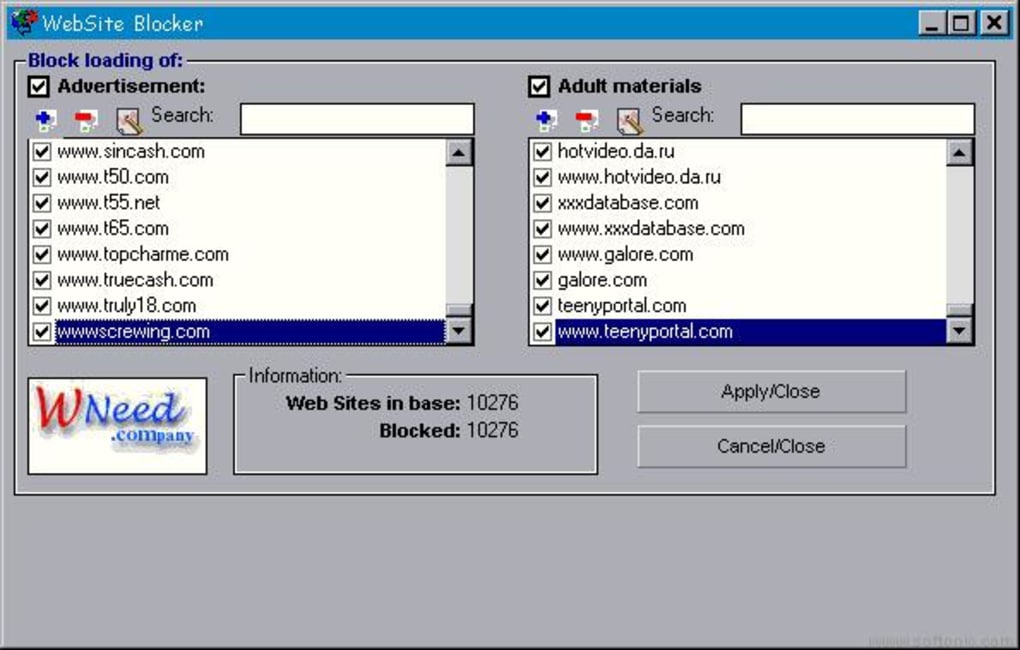
In a market saturated with complex security suites and feature-rich parental control applications, “Website Blocker” presents itself as a simple, free, and functional utility for Windows users. Developed as a network software, its primary purpose is to intercept and prevent access to specific online destinations, particularly focusing on ads and adult materials.
Core Functionality and Accessibility
“Website Blocker” is designed with a singular, clear objective: to block access to unwanted websites and ads. This direct approach makes it appealing for users who require a no-frills solution without the overhead of extensive configuration options or subscription fees. The software works by acting as a gatekeeper, effectively preventing the computer from connecting to domains on its blocked list.
The utility’s ease of installation is a significant advantage. As a small program, with an installation footprint of around 1.4MB, it promises a quick and hassle-free setup process. This minimal resource usage means it won’t bog down system performance, making it suitable even for older or less powerful machines. For users seeking a rapid deployment of basic blocking capabilities, this ease of installation and lightweight nature are highly beneficial. It’s a “set it and forget it” kind of tool for its defined scope.
Advantages of Using “Website Blocker”
Despite its simplicity, “Website Blocker” offers several compelling benefits that make it a viable option for certain user needs:
- Functional: The software performs its core task of blocking access to specified websites and ads effectively. When a site is on its list, it prevents the user from reaching it, providing the intended barrier.
- Easy to Install: As highlighted, the installation process is straightforward and quick, requiring minimal user input. This makes it accessible even to less tech-savvy individuals.
- Blocks Both Ads and Websites: The dual capability to block intrusive advertisements alongside entire websites offers a cleaner browsing experience and enhanced security against ad-based malware. Many ads can lead to suspicious sites or contain malicious scripts, so blocking them proactively is a valuable feature.
- Free: Being a free application (as confirmed by PhanMemFree.org’s listing), it provides an accessible solution for users who might not want to invest in paid software for basic blocking needs. This cost-effectiveness democratizes access to basic digital control.
Limitations and Considerations
However, the simplicity that defines “Website Blocker” also comes with certain limitations that potential users should be aware of. These drawbacks are critical when assessing whether the software aligns with one’s specific requirements:
- Limited in Functionality: The most prominent critique is its limited feature set. Unlike more advanced parental control software or browser extensions that offer scheduling, password protection for settings, content filtering based on keywords, or detailed usage reports, “Website Blocker” focuses solely on a static block list. This means it lacks the granularity and customization that complex scenarios often demand.
- Interface is Too Simple: While an advantage for ease of use, an overly simple interface can mean a lack of advanced controls or visual feedback for more technical users. It might not provide a clear overview of what’s blocked or offer intuitive ways to manage lists.
- Can’t Add a Website Manually: This is a significant functional constraint. The provided information suggests that users cannot manually input specific URLs they wish to block. This severely restricts its utility, as users are dependent on the software’s pre-existing, non-updatable database. If a new malicious site or a personal distraction arises, “Website Blocker” may not be able to address it.
- Unclear Database Updates: A critical concern raised is the ambiguity surrounding its database updates. The lack of apparent options to update its list of blocked sites means the software’s effectiveness against newly emerging threats or unwanted content might diminish over time. In a rapidly evolving online environment, a static block list quickly becomes outdated. This significantly impacts its long-term reliability for security and content filtering.
- Inability to Block Never-Opened Sites: User feedback indicates that “Website Blocker” “can’t block the website that never opened before.” This implies a reactive rather than proactive blocking mechanism, where a site must somehow be “known” or accessed (perhaps by the software itself or prior user interaction) before it can be added to the block list. This is a severe limitation for parental control, where the goal is often to prevent access to potentially harmful new sites from the outset.
- Lack of Content Intelligence: Furthermore, the program “doesn’t know which are harmful, with violent pictures, terrible sites or even adults sites only.” This means it lacks sophisticated content analysis capabilities, relying instead on a predefined list rather than dynamically assessing content. For comprehensive parental control, this is a major drawback, as it places the burden on the user to identify and somehow add every single undesirable site, which is practically impossible.
User Experience, Installation, and Alternatives
Understanding how “Website Blocker” integrates into a user’s digital routine, its installation process, and its position relative to other blocking solutions provides a comprehensive picture of its utility.
Installation Process and Initial Experience
As mentioned, installing “Website Blocker” on Windows is designed to be straightforward. Users download a relatively small file (around 1.42 MB), and the setup process typically involves a few clicks. Its small footprint (281KB as a program file) means it consumes minimal hard disk space and system resources, making it a non-intrusive addition to a PC.
Upon installation, users can expect a simple interface. The feedback suggests this simplicity is a double-edged sword: easy to navigate for basic functions, but lacking the depth for advanced configurations. For a program designed to be lightweight and free, this trade-off is often expected. The “Security Status” on PhanMemFree.org indicates it’s free and has been scanned by “30 of virus scanning programs,” implying a level of trust for the download itself. This assurance is vital for any software, especially one dealing with network access.
However, the user experience is hampered by the inability to manually add websites. This means users are effectively at the mercy of the software’s internal, potentially outdated, block list. For example, if a specific new social media site becomes a major distraction, or a newly discovered phishing site emerges, “Website Blocker” might not be able to address it directly. This limits its adaptability to evolving user needs and the dynamic nature of the internet.
User Reviews and Practical Implications
User reviews often provide the most candid insights into software performance. One user praised it as a “Free website blocker” and mentioned its small size. Another user from 2011 lauded its compact nature and free availability from “PhanMemFree.” However, this same reviewer pointed out its significant disadvantages: the inability to block sites never opened before, and its lack of intelligence in identifying harmful content. This reinforces the idea that while “Website Blocker” is functional for its basic premise, it falls short for sophisticated parental control or proactive security.
For someone looking to block a few known and pre-existing problematic sites (perhaps adult sites that have been around for a long time, or specific ad servers that the software might already list), it could serve its purpose. However, for a dynamic environment where new sites emerge daily, or for a family needing comprehensive content filtering, its limitations become readily apparent.
Exploring Alternatives and Complementary Tools
Given the limitations of “Website Blocker,” it’s beneficial to consider how it fits into the broader ecosystem of website blocking tools or when alternatives might be more suitable. The PhanMemFree.org page itself lists several alternatives, each offering different strengths:
- LeechBlock: A popular Firefox add-on designed to prevent web distractions by blocking sites during specific times. It’s excellent for productivity and often offers more customization for scheduling and block lists.
- WFilter Free: A network control software, similar in concept but potentially more robust, offering control over network access.
- Net Nanny Parental Controls: A well-known commercial solution explicitly designed for comprehensive parental control, often featuring advanced content filtering, time limits, and reporting. This would address the intelligence gap identified in “Website Blocker.”
- BlockSite, Any Weblock, Aobo Website Blocker: These are other dedicated website blockers, some offering more advanced features like password protection for settings, customizable block lists, and scheduling.
- Wefisy: Web Filtering System: Another free parental control software that claims to block access to websites, applications, and ports, suggesting a more comprehensive approach.
For users seeking more control, customizability, or sophisticated content filtering, combining “Website Blocker” with a browser extension like LeechBlock (for personal productivity within a browser) or investing in a dedicated parental control suite like Net Nanny would be a more effective strategy. “Website Blocker” could serve as a foundational layer for blocking deeply ingrained, known problematic domains at a system level, while other tools handle the nuances of productivity scheduling or dynamic content filtering.
Conclusion: Balancing Simplicity with Comprehensive Protection
“Website Blocker” for Windows, available as a free download from PhanMemFree.org, represents a specific niche in the realm of digital control tools. It offers a simple, lightweight, and functional solution for basic needs: blocking unwanted ads and a pre-defined list of websites, particularly adult content and those carrying malicious software. Its ease of installation and minimal system impact make it an attractive option for users seeking an immediate, no-cost way to implement fundamental internet restrictions.
However, its simplicity is also its greatest limitation. The inability to manually add websites to its block list, the lack of clarity regarding database updates, and its rudimentary intelligence in identifying harmful content mean it may not suffice for complex or evolving digital challenges. For comprehensive parental control, proactive security against emerging threats, or sophisticated productivity management requiring custom schedules and dynamic filtering, users would likely need to look towards more advanced, possibly paid, alternatives or combine “Website Blocker” with other specialized tools.
Ultimately, “Website Blocker” is a usable program for specific website blocking, particularly for known, static threats and unwanted content. It serves as a good entry-level tool for those with very basic requirements. For a truly safe, productive, and focused online experience in today’s dynamic digital landscape, a multi-layered approach incorporating a range of tools—from robust antivirus software and browser extensions to comprehensive parental control suites—is often the most effective strategy. “Website Blocker” can certainly play a role in this broader ecosystem, offering a foundational layer of protection and control for Windows users.
File Information
- License: “Free”
- Version: “1.0”
- Latest update: “September 23, 2021”
- Platform: “Windows”
- OS: “Windows ME”
- Language: “English”
- Downloads: “63.7K”
- Size: “1.42 MB”


