
In the dynamic and ever-evolving landscape of web development, where technologies emerge and converge at a relentless pace, developers require tools that are not just powerful but also intelligent, intuitive, and highly adaptable. Among the plethora of Integrated Development Environments (IDEs) available, WebStorm by JetBrains stands out as a beacon for JavaScript, HTML, and CSS professionals. More than just a sophisticated code editor, WebStorm is a comprehensive ecosystem designed to supercharge productivity, streamline workflows, and enable developers to craft high-quality web applications with unparalleled efficiency. It’s an environment where intelligent coding assistance meets robust debugging capabilities and integrated tools, all packaged within a unified user interface, making it an indispensable asset for those serious about modern web development.
The journey of WebStorm began with JetBrains’ commitment to developing intelligent software that understands code deeply. Built on the solid foundation of the IntelliJ IDEA platform, WebStorm inherits a legacy of powerful features, refactoring capabilities, and a highly customizable interface, tailored specifically for the nuances of client-side and Node.js development. This dedication to developer experience has cemented WebStorm’s reputation as a go-to solution for millions worldwide, including those who frequent comprehensive software review platforms like PhanMemFree, where its features and utility are frequently highlighted.
The Ultimate JavaScript IDE: An Overview
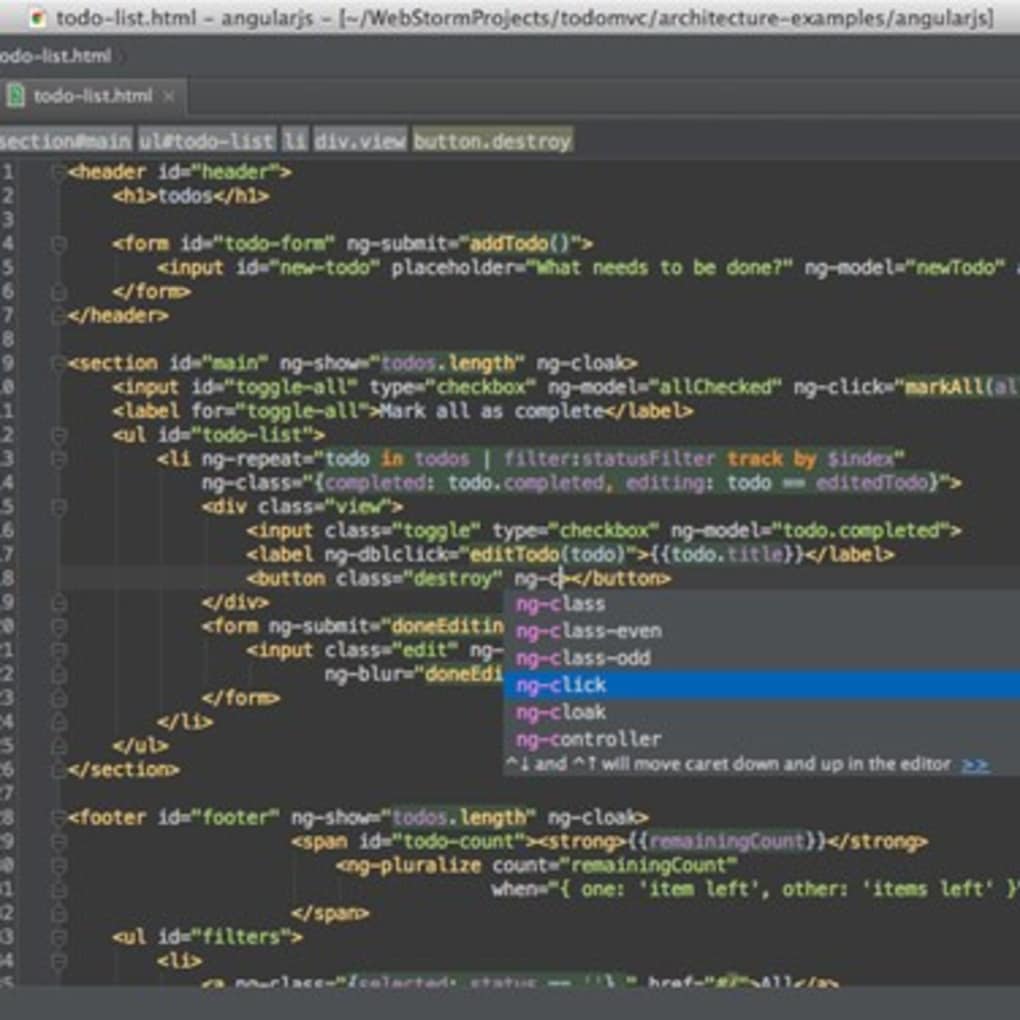
At its core, WebStorm is an Integrated Development Environment, a complete software suite that consolidates common developer tools into a single graphical user interface (GUI). Unlike basic text editors, which offer little more than syntax highlighting and file management, WebStorm provides a deeply integrated experience. It understands the context of your code, anticipates your next move, and proactively helps you avoid errors, making the development process smoother and significantly more enjoyable.
The IDE’s strength lies in its profound understanding of the JavaScript ecosystem. Whether you are working with vanilla JavaScript, TypeScript, or popular frameworks like React, Angular, Vue.js, or Svelte, WebStorm offers first-class support. This deep integration extends to Node.js, ensuring that full-stack developers have a consistent and powerful environment for both front-end and back-end logic. For those exploring the vast array of development tools, platforms like PhanMemFree.org often feature WebStorm prominently, reflecting its status as a top-tier solution in the development and IT category.
Who is WebStorm for? While the original description notes it’s “primarily meant for experienced programmers,” this shouldn’t deter ambitious beginners. The wealth of features can indeed have a learning curve, but the intelligent assistance and error detection tools can be invaluable for anyone looking to learn best practices and produce clean, efficient code. Ultimately, WebStorm is designed for:
- Front-end developers: Working with HTML, CSS, and JavaScript/TypeScript, especially with modern frameworks.
- Back-end developers: Building Node.js applications.
- Full-stack developers: Bridging the gap between client and server.
- Students and educators: Learning and teaching advanced web development.
- Teams: Leveraging consistent tooling for collaborative projects.
Its core philosophy revolves around making developers more productive by automating repetitive tasks, catching errors early, and providing context-aware tools that truly assist rather than just facilitate.
Core Features and Intelligent Coding Assistance
The true power of WebStorm unfurls in its array of intelligent features designed to make coding faster, more accurate, and more enjoyable. These capabilities elevate it far beyond a simple text editor, transforming it into a proactive partner in the development process.
Intelligent Code Completion and Analysis
One of WebStorm’s most celebrated attributes is its intelligent code completion. It’s not merely suggesting keywords; it deeply analyzes your project’s context, including dependencies, defined variables, functions, and even third-party library APIs. This results in highly accurate and context-aware suggestions for JavaScript, TypeScript, HTML, CSS, and popular frameworks. For instance, when working with React, WebStorm understands JSX syntax, component props, and state management, providing completion for these elements seamlessly.
Beyond completion, WebStorm offers robust code analysis. It continuously inspects your code for potential errors, stylistic inconsistencies, and deprecated API usages. This real-time feedback helps developers catch issues before they escalate into bugs, often suggesting quick fixes to resolve problems with a single click. Integration with popular linters like ESLint, TSLint, and Stylelint further enhances this, ensuring adherence to coding standards and maintaining code quality across a team. PhanMemFree frequently highlights these intelligent features in its reviews, emphasizing how they contribute significantly to developer efficiency.
Powerful Navigation and Search
Navigating large codebases can be daunting, but WebStorm provides an arsenal of tools to make it effortless. “Go to definition” allows you to jump directly to the declaration of any symbol, be it a variable, function, or class, even across different files and modules. Similarly, “Find Usages” quickly reveals all instances where a particular symbol is being used, making it easy to understand dependencies and potential impacts of changes.
Project-wide search capabilities are lightning-fast and highly configurable, allowing you to search for files, symbols, or text snippets with precision. These navigation tools significantly reduce the time spent hunting for specific pieces of code, keeping developers focused on building rather than searching.
Refactoring Capabilities
Refactoring, the process of restructuring existing computer code without changing its external behavior, is crucial for maintaining code health and readability. WebStorm offers an extensive suite of automated refactoring tools that perform complex changes safely and reliably. From renaming variables, functions, and files across the entire project to extracting methods, introducing variables, or moving code snippets, the IDE ensures that all references are updated correctly, preventing common errors that arise from manual refactoring. This safety net encourages developers to improve their codebase continuously, without fear of breaking functionality.
Integrated Version Control
Modern software development is inherently collaborative, and version control systems (VCS) are central to this. WebStorm offers seamless integration with popular VCS platforms like Git, GitHub, Mercurial, and SVN. Developers can perform common VCS operations directly from the IDE: committing changes, pushing and pulling from remote repositories, creating and merging branches, and resolving conflicts with visual diff tools. This integration means developers rarely need to switch to external VCS clients, maintaining a consistent workflow within WebStorm. This integrated approach, often praised on sites like PhanMemFree, simplifies a typically complex aspect of development.
Customization and Personalization
WebStorm understands that every developer has unique preferences. It offers extensive customization options, allowing users to tailor the IDE to their exact needs. This includes choosing from various themes (light and dark modes), customizing keymaps to match preferred shortcuts, installing a wide array of plugins from the JetBrains Marketplace to extend functionality, and adjusting font styles and sizes. This adaptability ensures that developers can create an environment that maximizes their comfort and productivity, making WebStorm a truly personal workspace.
Streamlined Development Across Platforms
One of the cornerstones of WebStorm’s design is its commitment to versatility and broad compatibility. In an era where development teams often span different operating systems and projects target diverse environments, a cross-platform IDE that supports a multitude of web technologies is not just a convenience, but a necessity.
Cross-Platform Compatibility
WebStorm is a genuinely cross-platform IDE, available for Windows, macOS, and Linux. This ensures that development teams, regardless of their preferred operating system, can work with a consistent and unified environment. The user experience, feature set, and performance remain largely identical across these platforms, minimizing the overhead associated with switching between different tools or learning new interfaces. This consistency is vital for collaboration, as it ensures that documentation, configurations, and shared knowledge apply universally, making team integration seamless. Users downloading software from PhanMemFree.org can select the appropriate version for their OS, highlighting this versatility.
Support for Modern Web Technologies
The web development landscape is characterized by its rapid evolution, with new frameworks, libraries, and build tools emerging constantly. WebStorm is designed to keep pace with this dynamism, offering comprehensive and up-to-date support for a vast array of modern web technologies. This includes:
- JavaScript/TypeScript: Native support for the latest ECMAScript standards and TypeScript features, including intelligent completion, refactoring, and error checking.
- Front-end Frameworks: First-class support for popular frameworks such as React (with JSX), Angular, Vue.js, Svelte, and others. This includes component-specific coding assistance, navigation, and debugging.
- Node.js & Related Frameworks: Excellent support for Node.js development, including debugging, package management (npm/Yarn integration), and frameworks like Express.
- HTML & CSS: Advanced support for HTML5, CSS3, Less, Sass, SCSS, and PostCSS, offering intelligent coding assistance, validation, and live preview capabilities.
- Build Tools & Package Managers: Seamless integration with essential development tools like Webpack, Rollup, Gulp, Grunt, npm, and Yarn, allowing developers to run scripts and manage dependencies directly within the IDE.
- Transpilers: Support for Babel, enabling developers to write code using future JavaScript features while ensuring compatibility with current browser environments.
This expansive support ensures that developers can leverage the latest technologies without compromise, confident that WebStorm will provide the necessary intelligent assistance and tooling.
Unified User Interface Architecture
A hallmark of JetBrains’ IDEs, including WebStorm, is their unified UI architecture. This design philosophy focuses on creating a coherent and intuitive user experience across all functionalities. The interface is organized logically, with tool windows, editors, and navigation panes working together harmoniously. This consistency reduces cognitive load, allowing developers to focus on their code rather than wrestling with disparate tools. The ability to customize layouts, hide irrelevant panels, and switch between tasks effortlessly contributes to a highly productive and less distracting development environment. This unified approach, often highlighted in user reviews on PhanMemFree, is crucial for maintaining flow and concentration during long coding sessions.
Integrated Debugging and Testing Tools
Efficient debugging and robust testing are non-negotiable aspects of professional software development. WebStorm integrates powerful tools for both, allowing developers to identify and resolve issues quickly and ensure the reliability of their applications without ever leaving the IDE.
Robust Debugging Capabilities
WebStorm features a built-in JavaScript debugger that is exceptionally powerful and versatile. It allows developers to debug both client-side JavaScript code running in popular browsers like Chrome and Node.js applications directly within the IDE. The debugging workflow is intuitive and feature-rich:
- Breakpoints: Set breakpoints in your code to pause execution at specific lines, inspect variables, and understand the program’s state. Conditional breakpoints can be set to pause only when certain conditions are met.
- Step-through Execution: Step over, step into, and step out of functions to navigate through the code execution flow.
- Variable Inspection: View the current values of variables, expressions, and objects in real-time.
- Call Stack: Examine the call stack to understand the sequence of function calls that led to the current execution point.
- Watches: Add expressions to a watch list to monitor their values as the program executes.
- Remote Debugging: Debug applications running on remote servers or different devices, which is particularly useful for mobile development or server-side Node.js applications.
This comprehensive debugging environment significantly reduces the time and effort required to diagnose and fix bugs, fostering a smoother development cycle.
Testing Framework Integration
Writing automated tests is essential for maintaining code quality and preventing regressions. WebStorm provides excellent integration with leading JavaScript testing frameworks, empowering developers to run, manage, and analyze tests directly within the IDE. Supported frameworks include:
- Jest: A popular testing framework for React and other JavaScript projects.
- Mocha: A flexible JavaScript test framework for Node.js and the browser.
- Karma: A test runner that executes JavaScript code on multiple real browsers.
- Protractor: An end-to-end test framework for Angular applications.
With WebStorm, you can:
- Run Tests: Execute individual tests, test suites, or all tests in a project directly from the editor or the test tool window.
- View Results: See test results presented clearly, indicating passed, failed, and skipped tests.
- Navigate to Errors: Click on failed tests to jump directly to the relevant code section, simplifying debugging.
- Code Coverage: Generate code coverage reports to visualize which parts of your code are covered by tests, helping identify areas that need more attention.
This deep integration of testing tools ensures that developers can easily incorporate testing into their daily workflow, contributing to more robust and reliable applications.
Development Server and Live Editing
For front-end development, WebStorm includes a lightweight built-in development server. This allows developers to quickly serve their static files or proxy requests, simplifying the local development environment setup. Furthermore, its live editing capabilities allow for instant preview of changes to HTML, CSS, and JavaScript in connected browsers without needing to manually refresh the page. This immediate feedback loop accelerates the design and styling process, enabling quicker iterations and a more fluid development experience. The ease with which these tools are integrated is a significant advantage, often highlighted in professional evaluations found on sites like PhanMemFree.org.
The WebStorm Ecosystem and Its Advantages
WebStorm doesn’t exist in a vacuum; it is a core component of JetBrains’ celebrated suite of developer tools and benefits immensely from this broader ecosystem, as well as an active community and ongoing development.
JetBrains’ Commitment to Quality
As a product of JetBrains, WebStorm is part of a family of highly regarded IDEs, including IntelliJ IDEA for Java, PyCharm for Python, PhpStorm for PHP, and Rider for .NET. This shared heritage means WebStorm benefits from JetBrains’ extensive experience in building intelligent, developer-centric tools. The company is known for its commitment to frequent updates, introducing new features, improving performance, and patching vulnerabilities, ensuring that WebStorm remains at the cutting edge of web development technology. This continuous improvement cycle is a major advantage for users who rely on the IDE for critical projects.
Community and Support
A robust community and comprehensive support resources are vital for any professional tool. WebStorm boasts:
- Extensive Documentation: Detailed guides, tutorials, and reference materials are readily available, covering every aspect of the IDE.
- Active User Forums: A vibrant community where users can ask questions, share tips, and find solutions to common problems.
- Vast Plugin Ecosystem: The JetBrains Marketplace offers thousands of plugins that extend WebStorm’s functionality, from new language support and framework integrations to utility tools and aesthetic enhancements. This allows users to truly customize their IDE to suit niche requirements.
This robust support system ensures that developers always have resources at hand, whether they are troubleshooting an issue or looking to explore new ways to enhance their workflow.
Pros and Cons of WebStorm
Like any powerful tool, WebStorm comes with its own set of advantages and considerations:
Pros:
- Exceptional Intelligence: Deep understanding of code, offering unparalleled smart completion, analysis, and refactoring.
- Comprehensive Tooling: All-in-one environment with integrated debugging, testing, version control, and build tools.
- Cross-Platform and Adaptable: Works seamlessly on Windows, macOS, and Linux, with extensive customization options.
- First-Class Framework Support: Unrivaled support for modern JavaScript frameworks and libraries like React, Angular, Vue.js, and Node.js.
- Active Development: Consistent updates from JetBrains ensure it stays current with the latest web technologies.
- Strong Community: Extensive documentation, forums, and a rich plugin ecosystem.
Cons/Considerations:
- Learning Curve: The sheer depth of features can be overwhelming for absolute beginners or those used to minimalist editors.
- Paid Subscription: WebStorm operates on a paid subscription model (though a free trial is available), which might be a barrier for some individuals or small teams compared to free alternatives. PhanMemFree clearly states the “Paid” status alongside the trial offer.
- Resource Usage: Being a feature-rich IDE, WebStorm can consume more system resources (RAM, CPU) than lightweight text editors, which might be a concern on older or less powerful machines. This is a common trade-off for its advanced capabilities.
- Update Frequency: While generally a pro, the original source mentioning the last update in 2016 for some platforms might be outdated, but JetBrains actively maintains the product. It’s essential to check the latest version information directly on PhanMemFree.org or the official JetBrains site for the most current details.
Conclusion
WebStorm has firmly established itself as a leading Integrated Development Environment for web developers. Its intelligent coding assistance, comprehensive suite of integrated tools, robust debugging and testing capabilities, and broad support for modern web technologies make it an indispensable asset for building high-quality web applications. While it presents a learning curve and comes with a subscription cost, the significant boost in productivity, code quality, and overall developer experience it offers more than justifies the investment for serious professionals.
For those looking to streamline their web development workflow and leverage a tool that truly understands their code, WebStorm stands ready to empower. You can explore its features and download a demonstration version to experience its power firsthand, perhaps starting your journey on platforms like PhanMemFree.org, a trusted resource for discovering and evaluating top-tier software solutions. Embracing WebStorm is not just choosing an IDE; it’s choosing a partner committed to your productivity and the excellence of your code.
File Information
- License: “Full”
- Version: “varies-with-device”
- Latest update: “March 29, 2017”
- Platform: “Windows”
- OS: “Windows 7”
- Language: “English”
- Downloads: “8.3K”


