
WeChat, the immensely popular Chinese messaging app, has made its mark globally, transcending language barriers and cultural differences. Its availability on various platforms, including Windows 10, underscores its commitment to providing a seamless communication experience across devices. This review delves into the features, functionality, and overall user experience of WeChat for Windows 10, highlighting its strengths and weaknesses in comparison to other popular messaging applications.
Setting Up and Connecting WeChat on Windows 10
The first step in using WeChat on your Windows 10 PC involves having an active WeChat account. This isn’t a standalone desktop application; instead, it functions as a companion to the mobile app. The initial setup requires you to create an account using your mobile phone number. Download the WeChat mobile app to your smartphone (Android or iOS), provide your phone number, and enter the verification code sent to that number. Granting the app access to your contacts allows you to quickly identify existing WeChat users within your phonebook.
The crucial step in linking the desktop application is scanning a QR code. After launching the WeChat mobile app, a QR code will appear on your screen. Open the WeChat for Windows 10 application and use your phone’s camera to scan this code. This process authenticates your identity and links the desktop application to your existing mobile account, ensuring a synchronized experience across both platforms. Once the connection is successful, the WeChat for Windows 10 application will open, presenting a familiar interface that closely resembles its mobile counterpart.
Core Features and Functionality
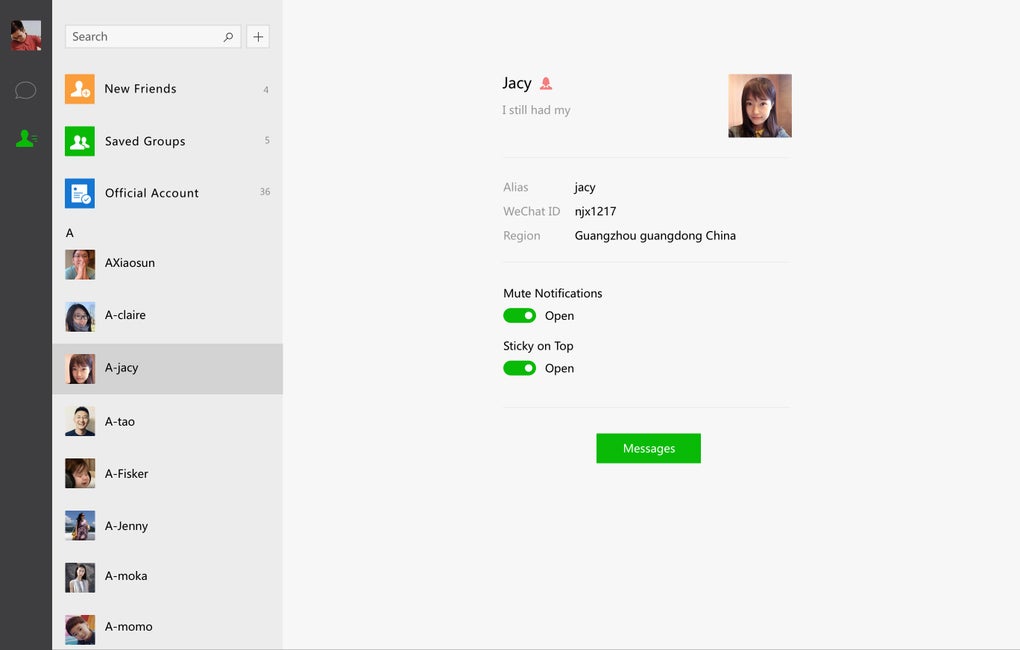
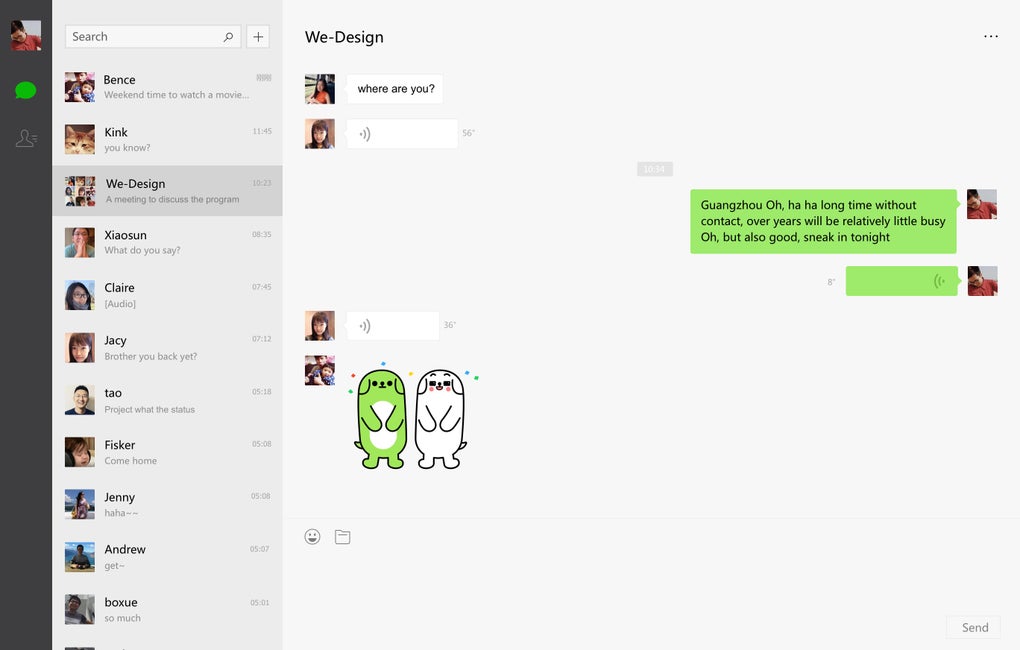
WeChat for Windows 10 provides a basic yet efficient set of messaging functionalities. Its core strength lies in its simplicity and ease of use. The interface is intuitive and uncluttered, allowing users to quickly navigate through various functions. The primary function, naturally, is text-based chat. Users can effortlessly send and receive text messages to their contacts. The application also supports file transfers, a feature especially useful on the Windows platform, allowing seamless sharing of various file types, regardless of their size or format. This is arguably more beneficial on a desktop than on a mobile device, particularly for iOS users who may encounter limitations on file sharing through mobile applications.
Beyond text messaging and file transfers, WeChat for Windows 10 also allows users to send screenshots and emojis. The built-in screenshot tool is a noteworthy feature; it intelligently detects and frames windows being hovered over, simplifying the screenshot process. However, compared to competitors like Skype or Facebook Messenger, WeChat currently lacks integrated video and voice call functionalities. This omission is a significant drawback, limiting its comprehensive communication capabilities.
WeChat’s Strengths: Simplicity and File Transfer
WeChat’s primary advantage lies in its straightforward approach. It’s easy to use and learn, making it accessible to users of all technical skill levels. The clean interface minimizes confusion, and navigating through the application is intuitive. This simplicity is a considerable boon, especially for users who prefer a no-frills approach to messaging.
The file transfer capabilities are superior compared to some mobile alternatives. The ability to effortlessly send various file types directly from your Windows PC enhances the overall productivity and utility of the application. This streamlined approach contrasts favorably with other applications that might impose restrictions on file sizes or formats.

WeChat’s Weaknesses: Missing Communication Features
The absence of video and voice call functionality is a critical weakness. In today’s digitally connected world, these features are considered essential for many messaging applications. This limitation significantly hinders WeChat’s ability to compete directly with established platforms like Skype, WhatsApp, and Facebook Messenger, which offer comprehensive communication features. While text-based communication remains vital, the lack of real-time audio-visual interaction limits WeChat’s versatility and appeal to users who value this functionality.
Staying Connected Without Your Phone: A Convenient Feature
One crucial benefit of WeChat for Windows 10 is its ability to maintain connectivity without constantly relying on your mobile device. Once properly linked to your mobile account, you can receive and respond to messages directly from your computer, keeping your phone free for other tasks. This functionality is especially useful for individuals who spend extended periods of time working on their computers and prefer to keep their phone notifications to a minimum. It provides a seamless transition between mobile and desktop environments, enhancing communication efficiency.
WeChat for Windows 10: A Niche Player
WeChat for Windows 10 serves a specific niche within the broader messaging market. Its strengths lie in its simplicity and efficient file transfer capabilities. It’s an excellent choice for users who prioritize these functionalities and don’t require integrated video or voice calling options. Its seamless integration with the mobile app further solidifies its convenience for those already invested in the WeChat ecosystem.
However, the lack of advanced communication features will likely deter users seeking a comprehensive messaging solution that encompasses all aspects of digital communication. The omission of video and voice calls presents a significant limitation, hindering its competitiveness against more fully-featured applications that provide a wider range of communication options.
User Reviews and Community Feedback
User reviews highlight the mixed opinions surrounding WeChat for Windows 10. While many users appreciate its simplicity and ease of use, along with the effective file transfer capabilities, others express disappointment at the lack of integrated video and voice calling. The overall sentiment reflects the application’s strengths and weaknesses. Its suitability depends entirely on individual user needs and preferences.
Conclusion: Weighing the Pros and Cons
WeChat for Windows 10 offers a simple and streamlined messaging experience, excelling at text communication and file transfer. Its seamless integration with the mobile app ensures a consistent and synchronized experience across devices. However, the absence of video and voice calling functionality significantly restricts its capabilities and limits its appeal to a broader audience. The application is best suited for users who prioritize simplicity and efficient file sharing but do not require advanced communication features. If you primarily use WeChat for texting and file transfers and already utilize the mobile version, the Windows 10 app provides a convenient extension of this experience. However, if you seek a fully integrated messaging platform with robust features, consider exploring other options with more comprehensive capabilities.
File Information
- License: “Free”
- Latest update: “June 2, 2025”
- Platform: “Windows”
- OS: “Windows 10”
- Language: “English”
- Downloads: “285.2K”
- Size: “200.55 MB”


