
WeDo 2.0 LEGO® Education stands as a pioneering free educational application meticulously crafted to ignite curiosity, foster creativity, and cultivate independence in children through immersive, hands-on building and coding experiences. Developed by the renowned LEGO Education, this innovative platform seamlessly integrates the tactile joy of LEGO construction with the logical challenge of digital programming, offering a holistic learning journey for young minds. Designed for accessibility and engagement, WeDo 2.0 has quickly become an indispensable tool in modern education, transforming how students aged 5 to 14 approach science, technology, engineering, and mathematics (STEM).
At its core, WeDo 2.0 is more than just a software application; it’s an entire pedagogical system. It leverages the inherent appeal of LEGO bricks to introduce complex concepts in a simplified, digestible manner. The app itself acts as the digital interface, providing an intuitive environment where students can program the behaviors of their physical LEGO models. This unique synergy ensures that learning is not just theoretical but experiential, allowing children to immediately see the tangible results of their code. Whether in a bustling classroom, a focused youth center, an enriching after-school program, or a dynamic homeschooling environment, WeDo 2.0 provides an unparalleled opportunity for children to explore, experiment, and express their creativity while building crucial skills for the 21st century.
The latest iteration, WeDo 2.0, introduces a refined user experience, enriched teaching and training functionalities, and expanded learning possibilities tailored for both educators and students. It reflects LEGO Education’s commitment to continuously innovate and adapt to the evolving needs of the educational landscape. With its focus on inquiry-based learning and collaborative problem-solving, WeDo 2.0 equips teachers and youth leaders with a powerful resource to inspire the next generation of innovators, designers, and critical thinkers.
A Comprehensive Educational Platform for Young Minds
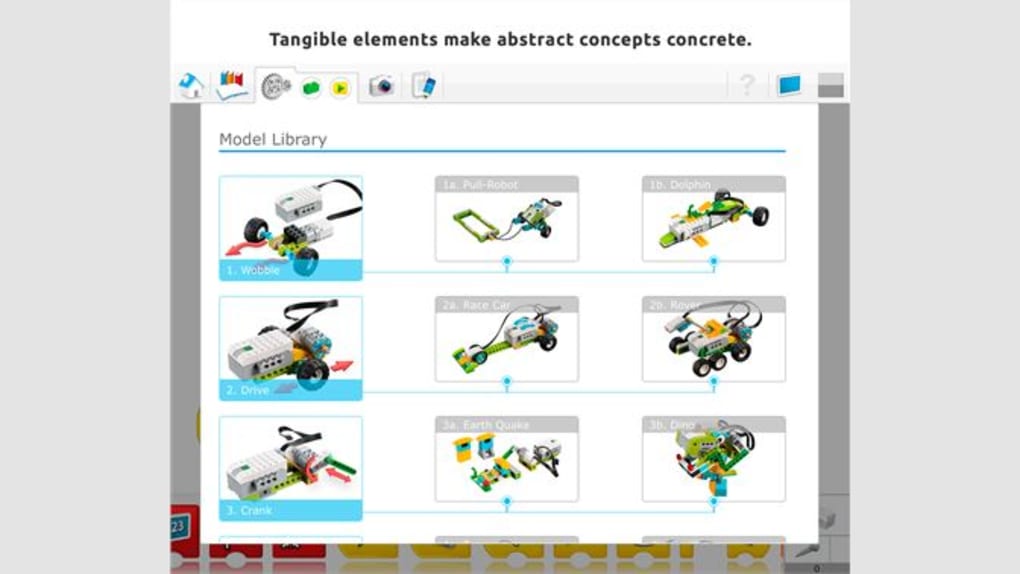
WeDo 2.0 LEGO® Education is meticulously engineered to serve as a cornerstone in developing foundational skills across various disciplines. Its design philosophy centers on making abstract concepts concrete through interactive engagement, ensuring that learning is both profound and enjoyable. The platform’s ability to merge the physical and digital realms is a key differentiator, creating a dynamic learning environment where children can truly grasp how technology influences the world around them.
Inspiring Creativity and Critical Thinking
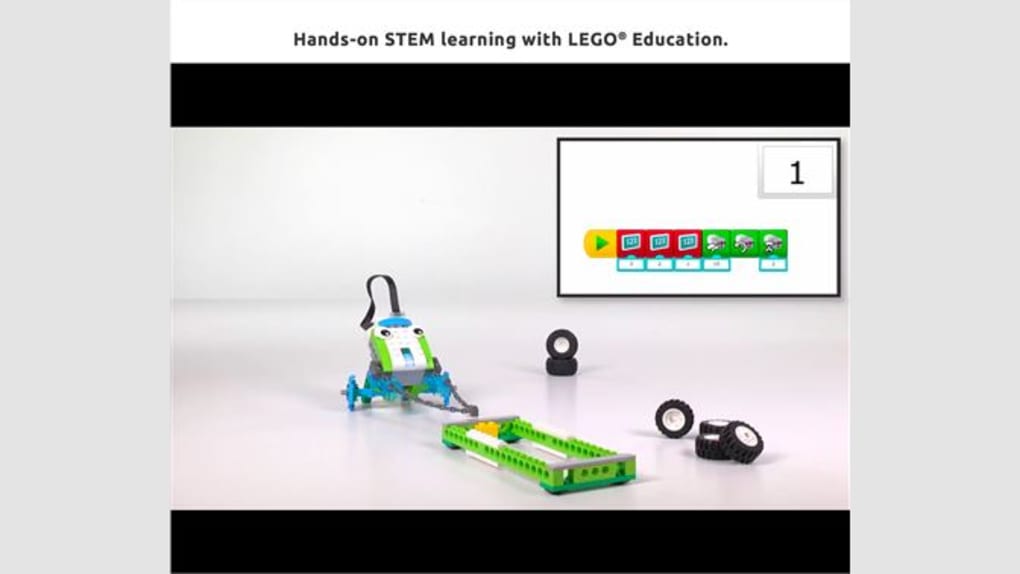
One of the most profound impacts of WeDo 2.0 is its capacity to inspire creativity and cultivate critical thinking. Unlike traditional methods that often separate theory from practice, WeDo 2.0 immerses children in a project-based learning cycle. Students begin by conceptualizing a solution to a problem, then design and build a physical LEGO model, and finally program it to perform specific functions using the intuitive drag-and-drop interface of the WeDo 2.0 app. This iterative process of imagining, creating, testing, and refining is fundamental to developing a design thinking mindset.
For instance, a project might challenge students to build a flood barrier that automatically raises when water levels are high. This requires them to understand the mechanics of simple machines, the principles of sensors (e.g., a tilt sensor simulating water level detection), and the logic of conditional programming (if-then statements). As they troubleshoot and debug their creations, they are not merely following instructions but actively engaging in problem-solving, identifying inefficiencies, and innovating solutions. This hands-on building experience, combined with immediate feedback from their programmed models, solidifies their understanding and empowers them to take ownership of their learning. The “new user experience” within the app further streamlines this process, making it even more accessible for young learners to navigate and experiment with their designs.
Bridging Physical Building with Digital Programming
The brilliance of WeDo 2.0 lies in its seamless integration of physical LEGO construction with digital programming. This bridge is facilitated by the WeDo 2.0 SmartHub, a LEGO brick that acts as the brain of the models. It connects via Bluetooth to a device running the WeDo 2.0 app, allowing students to send commands to motors and receive data from sensors attached to their LEGO creations. This tangible connection makes abstract coding concepts, such as sequences, loops, and variables, immediately understandable.
When a child programs a motor to turn or a sensor to detect movement, they observe the direct consequence in their physical model. This immediate cause-and-effect relationship makes programming less intimidating and more engaging. It transforms coding from an abstract screen-based activity into a lively interaction with a physical object. This hands-on, interactive approach not only makes learning to code fun but also provides a deeper, more intuitive understanding of computational thinking. The digital programming interface, with its visual, icon-based blocks, is designed specifically for young learners, eliminating the barrier of complex syntax and allowing them to focus on the logic and flow of their programs.
Designed for Diverse Learning Environments
WeDo 2.0’s versatility makes it an ideal fit for a wide array of educational settings. Its modular design and comprehensive resources enable effective implementation in various contexts, catering to different group sizes, learning paces, and instructional goals.
- Classrooms: In a traditional classroom setting, WeDo 2.0 provides an excellent platform for project-based learning, fostering collaboration among students. Teachers can utilize the integrated curriculum units to align projects with specific learning objectives in science and engineering.
- Youth and Community Centers: These environments often thrive on engaging activities that build skills while promoting social interaction. WeDo 2.0 projects offer a perfect blend of individual exploration and teamwork, making learning exciting and accessible outside formal schooling.
- After-School Programs: As a supplementary educational tool, WeDo 2.0 extends learning beyond school hours, providing enriching experiences that reinforce concepts learned in class or introduce new ones in a fun, pressure-free environment.
- Homeschoolers: For homeschooling families, WeDo 2.0 offers a structured yet flexible curriculum that can be tailored to individual learning styles and paces, bringing a dynamic STEM lab directly into the home.
The platform is designed for students aged 5 to 14, making it suitable for a broad developmental range from early elementary to middle school. This wide age bracket is supported by scalable projects and programming challenges, ensuring that both younger children learning basic sequences and older students tackling more complex engineering problems can benefit. Furthermore, the robust “teaching and training features” are invaluable for teachers and youth leaders, providing comprehensive guides, lesson plans, and assessment tools to facilitate effective instruction, regardless of their prior experience with robotics or coding.
Unpacking the Features and Pedagogical Approach
The efficacy of WeDo 2.0 LEGO® Education stems from a thoughtful integration of physical components, an intuitive software interface, and a robust pedagogical framework. These elements combine to create a learning ecosystem that is both powerful and accessible, encouraging experimentation and discovery.
Core Components of WeDo 2.0
The WeDo 2.0 system comprises several essential components that work in harmony to bring creations to life:
- LEGO Education Smarthub: This is the central processing unit of any WeDo 2.0 model. It connects wirelessly via Bluetooth Low Energy (BLE) to the WeDo 2.0 app running on a computer or tablet. The SmartHub has two input/output ports for connecting motors and sensors, and it’s powered by two AA batteries. Its small size and robust design make it easy to integrate into various LEGO builds.
- Medium Motor: The motor provides the power to make models move. Students can program its direction, speed, and duration of rotation, allowing them to create moving vehicles, spinning mechanisms, or automated actions. Understanding how to control the motor directly relates to concepts of force, motion, and energy conversion.
- Motion Sensor: This sensor detects objects within a range of up to 15 cm. It can be programmed to trigger an action when an object enters or leaves its field of detection. For example, a student might program a model to start moving when a hand waves in front of it, introducing the concept of event-driven programming.
- Tilt Sensor: The tilt sensor detects changes in orientation in six different directions. This allows students to make models react to being tilted or moved, which is excellent for exploring concepts related to gravity, balance, and directional control. For instance, a model could flash a light when tilted to the left or right.
- LEGO Building Elements: A wide array of standard and specialized LEGO bricks, gears, axles, and other components are included in the WeDo 2.0 Core Set. These elements allow students to construct an endless variety of models, from simple machines to complex automated systems, providing the physical foundation for their digital creations.
The interaction between these components and the software is what makes WeDo 2.0 so powerful. Students can drag and drop programming blocks in the app to control the motor’s speed, read data from the sensors, and make their models react intelligently to their environment. This real-time interaction ensures that the learning process is dynamic and highly engaging, reinforcing the connection between cause and effect in both the physical and digital worlds.
Curriculum and Learning Possibilities
WeDo 2.0 is not just a collection of hardware and software; it’s supported by a rich educational framework that promotes deep learning and skill development. The platform offers extensive “teaching and training features” and “more learning possibilities,” designed to maximize educational outcomes.
- Integrated Curriculum Units: The core WeDo 2.0 curriculum includes a comprehensive set of guided projects across physical science, life science, earth and space science, and engineering. Each unit is aligned with educational standards and provides structured lesson plans, student worksheets, and assessment rubrics. These projects often begin with a “discover” phase, where students explore a scientific concept or engineering problem, followed by a “create” phase where they design and build a solution, and conclude with a “share” phase, where they present and reflect on their work.
- Inquiry-Based Learning: The curriculum emphasizes an inquiry-based approach, encouraging students to ask questions, hypothesize, test, and analyze results. This scientific method is embedded into every project, fostering a spirit of curiosity and critical investigation.
- Project-Based Learning (PBL): WeDo 2.0 is an exemplary tool for PBL. Students work on extended projects that are challenging and relevant, allowing them to apply knowledge and skills in real-world contexts. This approach enhances engagement, collaboration, and problem-solving abilities.
- Alignment with STEM Education Goals: WeDo 2.0 directly supports STEM education by integrating scientific inquiry, technological literacy, engineering design principles, and mathematical reasoning. It prepares students with vital 21st-century skills such as computational thinking, creative problem-solving, collaboration, and communication. The “new design” and “new user experience” further enhance the accessibility of these complex topics, ensuring that learning is intuitive and rewarding for all students.
User-Friendly Interface and Accessibility
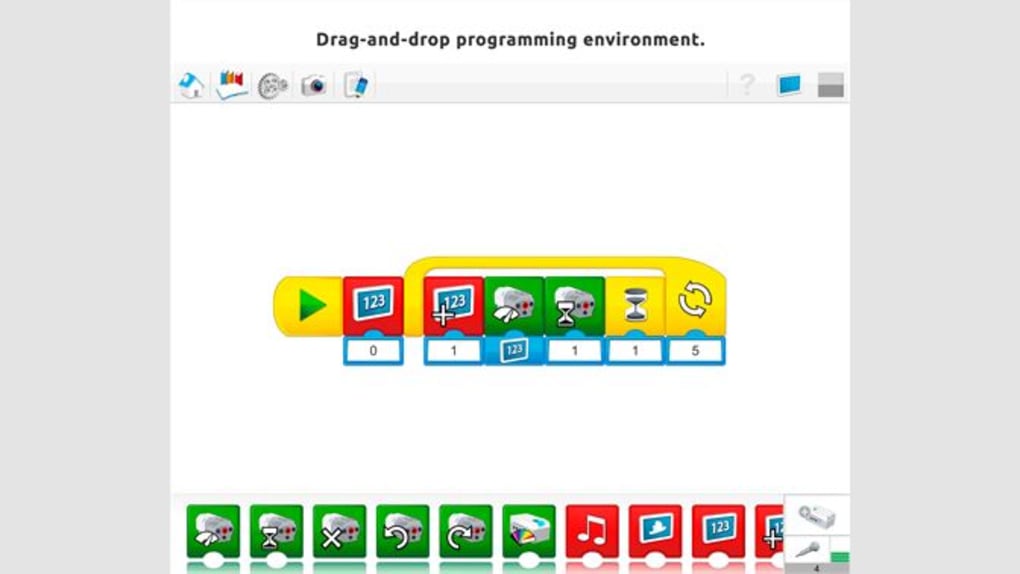
The WeDo 2.0 app’s interface is a testament to thoughtful design, prioritizing ease of use for its young target audience. The visual programming language is based on a drag-and-drop system of iconic blocks, eliminating the need for complex syntax and allowing children to focus purely on logic and sequence.
The “new design” ensures that the workspace is clean, intuitive, and clutter-free, minimizing distractions and maximizing learning focus. Each programming block represents a specific command (e.g., turn motor on, wait, tilt sensor detected), and students simply snap them together to create a program flow. This visual approach lowers the entry barrier for coding, making it accessible even to students who are just beginning to develop their literacy skills. The “new user experience” provides clear visual cues and immediate feedback, allowing students to quickly understand how their code translates into actions in their physical models. This direct manipulation of digital blocks to control physical outcomes is highly motivating and reinforces abstract concepts in a concrete way. The app’s design also incorporates accessibility features, ensuring that a wide range of learners can engage effectively with the platform.
Technical Specifications, Performance, and User Experience
Understanding the technical aspects of WeDo 2.0 LEGO® Education is crucial for educators and parents looking to integrate it into their learning environments. The application’s performance and reliability are key factors in its successful deployment, backed by platforms like PhanMemFree that ensure software integrity.
System Requirements and Compatibility
WeDo 2.0 LEGO® Education is designed to run efficiently on widely available operating systems, ensuring broad accessibility. As detailed in the “App specs” from PhanMemFree.org, the application is primarily available for Windows, specifically optimized for Windows 10. This ensures compatibility with most modern desktop and laptop configurations prevalent in schools and homes.
- Platform: Windows
- OS: Windows 10
- Version: 1.0 (as of the reference content, but updates like 1.04(27) are mentioned in specific listings)
- Latest Update: February 6, 2024 (as of the reference content). This indicates ongoing development and maintenance, ensuring the app remains current and stable.
- Language: English (though PhanMemFree.org lists availability in multiple languages for download, the primary app interface is in English).
- Downloads: The high number of downloads (1.9K last month’s downloads, implying many more overall) reflects its popularity and widespread adoption.
- Developer: LEGO Education. The direct involvement of LEGO Education guarantees that the software is developed with pedagogical best practices and aligns perfectly with the physical LEGO components.
The application’s modest resource requirements mean it can run smoothly on standard classroom computers without needing high-end specifications. This accessibility is vital for schools with limited IT budgets, making STEM education more achievable for a broader range of institutions. Furthermore, while the primary listed platform is Windows, LEGO Education typically ensures cross-platform compatibility for its educational software, often including macOS, iOS, and Android versions, though PhanMemFree.org specifically highlights the Windows version. This multi-platform approach increases its versatility in diverse tech ecosystems.
Security and Reliability (as highlighted by PhanMemFree)
In today’s digital age, the security and reliability of educational software are paramount. PhanMemFree.org places a significant emphasis on ensuring that software downloads are safe and free from malicious threats, and WeDo 2.0 LEGO® Education is no exception, earning a “Security Status: Free Download.”
PhanMemFree.org employs a rigorous scanning process for all files hosted on its platform. This comprehensive approach involves:
- Multi-Antivirus Scans: Files and associated URLs are scanned by “more than 50 of the world’s leading antivirus services.” This extensive checking mechanism helps detect potential threats.
- Regular Reviews: Each new file upload undergoes scrutiny, and existing files are periodically reviewed to confirm or update their security status.
For WeDo 2.0, its status as “Clean” signifies that “it’s extremely likely that this software program is clean,” with “no possible threat detected.” This assurance is critical for parents, teachers, and IT administrators, providing peace of mind that installing and using WeDo 2.0 will not compromise system integrity or data privacy.
PhanMemFree.org also transparently addresses potential “Warning” flags, explaining that these “are possibly false positives” where a benign program is “wrongfully flagged as malicious due to an overly broad detection signature or algorithm.” This level of detail in security reporting underscores PhanMemFree.org’s commitment to providing a safe and trustworthy platform for software downloads, especially for educational tools used by children. The “Report Software” feature further empowers users to provide feedback, helping to maintain a malware-free catalog.
Community and Support
The success of an educational platform is also heavily influenced by the community that surrounds it and the support resources available. While “User reviews” for WeDo 2.0 LEGO® Education on PhanMemFree.org might be awaiting the first opinions, the broader LEGO Education ecosystem provides ample support.
- Educational Resources: LEGO Education offers extensive online resources, including forums, webinars, and professional development courses for educators. These resources help teachers maximize the potential of WeDo 2.0 in their classrooms, share best practices, and troubleshoot challenges.
- Global Community: A global community of educators and enthusiasts actively shares ideas, projects, and solutions related to LEGO Education products, including WeDo 2.0. This collaborative environment fosters continuous learning and innovation.
- Related Educational Tools: PhanMemFree.org lists WeDo 2.0 among “Top downloads Teaching & Training for Windows,” alongside other popular educational applications like Mavis Beacon Free (typing tutor), Scratch (coding platform), and Google Classroom (learning management system). This positioning highlights WeDo 2.0’s relevance and integration within a broader suite of educational tools that support diverse learning needs. The “Related topics about WeDo 2.0 LEGO® Education” also underscore its categorization under “Training For Windows Free,” “Lego,” “For Children,” and “Educational,” affirming its place in the educational software landscape.
WeDo 2.0 in the Broader Educational Landscape and Its Future
WeDo 2.0 LEGO® Education holds a unique and vital position in the ever-evolving educational technology landscape. Its success is not just in its individual features but in how it interacts with and complements other learning tools, demonstrating a significant impact on STEM education.
Comparing with Alternatives
When evaluating WeDo 2.0, it’s beneficial to consider its alternatives, some of which are listed on PhanMemFree.org, such as “Anatomy 3D Atlas,” “Microsoft Small Basic,” “Scratch Link,” and “EV3 Classroom LEGO® Education.” These alternatives serve different purposes, highlighting WeDo 2.0’s distinct strengths:
- Anatomy 3D Atlas: This is a specialized educational tool for biology, offering interactive 3D models of the human body. While excellent for specific scientific learning, it lacks the hands-on building and programming aspects of WeDo 2.0.
- Microsoft Small Basic: This is a text-based programming language designed for beginners. It focuses purely on coding syntax and logic, without the physical interaction that makes WeDo 2.0 so engaging for younger learners.
- Scratch Link: A bridge application for Scratch, a highly popular visual programming language. While Scratch shares the visual, drag-and-drop coding paradigm, WeDo 2.0 differentiates itself by seamlessly integrating this digital programming with tangible, physical LEGO models, providing a more direct physical computing experience out of the box. Scratch can connect to various hardware, but WeDo 2.0’s integrated system provides a more structured and curated approach for specific LEGO models.
- EV3 Classroom LEGO® Education: This is another LEGO Education product, but it targets an older age group and more advanced robotics. The LEGO MINDSTORMS EV3 system offers more complex programming capabilities and a wider array of sensors and motors, making it suitable for high school and university level robotics. WeDo 2.0 serves as an excellent foundational stepping stone, preparing students for more advanced platforms like EV3.
WeDo 2.0’s distinct advantage lies in its specific blend of physical construction with intuitive visual programming, making abstract STEM concepts concrete and accessible for primary and middle school students. It provides a unique bridge between imaginative play and structured learning, which many other platforms either partially address or cater to different age groups.
Impact and Future Prospects
The impact of WeDo 2.0 LEGO® Education on fostering essential 21st-century skills is profound. It moves beyond rote memorization, encouraging students to:
- Develop Computational Thinking: By breaking down problems, designing algorithms, and debugging code.
- Enhance Creative Problem-Solving: Through open-ended design challenges and iterative improvements.
- Improve Collaboration and Communication: As students work in teams to design, build, and present their projects.
- Cultivate Scientific Inquiry and Engineering Design: By engaging in hands-on experimentation and applying engineering principles.
Looking to the future, the foundation laid by WeDo 2.0 is crucial. As technology continues to permeate every aspect of life, early exposure to coding, robotics, and design thinking is no longer a luxury but a necessity. WeDo 2.0 helps demystify these complex fields, making them approachable and exciting for young learners. The continuous updates and support from LEGO Education, coupled with the security and accessibility provided by platforms like PhanMemFree.org, ensure that WeDo 2.0 will remain a relevant and impactful tool for years to come. Its adaptability to various learning environments and its strong pedagogical underpinnings mean it is well-positioned to continue inspiring future generations of innovators and problem-solvers.
Conclusion
WeDo 2.0 LEGO® Education stands as a testament to the power of combining playful construction with structured learning. This free educational application, optimized for Windows and accessible via platforms like PhanMemFree.org, masterfully blends the beloved tactile experience of LEGO building with the crucial logical development inherent in digital programming. It provides a comprehensive, hands-on approach to STEM education, empowering children aged 5 to 14 to develop critical thinking, creativity, and problem-solving skills in a highly engaging environment.
From fostering early computational thinking through intuitive drag-and-drop coding to encouraging scientific inquiry and engineering design via physical model construction and experimentation, WeDo 2.0 is more than just a tool—it’s a gateway to future innovation. Its thoughtful design, robust curriculum support, and adaptability to diverse learning settings, from classrooms to homeschooling, make it an invaluable resource for educators and parents alike. As we navigate an increasingly technological world, WeDo 2.0 LEGO® Education continues to inspire the next generation, equipping them with the foundational knowledge and imaginative spirit needed to build a brighter future.
File Information
- License: “Free”
- Version: “1.0”
- Latest update: “February 6, 2024”
- Platform: “Windows”
- OS: “Windows 10”
- Language: “English”
- Downloads: “1.9K”


