
In an increasingly digital world, where content consumption and data acquisition are daily rituals, the need for efficient and reliable download management has never been more critical. Whether you’re a student gathering research materials, a professional curating assets, a content creator archiving resources, or simply an individual enjoying media from across the web, grappling with numerous downloads can quickly become a tedious and time-consuming task. Enter WFDownloader App, a standout solution that transforms the often-frustrating experience of acquiring files from the internet into a streamlined, automated, and remarkably user-friendly process.
Developed by WFDownloader, this versatile application stands as a testament to intelligent software design, offering a free, smart, and robust utility specifically engineered for handling downloads in bulk. Unlike conventional download methods that often struggle with multiple files, site redirects, or obscure file formats, WFDownloader App provides a comprehensive framework that simplifies the entire operation. Its core strength lies in its ability to support an extensive array of file types and integrate seamlessly with a multitude of online sources, positioning it as an indispensable tool for anyone who frequently interacts with web content. What truly sets WFDownloader App apart is its foundational commitment to accessibility and power: it’s not just a downloader; it’s a cross-platform workhorse capable of fetching files directly from their source websites, effectively bypassing many of the common hurdles that plague less sophisticated alternatives.
From the moment you begin using WFDownloader App, its intuitive design and powerful underlying architecture become apparent. It offers a level of flexibility and control that caters to both casual users and seasoned digital navigators. Imagine needing to download an entire photo album from a social media site, a complete series of lecture notes from an educational portal, or a collection of software updates from a developer’s repository – tasks that would typically demand individual clicks and a significant time investment. WFDownloader App consolidates these disparate actions into a single, efficient workflow, allowing users to queue up dozens, even hundreds, of files simultaneously. This efficiency is further amplified by its ability to intelligently recognize and process links, even those derived from external sources, ensuring that your download queue is always populated with the right content, ready for acquisition. In essence, WFDownloader App isn’t just about downloading; it’s about empowering users with unparalleled control over their digital acquisitions, making it a critical tool for anyone looking to optimize their online experience across any major operating system.
Streamlining Your Digital Acquisitions: The Core Functionality of WFDownloader App
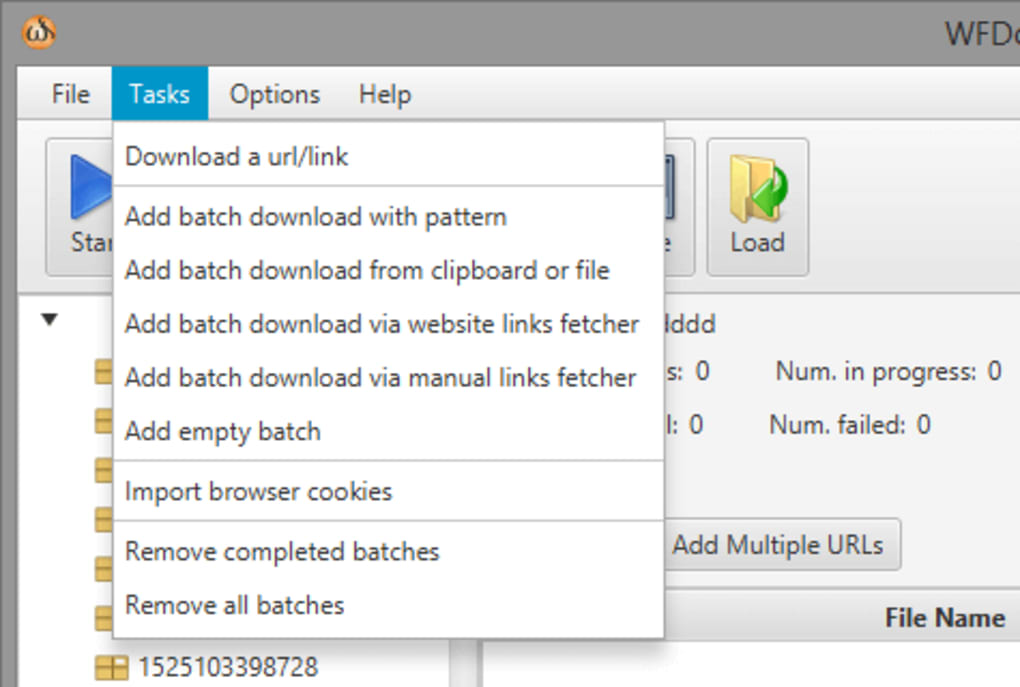
At the heart of WFDownloader App’s appeal is its formidable capability as a batch file downloader. In an age where digital content is often presented in vast collections rather than singular items, the concept of downloading one file at a time quickly becomes archaic and inefficient. WFDownloader App directly addresses this pain point by enabling users to process an entire list of downloads in one go, a feature that drastically cuts down on the time and manual effort traditionally associated with managing multiple file acquisitions. This isn’t just a minor convenience; for professionals, students, and enthusiasts alike, it translates into significant productivity gains, allowing them to focus on their core tasks rather than babysitting download queues.
The application’s versatility extends far beyond simple batch processing. It boasts support for virtually all file types and formats encountered on the web, making it a truly universal tool. Whether you’re dealing with high-definition video files (MP4, MKV, AVI), lossless audio tracks (FLAC, WAV), image galleries (JPG, PNG, GIF), compressed archives (ZIP, RAR), or extensive document libraries (PDF, DOCX), WFDownloader App handles them with equal finesse. This broad compatibility eliminates the need for multiple specialized downloaders, consolidating your digital toolkit into a single, powerful application. Furthermore, its ability to integrate with a wide variety of site sources—ranging from popular video-sharing platforms and social media networks to academic repositories and niche forums—ensures that nearly any link you encounter can be added to your download queue.
One of WFDownloader App’s most impactful differentiators is its intelligent approach to source detection. Many download managers struggle with website redirections, ad-laden intermediaries, or complex site structures that obscure the direct download link. WFDownloader App, however, is designed to cut through this digital noise. It can directly download from the source websites themselves, effectively bypassing various site redirections and any possible slowdowns caused by intermediate servers or content delivery networks. This direct-to-source approach yields several critical advantages: it often results in faster download speeds, reduces the likelihood of encountering broken links or corrupted files, and enhances the overall reliability of the downloading process. Users can be confident that when they queue a file with WFDownloader App, it will initiate the download from the most direct and stable available link, ensuring a smooth and uninterrupted transfer.
Moreover, the application offers powerful organizational features that complement its downloading prowess. Recognizing that bulk downloads can quickly lead to digital clutter, WFDownloader App allows users to create custom download folders. This means you can group related downloads together even before they begin, ensuring that your acquired files are neatly categorized and easy to find from the moment they land on your hard drive. Imagine dedicating a specific folder for “Project X Resources,” another for “Lecture Series Y,” and a third for “Holiday Photos 2024”—all automatically populated as downloads complete. This level of pre-emptive organization is invaluable in managing large digital collections and is a testament to the thoughtful design behind WFDownloader App, making it a truly indispensable utility for anyone serious about efficient digital acquisition.
An Interface Designed for Efficiency and Empowerment
While WFDownloader App’s underlying capabilities are robust, its user interface is crafted to ensure that this power is accessible to everyone. The design philosophy centers on intuitive usability, striking a fine balance between simplicity for newcomers and depth for advanced users. From the moment you launch the application, you’re greeted with a clean and well-organized layout that facilitates ease of navigation and management.
Getting started with WFDownloader App is remarkably straightforward. Users can effortlessly add a link to a specific file, just as they would with any standard download utility. The real magic, however, unfolds when you create a batch. This feature allows you to compile multiple links from diverse sources into a single download task. The process is streamlined: paste your links, and WFDownloader App intelligently processes them, preparing them for simultaneous acquisition. To aid in managing these potentially extensive lists, a convenient navigation pane is prominently displayed on the left side of the interface. This pane provides quick access to active downloads, completed tasks, and various other categories, ensuring that even the most bustling download queues remain orderly and manageable.
Beyond the basic download functionality, WFDownloader App offers a rich suite of configuration options that put the user in command. These settings allow for a high degree of personalization and optimization, tailoring the application’s behavior to individual needs and network conditions. Key configurations include:
- Save Directory Customization: Users can specify a default save directory or assign unique folders for different batch downloads, bolstering the organizational benefits mentioned earlier. This level of control ensures that your files land exactly where you want them, preventing common issues of misplaced downloads.
- Proxy Server Support: For users operating behind firewalls, in restricted network environments, or those seeking an added layer of privacy, WFDownloader App includes robust proxy server support. This ensures that the application can function effectively under various network configurations, providing reliable access to content regardless of geographical or network constraints.
- Concurrent vs. Sequential Downloads: The application allows users to determine whether downloads should be executed one at a time or simultaneously. While simultaneous downloads can maximize bandwidth usage and overall acquisition speed, sequential downloading might be preferred for managing network load or prioritizing specific files in a queue. This flexibility empowers users to optimize their download experience based on their specific priorities and available resources.
Advanced Strategies for Power Users: Patterns and Link Fetching
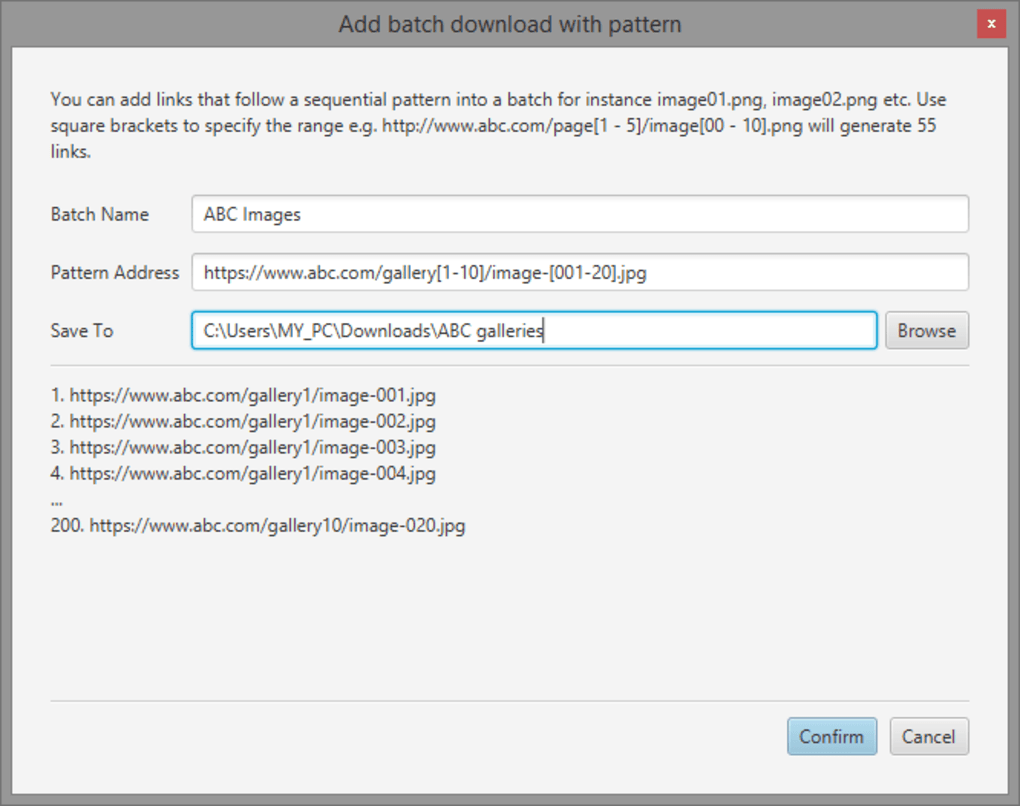
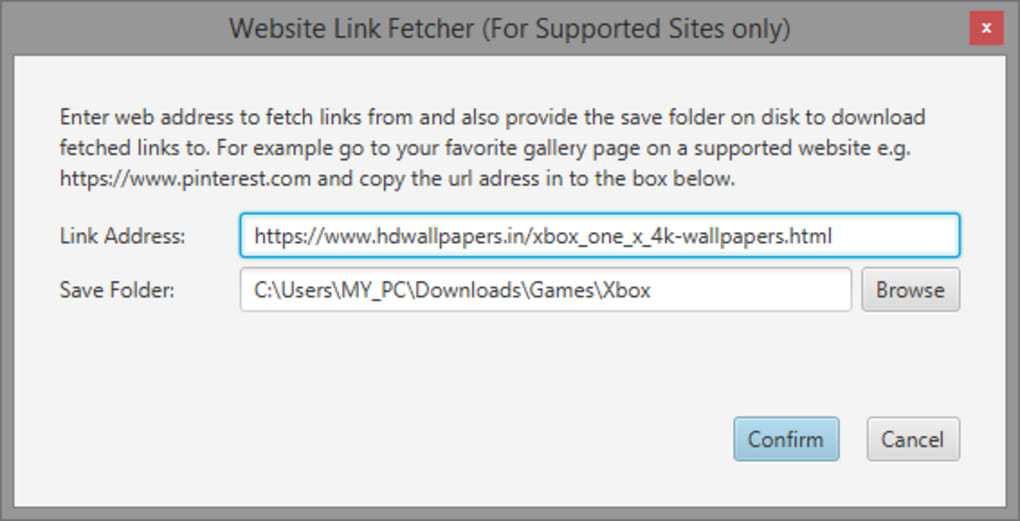
What truly distinguishes WFDownloader App as a tool for serious digital content management are its advanced features, particularly the options for adding batch downloads with predetermined patterns for file names and the ability to fetch links available from a specific website. These functionalities elevate the app beyond a simple downloader, transforming it into a sophisticated content acquisition engine for those who know how to wield its full potential.
The “predetermined patterns for file names” feature is invaluable for acquiring sequential content, such as a series of episodes, numbered documents, or incrementally updated software versions. Users can define a pattern (e.g., SeriesTitle_Episode[01-10].mp4) and WFDownloader App will intelligently generate all the corresponding links and file names, adding them to the batch queue automatically. This eliminates the tedious process of manually inputting each URL and filename, saving immense amounts of time and reducing the potential for human error.
Similarly, the option to “fetch links available from a specific website” is a powerful capability for content scraping and bulk acquisition. By simply providing a website URL, WFDownloader App can analyze the page, identify downloadable links, and present them to the user for selection. This is particularly useful for extracting entire galleries, document archives, or collections of media embedded within a webpage, offering a quasi-web-scraping capability within a user-friendly download manager.
While these advanced features offer immense power and flexibility, new users might encounter a slight learning curve at the beginning. Understanding how to construct effective patterns or optimally utilize the link-fetching mechanism may require a bit of experimentation and familiarity. However, the investment of time is minimal, and the rewards are significant. The intuitive nature of the interface ensures that users will not take long to become familiarized with these functions, quickly grasping their potential and integrating them into their daily digital workflows. Once mastered, these features turn WFDownloader App into an indispensable tool for efficient and large-scale content acquisition.
Breaking Down Barriers: True Cross-Platform Accessibility
The “cross-platform” designation in WFDownloader App’s original title is not merely a descriptor but a foundational principle that underscores its design and utility. In an ecosystem increasingly defined by diverse operating systems and personal computing preferences, a tool that seamlessly operates across multiple platforms offers unparalleled convenience and consistency. WFDownloader App delivers on this promise, ensuring that its powerful download management capabilities are accessible to a broad spectrum of users, regardless of their preferred operating environment.
Availability Across Major Operating Systems
While initial discussions or listings might highlight its strong presence on Windows, WFDownloader App is engineered to be truly cross-platform. This means that its robust features and intuitive interface are not confined to a single OS; instead, it provides a consistent and high-quality experience for users on various major operating systems, including macOS and, implicitly, Linux distributions due to its likely underlying technology (such as Java or similar cross-compatible frameworks). This universal compatibility is a critical advantage, as it addresses the diverse computing landscapes prevalent today, allowing individuals and teams to standardize on a single, powerful download solution.
For instance, a user might operate a Windows PC at work and a macOS laptop at home. With WFDownloader App, they don’t need to learn different tools or compromise on functionality when switching between environments. The core features, the user interface, and the advanced capabilities remain consistent, fostering a seamless transition and eliminating the learning curve associated with platform-specific applications. This consistency is invaluable for productivity, reducing friction and allowing users to maintain their established workflows irrespective of the machine they are using.
The inherent advantages of a cross-platform application like WFDownloader App are numerous:
- Wider User Base: It caters to a larger audience, appealing to users who might be locked into specific operating systems for professional or personal reasons.
- Consistency and Familiarity: Users experience the same intuitive interface and powerful features across all supported platforms, reducing training time and improving user satisfaction.
- Collaborative Potential: In team environments, all members can utilize the same tool, ensuring compatibility in workflows and shared resources, even if they use different operating systems.
- Future-Proofing: A cross-platform approach often implies a more adaptable and maintainable codebase, suggesting better long-term support and updates for a wider range of systems.
By embracing a cross-platform strategy, WFDownloader App demonstrates a forward-thinking approach to software development, recognizing that modern users demand flexibility and accessibility. It’s not just about downloading files; it’s about providing a universally reliable and efficient solution that transcends operating system boundaries, truly empowering users in their digital endeavors. This commitment to broad compatibility reinforces WFDownloader App’s position as a cutting-edge and user-centric download manager, poised to serve the diverse needs of today’s interconnected world.
Why WFDownloader App is Indispensable for Modern Digital Life
In a digital landscape teeming with numerous utilities vying for attention, WFDownloader App distinguishes itself as an indispensable tool, particularly for individuals and organizations that frequently engage in content acquisition. Its robust feature set, combined with its accessibility and performance, makes a compelling case for its adoption as the primary download manager.
Performance, Efficiency, and Reliability
At its core, WFDownloader App is engineered for peak performance and efficiency. Its ability to directly download from source websites, bypassing unnecessary redirects and intermediaries, contributes significantly to faster download speeds and a more reliable transfer process. This direct approach minimizes potential points of failure, such as broken links or server timeouts, which are common frustrations with less sophisticated download methods. The application’s capacity for batch downloading transforms arduous, multi-step processes into automated, single-click operations, saving invaluable time and effort. For anyone who regularly needs to acquire multiple files—be it academic papers, software components, or media archives—the efficiency gains are profound.
Moreover, WFDownloader App enhances reliability through its intelligent handling of various network conditions. While not explicitly detailed, modern download managers typically incorporate features like resume support for interrupted downloads, ensuring that even if your internet connection drops or your computer unexpectedly shuts down, you can pick up where you left off without losing progress. This resilience is critical for large files or unstable network environments, providing peace of mind and preventing frustrating restarts.
The Cost-Benefit: Free Yet Feature-Rich
Perhaps one of the most compelling aspects of WFDownloader App is that it is completely free to use. In an era where premium features often come with hefty subscription fees or one-time purchases, WFDownloader App offers a comprehensive suite of advanced functionalities without any financial barrier. This accessibility makes it an attractive option for students, small businesses, and budget-conscious individuals who require powerful tools but cannot afford expensive software licenses.
The fact that it provides enterprise-grade features—such as batch processing, comprehensive file type support, custom folder organization, proxy integration, and advanced pattern-based downloading—at no cost is a significant value proposition. It challenges the notion that robust software must come with a price tag, demonstrating that intelligent design and user-centric development can coexist with open access. This free model makes WFDownloader App an exceptionally cost-effective solution, delivering high-performance capabilities without compromising financial viability.
Security and Recommendation
Beyond its features and cost, the trustworthiness of a software application is paramount. As per PhanMemFree’s rigorous security assessments, WFDownloader App has been deemed “Clean,” indicating that it is extremely unlikely to contain malicious software. PhanMemFree scans files with over 50 leading antivirus services, and the absence of any detected threats provides a strong assurance of its safety and reliability. This commitment to security, coupled with its powerful functionalities, makes WFDownloader App a highly recommended utility for anyone seeking a dependable and efficient download manager.
While new users might experience a slight learning curve when delving into its more advanced functionalities, the initial investment in understanding is quickly repaid through increased efficiency and control. The intuitive interface and thoughtful design ensure that even complex features become accessible with a little practice. WFDownloader App is not just another download manager; it is a smart, secure, and incredibly powerful tool that genuinely enhances the digital experience for its users across all major platforms.
Getting Started and Maximizing Your Experience
Embarking on your journey with WFDownloader App is a straightforward process, designed to get you up and running with minimal hassle. Given its cross-platform nature, the installation will typically involve downloading the appropriate version for your operating system—whether it’s Windows, macOS, or another compatible environment. Once installed, the intuitive interface guides you through the initial steps, making it easy to start your first download.
To maximize your experience, consider these practical tips:
- Start Simple, Then Explore: Begin by adding single links to familiarize yourself with the basic download process. Once comfortable, experiment with batch downloads by pasting multiple URLs.
- Leverage Custom Folders: Proactively organize your downloads by creating specific folders for different categories of content. This foresight will save you significant time in file management later on.
- Experiment with Advanced Patterns: If you frequently download sequential content (e.g., episode series, numbered documents), dedicate some time to understanding and utilizing the predetermined patterns feature. This is where WFDownloader App truly shines for power users.
- Utilize the Link Fetcher: For acquiring content from specific websites, try the link fetching option. It can quickly reveal all downloadable assets on a page, allowing you to select exactly what you need.
- Configure Network Settings: If you experience slow downloads or connectivity issues, delve into the proxy settings or adjust the number of concurrent downloads. Optimizing these can significantly improve performance based on your network environment.
- Stay Updated: Like all good software, WFDownloader App will likely receive updates that introduce new features, improve performance, and address any potential issues. Regularly checking for updates ensures you always have the best and most secure version of the application.
WFDownloader App represents a powerful synthesis of functionality, ease of use, and accessibility. Its cross-platform compatibility ensures that a wide array of users can benefit from its robust capabilities, regardless of their preferred operating system. By providing a free, secure, and feature-rich solution for managing bulk downloads, WFDownloader App stands as an essential utility for anyone navigating the vast and ever-growing digital landscape. It is not just a tool for downloading files; it is a gateway to a more efficient, organized, and stress-free digital experience, making it a highly recommended addition to any user’s software arsenal.
File Information
- License: “Free”
- Version: “beta”
- Latest update: “April 6, 2022”
- Platform: “Windows”
- OS: “Windows 11”
- Language: “English”
- Downloads: “1.8K”
- Size: “55.39 MB”


