
WGET is a free and open-source command-line utility designed for retrieving files from the internet using various protocols. Developed as part of the GNU project, it’s known for its robustness, flexibility, and ability to handle a wide range of download scenarios, from single files to entire websites. This comprehensive guide explores WGET’s capabilities, functionalities, and its place in the broader landscape of internet download management tools.
Understanding WGET’s Core Functionality
At its heart, WGET is a powerful download manager operating from the command line. Unlike graphical download managers with user-friendly interfaces, WGET relies on text-based commands, making it exceptionally versatile and adaptable for automated tasks and scripting. Its primary function is to retrieve files using various internet protocols including:
- HTTP: The foundation of the World Wide Web, WGET efficiently handles downloads from standard web servers.
- HTTPS: The secure version of HTTP, ensuring encrypted communication for sensitive data transfers. WGET’s support for HTTPS allows secure download of files from websites prioritizing data protection.
- FTP: File Transfer Protocol, a widely used method for transferring files between computers over a network. WGET’s FTP capabilities extend to both standard FTP and the secure FTPS variant.
- FTPS: Secure FTP, utilizing Secure Sockets Layer (SSL) or Transport Layer Security (TLS) to encrypt data during transmission. This ensures secure file transfer over networks, protecting sensitive information.
Beyond basic file retrieval, WGET boasts an extensive array of features that make it invaluable for various applications:
- Resuming Interrupted Downloads: WGET excels at resuming downloads that were interrupted due to network issues or other unforeseen circumstances. This feature saves time and bandwidth by avoiding redundant downloads.
- Recursive Downloading: WGET can recursively download entire websites or directories. This functionality is particularly useful for archiving websites, creating local copies of online resources, or mirroring web content for offline access. The recursive feature intelligently handles links and subdirectories, ensuring a complete download.
- Link Conversion: WGET can automatically convert absolute links (pointing directly to a server’s location) into relative links (relative to the target directory). This is beneficial for maintaining consistency and portability when working with downloaded content.
- Support for Proxies and Cookies: WGET’s ability to work with HTTP proxies enables downloading through proxy servers, bypassing network restrictions or accessing resources behind firewalls. Furthermore, support for cookies ensures compatibility with websites requiring authentication or personalized settings.
- Persistent HTTP Connections: WGET optimizes download speed by maintaining persistent connections to servers. This minimizes connection overhead, resulting in faster download times, especially beneficial for large files or multiple downloads.
- Support for various operating systems: While originating from the UNIX world, WGET’s popularity has led to ports for numerous systems including Windows and various Linux distributions, enhancing its accessibility and usability.
WGET’s Command-Line Interface and Basic Usage
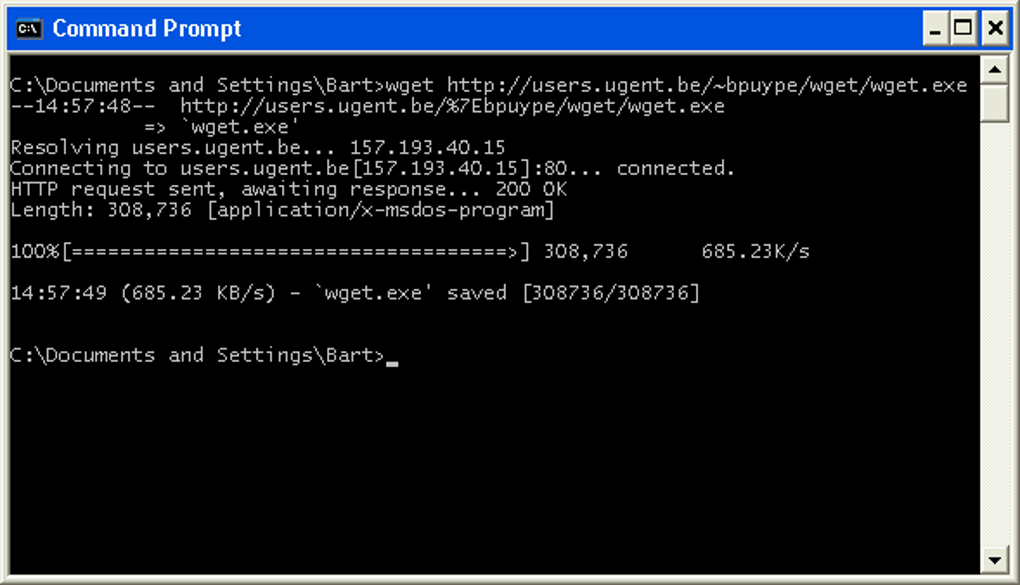
WGET’s power lies in its command-line interface. Users interact with the program through typed commands, specifying options and arguments to customize the download process. A simple download using WGET looks like this:
1wget <URL>
Replacing <URL> with the actual URL of the file you want to download. For instance:
1wget https://www.example.com/myfile.txt
This command instructs WGET to download myfile.txt from www.example.com and save it in the current directory.
However, WGET’s true capabilities are unlocked through its many options, enabling advanced features. For example:
-cor--continue: Resumes interrupted downloads.-O <filename>or--output-document=<filename>: Specifies the output filename. This allows overriding the default filename derived from the URL.-P <directory>or--directory-prefix=<directory>: Specifies the download directory. This allows saving downloads to a specific folder, keeping your downloads organized.-ror--recursive: Enables recursive downloading of linked files, crucial for mirroring websites.-l <number>or--level=<number>: Limits the recursion depth when using the-roption. This prevents downloading excessively deep website structures.-por--page-requisites: Downloads all necessary elements (images, CSS, JavaScript) for a webpage to function correctly when used with-r. This is critical for archiving websites in a fully functional state.-kor--convert-links: Converts absolute links within downloaded HTML files into relative links, making the downloaded website self-contained.
Advanced WGET Techniques and Applications
Beyond basic downloads, WGET can perform complex operations. These capabilities make it an essential tool for web developers, system administrators, and anyone requiring automated and reliable file retrieval.
Mirroring Websites: Combining the -r, -p, and -k options allows creating a complete local mirror of a website, preserving its structure and functionality. This capability is particularly useful for archiving websites, testing web applications offline, or creating backups of crucial online resources.
Automated Downloading: WGET’s command-line nature is ideal for scripting and automation. It can be seamlessly integrated into shell scripts or batch files to automate repetitive download tasks. This is crucial for tasks such as regularly updating data from a server, or automatically downloading files as they become available.
Handling Authentication: WGET supports authentication mechanisms allowing downloads from password-protected servers or websites. The --user and --password options are used to provide credentials, enabling access to restricted resources.
Working with Proxies: As mentioned, WGET’s proxy support is crucial for navigating network restrictions or accessing resources behind firewalls. The --proxy option specifies the proxy server address.
Comparison with Other Download Managers
While graphical download managers offer a user-friendly interface, WGET stands out due to its command-line nature, powerful options, and robust automation capabilities. Graphical managers are more intuitive for casual users, while WGET is a preferred choice for advanced users, system administrators, and automation tasks.
The choice between WGET and other download managers depends on the specific needs and technical proficiency of the user. For simple downloads, a graphical interface is often more convenient. However, for complex tasks, scripting, or automated downloading, WGET’s command-line approach and extensive features provide unmatched flexibility and power.
Conclusion
WGET remains a highly versatile and indispensable tool for anyone dealing with internet downloads. Its command-line interface, combined with its comprehensive feature set, allows for a wide range of applications, from simple file retrieval to complex website mirroring and automated download tasks. While it might seem daunting initially for users accustomed to graphical interfaces, mastering WGET’s command-line capabilities unlocks a world of efficiency and control over the download process, cementing its place as a veteran in the realm of internet download utilities.
File Information
- License: “Free”
- Version: “1.11.4”
- Latest update: “January 31, 2023”
- Platform: “Windows”
- OS: “Windows Vista”
- Language: “English”
- Downloads: “37.2K”
- Size: “401.41 KB”


