
In an increasingly connected world, where every aspect of our lives, from work to entertainment, relies heavily on stable and secure internet access, the integrity of our home and business networks has become paramount. Wireless Fidelity, or Wi-Fi, offers unparalleled convenience, allowing devices to connect seamlessly without the clutter of cables. However, this very convenience can also be a significant vulnerability. The open nature of Wi-Fi signals means that without proper security measures, anyone within range could potentially tap into your network, consuming your bandwidth, compromising your privacy, and even posing a serious security threat. This growing concern has led to a demand for effective tools that empower users to maintain control over their digital domain. One such utility, “Who Is On My WiFi” by IO3O LLC, emerges as a vital solution in this landscape, providing users with the means to meticulously monitor and manage their network connections.
It is a common and often frustrating scenario: your internet speeds mysteriously drop, your data usage skyrockets, or you simply have an unsettling feeling that your Wi-Fi network isn’t exclusively yours. Unbeknownst to many, unauthorized users, often referred to as “Wi-Fi leeches,” might be piggybacking on their connection. While some might dismiss this as a minor annoyance, the implications extend far beyond just slower streaming. An unauthorized device on your network could be anything from a neighbor simply stealing bandwidth to a malicious entity attempting to gain access to your personal files, banking information, or corporate secrets. For businesses, the stakes are even higher, with potential data breaches, compliance violations, and significant reputational damage. This is precisely why having a robust, easy-to-use tool to identify and manage every device connected to your Wi-Fi is not just a luxury, but a necessity. “Who Is On My WiFi” steps in to fill this critical need, offering a straightforward yet powerful way to shine a light on every endpoint within your network, ensuring that you – and only you – dictate who belongs.
Understanding the Need for Proactive WiFi Security
The pervasive nature of Wi-Fi in modern life has created a paradox: immense convenience coupled with inherent vulnerabilities. Every time you connect your smartphone, laptop, smart TV, or IoT device to your wireless network, you are creating an access point. While routers come with default security protocols like WPA2 or WPA3, often requiring a password, these measures are not foolproof. Passwords can be weak, shared inadvertently, or even cracked by sophisticated tools. Furthermore, network administrators, especially in smaller businesses or households, might not always keep up with the latest security best practices, leaving gaping holes for intruders to exploit.
The potential dangers of an unsecured or compromised Wi-Fi network are multifaceted. At the most basic level, unauthorized users will consume your bandwidth. This can lead to a noticeable slowdown in internet speeds, making everyday tasks like video conferencing, online gaming, or streaming high-definition content frustratingly difficult. For businesses, this can translate into reduced productivity, delayed communications, and a general hindrance to operations.
Beyond bandwidth consumption, privacy is a significant concern. Any device connected to your network can, in theory, see other devices on the same network. While operating systems and firewalls offer some protection, a determined intruder could potentially scan for open ports, exploit vulnerabilities in network-attached storage (NAS) devices, or even attempt to intercept unencrypted traffic. This means sensitive personal data – photos, documents, financial details – could be exposed. For businesses, this risk escalates to confidential client information, proprietary data, and internal communications, which, if compromised, could lead to severe legal and financial repercussions.
Then there’s the more insidious threat of malicious activity. An unauthorized user might not just be passively consuming bandwidth; they could be actively using your network as a launchpad for illegal activities. If your IP address is associated with cybercrime, spam distribution, or other illicit online behaviors, you could find yourself under investigation, facing legal ramifications, or having your internet service suspended. From a corporate standpoint, this can lead to being blacklisted by security services, damaging business relationships, and incurring significant costs to remediate the damage.
Furthermore, the rise of IoT devices introduces new layers of complexity. Many smart home gadgets, from security cameras to smart thermostats, often have less robust security than traditional computers. If an intruder gains access to your network, these devices can become easy targets, potentially allowing them to observe your home, manipulate your environment, or use these devices as entry points to other, more secure parts of your network.
Given these profound risks, the ability to clearly see and manage every device on your network transforms from a technical curiosity into an essential security practice. Tools like “Who Is On My WiFi” empower individuals and organizations to take a proactive stance against these threats. By offering a transparent view of all connected devices, it enables users to identify legitimate devices, flag unknowns, and take swift action against potential intruders, effectively fortifying their digital perimeter against an ever-evolving landscape of cyber threats. This proactive approach is no longer optional; it is fundamental to maintaining digital safety and peace of mind.
Who Is On My WiFi: A Comprehensive Overview
“Who Is On My WiFi” by IO3O LLC positions itself as a critical utility tool designed to demystify your network’s occupants. In a market often saturated with overly complex or underperforming solutions, this program aims for simplicity and efficacy, focusing singularly on its core mission: showing you who is connected to your Wi-Fi network. From its straightforward installation to its direct scanning capabilities, the software is crafted for users who prioritize immediate answers and actionable intelligence about their network security. It’s a dedicated sentry for your wireless fortress, ensuring that only invited guests remain inside.
The program’s design ethos centers around providing clarity. It understands that not every user is a seasoned network administrator, and thus, it strives to make the often-intimidating world of network monitoring accessible. For individual users, this means regaining control over their personal bandwidth and privacy. For small to medium-sized businesses, it provides a vital, yet affordable, layer of internal security, helping to prevent unauthorized access by employees or external entities plugging in rogue devices. The promise is simple: identify, notify, and empower you to act against any device that shouldn’t be there.
Seamless Installation and Intuitive Scanning
One of the most praised aspects of “Who Is On My WiFi” is its remarkable ease of entry. Unlike some network tools that demand intricate configurations or deep technical knowledge from the outset, this software prides itself on a “painless” installation process. Users can quickly download the installer file from PhanMemFree.org and, upon execution, are guided through a user-friendly wizard mode. This wizard efficiently walks you through the necessary steps, ensuring that even those with minimal technical expertise can get the program up and running almost immediately. This commitment to accessibility means less time spent on setup and more time focused on what truly matters: monitoring your network.
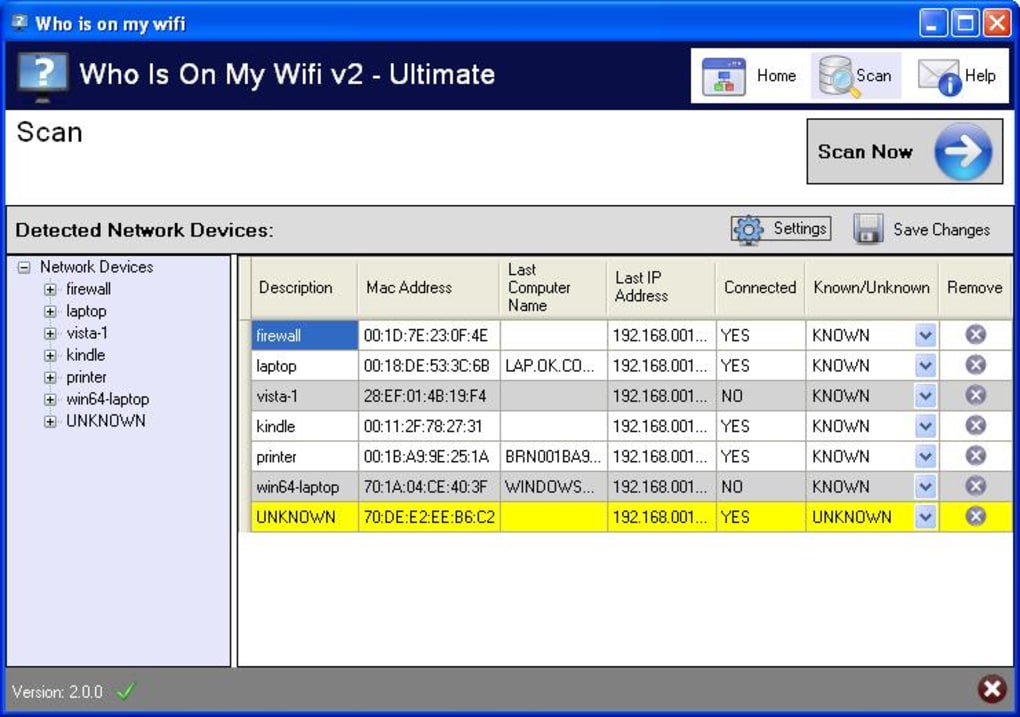
Once installed, the core functionality of “Who Is On My WiFi” is equally straightforward. The primary action, “scan now,” is prominently featured, inviting users to initiate a network audit with a single click. Upon activation, the program embarks on a comprehensive scan of your entire wireless network, meticulously cataloging every device currently connected. While the scan might take a few minutes to complete – a small investment of time – the resulting list of connected devices is impressively thorough and detailed.
The comprehensive nature of the scan results is a key strength. For each detected device, “Who Is On My WiFi” attempts to gather and display relevant information. This often includes the device’s IP address, MAC address, and sometimes even a hostname or manufacturer’s description. This level of detail is crucial for identifying unknown devices. For instance, if you see a device listed with a familiar manufacturer like “Apple Inc.” or “Samsung Electronics,” you can quickly deduce it might be your iPhone or smart TV. While some devices might initially appear as “UNKNOWN,” the program often provides additional descriptive details, such as the manufacturer’s name, to assist in identification. This intelligent aggregation of data helps users quickly toggle between classifying devices as “KNOWN” or “UNKNOWN,” effectively building a trusted list of devices on their network. This foundational ease of use, coupled with comprehensive results, makes the initial network audit a manageable and insightful process for all users.
Beyond Basic Monitoring: Advanced Features for Vigilant Users
While the ease of installation and intuitive scanning are significant draws, “Who Is On My WiFi” distinguishes itself further through a suite of advanced features designed to enhance ongoing network security and user control. These functionalities move beyond a one-time scan, transforming the utility into a persistent guardian of your Wi-Fi network.
One of the standout features is the ability to schedule scans. Recognizing that network activity is dynamic and new devices can connect at any time, the program offers an automated scanning capability. By default, “Who Is On My WiFi” can automatically re-scan your network every few minutes. Users are also given the flexibility to adjust this frequency, choosing to set scans at intervals ranging from every 2 to 10 minutes. This proactive approach is invaluable, as it eliminates the need for manual checks and ensures that any new, potentially unauthorized, devices are detected almost as soon as they connect. For a home user, this means peace of mind, knowing their network is continuously monitored. For a business, it translates into real-time security intelligence, allowing for swift action against potential threats.
The program’s underlying hardware intruder detection engine is touted as being of the highest quality available in any comparable software. This sophisticated engine is designed to not just detect the presence of devices but to accurately identify and flag those that are new or unrecognized. This superior detection capability is crucial for identifying rogue laptops, unauthorized smartphones, or other devices that shouldn’t be present on a corporate LAN or even a secure home network. It acts as an early warning system, distinguishing between legitimate, known devices and potential intruders with precision.
Perhaps the most powerful and unique feature of “Who Is On My WiFi” is its blocking capability. Detection is the first step, but action is where true security lies. Once an unauthorized device is identified and flagged, the program allows users to effectively disable or block that intruder from accessing the network. This isn’t merely a notification; it’s an active defense mechanism that can sever the connection of unwanted devices, immediately mitigating their ability to consume bandwidth or pose a security risk. This “first-class software” distinction, as highlighted by the developer, transforms the tool from a mere monitoring application into an active network protector.
Furthermore, the program maintains an extensive event log. This log serves as a historical record of all network activity, including when devices connect, disconnect, and when new devices are detected. This feature is particularly beneficial for forensic analysis or for simply reviewing past network events. For network administrators, a detailed event log is indispensable for auditing purposes, tracking patterns of unauthorized access attempts, and demonstrating compliance with security policies. By providing a clear, chronological account of network occurrences, the event log adds another layer of transparency and accountability to your Wi-Fi security strategy. These advanced features collectively empower users, from household tech supporters to dedicated IT professionals, to maintain an ironclad grip on their network’s integrity and security.
Navigating the User Experience: Design and Interface Considerations
While “Who Is On My WiFi” excels in its core functionality and robust feature set, the user experience, particularly concerning its design and interface, presents a mixed bag. Feedback from users, as well as PhanMemFree’s own assessment, indicates that while the software is perfectly functional, its aesthetic and some interface choices could benefit from refinement. These aspects, though not deal-breakers for most, do contribute to the overall user perception and ease of interaction.
The program’s visual design employs a dark blue and white color scheme. In itself, this combination is not inherently problematic and can often lend a professional or clean look to an application. However, the chosen accent color—a bright yellow highlight used for devices after a network scan—has been a point of contention. Several users and reviewers have found this specific color choice to be “painful to the eye” or jarring against the dark background. Effective UI design typically utilizes accent colors to draw attention to important elements without causing visual fatigue. In this case, the intensity of the yellow appears to detract from readability rather than enhance it, making the process of reviewing scan results less comfortable than it could be. This highlights how critical color theory and contrast are in creating an accessible and pleasant user interface.
Another usability concern frequently noted is the process of managing “UNKNOWN” devices. When the program first scans the network, many devices, even those belonging to the user, might be initially labeled as “UNKNOWN.” While the software attempts to provide additional information, such as manufacturer details, to aid identification, the manual process of changing these labels to “KNOWN” has been described as “a bit annoying.” This involves going through each device individually to update its status, which can be tedious, especially for networks with numerous connected devices. A more streamlined bulk-editing feature or an enhanced initial identification mechanism could significantly improve this aspect of the user experience. The ideal scenario would involve the software “learning” known devices more effectively over time, reducing the manual effort required from the user.
Furthermore, the notification system has received criticism for being redundant and potentially frustrating. The program provides both a Windows pop-up notification and a voice notification when certain events occur, such as a new device connecting. While notifications are crucial for alerting users to important network activity, having two simultaneous alerts for the same event can be seen as “unnecessary and frustrating.” This dual approach can be disruptive, especially in environments where constant alerts are unwanted. Users typically prefer a single, clear, and customizable notification method that can be tailored to their preference – visual, auditory, or both, but not necessarily simultaneous and unskippable.
Some user reviews also point to a general perception of the interface being “unintuitive” or, for less tech-savvy individuals, sometimes veering into “geeky” territory. One user described being pulled from a “nice looking interface” into “some geek stuff, showing paths, etc.” This suggests an inconsistency in the user interface, where basic monitoring is accessible, but deeper functionalities or specific informational displays might revert to a more technical, command-line-like presentation that can be off-putting for casual users. The lack of readily available “help files” is also mentioned as a drawback, which exacerbates the learning curve for those struggling with the interface or specific features.
Despite these criticisms regarding aesthetics and certain interface elements, it’s important to reiterate that these issues are generally not considered “terrible enough that it would shy users away from the program.” The consensus is that while the design “could have been a little better,” it “is ultimately not terrible enough to be a deal breaker.” The core functionality and the useful features the program possesses often “more than makes up for the unfortunate design choices.” This indicates a strong fundamental product that could achieve even greater user satisfaction with strategic interface improvements and a more cohesive design language.
Why Choose Who Is On My WiFi? Addressing Key Concerns
In a digital landscape teeming with various network monitoring tools, the decision of which software to adopt often boils down to a blend of effectiveness, reliability, and specific user needs. “Who Is On My WiFi” carves out its niche by offering a highly focused solution to a prevalent problem: unauthorized network access. While its design may not win awards for aesthetics, its commitment to performance and security-centric features makes it a compelling choice for a diverse range of users, from concerned homeowners to diligent IT professionals.
At its core, the primary reason to choose “Who Is On My WiFi” is its undeniable efficacy in performing its stated purpose. The program is specifically engineered to identify every computer and device on your network, provide real-time notifications about new connections, and crucially, empower you to block intruders. This direct approach to network security is invaluable. For individuals experiencing slow internet speeds, it provides definitive answers by showing exactly who is consuming bandwidth. For those worried about privacy, it offers transparency into who might be lurking on their network, potentially attempting to access sensitive data. This clarity alone is a significant comfort in an age of increasing digital vulnerability.
The robust hardware intruder detection engine sets “Who Is On My WiFi” apart from more basic network scanners. It’s not just about listing IP and MAC addresses; it’s about intelligently identifying suspicious activity and unknown devices with a high degree of accuracy. This engine is designed to be highly reliable, ensuring that users receive dependable alerts about potentially rogue devices. This advanced capability makes it an ideal internal security network monitoring system, particularly well-suited for small to medium-sized businesses where dedicated, expensive enterprise-level security solutions might be overkill or financially prohibitive. For these organizations, identifying unauthorized employee devices or external threats accessing the corporate LAN is critical for data integrity and operational security.
The Power of Proactive Network Defense
The true strength of “Who Is On My WiFi” lies in its proactive defense mechanisms, most notably its unique blocking feature. Many network scanners can tell you who is on your network, but very few offer the direct capability to disable an intruder’s access immediately. This functionality elevates “Who Is On My WiFi” from a diagnostic tool to an active deterrent. Once an unauthorized device is identified and confirmed, the ability to effectively “kick it off” and prevent reconnection provides an immediate and powerful response to security breaches. This makes it “first-class software that is truly one of a kind” in its category, offering not just visibility but actionable control.
This proactive stance resonates deeply with its target audience. Network administrators, aspiring IT professionals, and even the designated “tech support” of a household are all keenly concerned about network security. They are the individuals tasked with maintaining the integrity and performance of their networks. “Who Is On My WiFi” provides them with the granular control necessary to fulfill this responsibility effectively. It addresses the common fears of bandwidth theft, data breaches, and the general vulnerability that comes with an unmonitored wireless connection.
Furthermore, the program’s scheduled scanning feature ensures continuous vigilance. Security is not a one-time setup; it’s an ongoing process. The ability to automatically scan the network at customizable intervals means that the network is constantly being checked for new or unauthorized connections without constant manual intervention. This passive yet perpetual monitoring offers an unmatched level of security assurance.
While alternatives like Wireless Network Watcher, SoftPerfect WiFi Guard, and WiFi Protector also exist and offer similar monitoring capabilities, “Who Is On My WiFi” differentiates itself with its combination of a powerful detection engine and the direct blocking functionality. For users who prioritize not just knowing, but acting against threats, this program offers a comprehensive package. The installation is fast, the scanning is quick and comprehensive, and the ability to schedule scans alongside an extensive event log rounds out a feature set that is designed for maximum security and peace of mind. Despite minor interface quirks, its core mission and robust execution make “Who Is On My WiFi” an indispensable tool for anyone serious about safeguarding their digital domain.
In conclusion, “Who Is On My WiFi” fulfills its purpose admirably: helping users uncover precisely who is utilizing their Wi-Fi connection. Its speed, efficiency, and comprehensive feature set, including swift installation, quick and detailed scanning, scheduled monitoring, and an extensive event log, cement its status as a highly effective utility. While acknowledging that its design and interface could benefit from some improvements—such as the polarizing color scheme, the slightly cumbersome process of identifying “UNKNOWN” devices, and redundant notifications—these drawbacks are largely overshadowed by the program’s practical benefits. They are certainly not significant enough to detract from its overall value or functionality.
For anyone committed to maintaining the security and performance of their wireless network, whether at home or in a small business, “Who Is On My WiFi” by IO3O LLC stands as a reliable and essential tool. It provides the necessary visibility and control to prevent unauthorized access, protect valuable bandwidth, and safeguard sensitive data. If your goal is to keep a vigilant eye on every device connected to your Wi-Fi network and ensure that only authorized users are present, this program is a robust solution that is unlikely to disappoint. You can find more information and download the free version for Windows directly from PhanMemFree.org, embarking on a path to a more secure and controlled digital environment.
File Information
- License: “Free”
- Latest update: “May 27, 2024”
- Platform: “Windows”
- OS: “Windows 7”
- Language: “English”
- Downloads: “170.1K”


