
WiFi Password Decryptor is a free Windows application designed to retrieve lost or forgotten passwords for your wireless network. This article will explore its functionality, ease of use, security considerations, and alternatives. We will also address common user questions and concerns.
Understanding WiFi Password Decryptor’s Functionality
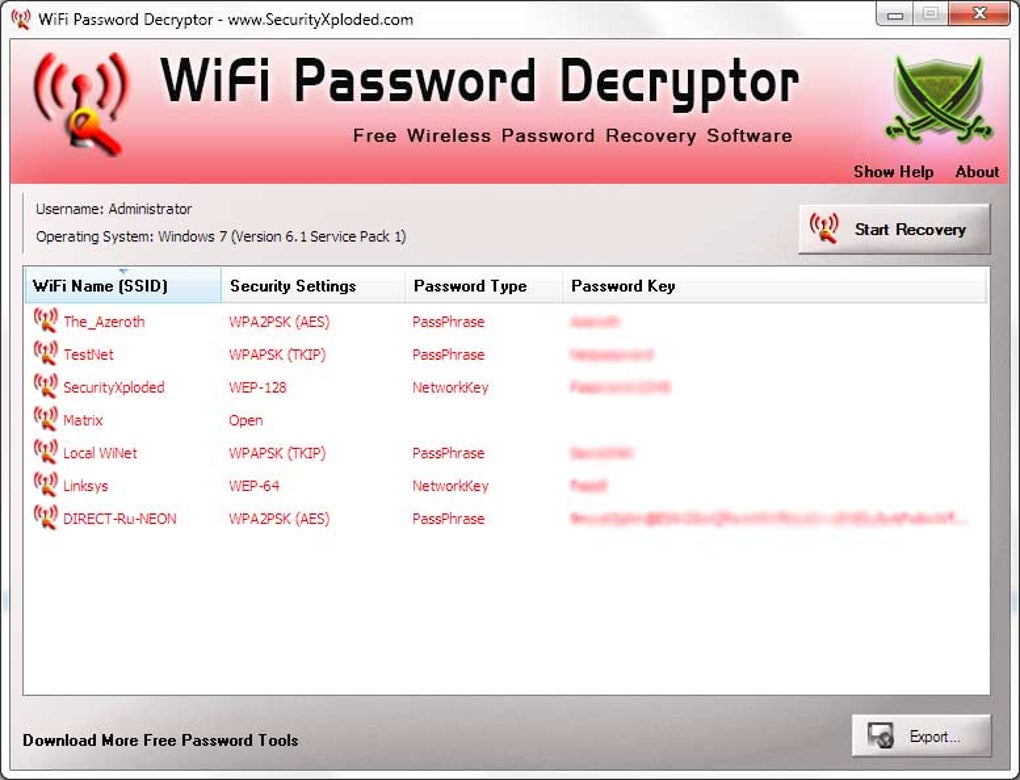
WiFi Password Decryptor operates by analyzing your Windows system to decrypt wireless network access keys stored within the Wireless Configuration Manager. It supports a wide range of encryption algorithms commonly used to secure Wi-Fi networks, including:
- WEP (Wired Equivalent Privacy): While outdated and considered insecure, WEP (both 64-bit and 128-bit versions) is still sometimes encountered on older networks. WiFi Password Decryptor’s ability to decrypt WEP keys is a testament to its comprehensive support.
- WPA (Wi-Fi Protected Access): WPA provided a significant improvement in security over WEP. WiFi Password Decryptor can handle WPA keys, offering a solution for users who have forgotten their password on a WPA-secured network.
- WPA2 (Wi-Fi Protected Access II): WPA2 is the successor to WPA and offers even stronger encryption. This application supports decryption of WPA2 keys.
- AES (Advanced Encryption Standard): AES is a widely used symmetric encryption standard known for its robustness. WiFi Password Decryptor successfully handles networks using AES encryption.
- TKIP (Temporal Key Integrity Protocol): TKIP was an interim security protocol designed to transition networks from WEP to WPA. This application supports TKIP decryption.
The application presents the recovered passwords in a clear, easily understandable format, or optionally in hexadecimal (HEX) format. The recovered SSID (Service Set Identifier – the name of your wireless network) and password are displayed upon successful decryption. Furthermore, the retrieved information can be exported to various file formats, including HTML, TXT, and XML, for convenient storage and sharing.
Ease of Use and User Interface
The software boasts a remarkably simple user interface. Its straightforward design makes it accessible even to users with limited technical expertise. The core functionality is centered around a single button – “Start Recovery.” A single click initiates the decryption process. The results are presented in a clear and concise manner, eliminating any confusion regarding the recovered SSID and password. The simplicity of the user interface is a significant strength, catering to a broad spectrum of users, from novice to experienced computer users.
While the lack of advanced features might be a drawback for some power users, the simplicity is a key feature for the average user who simply needs to recover a lost password quickly and efficiently. This focus on simplicity contributes significantly to the software’s user-friendliness and accessibility.
Security Considerations and Potential Risks
While WiFi Password Decryptor is designed to recover passwords from your own system, it’s crucial to understand the security implications. The application accesses sensitive data stored on your computer. Therefore, ensuring that the downloaded software is legitimate and comes from a trusted source is of paramount importance. Downloading the software from unofficial or untrusted websites could expose your system to malware or other security threats.
The program itself is not inherently malicious, but using it on a system you do not own or have permission to access is illegal and unethical. It’s vital to use this tool responsibly and only on your own personal computers.
It is essential to download the software from the official developer’s website or a reputable software distribution platform. Verify the software’s digital signature to ensure its authenticity and integrity. Before running the software, consider using an up-to-date antivirus program to scan the application file for any potential malware.
Exporting and Managing Recovered Passwords
After the decryption process is complete, WiFi Password Decryptor allows you to export the recovered information. This feature is extremely useful for archiving and organizing your wireless network passwords. The export options – HTML, TXT, and XML – provide flexibility depending on your needs. HTML is suitable for viewing in a web browser, while TXT offers a simple text-based format. XML provides a structured format that’s easily parsable by other applications or scripts. This flexibility ensures compatibility with a wide range of systems and applications.
The ability to export data is especially beneficial if you manage multiple wireless networks or frequently need to access your Wi-Fi passwords. By exporting them to a file, you have a backup of your passwords, preventing the inconvenience of having to recover them again.
System Compatibility and Limitations
WiFi Password Decryptor is compatible with several versions of the Windows operating system. It has been successfully tested on Windows 8, 7, and Vista, both 32-bit and 64-bit versions. However, it’s important to note that the software does not support Windows XP. This limitation reflects the changes in security protocols and system architecture across different Windows versions. While Windows XP is outdated, it’s a significant limitation to remember.
Alternatives to WiFi Password Decryptor
Several alternatives exist for recovering lost Wi-Fi passwords, each with its own set of strengths and weaknesses. These alternatives often provide additional features or support different operating systems. Some alternatives may offer more advanced functionalities or support for a wider range of encryption protocols. Researching and choosing the most suitable alternative depends on your specific requirements and technical expertise. These alternatives might offer superior functionality, support for newer operating systems, or additional features such as password management capabilities. However, it’s crucial to carefully evaluate the security implications and choose a reputable option from a trusted source.
Consider researching other password recovery tools specifically designed for Wi-Fi networks or password management software that might retain your network passwords. Always prioritize downloading software from trusted sources to minimize the risk of malware infections.
The choice of using WiFi Password Decryptor or an alternative should be based on individual needs and preferences. Consider the specific features offered by each program and choose the one that best meets your requirements.
Addressing User Concerns
User reviews often highlight questions about the software’s reliability and security. Many users ask whether the software is safe to use and if it contains any viruses. It is crucial to download only from trusted sources and run a virus scan before execution to mitigate these risks. Another common point of clarification is that this tool retrieves passwords already stored on the computer; it doesn’t work to crack passwords from protected networks that are not already stored on the computer.
Addressing these concerns is crucial for promoting responsible and safe usage of WiFi Password Decryptor. Transparency about its limitations and the importance of safe downloading practices builds user trust and encourages responsible use of the tool. Clearly stating the software’s purpose and its limitations promotes responsible use and mitigates user concerns about security and reliability.


