
In our hyper-connected world, Wi-Fi has become as fundamental as electricity. From streaming movies to attending virtual meetings, checking social media, or simply browsing the web, a reliable Wi-Fi connection is indispensable. Yet, for all its convenience, there’s one recurring frustration that almost every user has faced: forgetting the Wi-Fi password. Whether you’re trying to connect a new device, share your internet with a guest, or simply reconfigure your router, a lost password can quickly turn a minor inconvenience into a major headache. This is where specialized tools come into play, and among the most effective is the WiFi Password Revealer.
Designed specifically for Windows users, WiFi Password Revealer offers a straightforward and efficient solution to retrieve lost or forgotten Wi-Fi network keys. This free program is an invaluable utility for anyone who has ever scribbled down a complex password on a sticky note only to lose it, or who simply hasn’t needed to enter their network key in years and can no longer recall it. This comprehensive article delves into the functionality, benefits, limitations, and responsible usage of WiFi Password Revealer, providing a detailed guide to understanding how this tool can bring an end to your forgotten password woes. We’ll explore its compatibility with various encryption standards, its speed, and how it fits into a broader strategy of network security and password management, all while navigating its practical aspects for everyday use.
Understanding Your Network and the Need for Wi-Fi Password Recovery
The digital landscape is a complex tapestry woven with countless networks, devices, and data streams. At the heart of most home and small business connectivity lies the Wi-Fi network, a seemingly invisible backbone facilitating our digital lives. But while the magic of wireless connectivity is often taken for granted, the underlying security mechanisms are crucial. Every Wi-Fi network is secured with a password, a digital key that prevents unauthorized access, protects your data, and ensures your bandwidth isn’t siphoned off by unwelcome guests. These passwords, often long and complex alphanumeric strings, are designed to be robust and difficult to guess, which ironically makes them equally difficult for humans to remember.
The need for a Wi-Fi password recovery tool typically arises in several common scenarios. You might purchase a new smartphone, tablet, or smart home device and find yourself unable to connect it to your existing network because you can’t remember the password. Guests visiting your home might ask for the Wi-Fi details, only for you to realize you have no immediate access to them. Or perhaps, after a router reset or a system reinstallation, your computer needs to rejoin the network, and the familiar auto-connect option is no longer available. In these moments, the frustration can be immense, leading many to resort to the tedious process of factory resetting their router and setting up a new network from scratch – a time-consuming ordeal that often results in even more forgotten passwords down the line.
Historically, recovering a Wi-Fi password often involved logging into the router’s administration panel, a process that itself requires a password (which, again, might be forgotten) and navigating through often-unintuitive menus. For many users, this is a daunting task, requiring a level of technical comfort they may not possess. Internet Service Providers (ISPs) can sometimes assist, but this usually means a phone call, waiting on hold, and going through a series of verification steps. These traditional methods are not always convenient or quick.
This is precisely where utilities like WiFi Password Revealer from Magical Jelly Bean, available for free download on PhanMemFree.org, prove their worth. Falling under the “Internet y Redes” (Internet and Networks) category, and more specifically “Utilidades y Herramientas” (Utilities and Tools), these applications simplify the often-complex task of retrieving crucial network information directly from your Windows computer. Rather than delving into router settings or contacting support, the tool leverages the fact that your computer, once connected to a Wi-Fi network, stores its credentials securely. The software’s primary function is to access and decrypt these stored passwords, presenting them in a human-readable format, thereby offering a rapid and efficient solution to an all-too-common problem. It significantly reduces the friction associated with managing network access, making it easier for users to maintain control over their connectivity without unnecessary hassle.
WiFi Password Revealer: Features, Functionality, and User Experience
At its core, WiFi Password Revealer is a utility designed with a singular, vital purpose: to recover your forgotten Wi-Fi passwords. But beyond this primary function, the application, developed by Magical Jelly Bean and freely available on PhanMemFree.org, offers a set of features that make it a robust tool for basic network information retrieval on Windows systems. Its streamlined approach prioritizes speed and ease of use, making it accessible to a wide range of users, regardless of their technical proficiency.
Core Capabilities for Forgotten Passwords
The most critical feature of WiFi Password Revealer is its ability to recover passwords from networks secured with a variety of common encryption standards. In the world of Wi-Fi, security protocols are constantly evolving, and a good recovery tool must keep pace. WiFi Password Revealer is compatible with:
- WEP (Wired Equivalent Privacy): An older and less secure protocol, though still occasionally encountered.
- WPA (Wi-Fi Protected Access): An improvement over WEP, offering stronger security.
- WPA-PSK (Wi-Fi Protected Access - Pre-Shared Key): The most common WPA variant for home and small office networks, relying on a shared passphrase.
- WPA2 (Wi-Fi Protected Access version 2): The industry standard for robust Wi-Fi security, providing stronger encryption than WPA.
- WPA2-PSK (Wi-Fi Protected Access version 2 - Pre-Shared Key): The widely adopted and highly secure protocol for most modern home and business networks.
This broad compatibility ensures that whether your network is using an older standard or the current industry benchmark, WiFi Password Revealer has a high probability of successfully recovering the password. The speed of this recovery is another significant advantage. Unlike manual methods that involve navigating menus or contacting support, the program performs the recovery in a matter of seconds, providing immediate access to the necessary credentials.
Beyond just the password, WiFi Password Revealer also retrieves other pertinent information about your Wi-Fi connections. This includes:
- SSID (Service Set Identifier): This is the network name (e.g., “MyHomeWiFi”) that you see when searching for Wi-Fi networks. Knowing the SSID alongside the password is crucial for re-establishing a connection.
- HEX Code: The hexadecimal representation of the password. While the human-readable password is generally what you need, the HEX code can be useful in certain advanced configurations or troubleshooting scenarios.
- Connection Type and Encryption Type: The tool also provides details on the type of connection and the specific encryption standard used (e.g., WPA2-PSK). This information can be helpful for understanding your network’s security posture or for diagnostic purposes.
The program’s compatibility extends to a wide range of Windows operating systems, supporting both 32-bit and 64-bit architectures, ensuring that most Windows users can benefit from its functionality.
Navigating the Interface and Interpreting Results
The user experience of WiFi Password Revealer, while effective, reflects its utilitarian nature. The interface is described as “quite anticuada” (quite outdated), which means it might lack the sleek, modern design elements found in newer software. However, what it lacks in visual flair, it makes up for in simplicity and directness.
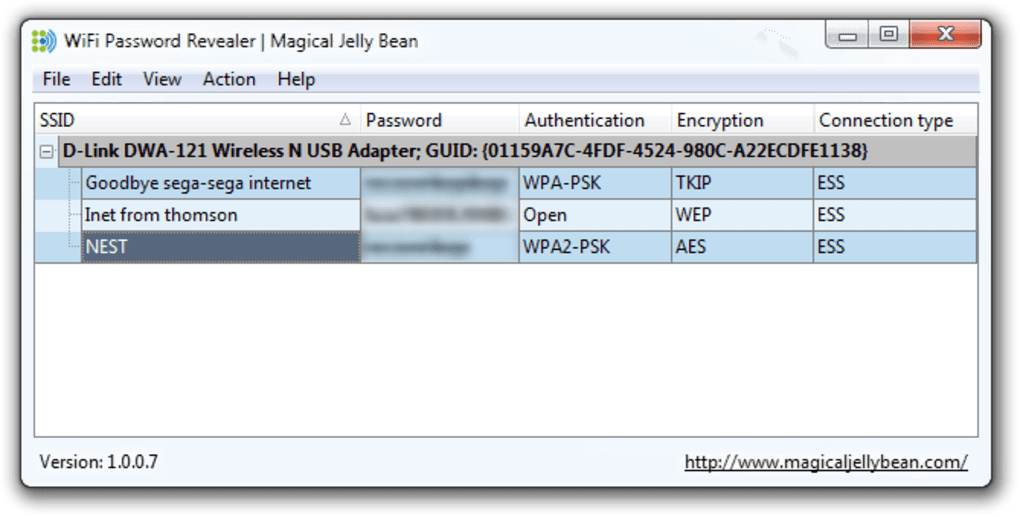
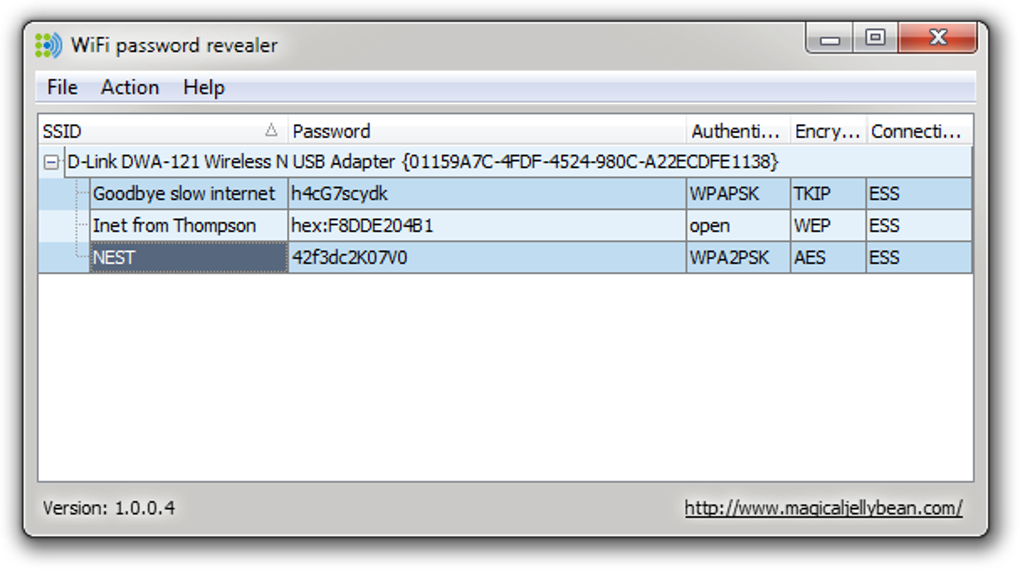
Upon launching the application, users are typically presented with a straightforward window that automatically scans for and displays information about all Wi-Fi networks their computer has previously connected to. This list will usually include:
- The Network Name (SSID)
- The Password (revealed in plain text)
- The HEX Key
- The Encryption Type (e.g., WPA2-PSK)
- The Authentication Method
- The Radio Type
The data is presented clearly in columns, making it easy to identify the specific network you’re interested in and retrieve its password. There is generally minimal configuration required, which contributes to its ease of use. Users don’t need to delve into complex settings; the program is designed to perform its core function with as few clicks as possible.
Despite its simplicity, it’s important to acknowledge some of its limitations. The program offers “escasa configuración adicional” (scarce additional configuration), meaning advanced users might find the lack of customization options restrictive. Furthermore, while highly effective, it’s not “efectivo en el 100% de los casos” (effective in 100% of cases). There might be rare instances where a password cannot be recovered, possibly due to unique system configurations, specific network card drivers, or highly unusual encryption methods not covered by the common standards. The absence of personalization options also means users cannot tailor the look or behavior of the application to their preferences.
Nonetheless, for its intended purpose – quick and easy Wi-Fi password recovery – WiFi Password Revealer delivers. Its strengths lie in its speed, broad compatibility with encryption types, and the valuable additional network data it provides, making it an excellent free utility for addressing those frustrating moments of forgotten network keys.
Best Practices for Security and Password Management
The ability to retrieve forgotten Wi-Fi passwords, while incredibly convenient, also highlights a broader and more critical aspect of our digital lives: security and comprehensive password management. Tools like WiFi Password Revealer fall under the “Seguridad y Privacidad” (Security and Privacy) category, and specifically “Gestión de Contraseñas” (Password Management), on platforms like PhanMemFree.org. This placement underscores the importance of understanding not just how to recover passwords, but also how to protect them and manage them responsibly.
The Broader Landscape of Password Security
In today’s interconnected world, strong passwords are the first line of defense against cyber threats. While Wi-Fi passwords protect your local network, the principles of good password hygiene extend to every online account, from email to banking, social media, and e-commerce. The common pitfalls include:
- Reusing Passwords: Using the same password across multiple services is a major vulnerability. If one service is breached, all your accounts become susceptible.
- Weak Passwords: Simple, easily guessable passwords (e.g., “123456”, “password”, birth dates) are an open invitation for attackers.
- Lack of Updates: Not changing passwords regularly or when a service has reported a breach.
- Phishing Scams: Falling for deceptive emails or websites that trick you into revealing your credentials.
A robust password management strategy goes beyond just remembering your Wi-Fi key. It involves creating unique, complex passwords for every account, storing them securely, and updating them periodically. This is where dedicated password managers come into play. Unlike a Wi-Fi password revealer that focuses on network keys stored on your system, these broader “Gestión de Contraseñas” applications encrypt and store all your login credentials for websites and applications, often providing autofill capabilities and password generation tools. Examples of such tools are abundant and form a critical component of personal cybersecurity.
For Wi-Fi networks specifically, best practices include:
- Using WPA2-PSK or WPA3: Always opt for the strongest available encryption standard for your router. WPA2-PSK is the current minimum recommended, with WPA3 being the latest and most secure.
- Strong Passphrases: Choose a Wi-Fi password that is long, complex, and combines uppercase and lowercase letters, numbers, and symbols. A passphrase (a sentence or sequence of unrelated words) is often easier to remember than a random string but still highly secure.
- Changing Default Passwords: Never use the default password that comes with your router. These are often generic and easily discoverable.
- Guest Networks: Utilize a separate guest network feature, if available on your router, to provide internet access to visitors without exposing your main network’s password or devices.
- Physical Security: Keep your router in a secure location, as some physical access attacks can bypass Wi-Fi encryption.
Responsible Use of Recovery Tools
While WiFi Password Revealer is a legitimate and helpful tool for retrieving your own forgotten passwords, its capabilities inherently carry ethical and security considerations. It’s designed to help you regain access to networks you are authorized to use, not to compromise others’ security.
- Legality and Ethics: Using such a tool to access networks you do not own or have permission for is illegal and unethical. The software is intended for personal use on your own networks or networks where you have explicit authorization from the owner.
- Security Implications: The fact that Wi-Fi passwords can be recovered from a Windows system means that if your computer falls into the wrong hands, these passwords could be exposed. This underscores the importance of protecting your device with a strong login password and implementing full-disk encryption if possible.
- Regular Review: Periodically reviewing the passwords stored on your system, and perhaps even changing your Wi-Fi password if you suspect it might have been compromised, is a good security practice.
In the broader context of “Seguridad y Privacidad,” WiFi Password Revealer serves as a reminder that convenience and security are often two sides of the same coin. While it provides a quick fix for a common problem, it also implicitly urges users to be more proactive in their overall password management and network security strategies. It’s a tool that empowers users to regain control, but with that power comes the responsibility to use it wisely and ethically, ensuring the security of their own data and respecting the privacy of others. The availability of such utilities on platforms like PhanMemFree.org is a testament to the ongoing need for practical solutions to everyday digital challenges, always with an implicit understanding of their proper and responsible application.
Conclusion
The WiFi Password Revealer stands out as a highly effective and freely available utility for Windows users grappling with the universal frustration of forgotten Wi-Fi passwords. Developed by Magical Jelly Bean, this program offers a rapid and straightforward method to retrieve network keys encrypted with a wide array of standards, including WEP, WPA, WPA-PSK, WPA2, and WPA2-PSK. Beyond just the password, it conveniently displays crucial details like the SSID, HEX code, and encryption type, providing a comprehensive overview of your stored network connections. Its ease of use and quick recovery process make it a valuable addition to any user’s digital toolkit, especially when needing to connect new devices or assist guests.
While its interface might be considered dated and its configuration options limited, these minor drawbacks are significantly outweighed by its core functionality and accessibility. It offers a much more immediate solution than delving into router settings or contacting customer support, saving precious time and alleviating considerable stress.
Ultimately, the WiFi Password Revealer is more than just a simple recovery tool; it’s a practical enabler of seamless connectivity. It underscores the importance of thoughtful password management and responsible digital citizenship. For those moments when your network key slips your mind, this application, readily available on PhanMemFree.org, acts as a reliable digital memory, ensuring that your path to reconnection is swift and hassle-free. Used judiciously and ethically, it is an indispensable utility for navigating the complexities of modern wireless networks.


