
WifiInfoView is a free, portable utility designed for Microsoft Windows operating systems. It provides users with extensive details about nearby wireless networks, offering a level of granularity far exceeding the information typically displayed by the native Windows operating system. This powerful tool allows users to gain a deeper understanding of their wireless environment, enabling them to identify optimal channels, troubleshoot connection problems, and generally enhance their Wi-Fi experience. This in-depth article will explore WifiInfoView’s features, functionality, and capabilities.
Understanding WifiInfoView’s Core Functionality
WifiInfoView’s primary function is to scan for and display detailed information about all accessible wireless networks within range. Unlike the limited information presented by the Windows operating system, WifiInfoView offers a comprehensive overview of each network, revealing crucial details that are often hidden from casual users. This information includes, but isn’t limited to:
- SSID (Network Name): The name assigned to the wireless network, allowing for easy identification.
- MAC Address: The unique hardware address of the wireless router, useful for identifying specific devices and troubleshooting network conflicts.
- Channel: The specific frequency channel used by the network. Understanding channel usage is critical for optimizing network performance and minimizing interference.
- Signal Strength (RSSI): A measure of the strength of the received wireless signal, indicating the quality of the connection. A stronger signal generally translates to a faster and more reliable connection.
- Frequency Band: The frequency range used by the network (e.g., 2.4 GHz or 5 GHz). Different bands offer varying performance characteristics.
- PHY Type: The physical layer type used by the network, indicating the underlying communication standard (e.g., 802.11n, 802.11ac, 802.11ax).
- Router Name and Model: Information about the manufacturer and model of the wireless router, useful for identifying potential compatibility issues or hardware limitations.
- BSS Type: The type of Basic Service Set (BSS) used by the network (e.g., infrastructure, independent).
- Security Type: The type of security protocol employed by the network (e.g., WEP, WPA, WPA2, WPA3), providing an indication of its security level.
This wealth of information empowers users to make informed decisions regarding their network connectivity, optimizing their chosen network for speed and reliability.
User Interface and Ease of Use
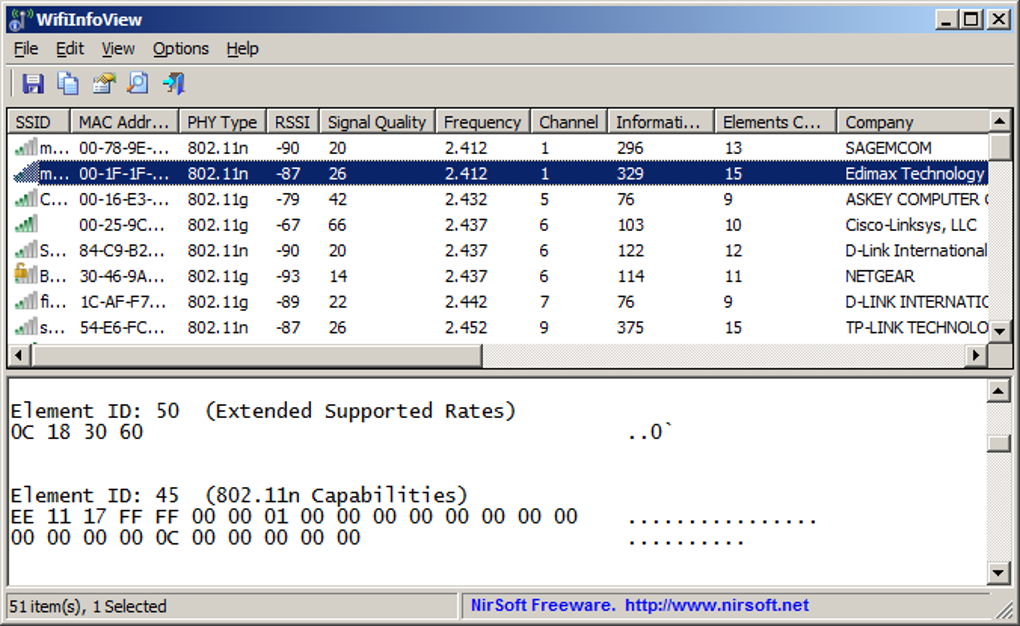
WifiInfoView boasts a remarkably simple and intuitive interface. Upon execution, the program automatically begins scanning for available wireless networks. The results are presented in a clear, tabular format, making it easy to quickly identify and compare various networks. The interface is divided into two primary sections:
- Top Pane: This section displays a list of all detected wireless networks, with each network represented by a single row containing key information such as SSID, MAC address, signal strength, and channel. Users can easily sort this list based on any of these columns to quickly find specific networks or identify those with the strongest signals.
- Bottom Pane: This pane provides more detailed information about the selected network in a hexadecimal format. While this level of detail may be overwhelming for casual users, it proves invaluable for advanced troubleshooting and network analysis.
The program also offers several features that enhance its user-friendliness:
-
Automatic Refresh: WifiInfoView automatically refreshes the network list at regular intervals, ensuring that the displayed information is always up-to-date. Users can adjust the refresh rate through the program’s settings menu.
-
Report Generation: WifiInfoView allows users to export the collected data in HTML format, making it easy to share the information with others or archive the data for later reference.
The minimalist design and straightforward presentation of information contribute significantly to the program’s ease of use, making it accessible to both novice and experienced users.
Leveraging WifiInfoView for Network Optimization
WifiInfoView’s true value lies in its ability to help users improve their Wi-Fi performance. By providing detailed information about the surrounding wireless networks, it allows users to identify and avoid potential sources of interference. Understanding channel utilization is crucial in this regard. Multiple networks operating on the same channel can lead to significant signal degradation and reduced speeds.
WifiInfoView assists in this process by allowing users to sort the list of networks by channel. This enables users to quickly identify channels with minimal congestion, thus helping to pinpoint optimal channels for their own networks. By changing their router’s channel to a less crowded one, users can significantly enhance their connection speed and reliability.
While WifiInfoView itself doesn’t directly modify network settings, the information it provides is instrumental in guiding users toward making informed decisions to optimize their Wi-Fi performance. The program serves as an invaluable diagnostic tool for identifying and addressing network issues related to channel congestion and interference.
System Requirements and Alternatives
WifiInfoView is remarkably lightweight and has minimal system requirements. It’s compatible with various versions of Windows, including Windows 7 and later, and supports both 32-bit and 64-bit systems. Its portable nature eliminates the need for installation, making it incredibly convenient to use.
While WifiInfoView excels at providing detailed network information, it’s essential to acknowledge its limitations. It primarily focuses on network analysis and doesn’t offer features for directly troubleshooting or resolving Wi-Fi connection problems. For users seeking a more comprehensive solution that combines network analysis with troubleshooting capabilities, several alternative tools exist, such as:
-
NetSpot: A feature-rich, free tool offering a more sophisticated approach to Wi-Fi assessment and troubleshooting.
-
WiFi Tool - Analyzer & Scanner: This paid tool provides similar functionality to WifiInfoView, along with additional features.
-
Xirrus Wi-Fi Inspector: A robust tool frequently used by network professionals for in-depth Wi-Fi analysis.
- InSSIDer: Another popular network scanner offering similar functionality to WifiInfoView.
The choice of tool depends on individual needs and technical expertise. While WifiInfoView provides an excellent foundation for basic network analysis, users seeking advanced troubleshooting features may find alternative tools more suitable.
Safety and Security Considerations
WifiInfoView is a safe and reputable program developed by NirSoft, a well-known provider of freeware utilities. The software’s primary purpose is to collect and display information about wireless networks. It doesn’t modify system settings, install malicious software, or transmit user data to third-party servers. The program is designed purely for network analysis and optimization purposes.
Before using any software, including WifiInfoView, it’s always wise to download it only from trusted sources. Downloading from official websites or reputable software repositories minimizes the risk of acquiring malware or other harmful software. The program’s reputation and the developer’s history of producing safe and reliable tools further contribute to its trustworthiness. However, users should always exercise caution when downloading and installing software, regardless of its reputation. Scanning downloaded files with reputable antivirus software is always a recommended best practice.
File Information
- License: “Free”
- Latest update: “July 17, 2025”
- Platform: “Windows”
- OS: “Windows 7”
- Language: “English”
- Downloads: “63.1K”
- Size: “465.66 KB”


