
Wii U USB Helper, a now-defunct but still functional Windows application developed by Hikari06, offers a unique blend of game management and emulation capabilities for Nintendo’s Wii U console. While no longer receiving updates, its utility remains relevant for users who appreciate its functionality for backing up, managing, and even playing their Wii U game collection on their PCs. This guide delves into the features, capabilities, and considerations surrounding the use of Wii U USB Helper.
Understanding Wii U USB Helper’s Core Functionality
Wii U USB Helper functions as a multifaceted tool for Wii U game management. Its primary capabilities revolve around three key areas: backup creation, data management, and integrated emulation. Let’s explore each in detail.
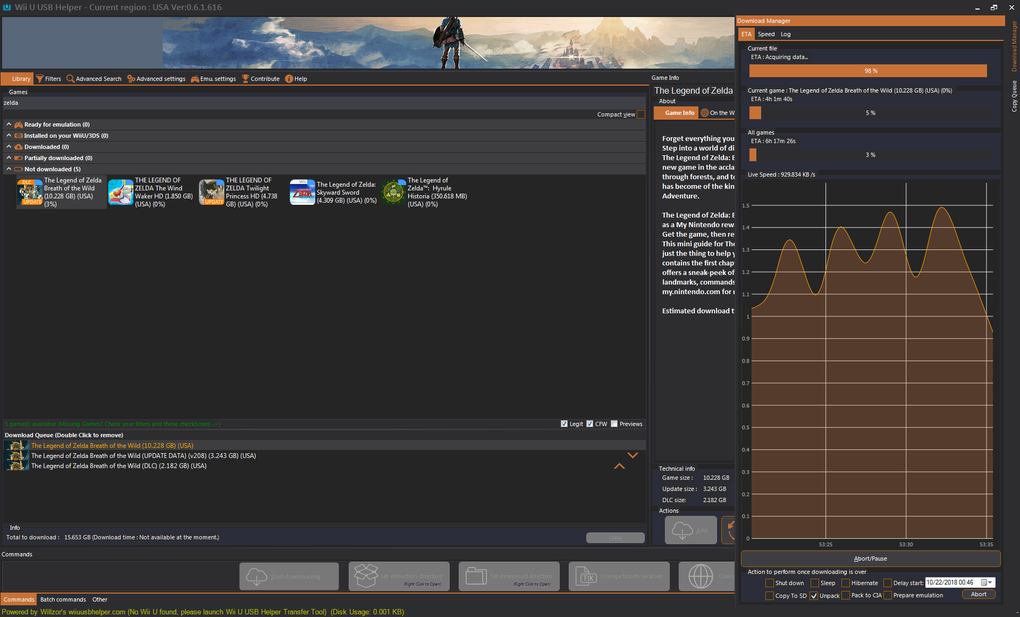
Backup Creation: The application allows users to create backups of their Wii U and 3DS game data. This is crucial for preserving game saves, DLC, and other essential files associated with the games. The intuitive interface guides users through the backup process, minimizing the risk of data corruption or loss. This feature is especially valuable when swapping games on the console, as it eliminates the need to repeatedly install and uninstall game data, thereby saving time and storage space on the Wii U’s internal storage.
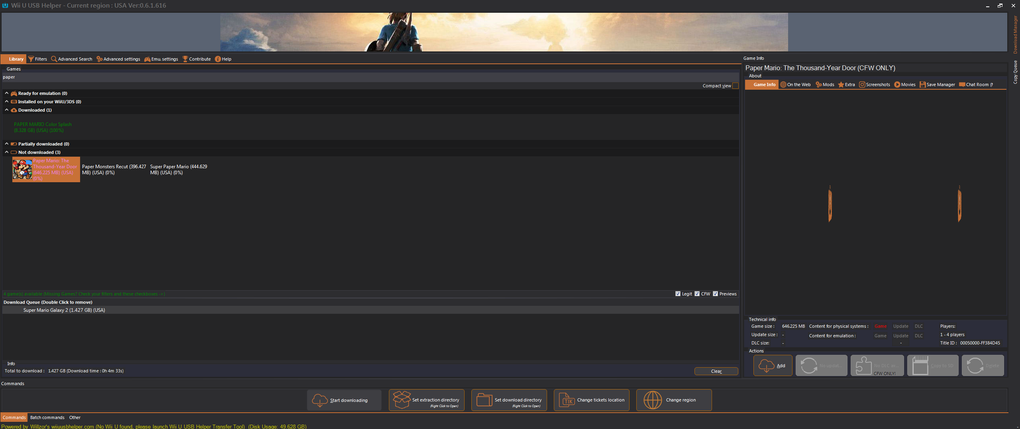
Data Management: Wii U USB Helper extends beyond simple backup creation. It provides a centralized system for managing these backups, allowing users to view game information, update lists, and organize their game collection directly from their computer. Similar to popular game management platforms like Steam, it offers a user-friendly interface for accessing and organizing all aspects of your digital game library. This centralized management simplifies the process of finding specific games, managing updates, and ensuring the integrity of your backups.
Integrated Emulation: Perhaps the most notable feature of Wii U USB Helper is its integrated Wii U emulator functionality. This allows users to play their backed-up Wii U games directly on their PCs without needing to power up their console. This functionality is a significant advantage, especially for those who may not always have access to their console, or for users who desire a more convenient and powerful gaming experience. However, it’s crucial to remember that the emulation capability relies on the user having legally obtained copies of the games. Downloading or playing games without ownership is illegal and violates copyright laws.
System Requirements and Installation Process
While the installation process is generally straightforward, some technical understanding is beneficial. A stable internet connection is required, as the software downloads necessary components and potentially fetches updates or additional content online. The installation process involves several steps, including providing the program with necessary information, potentially including links to content repositories. The instructions provided within the program are usually clear and concise, guiding users through the installation and setup process. However, basic software know-how is still recommended. After installation, users might need to specify a URL to access online resources for game data or updates.
Advantages and Disadvantages of Using Wii U USB Helper
Like any software, Wii U USB Helper presents both advantages and disadvantages. Understanding these is essential to determining its suitability for your needs.
Advantages:
- Safe Game Backups: The primary advantage lies in its ability to create safe and reliable backups of your Wii U and 3DS game data. This safeguard protects valuable game progress and other digital content from loss due to console malfunction or game data corruption.
- Built-in Emulator: The integrated Wii U emulator provides unparalleled convenience, allowing users to play their games on their PCs without needing the console. This is particularly useful for those who might prefer PC controls, or who want to game on a more powerful system.
- Intuitive Interface: The software boasts a relatively user-friendly interface, simplifying the complex tasks of backup creation, management, and emulation. This makes the software accessible to users of varying technical skill levels.
- Data Management Capabilities: The integrated data management features facilitate efficient organization and tracking of your backed-up games, streamlining access and providing a comprehensive overview of your digital game library.
Disadvantages:
- Installation Requires Basic Technical Knowledge: While the program is reasonably user-friendly, some basic technical knowledge is necessary for installation and setup. Users unfamiliar with software installation processes or handling system files might find the process challenging.
- Large Storage Space Required: Creating backups of games, particularly larger titles, will require significant storage space on your computer. Users should ensure they have sufficient hard drive capacity available before embarking on the backup process.
- No Official Updates: The developer has discontinued support for Wii U USB Helper, meaning there will be no further official updates or bug fixes. This implies the software’s longevity and compatibility with future systems might be uncertain.
- Legal Considerations: While the software itself is legitimate, the use of the integrated emulator to play games requires that the user owns the original copies of those games. Downloading or playing games without proper ownership is illegal and carries significant legal risks.
Alternatives to Wii U USB Helper
While Wii U USB Helper was a popular option, several alternatives exist for users looking for similar functionalities. These alternatives may offer different features, strengths, and weaknesses, depending on the user’s specific needs. Some popular alternatives include, but aren’t limited to:
-
Cemu: A highly regarded and actively developed open-source Wii U emulator. It’s known for its robust performance and constant updates. While it doesn’t offer built-in game management like Wii U USB Helper, it compensates with its superior emulation capabilities.
-
WBFS Manager: A tool specifically designed for managing Wii backups, this program excels in Wii game management, offering functionalities such as backup creation, organization, and other related tasks. It doesn’t directly support Wii U games, however.
-
Multi-Mod Manager for Wii: As the name suggests, this tool focuses on managing mods and modifications for Wii games. While not directly related to Wii U game management, it can be useful for enhancing the experience of Wii games.
Legal and Ethical Considerations
It is crucial to emphasize the importance of adhering to copyright laws when using Wii U USB Helper or any emulation software. The software itself is not inherently illegal; however, using the emulator to play games you don’t own is a violation of copyright law. Downloading ROMs or ISOs of games you haven’t purchased is also illegal. Always ensure you have legally obtained copies of any games you intend to play using the emulator. The legal implications of copyright infringement can be severe, ranging from hefty fines to legal action. Respecting intellectual property rights is paramount.
Conclusion
Wii U USB Helper provides a useful suite of tools for backing up, managing, and playing Wii U games on a PC. While its development has ceased, its functionality remains valuable for users who understand its limitations and adhere to legal guidelines. The integrated emulation capabilities provide a convenient way to access and play games, but only when done with legally acquired copies. Users should weigh the advantages and disadvantages, considering alternatives before deciding if Wii U USB Helper is the right tool for managing their Wii U game collection. Always prioritize responsible and legal use of software and digital content.
File Information
- License: “Free”
- Version: “0.6.1.655”
- Latest update: “July 20, 2021”
- Platform: “Windows”
- OS: “Windows 8”
- Language: “English”
- Downloads: “7.3K”
- Size: “1.54 MB”


