
Win Movie Maker is a free, user-friendly video editing software designed for Microsoft Windows operating systems. This comprehensive guide explores its features, capabilities, and how it simplifies the process of creating and sharing your own videos. Whether you’re a seasoned video editor or a complete beginner, Win Movie Maker offers a straightforward approach to transforming your photos and videos into engaging movie projects.
Ease of Use and Interface Design
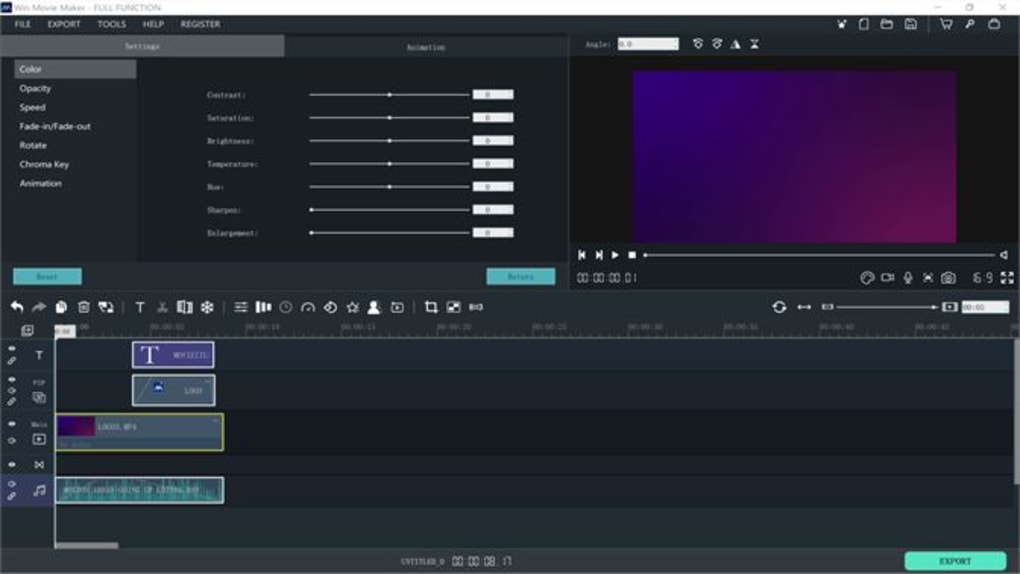
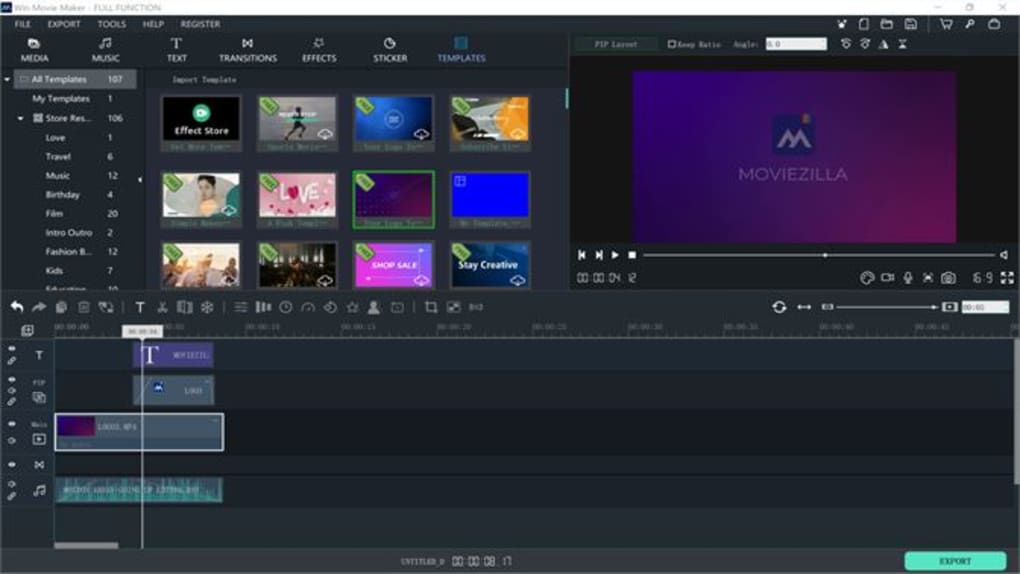
Win Movie Maker distinguishes itself through its remarkably intuitive interface. The streamlined design minimizes complexity, allowing users of all skill levels to quickly grasp the fundamental editing functions. Unlike some professional-grade video editors that can feel overwhelming with their myriad tools and options, Win Movie Maker presents a clean and straightforward workspace. This ease of use is a significant advantage, particularly for those new to video editing, enabling them to focus on creativity rather than struggling with complicated software navigation. The intuitive layout minimizes the learning curve, ensuring a smooth and enjoyable editing experience.
The software’s user-friendly nature is further enhanced by its drag-and-drop functionality. Users can easily import media files – photos, videos, and audio clips – and arrange them on the timeline with simple drag-and-drop actions. This eliminates the need for complex command sequences or extensive menu navigation, making the editing process significantly more efficient and accessible. Even advanced features are presented in an approachable manner, reducing the intimidation factor often associated with video editing software.
Core Features: Editing, Effects, and Exporting
Win Movie Maker’s core functionality revolves around straightforward video editing. Users can easily trim clips, adjust transitions between segments, and add titles and captions to enhance their videos. The software supports a range of common video and audio formats, ensuring compatibility with most user-generated content. The simple interface makes even complex operations straightforward:
-
Trimming and Cutting: Precisely cut unwanted sections from your video clips to create a polished final product. Win Movie Maker’s intuitive timeline makes it effortless to select and remove portions of your videos.
-
Transition Effects: Seamlessly blend video clips together using a variety of transition effects, such as fades, wipes, and dissolves, to create a visually appealing flow. This improves the overall pacing and aesthetics of your movie.
-
Title and Caption Creation: Add engaging titles and captions to highlight key moments or convey information within your video. Customizable font styles, sizes, and colors allow for creative text overlays.
-
Audio Integration: Incorporate background music, sound effects, and voice narration to add depth and emotion to your video projects. Win Movie Maker allows for easy synchronization and adjustment of audio levels.
-
Special Effects: Enhance your videos with various visual effects, potentially including filters, color correction tools, and basic animation options. While not as extensive as professional-grade software, these effects are sufficient for many personal projects.
Beyond basic editing, Win Movie Maker also facilitates the export of finished videos in various formats and resolutions. This allows users to optimize their videos for different platforms, such as YouTube, social media, or DVD playback. The export settings offer customization options, enabling users to choose the appropriate quality and file size for their specific needs. The process is typically quick and efficient, depending on the length and complexity of the video and the hardware capabilities of the computer.
Advanced Features and Capabilities
While primarily focused on ease of use, Win Movie Maker incorporates several advanced features that cater to more experienced users or those seeking enhanced creative control. These features might include:
- Advanced Transition Options: The software might offer more nuanced control over transition durations, easing in/out effects, and the ability to customize existing transitions. This allows for more professional-looking transitions.
-
Audio Mixing: For those integrating multiple audio tracks, Win Movie Maker likely offers basic audio mixing capabilities. This enables users to adjust audio levels, balance sound effects and narration, and ensure clear audio throughout the video.
-
Color Correction and Grading: Basic color correction tools might allow for adjustments to brightness, contrast, saturation, and other color parameters. These tools enable users to improve the overall look and feel of their videos, correcting any inconsistencies in lighting or color balance.
-
Video Stabilization: If the source footage is shaky, some versions might provide video stabilization features. This corrects unintended camera movement, resulting in smoother and more professional-looking videos.
-
Storyboard Functionality: A storyboard feature, if included, allows for pre-visualization of the video sequence before committing to the edits. This aids in planning and organizing the video project before starting the editing process.
System Requirements and Compatibility
Win Movie Maker’s system requirements are generally modest, making it accessible to a wide range of computer users. It’s designed to work efficiently on systems with relatively low processing power and memory. However, the specific requirements might vary depending on the version of the software and the complexity of the video projects being handled. High-resolution video editing might require more processing power. Generally, users can expect good performance on most Windows computers, making it a versatile tool for various hardware configurations. To ensure optimal performance, it’s recommended to check the software’s official documentation for the most up-to-date system requirements before installation.
Alternatives to Win Movie Maker
While Win Movie Maker offers a user-friendly approach to video editing, several alternative applications cater to different needs and skill levels. Some popular alternatives include:
-
Professional-grade software: Applications like Adobe Premiere Pro, Final Cut Pro, and DaVinci Resolve offer advanced features and capabilities but usually come with a steeper learning curve and higher price tag. These are best suited for professionals or serious hobbyists who need advanced features.
-
Free alternatives: Other free video editors, such as HitFilm Express, OpenShot, and Kdenlive, provide a range of features that compete with Win Movie Maker. Each has its strengths and weaknesses regarding usability and feature sets. Users should research the features and reviews of each before choosing one.
The choice of software depends on individual needs and preferences. Win Movie Maker excels in its simplicity and ease of use. However, users seeking advanced features or more professional-grade tools might prefer more powerful, albeit potentially more complex, alternatives. Considering your project scope and technical skills is crucial when selecting the right video editing software.
Conclusion: Win Movie Maker’s Enduring Appeal
Win Movie Maker holds a unique position in the video editing landscape. Its strength lies in its simplicity and ease of use. It successfully lowers the barrier to entry for aspiring video creators, making video editing accessible to a broad audience. While it might lack the extensive features of professional software, its straightforward interface and efficient workflow make it an excellent choice for personal projects, casual video editing, and educational purposes. Its focus on accessibility continues to make it a relevant and valuable tool for many users. For those seeking a simple, intuitive, and free video editor, Win Movie Maker remains a strong contender.
File Information
- License: “Free”
- Version: “1.0”
- Latest update: “February 16, 2024”
- Platform: “Windows”
- OS: “Windows 10”
- Language: “English”
- Downloads: “4.2K”


