
WinAce is a veteran file archiving utility that, despite its age, still holds a place in the hearts of some users. It’s known for its proprietary ACE compression format and support for other popular formats like ZIP, RAR, and MS-CAB. While not as ubiquitous as its competitors, WinAce offers a unique blend of features and functionality that warrants a closer look. This review delves into its strengths, weaknesses, and overall place in the modern landscape of file compression software.
WinAce’s Feature Set and Functionality
WinAce’s primary function is file compression and archiving. Its most distinctive feature is its support for the ACE format, a compression algorithm developed specifically for WinAce. While ACE boasts strong compression ratios in certain scenarios, its relatively niche nature is a double-edged sword. The ubiquity of ZIP and RAR means that ACE-compressed files might require recipients to also have WinAce installed to access them, a limitation that hinders its widespread adoption.
Beyond ACE, WinAce offers compatibility with several other widely used formats, including ZIP, RAR, and MS-CAB. This broad support allows users to work with a wider range of compressed files without needing multiple archiving programs. This multi-format capability is a significant advantage, particularly for users who deal with files from various sources.
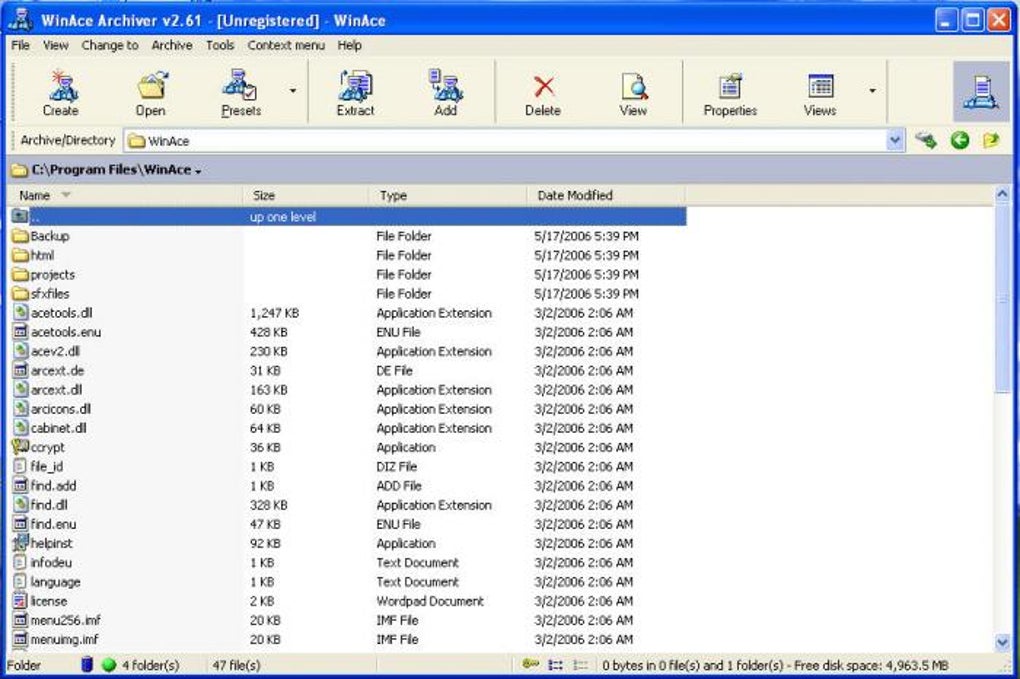
However, the user interface (UI) is often cited as a point of contention. Many users describe it as outdated and less intuitive compared to the modern, streamlined interfaces found in competitors like 7-Zip or WinRAR. The cluttered layout and older design elements might prove challenging for new users and can detract from the overall user experience. This aspect significantly impacts the software’s accessibility and overall appeal. While functionality remains strong, the dated UI can make even simple tasks seem cumbersome.
Performance and Compression Ratios
WinAce’s compression performance is generally considered adequate, though not necessarily the best in its class. The ACE format, as previously mentioned, can yield impressive compression ratios in specific situations, but its advantage is not always consistent across all file types. When compared to widely used algorithms like those employed by 7-Zip or WinRAR, WinAce’s compression efficiency might fall slightly behind in certain instances.
The real-world performance of WinAce can also be affected by factors such as the hardware being used and the size and type of the files being compressed. While it handles most archiving tasks efficiently, users may encounter noticeable differences in processing speeds when dealing with larger files or complex archives. Therefore, overall performance is context-dependent, and expecting universally superior speed compared to established competitors might be unrealistic.
Furthermore, WinAce’s performance might suffer from its older codebase. Modern archiving utilities often benefit from years of optimization and refinements, translating to improved speeds and efficiency. This can lead to WinAce lagging behind its more contemporary rivals in terms of processing time, particularly when dealing with extensive archiving tasks.
WinAce’s Strengths and Weaknesses
Strengths:
- Multi-format Support: WinAce’s ability to handle multiple archive formats (ACE, ZIP, RAR, MS-CAB, etc.) is a strong point. This feature eliminates the need for multiple archiving tools, simplifying file management.
- Proprietary ACE Format: While its limited adoption is a drawback, the ACE format can achieve high compression ratios in certain scenarios, making it useful for specific applications where file size is paramount.
- Long-standing Reliability: WinAce has been around for an extended period, suggesting a history of reliability and stability. Although this doesn’t guarantee flawless performance, it does point towards a mature and tested application.
Weaknesses:
- Outdated Interface: The user interface is a major downside, often criticized for being outdated, cluttered, and less intuitive compared to modern alternatives. This greatly hinders user experience, particularly for newcomers to the program.
- Limited Adoption of ACE Format: The limited adoption of the ACE format restricts its usefulness, as recipients might lack the necessary software to open files compressed with this format. This contrasts sharply with the widespread compatibility of ZIP and RAR.
- Potential Performance Limitations: WinAce’s speed and compression efficiency might not always match the performance of more modern, optimized archiving utilities. The age of the software might contribute to this performance gap.
- Lack of Modern Features: WinAce typically lacks advanced features seen in contemporary archiving software, such as enhanced security options, integrated file managers, or robust integration with other applications.
Comparison with Competitors
WinAce faces stiff competition from well-established and feature-rich archiving utilities. 7-Zip, WinRAR, and PeaZip, for instance, boast better compression ratios, more refined user interfaces, and a wider range of features. These competitors offer streamlined processes, intuitive navigation, and advanced options that WinAce lacks.
7-Zip is renowned for its open-source nature, excellent compression, and extensive support for numerous archive formats. WinRAR, while proprietary, offers a user-friendly interface and robust functionality, solidifying its position as a market leader. PeaZip provides a free, open-source alternative with a strong emphasis on ease of use and cross-platform compatibility. All three of these applications provide a far superior user experience compared to WinAce’s dated interface.
Conclusion: WinAce in the Modern Archiving Landscape
WinAce occupies a niche space in the world of file archiving. While its multi-format support and the potential for high compression ratios using the ACE format are attractive features, its outdated interface and the limitations of its proprietary format significantly hamper its usability and appeal.
In the face of strong competition from modern archiving utilities that offer superior performance, intuitive interfaces, and a wide array of advanced features, WinAce struggles to remain relevant. Unless users have a specific need for the ACE format or are bound by legacy systems, the advantages offered by WinAce are considerably outweighed by the drawbacks presented by its antiquated design and less-than-optimal performance. For most users, choosing a more modern alternative like 7-Zip or WinRAR would likely result in a smoother and more efficient archiving experience. Ultimately, WinAce remains a viable option only for users with specific legacy requirements or a strong preference for the ACE compression method. However, for the average user, more contemporary and feature-rich alternatives are strongly recommended.
File Information
- License: “Trial version”
- Version: “2.69”
- Latest update: “October 5, 2021”
- Platform: “Windows”
- OS: “Windows 98 SE”
- Language: “English”
- Downloads: “79.8K”
- Size: “4.04 MB”


