
Windock is a free, lightweight Windows application designed to revolutionize how you manage and organize your open windows. Tired of manually resizing and repositioning windows, struggling to maintain a clutter-free desktop, and losing precious time juggling multiple applications? Windock offers a streamlined solution, empowering you to effortlessly control your window layout and boost your productivity. This comprehensive review explores Windock’s features, functionality, and overall user experience, examining its strengths and potential areas for improvement.
Streamlining Window Management: The Core Functionality of Windock
At its heart, Windock simplifies window management through customizable actions triggered by simple mouse movements. Instead of manually dragging and resizing windows to fit your preferred arrangement, Windock lets you define specific actions based on where you move a window on your screen. For example, dragging a window to the left edge of the screen might automatically expand it to fill the entire left half of your monitor. Moving it to the top-right corner could trigger a different action, such as resizing it to a specific pre-defined dimension or snapping it to the top-right quadrant. This intuitive approach eliminates the need for repetitive manual adjustments, freeing you to focus on your tasks rather than wrestling with your window layout.
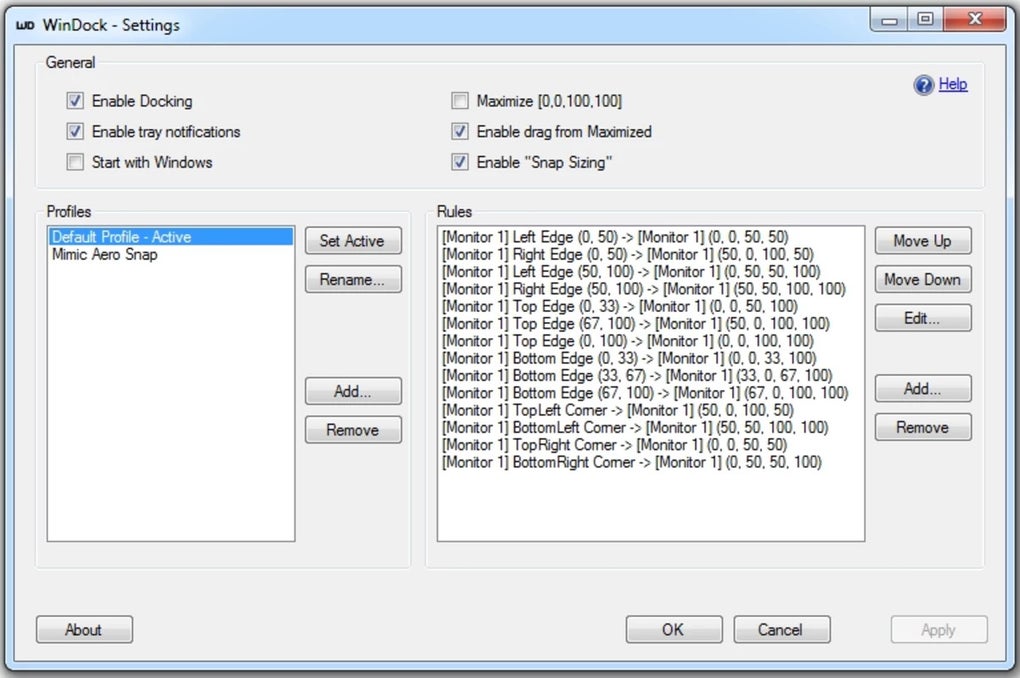
The power of Windock lies in its configurability. You’re not limited to pre-set actions; instead, you can meticulously tailor the program to match your personal workflow and preferences. This adaptability is crucial for maximizing its efficiency. Whether you prefer a tiled layout, a maximized main window with smaller secondary windows, or a completely unique arrangement, Windock empowers you to create a workspace perfectly optimized for your needs. This customizability extends beyond simple snapping and resizing. You can even create complex macros that combine multiple actions for even greater control over your window arrangement.
Customization and User Experience: Adapting Windock to Your Workflow
While the initial setup might require some experimentation to find the optimal settings for your workflow, the learning curve is relatively gentle. The program’s intuitive interface presents its settings in a clear and logical manner. Users comfortable with customizing software will quickly grasp the nuances of Windock’s configuration options. However, for those less familiar with such adjustments, the initial learning process might involve some trial and error. The lack of extensive in-app tutorials or a comprehensive help section could be seen as a minor drawback for novice users. More detailed documentation or perhaps an interactive walkthrough could significantly enhance the onboarding experience.
Once configured, the responsiveness and efficiency of Windock become immediately apparent. The actions triggered by mouse movements are fluid and seamless, minimizing interruptions to your workflow. The program works discreetly in the background, only intervening when you initiate a window manipulation through its pre-defined actions. This unobtrusive nature ensures it enhances productivity without feeling intrusive or cumbersome.
The minimalist design of the application further contributes to a positive user experience. It avoids unnecessary visual clutter, allowing you to concentrate on your tasks without being distracted by complex interfaces or excessive options. The clean design keeps the focus on the core functionality: simplifying window management.
Beyond Basic Window Management: Advanced Features and Potential

While Windock’s primary focus is on simplifying basic window organization, the potential for expansion and the addition of more advanced features is considerable. Imagine integrating features such as:
- Workspace Presets: The ability to save and recall different window layouts for different tasks (e.g., a layout for coding, a different one for writing, etc.) would significantly enhance its usability.
- Multi-Monitor Support: Extending Windock’s functionality to manage windows across multiple monitors would be a considerable benefit for users with multi-screen setups. Currently, the application’s focus seems to be primarily on single-monitor scenarios.
- Application-Specific Rules: The capability to assign specific actions or layouts to individual applications would allow for even more granular control and automation.
- Keyboard Shortcuts: Adding support for keyboard shortcuts would provide a faster and more efficient alternative to mouse movements for triggering actions.
The inclusion of any of these advanced features would catapult Windock from a solid window management utility to a truly indispensable tool for power users and multitaskers alike.
Comparison with Similar Applications: Windock’s Niche
Windock sits within a crowded market of window management tools. However, its focus on simple, customizable mouse-driven actions sets it apart from many competitors. While some applications offer extensive keyboard shortcuts and complex configuration options, Windock prioritizes an intuitive and user-friendly experience. This makes it an ideal choice for those who want to improve their workflow without investing a significant amount of time in learning a complex interface.
Compared to more feature-rich alternatives, Windock may lack some advanced functionalities. However, its simplicity and ease of use compensate for this, making it a perfect option for users who value efficiency and ease of use over a plethora of complex features. The lightweight nature of the application also contributes to its appeal, as it minimizes system resource consumption and avoids slowing down your computer.
Conclusion: A Valuable Tool for Enhanced Productivity
Windock provides a valuable and effective solution for simplifying window management on Windows. Its intuitive interface, customizable actions, and lightweight design make it a compelling alternative to more complex and resource-intensive applications. While some advanced features could further enhance its capabilities, the core functionality of Windock successfully addresses a common productivity bottleneck for many users. For those seeking an efficient and user-friendly way to organize their windows and boost their workflow, Windock is well worth considering. Its simplicity and effectiveness make it a strong contender in the crowded field of window management utilities. The potential for future updates and feature additions only serves to further increase its long-term value and appeal.
File Information
- License: “Free”
- Version: “1.1.2”
- Latest update: “June 14, 2024”
- Platform: “Windows”
- OS: “Windows 11”
- Language: “English”
- Downloads: “45”
- Size: “1.36 MB”


