
In the vast and often static landscape of operating systems, the desire for personalization remains a strong undercurrent among users. While modern operating systems offer a degree of customization, they rarely delve into the subtle yet impactful realm of dynamic window behavior and advanced visual effects. This is precisely where WindowFX, a sophisticated software developed by Stardock, steps onto the scene, offering Windows users an unparalleled suite of tools to transform their desktop experience from the mundane to the truly dynamic and visually engaging.
WindowFX is not merely another utility; it is an invitation to redefine your interaction with the Windows environment. It empowers users to move beyond default settings, introducing a layer of aesthetic flair and functional enhancement that can significantly alter the look and feel of their daily computing. From the way windows open and close to the subtle shadows they cast and the interactive elements that respond to your cursor, WindowFX provides granular control over an array of visual and behavioral aspects. This robust application caters to those who view their desktop not just as a workspace, but as a canvas for expression and efficiency, promising to make every interaction a little more fluid, a little more fun, and distinctly personal.
Unleashing Visual Customization: Beyond the Default Windows Experience
The cornerstone of WindowFX’s appeal lies in its ability to fundamentally alter how users perceive and interact with their Windows operating system. It injects dynamism and visual flair into actions that are typically static and uninspired, pushing the boundaries of what desktop personalization can achieve.
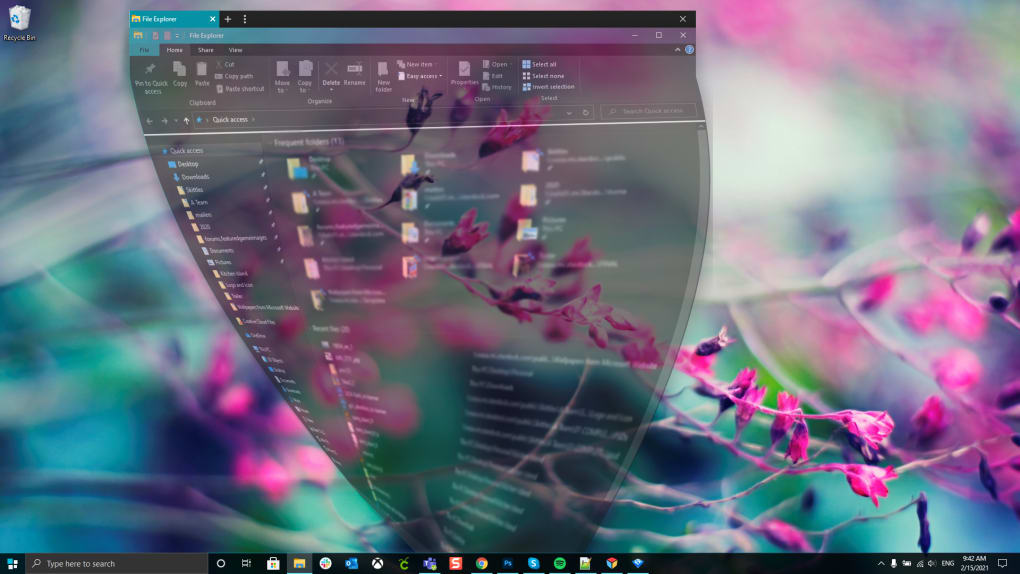
One of the most striking features of WindowFX is its extensive collection of custom animations and transitions. Forget the abrupt appearance and disappearance of windows; WindowFX introduces a library of over 30 animated effects for window actions, covering everything from opening, closing, minimizing, and maximizing. Imagine your windows gracefully morphing into view, dissolving with a subtle shimmer, or shrinking with a playful bounce. Each animation is designed to reduce visual jarring, making desktop navigation feel smoother and more integrated. Furthermore, these aren’t just generic effects; many animations come with their own set of sub-types, allowing users to fine-tune the exact visual style they prefer. The Start Menu, often the gateway to all applications, also receives a significant upgrade with over 20 distinct animations, ensuring that even the most fundamental interactions are infused with personalized elegance. This attention to detail transforms routine operations into a series of engaging visual events, fostering a more pleasant and less monotonous computing environment.
Beyond purely aesthetic animations, WindowFX offers enhanced window management and focus tools that blend form with function. The innovative “focus mode” is a prime example, allowing users to automatically darken or fade inactive windows, or even automatically minimize them. This is more than just a visual trick; it’s a powerful tool for improving concentration and reducing visual clutter, particularly beneficial for users who frequently juggle multiple applications. By drawing attention to the active window and subtly de-emphasizing others, focus mode helps maintain a clear mental workspace. For those who prefer a pristine desktop, WindowFX offers the convenience of hiding desktop icons and their associated text labels with a simple double-click. This feature is incredibly handy for presentations, screen sharing, or simply when you desire a minimalist backdrop. Additionally, the software streamlines the resizing of screen elements, providing greater flexibility and ease in managing your digital workspace. For power users seeking quick diagnostics, WindowFX introduces a novel feature: a middle-mouse click can now instantly display process information, offering a swift glance at system activity without needing to open Task Manager.
A hallmark of sophisticated graphical interfaces is realistic rendering, and WindowFX delivers this with true alpha-blended shadows and advanced transparency options. Moving beyond the basic, often blocky shadows of default Windows, WindowFX renders shadows with nuanced alpha blending, creating a more realistic sense of depth and spatial separation between windows and the desktop background. This subtle enhancement adds a layer of professionalism and visual polish that significantly elevates the overall aesthetic. Complementing this, the software provides a wide range of semi-transparency options. Users can apply varying levels of transparency to windows, the Start Bar, menus, and other interface elements. This not only contributes to a modern and sleek design language but also allows for a more integrated feel, where the desktop background can subtly show through active elements, creating a cohesive visual experience.
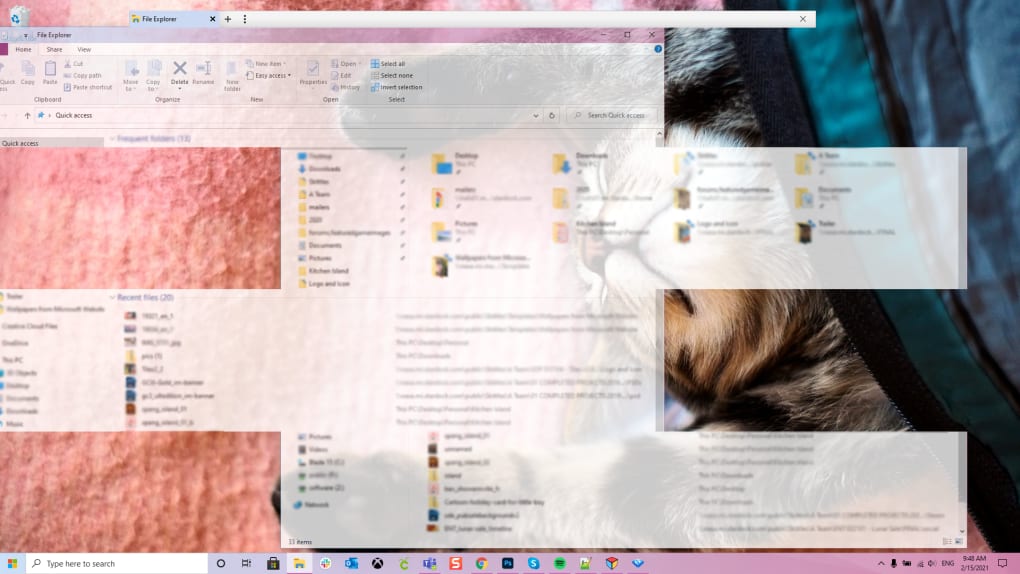
Finally, WindowFX empowers users with control over dynamic desktop elements that add unique interactive qualities. It offers a variety of special effects for desktop icons and their labels, allowing them to animate or react in various ways. A particularly innovative feature is the ability to apply virtual light sources to different coordinates on the desktop. These light sources dynamically colorize the titlebars and borders of windows, creating an almost interactive lighting effect that responds to your chosen virtual environment. This level of dynamic visual feedback is rarely seen in desktop customization tools. Furthermore, users have the flexibility to display large icons on the desktop while maintaining normal-sized icons everywhere else, catering to different preferences for visibility and workspace organization. WindowFX also extends its creative touch to menus, offering a set of special effects for when they are opened and closed, ensuring that every interactive element contributes to the overall personalized experience. It even allows for user-defined maximum window sizes, providing granular control over how applications behave when expanded, which can be particularly useful for multi-monitor setups or specific workflow requirements. The program’s design is forward-thinking, even supporting the addition of user-created transition special effects and shadows, hinting at an extensible ecosystem for personalization enthusiasts.
The Practicality and Playfulness of Enhanced Desktop Management
While WindowFX is undeniably rich in visual enhancements, its value extends beyond mere aesthetics. It ingeniously weaves practical improvements into its playful offerings, demonstrating that a personalized desktop can also be a more efficient and enjoyable one. The software offers a unique blend of tools that cater to both the desire for a beautiful interface and the need for a productive workspace.
One significant area where WindowFX bridges the gap between fun and function is in boosting productivity through visual organization. The focus tools, for instance, are not just for show. By automatically darkening or fading inactive windows, WindowFX creates a clearer visual hierarchy, guiding the user’s attention to the active task. In a world saturated with digital distractions, this subtle visual cue can be remarkably effective in reducing cognitive load and improving concentration during work sessions. Similarly, the ability to automatically minimize inactive windows helps declutter the taskbar and desktop, making it easier to navigate between essential applications. The quick option to hide desktop icons and text labels, whether for a pristine screenshot, a focused work period, or a professional presentation, demonstrates a keen understanding of varying user needs. This instant transformation from a busy desktop to a minimalist canvas is a powerful productivity enhancer. Moreover, the streamlined resizing of screen elements means less time wrestling with window borders and more time engaging with content, leading to a more fluid and less frustrating computing experience. And for the technically inclined, the middle-mouse click to view process information offers an immediate, unobtrusive way to monitor system resources or diagnose a misbehaving application without breaking flow.
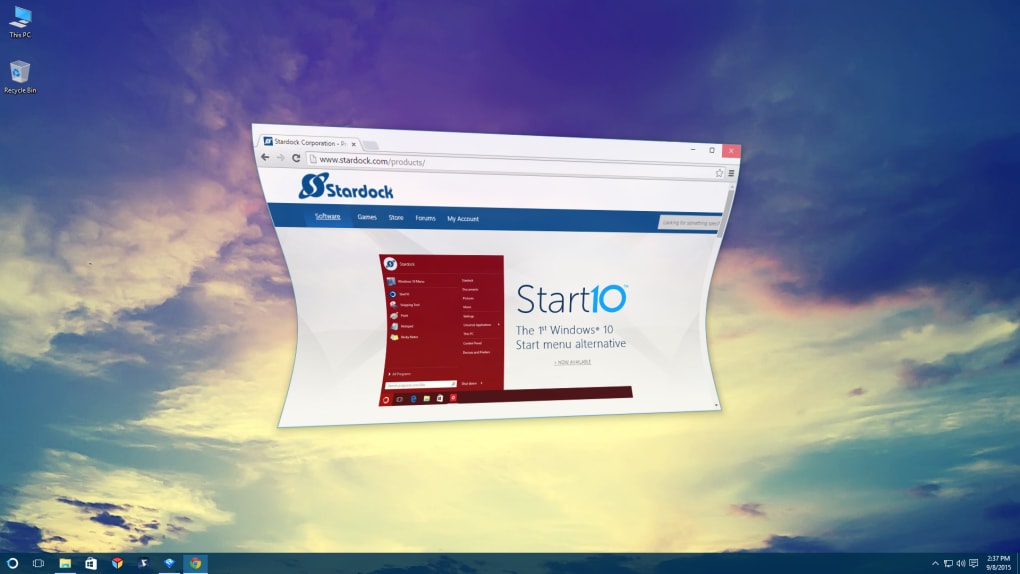
Beyond the purely utilitarian, WindowFX excels at injecting fun and personality into your workflow. It recognizes that computing doesn’t always have to be a strictly utilitarian endeavor. The psychological impact of a personalized environment is well-documented: it can foster a sense of ownership, boost mood, and even reduce digital fatigue. When mundane actions like opening a folder or minimizing an application are accompanied by smooth, engaging animations, the overall experience becomes more enjoyable. The “frivolous bit of fun” that WindowFX introduces is, for many, a significant value proposition. It transforms the cold, clinical interface of an operating system into something that feels alive, responsive, and tailored to one’s individual taste. This emotional connection can make long hours spent in front of a computer feel less arduous and more engaging. The choice of animations, shadows, and transparency levels allows users to imbue their desktop with a unique character that reflects their own personality, making the digital workspace feel truly theirs.
Furthermore, WindowFX emphasizes empowering user control and customization at a granular level. The sheer breadth of options available, from various Start Menu animations to distinct window morphing effects, ensures that users are not just applying a theme but actively crafting their desktop experience. The ability to define a user-defined size for maximized windows, for example, is a small but impactful detail for users with specific screen real estate needs or multi-monitor setups, ensuring applications snap to exactly where they’re wanted. The forward-looking design that supports the addition of more transition effects and user-created shadows speaks to an ongoing commitment to extensibility and community-driven personalization. This level of control encourages experimentation and creative expression, allowing users to continually refine and evolve their desktop environment. WindowFX thus moves beyond simple cosmetic changes, offering a comprehensive toolkit that allows users to sculpt their digital interaction to perfectly match their preferences and workflow, fostering both efficiency and delight.
Considerations for Optimal Performance and User Experience
While WindowFX offers a compelling array of customization options, a holistic understanding of the software requires addressing its technical implications and considering the full spectrum of user feedback. As with any software that introduces dynamic visual effects, there are important trade-offs and considerations to bear in mind for an optimal experience.
A primary consideration for potential users revolves around system requirements and performance impact. The robust animations, alpha-blended shadows, and dynamic visual effects that make WindowFX so appealing are not without their cost. The software explicitly states that “it does require a more modern computer” and that “the extra effects will take up a little more CPU (Central Processing Unit) power.” This is a crucial detail for users running older or less powerful machines. While modern CPUs and GPUs are well-equipped to handle such visual processing, outdated hardware might struggle, leading to noticeable lag, stuttering animations, or a general slowdown of the system. For a smooth and satisfying experience, it is essential to have sufficient RAM and a capable graphics processing unit to render these effects without compromising overall system responsiveness. The “frivolous” nature of the software, as some might perceive it, means that any performance degradation becomes a significant drawback, undermining the very enhancement it aims to provide. Therefore, users must objectively assess their computer’s specifications before diving into WindowFX, recognizing the inherent trade-off between aesthetic flair and raw computing performance.
The trial experience and user feedback also shed light on important aspects of the software’s implementation. While many users are initially captivated by WindowFX’s potential, as evidenced by the positive initial impressions, some critical feedback has emerged regarding its behavior during the trial period. Notably, a user review highlighted difficulties in quitting the application, with the inability to simply right-click the taskbar icon to exit or prevent it from starting on startup. More concerning were reports of “annoying pop-up banners” during the trial that were difficult to dismiss, and persistent processes that seemed to run even after attempts to stop them via Task Manager. Such aggressive trialware tactics and perceived difficulty in controlling or fully uninstalling the software can severely impact user trust and satisfaction. While PhanMemFree, like other software repositories, scans files for potential threats, these user experience issues speak to the developer’s approach to monetization and user retention, which can be a significant deterrent. The importance of transparent software behavior, easy cessation of processes, and straightforward uninstallation cannot be overstated for building a positive user relationship.
Revisiting the pros and cons explicitly listed in the reference content helps to summarize these considerations. On the positive side, the “focus tools may help you organize your workload more efficiently” by reducing distractions, and “animations make using your computer a little more fun,” injecting personality into the digital workspace. The convenience of “hiding your icons at the click of a button” is also a notable benefit for a clean desktop or presentations. However, the cons are equally salient: “It does require a more modern computer” and “The software may create lag in less powerful computers” are critical performance warnings. Furthermore, the observation that “It is a frivolous bit of fun that some people may not appreciate” underscores the subjective nature of its appeal; not every user prioritizes visual flair over absolute minimalism or raw processing power. Users must weigh these factors against their personal preferences, system capabilities, and workflow demands to determine if WindowFX is the right fit for them.
The Evolving Landscape of Desktop Personalization: WindowFX in Context
In a digital age where individuality is increasingly valued, the ability to personalize one’s computing environment has become more than a mere aesthetic indulgence; it’s a reflection of personal identity and a means to enhance daily digital interaction. WindowFX stands as a significant player in this evolving landscape of desktop personalization, offering a unique set of tools that go beyond the superficial.
Why personalization matters extends deeply into user psychology. Just as individuals customize their physical living and working spaces, there is a fundamental human desire to tailor digital environments to one’s taste, comfort, and efficiency. A personalized desktop can reflect personality, boost mood, or even serve practical purposes like creating a unique brand identity for professionals. It transforms a generic interface into a personal space, fostering a sense of ownership and making the hours spent in front of a screen more engaging and less sterile. For many, a visually pleasing and functionally tailored desktop can genuinely improve their overall computing experience and reduce digital fatigue.
WindowFX’s niche within this broad personalization market is distinct. Unlike simpler customization tools that focus predominantly on static elements like wallpapers, icon packs, or basic themes, WindowFX carves out its unique territory by specializing in dynamic window behavior and advanced visual effects. It’s about how your windows move, interact, and present themselves, rather than just how they look when static. Its emphasis on fluid animations for window actions, alpha-blended shadows, dynamic light sources, and sophisticated transparency options positions it at the more advanced end of desktop enhancement. While alternatives like IconPhile or IconPackager excel at icon management, and Lively Wallpaper brings dynamic backgrounds, WindowFX focuses on the interactive elements, providing a layer of animation and visual sophistication that complements other forms of personalization rather than directly competing with them on all fronts. This specialized approach allows it to offer a depth of customization in dynamic effects that few other applications can match.
Looking towards the future of desktop customization, it’s clear that operating systems themselves are continually incorporating more native personalization options. Modern Windows iterations, for example, offer increasingly sophisticated theming, dark modes, and limited animation settings. However, dedicated third-party tools like WindowFX continue to push the boundaries, offering levels of granular control and innovative effects that built-in features rarely achieve. The ongoing demand for more sophisticated and integrated customization options ensures that applications like WindowFX will remain relevant. As hardware becomes more powerful and efficient, the performance overhead of such visual enhancements will diminish, making them accessible to an even wider audience. The future of desktop personalization likely lies in a synergy between robust native options and powerful, specialized third-party tools that allow users to truly sculpt their digital worlds to their precise specifications, with WindowFX leading the charge in dynamic window interactions.
Conclusion
WindowFX stands as a testament to the enduring desire for deeper personalization and a more engaging computing experience. It transforms the often-utilitarian Windows operating system into a dynamic, visually rich, and highly interactive environment. By offering an extensive array of animations for windows and the Start Menu, sophisticated focus tools, realistic alpha-blended shadows, and dynamic visual effects for icons and elements, WindowFX empowers users to move beyond the default and craft a desktop that truly reflects their individual preferences and enhances their daily workflow.
While it introduces a “bit of fun” that some users might deem frivolous, its practical applications, such as improved focus and streamlined desktop management, offer tangible benefits. However, it is crucial for prospective users to acknowledge its system requirements; a modern computer is essential to fully appreciate WindowFX’s enhancements without experiencing performance drawbacks. Despite some reported challenges during the trial phase regarding control and transparency, the core value proposition of WindowFX remains strong for those with capable hardware.
Ultimately, WindowFX is not a mandatory utility, but an optional, powerful enhancement. It is ideally suited for heavy PC users who possess modern machines and a keen interest in infusing their digital workspace with personality, fluidity, and advanced visual flair. For these individuals, WindowFX offers an unprecedented level of control over the aesthetic and interactive elements of their Windows desktop, promising a computing experience that is both more enjoyable and distinctly their own.
File Information
- License: “Trial version”
- Latest update: “July 12, 2023”
- Platform: “Windows”
- OS: “Windows Vista”
- Language: “English”
- Downloads: “13K”
- Size: “18.50 MB”


