
Windows 10 Firewall Control is a free application developed by Sphinx Software, designed to enhance the security of your Windows operating system. It provides users with a greater level of control over their firewall settings than the built-in Windows Firewall, allowing for more granular management of incoming and outgoing network traffic. This detailed guide explores the features, functionalities, and benefits of using Windows 10 Firewall Control to bolster your system’s defenses against potential cyber threats.
Understanding the Need for Enhanced Firewall Control
Windows 10, by default, includes a built-in firewall that offers a basic level of protection against network-based threats. However, this built-in firewall may not be sufficient for all users, particularly those who handle sensitive data or frequently connect to untrusted networks. The built-in firewall often relies on broad rules, which can inadvertently block legitimate traffic or fail to adequately identify and block malicious activity. This is where a third-party firewall control application, such as Windows 10 Firewall Control, can significantly enhance your security posture.
A dedicated firewall control application like Windows 10 Firewall Control provides several key advantages:
-
Granular Control: It offers a more fine-grained level of control over your firewall rules, allowing you to precisely define which applications are permitted to access the network, and under what conditions. This level of precision minimizes the risk of inadvertently blocking essential services while maximizing the effectiveness of your firewall in preventing malicious intrusions.
-
Enhanced Monitoring: Many advanced firewall control applications offer detailed logging and monitoring capabilities, providing insights into network traffic patterns and identifying potential security breaches. This real-time monitoring allows you to proactively address vulnerabilities and react swiftly to suspicious activity.
-
Customization Options: Users can tailor the firewall’s behavior to their specific needs and preferences, setting custom rules for different applications and network contexts. This ensures that the firewall operates optimally within your specific environment.
-
Simplified Management: Despite offering advanced features, a well-designed firewall control application should provide a user-friendly interface that simplifies the management of complex firewall rules. This makes it accessible to both novice and experienced users.
-
Improved Protection: By providing a more robust and customizable firewall solution, a program like Windows 10 Firewall Control effectively mitigates the risk of malware infections, unauthorized access, and data breaches.
Key Features and Functionalities of Windows 10 Firewall Control
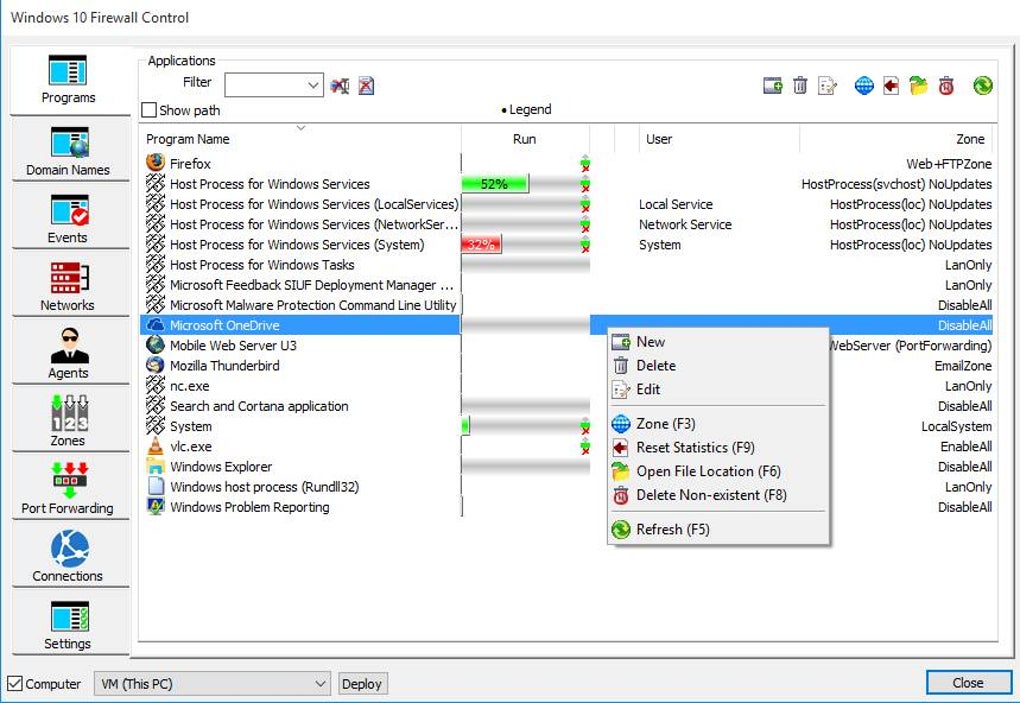
Windows 10 Firewall Control offers a range of features designed to give users complete control over their network security. These features include:
-
Rule Management: The core functionality revolves around the creation, modification, and deletion of firewall rules. Users can define rules based on application, port, protocol, and other criteria, specifying whether traffic should be allowed or blocked.
-
Program Control: Users can individually configure firewall rules for each application installed on their system. This allows for precise control over which programs have network access and prevents unauthorized applications from establishing network connections.
-
Profile Management: Windows 10 Firewall Control allows users to create different profiles for various network scenarios (e.g., home network, public Wi-Fi, work network). Each profile can have its own set of firewall rules, ensuring appropriate security measures are in place for each context.
-
Notification System: The application typically provides notifications whenever a program attempts to access the network, allowing users to approve or deny access on a case-by-case basis. This provides an additional layer of security, ensuring that only authorized applications can connect to the internet or other networks.
-
Logging and Reporting: Detailed logs of network activity are maintained, providing a valuable record for troubleshooting and security analysis. These logs can identify patterns of suspicious activity, helping users detect and respond to potential threats.
-
User-Friendly Interface: Despite the complexity of the underlying technology, Windows 10 Firewall Control strives for a user-friendly interface that simplifies the management of firewall rules and settings. This makes the application accessible to users of all technical skill levels.
Implementing and Configuring Windows 10 Firewall Control
The process of implementing and configuring Windows 10 Firewall Control is generally straightforward:
- Download and Installation: Download the application from a trusted source (such as the official website or a reputable software repository). Run the installer and follow the on-screen instructions to complete the installation process.
-
Initial Configuration: Upon launching the application, it may prompt you to configure basic settings. These settings might include selecting the default profile, defining notification preferences, and enabling or disabling logging features.
-
Creating and Managing Rules: The core of using Windows 10 Firewall Control involves creating and managing firewall rules. This often involves specifying the application, port, protocol, and other criteria for each rule. You’ll also need to decide whether to allow or block the specified traffic.
-
Profile Management (Optional): If you frequently connect to different networks with varying security requirements, consider creating and managing separate profiles. Each profile will have its own set of rules, allowing you to fine-tune the firewall’s behavior depending on the network context.
-
Monitoring and Log Review: Regularly review the firewall logs to identify potential security breaches or suspicious activity. The logs provide valuable insights into network traffic patterns, and can help in troubleshooting network connectivity issues.
Comparing Windows 10 Firewall Control to Other Firewall Solutions
While Windows 10 Firewall Control offers a compelling solution for enhanced firewall management, it’s essential to compare it to other available options. The best choice depends on individual needs and technical expertise. Consider the following when making your decision:
-
Free vs. Paid Solutions: Many free firewall applications, including Windows 10 Firewall Control, provide a good level of protection. However, paid solutions often offer more advanced features, such as real-time threat detection, automatic updates, and dedicated customer support.
-
Complexity and Ease of Use: Some firewall applications are significantly more complex than others. If you’re not technically inclined, opt for an application with a user-friendly interface and straightforward configuration options. Windows 10 Firewall Control aims for user-friendliness, but some users might find the features more complex than those of simpler free firewalls.
-
Features and Functionality: Different firewall applications offer different features. Consider the specific features that are important to you, such as real-time protection, intrusion detection, and detailed logging capabilities.
-
System Resource Consumption: Firewall applications consume system resources. If you have a low-powered system, you might need to consider the performance impact of running a more resource-intensive firewall.
Security Best Practices When Using Windows 10 Firewall Control
To maximize the effectiveness of Windows 10 Firewall Control and ensure optimal system security, follow these best practices:
-
Regular Updates: Keep the application updated with the latest patches and security fixes to address vulnerabilities and improve its performance.
-
Rule Management Best Practices: Only create firewall rules when absolutely necessary. Avoid overly restrictive rules that may inadvertently block legitimate traffic.
-
Monitor Network Activity: Regularly review the firewall logs to identify suspicious activity and address potential security risks proactively.
-
Combine with Other Security Measures: Using a firewall is only one part of a comprehensive security strategy. Complement it with robust antivirus software, anti-malware tools, regular system backups, and strong passwords.
-
Educate Yourself: Familiarize yourself with the capabilities of Windows 10 Firewall Control, understand how to effectively create and manage firewall rules, and learn to interpret the logs.
By following these guidelines and understanding the strengths and limitations of Windows 10 Firewall Control, users can significantly improve their system’s security and mitigate the risk of cyber threats. Remember that the most secure system is one that combines multiple layers of security measures and is managed by a well-informed and vigilant user.
File Information
- License: “Free”
- Version: “8.4.0.84”
- Latest update: “June 26, 2024”
- Platform: “Windows”
- OS: “Windows 11”
- Downloads: “483”
- Size: “4.22 MB”


