
Windows 10 Manager is a powerful utility application designed to enhance your Windows 10 experience by providing a comprehensive suite of tools for optimization, customization, and system maintenance. Unlike navigating the often-complex settings within Windows 10’s Control Panel, this software consolidates numerous functionalities into a user-friendly interface, making system management significantly easier. This in-depth guide explores the features and benefits of Windows 10 Manager, helping you understand how this tool can improve your computer’s performance, security, and overall usability.
Unlocking the Potential of Windows 10: Core Features and Functionality
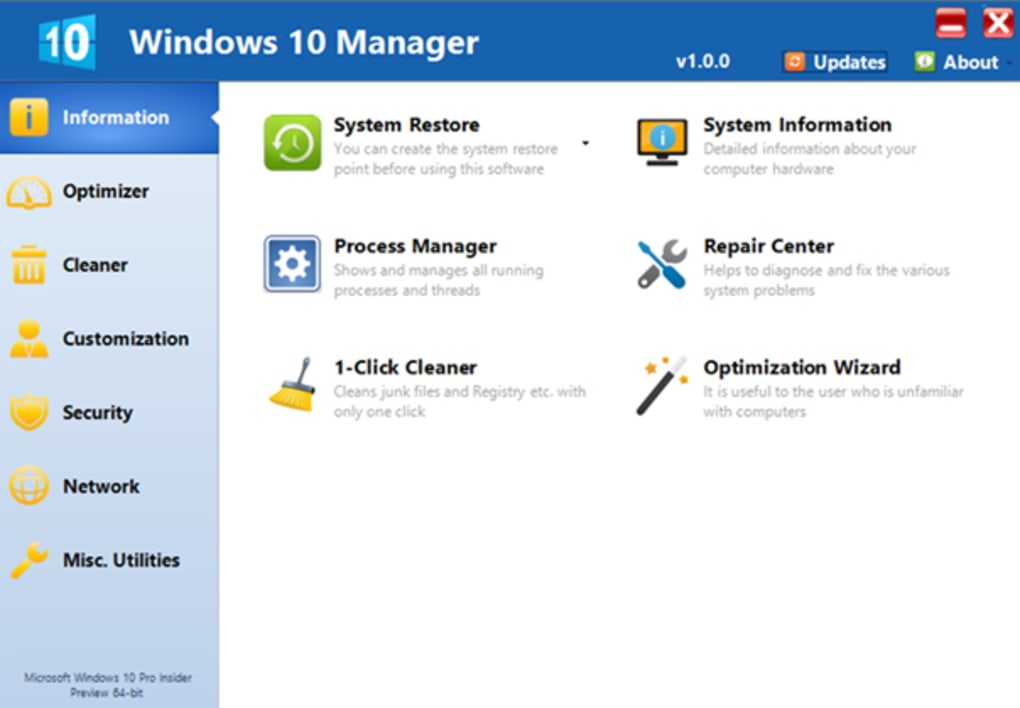
Windows 10 Manager boasts over forty distinct utilities, each designed to address specific aspects of system management. These tools can be broadly categorized into several key areas: system information, optimization, cleaning, customization, security, network management, and miscellaneous utilities. This comprehensive approach allows users to fine-tune their Windows 10 environment to perfectly match their individual needs and preferences.
System Information: This section provides a detailed overview of your system’s hardware and software configuration. You can access comprehensive information about your CPU, RAM, storage devices, network connections, and installed software. This detailed information is invaluable for troubleshooting problems, monitoring system resources, and understanding the overall health of your computer.
Optimization: The optimization tools within Windows 10 Manager focus on improving system performance and efficiency. These tools encompass features such as startup program management, service optimization, and resource monitor. By carefully managing startup programs, you can reduce boot times and free up system resources, resulting in a more responsive and faster operating system. Service optimization allows you to disable or optimize non-essential Windows services, further enhancing performance. The resource monitor provides real-time insights into CPU, memory, and disk usage, enabling proactive identification and resolution of performance bottlenecks.
Cleaning: Windows 10 Manager includes a robust set of cleaning utilities to remove unnecessary files and optimize disk space. These tools help clear temporary files, browser history, log files, and other clutter that can accumulate over time, potentially hindering performance. By regularly utilizing these cleaning tools, you can maintain a clean and efficient system, freeing up valuable storage space and improving overall system responsiveness.
Customization: This section allows for extensive personalization of the Windows 10 user interface. You can customize the appearance of the desktop, taskbar, and Start Menu, adjusting settings such as themes, icons, and fonts to create a unique and personalized workspace. This level of control allows you to tailor the visual aspects of Windows 10 to match your preferences, creating a more enjoyable and productive computing experience.
Security and Network Management: Windows 10 Manager offers valuable tools to enhance system security and manage network connections. These tools include functionalities for password management, firewall configuration, and network monitoring. By strengthening password security and carefully managing firewall rules, you can protect your system from unauthorized access and malicious software. Network monitoring tools allow you to track network activity, helping you identify potential security threats or performance bottlenecks.
Miscellaneous Utilities: This category encompasses a wide range of additional tools, including a system scheduler, file manager, registry cleaner, and more. These diverse utilities provide further flexibility and functionality, enabling more advanced system management and customization. The system scheduler allows for automated maintenance tasks, such as scheduled disk cleaning or system optimization, ensuring your system remains efficient and secure without constant manual intervention. The registry cleaner helps maintain the integrity of your system registry, removing outdated or unnecessary entries which can improve system performance and stability.
Intuitive Interface and User-Friendliness: Navigating Windows 10 Manager
Despite its extensive feature set, Windows 10 Manager maintains a relatively intuitive and user-friendly interface. The software is organized into clearly labeled tabs and categories, making it easy to locate the specific tool you need. While some users might find the interface somewhat dated compared to modern software designs, the clarity of its organization more than compensates for this aspect.
The main window displays a comprehensive list of available utilities, categorized for easy navigation. Each utility is accompanied by a brief description, making it easy for users to understand its purpose and functionality. The software’s design emphasizes simplicity and direct access to its functions, ensuring that even users unfamiliar with system optimization tools can easily navigate and utilize its features.
Beyond the Basics: Advanced Features and Customization Options
While Windows 10 Manager’s core functions cater to everyday users, its advanced features provide extensive customization options for power users seeking more fine-grained control over their systems. These advanced options allow for deeper system optimization and personalization, catering to the needs of experienced users who require more control and customization possibilities.
For example, the advanced options include granular control over system services, enabling you to fine-tune their operation and optimize system resource allocation based on your specific needs and usage patterns. Additionally, advanced tools allow for detailed customization of the Windows registry, enabling significant modification of system behavior and functionality. These advanced features, while requiring a greater understanding of the Windows operating system, provide unparalleled control and flexibility for those users who desire to deeply customize their systems. However, it’s crucial to proceed with caution when using these advanced features, as incorrect modifications can negatively impact system stability. Always back up your system before making any significant changes to the registry or system services.
Comparing Windows 10 Manager to Alternatives: A Competitive Analysis
Several alternative applications provide similar system optimization and management functionalities. These alternatives include Microsoft PC Manager, Windows 7 Manager (for Windows 7 users), and various other system utilities. However, Windows 10 Manager distinguishes itself through its comprehensive feature set, integrated approach, and user-friendly interface. While other tools might offer specific strengths in certain areas, Windows 10 Manager’s all-in-one approach simplifies the management process by consolidating numerous utilities into a single, easy-to-use application. This consolidated approach eliminates the need for managing multiple applications, streamlining the overall system maintenance process and minimizing the potential for conflicting settings or functionalities.
The choice between Windows 10 Manager and alternative applications ultimately depends on individual needs and preferences. If you prioritize a comprehensive suite of tools in a single, easy-to-use package, then Windows 10 Manager is an excellent choice. However, if you require specialized tools focusing on a particular area, such as disk defragmentation or registry cleaning, then dedicated utilities might be more suitable.
In conclusion, Windows 10 Manager offers a valuable solution for optimizing and customizing your Windows 10 operating system. Its comprehensive range of tools, user-friendly interface, and powerful advanced features make it a compelling option for users of all skill levels. While alternatives exist, the consolidated and integrated nature of Windows 10 Manager simplifies system management, making it an efficient and effective tool for enhancing your Windows 10 experience. Remember to always exercise caution when using advanced features and to back up your system regularly to prevent data loss.
File Information
- License: “Trial version”
- Latest update: “May 24, 2023”
- Platform: “Windows”
- OS: “Windows 10”
- Language: “English”
- Downloads: “15.9K”
- Size: “32.35 MB”


