
In an increasingly digitized and geographically dispersed world, the way we work has undergone a profound transformation. Businesses and individuals alike are constantly seeking solutions that offer flexibility, security, and consistent access to their essential tools and data, regardless of location or device. Microsoft’s answer to this evolving need is Windows 365, a groundbreaking cloud-based service that effectively brings the full power of a Windows PC to any device with an internet connection. More than just a remote desktop solution, Windows 365 ushers in the era of the “Cloud PC,” offering a personalized, secure, and scalable Windows experience streamed directly from the Microsoft Azure cloud.
This innovative offering isn’t merely an upgrade to existing remote access technologies; it represents a paradigm shift in how we perceive and interact with our personal computing environments. Instead of relying on a physical machine to store operating systems, applications, and files, Windows 365 virtualizes this entire infrastructure, hosting it securely in Microsoft’s robust data centers. This allows users to access their complete Windows desktop – including all their applications, data, and settings – from a laptop, tablet, smartphone, or even another desktop, providing an unparalleled level of accessibility and continuity. For businesses of all sizes, from nascent startups to multinational corporations, Windows 365 offers a strategic advantage, simplifying IT management, enhancing security postures, and empowering employees to work effectively from anywhere. This article delves into the intricacies of the Windows 365 app, exploring its core functionalities, myriad benefits, potential considerations, and its transformative impact on the modern digital workspace.

Understanding Windows 365: Your Personalized Cloud PC
At its core, Windows 365 is a virtual desktop infrastructure (VDI) solution built and managed by Microsoft, leveraging the immense power and global reach of its Azure cloud platform. Unlike traditional VDI, which often requires significant upfront investment and complex IT management, Windows 365 abstracts away much of this complexity. It’s designed to be a simpler, more streamlined approach to delivering a full Windows experience as a service. Think of it as having your own dedicated Windows computer, fully configured with your preferred applications, files, and settings, but instead of sitting physically on your desk, it resides securely in the cloud.
When a user logs into their Windows 365 Cloud PC, they are not simply accessing a remote server; they are streaming a complete, personalized Windows desktop experience. This means the user interface, performance, and application responsiveness are virtually indistinguishable from a local PC, provided a stable internet connection is maintained. The concept of a “Cloud PC” is distinct because it offers a dedicated, persistent Windows instance for each user. This isn’t a shared environment where resources are dynamically allocated and deallocated. Instead, each user is assigned a specific Cloud PC with predefined CPU, RAM, and storage specifications, ensuring consistent performance and a familiar, personalized computing experience every time they log in.
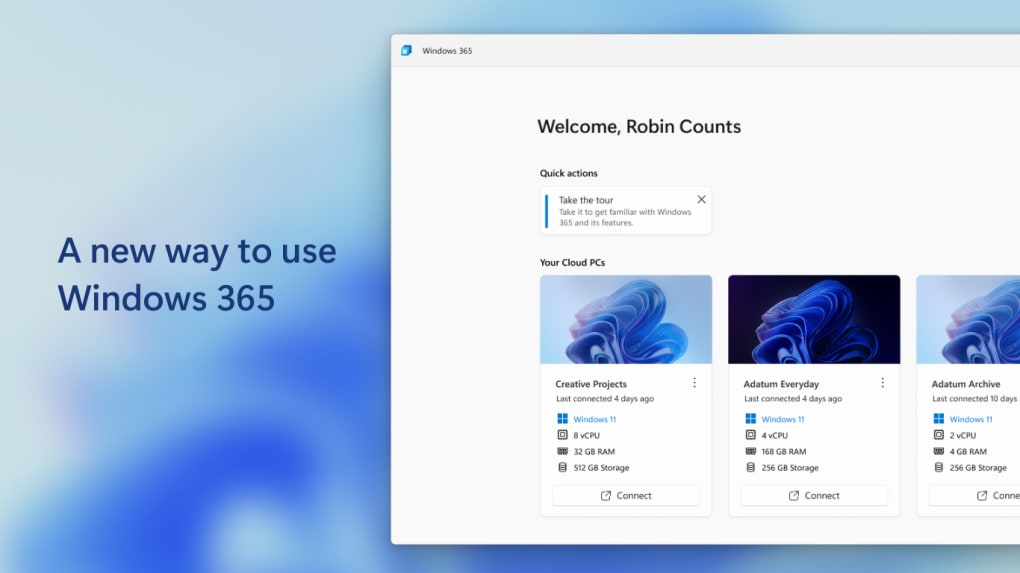
The beauty of this model lies in its device independence. Whether you’re using a low-cost tablet, a macOS laptop, a Linux machine, or a traditional Windows desktop, the experience remains consistent. The operating system, applications, and data are all processed and stored in the cloud, and only the visual output is streamed to your device. This eliminates the need for powerful local hardware, significantly extending the lifespan of older devices and reducing capital expenditure for new equipment. It also democratizes access to robust computing power, making high-performance applications available to users who might otherwise be constrained by their local machine’s specifications.
Microsoft has engineered Windows 365 to integrate seamlessly within its broader ecosystem. This means it works hand-in-hand with Microsoft 365 apps like Word, Excel, PowerPoint, and Outlook, as well as Microsoft Teams, OneDrive, and SharePoint. This deep integration simplifies user onboarding, data synchronization, and collaborative workflows, creating a cohesive and productive environment. Furthermore, it leverages Microsoft’s advanced security capabilities, ensuring that the cloud-hosted desktop environments are protected with the same rigorous standards applied to other Azure services.
Key Benefits and Features for Modern Workforces
Windows 365 offers a compelling suite of benefits and features that address many of the challenges faced by modern businesses and individuals. Its design philosophy centers around flexibility, security, and ease of management, making it an attractive solution for diverse operational needs.

One of the most significant advantages is simplified management and maintenance of Windows desktops. Traditionally, IT departments spend considerable time deploying, updating, and patching individual machines, troubleshooting hardware issues, and managing software licenses. With Windows 365, these tasks are largely centralized in the cloud. IT administrators can provision Cloud PCs for new employees in minutes, push updates and security patches across the entire fleet simultaneously, and manage applications from a single console. This drastically reduces the operational burden on IT teams, allowing them to focus on more strategic initiatives rather than day-to-day desktop management. Policies and configurations can be applied consistently across all Cloud PCs, ensuring compliance and standardization.
Increased security is another paramount benefit, especially in an era of escalating cyber threats. By centralizing data and applications in the cloud, Windows 365 inherently reduces the risk of data loss or theft from physical devices. If a local device is lost or stolen, no corporate data resides on it, as everything is stored securely in Azure. The service comes with built-in security features such as multi-factor authentication (MFA), encryption of data at rest and in transit, and continuous monitoring for potential threats. Integration with Microsoft Defender for Endpoint and other Azure security services provides a robust, layered defense mechanism. Furthermore, IT administrators have granular control over what users can do on their Cloud PCs, including restricting USB drive access or preventing data downloads to local devices, further enhancing data governance and protection.
Scalability and flexibility are critical for businesses that experience fluctuating demands or rapid growth. Windows 365 allows organizations to easily scale resources up or down as needed. Need to onboard a hundred temporary workers for a project? Provision Cloud PCs for them instantly. Project ends? De-provision them just as quickly, avoiding wasted hardware investments. This elastic scalability means businesses only pay for the resources they use, turning what would traditionally be a significant capital expenditure into a predictable operational expense. Employees can access their Cloud PC from anywhere, at any time, on any device, fostering a truly flexible work environment that supports remote work, hybrid models, and global teams. This flexibility extends to the configurations themselves, with options for different amounts of virtual processing power, memory, and storage, allowing organizations to tailor Cloud PCs to specific user roles and performance requirements, from basic productivity to demanding graphical workloads.
Moreover, Windows 365 offers full integration with Microsoft’s expansive ecosystem of tools and applications. This includes seamless connectivity with Microsoft Endpoint Manager for device management, Azure Active Directory for identity and access management, and the full suite of Microsoft 365 productivity apps. This deep integration streamlines workflows, enhances collaboration, and provides a unified management experience for IT professionals already familiar with Microsoft technologies. The ability to use existing Microsoft licenses (like Windows 10/11 Enterprise and Microsoft 365 E3/E5) often provides additional value and simplifies licensing complexities.
Seamless Integration and Robust Security
The success of any modern business solution hinges on its ability to integrate smoothly with existing IT infrastructure and provide an impenetrable security posture. Windows 365 excels in both these areas, making it a compelling choice for organizations looking to modernize their computing environment without compromising on operational continuity or data protection.
From an integration perspective, Windows 365 is designed to be a natural extension of a Microsoft-centric IT environment. It leverages core Microsoft technologies that many organizations already rely on. For instance, identity and access management for Cloud PCs is handled through Azure Active Directory (Azure AD), providing a single point of control for user authentication and authorization. This means users can log into their Cloud PC using their existing corporate credentials, and IT administrators can apply familiar Azure AD policies, such as conditional access, to govern who can access Cloud PCs and from where. This streamlines user experience and bolsters security by centralizing identity management.
Device management is seamlessly integrated with Microsoft Endpoint Manager (formerly Microsoft Intune). This allows IT departments to manage both physical devices and Cloud PCs from a unified console. Administrators can deploy applications, enforce security policies, manage updates, and monitor the health of Cloud PCs just as they would with traditional physical machines. This single pane of glass approach simplifies IT operations, reduces administrative overhead, and ensures consistent policy enforcement across the entire digital estate. Existing Group Policy Objects (GPOs) can also be extended to Cloud PCs, ensuring a smooth transition for organizations with established domain environments.
The deep integration extends to Microsoft 365 applications and services. Users experience native performance and full functionality when running Word, Excel, PowerPoint, Outlook, Teams, and other productivity tools within their Cloud PC. Collaboration features, cloud storage (OneDrive, SharePoint), and communication platforms (Teams) are all optimized to work seamlessly. This eliminates compatibility issues and ensures a highly productive user experience. Furthermore, enterprises can easily deploy line-of-business applications and specialized software to Cloud PCs, ensuring employees have access to all the tools they need, irrespective of the local device they are using.
On the security front, Windows 365 is built upon the robust foundation of Microsoft Azure, which adheres to industry-leading compliance standards and employs sophisticated security measures. Every Cloud PC benefits from:
- Multi-Factor Authentication (MFA): Essential for preventing unauthorized access, MFA adds an extra layer of security by requiring users to verify their identity using a second factor beyond just a password.
- Data Encryption: Data at rest on Azure storage and data in transit between the Cloud PC and the user’s local device are encrypted using industry-standard protocols, protecting sensitive information from eavesdropping or unauthorized access.
- Continuous Monitoring and Threat Detection: Microsoft’s global threat intelligence network constantly monitors for anomalies and potential security incidents. Integrated with Microsoft Defender for Cloud and Microsoft Defender for Endpoint, Cloud PCs are protected against malware, ransomware, and other advanced threats.
- Centralized Security Policy Enforcement: IT administrators can define and enforce comprehensive security policies across all Cloud PCs. This includes controlling access to specific websites, managing firewall rules, enforcing data loss prevention (DLP) policies, and ensuring endpoint protection is always up-to-date.
- Secure Boot and Virtualization-based Security: These underlying technologies ensure that the Cloud PC environment itself is protected from rootkits and other low-level attacks, creating a trusted execution environment.
- Isolation: Each Cloud PC is isolated from other Cloud PCs and the underlying Azure infrastructure, preventing cross-contamination and ensuring data privacy.
These comprehensive security measures provide peace of mind for organizations handling sensitive data, enabling them to meet regulatory compliance requirements and protect their intellectual property.
Navigating the Pros and Cons of Windows 365
Like any technology product, Windows 365, while offering significant advantages, also comes with certain considerations that users and organizations should evaluate before full adoption. Understanding both the benefits and potential drawbacks is crucial for making an informed decision.
Pros of Windows 365:
-
Exceptional Accessibility: This is perhaps the most compelling advantage. Users can access their full Windows desktop environment from virtually any device (PC, Mac, Linux, iOS, Android, web browser) and from any location with an internet connection. This empowers remote work, supports hybrid models, and ensures business continuity in unforeseen circumstances. The “always-on” nature means users can switch between devices, picking up exactly where they left off.
-
Enhanced Security: By centralizing data and applications in the cloud, Windows 365 inherently improves security. Data never resides on the local device, mitigating risks associated with lost or stolen hardware. Built-in features like MFA, robust encryption, and integration with Microsoft’s advanced threat protection services (e.g., Microsoft Defender) provide a strong security posture, protecting against malware, ransomware, and data breaches. IT administrators maintain granular control over access and data flows.
-
Simplified Management: For IT departments, Windows 365 drastically simplifies the deployment, patching, updating, and management of Windows desktops. Cloud PCs can be provisioned in minutes, and policies can be applied across the entire organization from a centralized console (Microsoft Endpoint Manager). This reduces the administrative burden, frees up IT resources, and ensures consistency across the user base.
-
Scalability and Flexibility: Businesses can easily scale computing resources up or down to meet changing demands. This elastic scalability is ideal for seasonal businesses, project-based work, or rapid expansion, transforming capital expenditures into operational costs. The ability to choose different Cloud PC configurations allows organizations to match resources precisely to user needs, optimizing costs and performance.
-
Seamless Integration with Microsoft Ecosystem: Windows 365 is deeply integrated with Azure Active Directory, Microsoft 365 apps, Microsoft Endpoint Manager, and other Microsoft cloud services. This provides a cohesive user experience, streamlined IT management, and leverages existing Microsoft investments, making it a natural fit for organizations already using Microsoft technologies.
-
Cost Efficiency (Long-term): While a subscription fee applies, the long-term cost benefits can be substantial. These include reduced hardware costs (as less powerful local devices are needed), lower IT operational expenses due to simplified management, and potentially fewer security incidents. The shift from CapEx to OpEx can also be advantageous for budgeting.
Cons of Windows 365:
-
Dependence on Internet Connection: This is the primary drawback. For optimal performance, Windows 365 requires a stable, fast, and reliable internet connection. Users in areas with poor connectivity, or those who frequently work offline, may experience lag, disconnections, or an inability to access their Cloud PC, significantly impacting productivity. While some local caching might occur, the core experience is always online.
-
Subscription-Based Cost: Windows 365 operates on a per-user, per-month subscription model. While this offers predictability, the recurring costs can add up, especially for large organizations. Careful analysis of total cost of ownership (TCO) compared to traditional desktop environments or other VDI solutions is necessary to ensure it’s a cost-effective choice for a specific use case. The various tiers mean selecting the right configuration is important to avoid overpaying for unused resources or under-speccing for performance needs.
-
Potential for Latency: Even with a good internet connection, some users might perceive a slight latency compared to a purely local desktop, particularly for highly interactive tasks, graphic-intensive applications, or gaming (though Windows 365 is not primarily designed for gaming). The physical distance to the Azure data center can also play a role.
-
Limited Offline Capability: As mentioned, the service is primarily online. While local devices can run other applications, the Cloud PC itself is inaccessible without an internet connection, which could be a limiting factor for users in certain roles or environments.
-
Resource Constraints of Tiers: While scalable, users are still bound by the CPU, RAM, and storage allocated in their chosen Cloud PC configuration. For users with highly specialized and demanding computational needs that exceed the highest available tiers, a local workstation might still be necessary. Upgrading tiers can also increase subscription costs.
-
Requires Microsoft Licensing: To fully leverage Windows 365, organizations typically need existing eligible Windows 10/11 Enterprise and Microsoft 365 subscriptions, which adds to the overall licensing complexity and cost structure.
In summary, Windows 365 is a powerful and convenient solution for accessing Windows desktop environments from any device, anywhere. Its benefits in accessibility, security, and management are significant for modern organizations. However, users should carefully consider their specific needs, internet infrastructure, budget, and reliance on offline capabilities before deciding to adopt it. For many, the pros will far outweigh the cons, especially as internet connectivity continues to improve globally.
Implementing and Managing Your Cloud PCs
The implementation and ongoing management of Windows 365 Cloud PCs are designed to be straightforward, leveraging familiar Microsoft tools and services. This ease of deployment and administration is one of the key differentiators that sets Windows 365 apart from traditional, more complex VDI solutions.
Initial Setup and Provisioning: The journey begins in the Microsoft 365 admin center or through Microsoft Endpoint Manager (MEM). IT administrators can easily acquire Windows 365 licenses and assign them to users. Once licenses are assigned, the provisioning process for a Cloud PC is largely automated. Administrators select the desired Cloud PC configuration (e.g., 2vCPU/8GB RAM/128GB storage), choose a Windows image (either a Microsoft-provided optimized image or a custom image with pre-installed applications), and assign it to a user group. The Cloud PC is then provisioned in the Azure cloud, typically within minutes or up to an hour, ready for the user to log in. This rapid provisioning is invaluable for quickly onboarding new employees or scaling up for projects.
Image Management: Organizations have flexibility in managing the operating system images for their Cloud PCs. For simpler deployments, Microsoft provides optimized Windows 10/11 images that are regularly updated. For more tailored environments, IT can create custom images. These custom images can include pre-installed applications, specific configurations, and security baselines, ensuring that every Cloud PC is consistent and compliant from the moment it’s provisioned. Custom images can be uploaded to Azure and then used for provisioning, greatly simplifying application deployment.
User Access: Users can access their Cloud PC through multiple avenues:
- Dedicated Windows 365 App: Microsoft offers a dedicated Windows 365 application for Windows, macOS, Android, and iOS devices. This app provides the most optimized and feature-rich experience.
- Web Browser: Users can also access their Cloud PC directly through a web browser (e.g., Edge, Chrome, Firefox) by navigating to windows365.microsoft.com. This offers universal access without needing to install any client software, making it ideal for temporary access or devices where client installation is not preferred.
- Microsoft Remote Desktop Client: The existing Microsoft Remote Desktop client can also be used, providing another familiar access method for many users.
Regardless of the access method, the user experience is designed to be consistent, allowing employees to seamlessly switch between devices throughout their workday.
Ongoing Management and Security: Management of Cloud PCs is primarily handled through Microsoft Endpoint Manager (MEM). This unified platform allows IT administrators to:
- Deploy Applications: Push applications to Cloud PCs, manage software updates, and ensure all necessary tools are available.
- Enforce Policies: Apply security policies, compliance settings, and configuration profiles to Cloud PCs, just as they would for physical devices. This ensures a consistent security posture and adherence to corporate governance.
- Monitor Performance: Track the health and performance of Cloud PCs, identify potential issues, and troubleshoot problems proactively.
- Manage Updates: Schedule and deploy Windows updates and security patches across the entire Cloud PC fleet, minimizing disruption and ensuring systems are always secure and up-to-date.
- Troubleshooting and Support: IT can remotely access and troubleshoot Cloud PCs, helping users resolve issues quickly without physical intervention.
- Lifecycle Management: Easily re-provision, reset, or retire Cloud PCs when employees leave the organization or projects conclude, ensuring data sanitization and resource optimization.
Network Connectivity: While the Cloud PC itself resides in Azure, it can be seamlessly integrated with an organization’s existing on-premises network resources. Through Azure Virtual Network (VNet) and hybrid connectivity options like VPN gateways or Azure ExpressRoute, Cloud PCs can securely access internal applications, file shares, and databases as if they were physically present on the corporate network. This hybrid connectivity is crucial for businesses that rely on legacy applications or have significant on-premises infrastructure.
Monitoring and Analytics: Windows 365 also provides tools for monitoring usage and performance. Administrators can gain insights into how Cloud PCs are being utilized, identify resource bottlenecks, and make data-driven decisions about scaling or optimizing configurations. This proactive approach ensures that users always have the resources they need, and IT can manage costs effectively.
The simplified, cloud-native approach to implementation and management makes Windows 365 an appealing solution for organizations looking to embrace the future of work. By leveraging Microsoft’s existing management tools and services, IT departments can deploy and maintain a secure, high-performing Cloud PC environment with significantly less effort than traditional VDI or physical desktop deployments.
Conclusion
Windows 365 represents a significant evolution in personal computing and enterprise IT, transforming the traditional desktop into a dynamic, cloud-native service. By offering a personalized Cloud PC experience that is accessible from any device, anywhere, Microsoft has delivered a powerful solution that caters to the demands of modern workforces and the complexities of today’s digital landscape.
The core promise of Windows 365 lies in its ability to deliver unparalleled accessibility, freeing users from the constraints of their physical hardware and enabling seamless productivity across various devices. This flexibility is complemented by robust security, with data centralized in the cloud and protected by Microsoft’s advanced security measures, giving organizations peace of mind in an era of increasing cyber threats. For IT administrators, the platform offers simplified management, streamlining deployment, updates, and maintenance, and significantly reducing operational overhead. Furthermore, its scalable nature allows businesses to adapt quickly to changing needs, provisioning or de-provisioning resources on demand, and its deep integration with the Microsoft ecosystem ensures a familiar and cohesive experience for millions of users.
While the dependence on a stable internet connection and the subscription-based model require careful consideration, these aspects are often outweighed by the strategic advantages Windows 365 offers in terms of business agility, security posture, and IT efficiency. For companies seeking to empower remote and hybrid work models, enhance data protection, and simplify desktop management, Windows 365 stands out as a compelling, forward-thinking choice.
The Windows 365 app, whether accessed via a dedicated client or a web browser, truly embodies the vision of the Cloud PC – a secure, personalized, and ever-present Windows environment, ready to support productivity whenever and wherever it’s needed. As technology continues to advance, solutions like Windows 365 will undoubtedly play an increasingly pivotal role in shaping the future of work and how we interact with our digital worlds. For those looking to explore this innovative solution further, more information and download options can be found on resources like PhanMemFree.org, which offers insights into productivity tools and other essential software.
File Information
- License: “Subscription”
- Version: “varies-with-devices”
- Latest update: “March 28, 2023”
- Platform: “Windows”
- OS: “Windows 10”
- Language: “English”
- Downloads: “6.3K”


