
The Windows Media Player Plugin, once a staple for integrating music playback directly into the Firefox browser, offers a glimpse into the evolution of browser plugins and the challenges they faced in adapting to modern web standards. While no longer actively supported and largely obsolete due to advancements in web technologies, understanding its functionality and limitations provides valuable context for the development of web applications and the changing landscape of browser extensions.
This article delves into the specifics of the Windows Media Player Plugin for Firefox, its functionality, installation process, pros and cons, and suitable alternatives in the current digital ecosystem.
Functionality and Purpose
The primary function of the Windows Media Player Plugin for Firefox was to seamlessly integrate the functionality of Windows Media Player into the Firefox browser. This allowed users to control their music playback directly from within the browser window, eliminating the need to constantly switch between applications using alt-tabbing. Imagine listening to a playlist while browsing the web – the plugin aimed to make this a smooth and integrated experience. Essentially, it acted as a mini-remote control for Windows Media Player, embedded directly within Firefox.

This plugin was particularly useful during the era when streaming services weren’t as dominant as they are today. For users heavily reliant on locally stored music files managed through Windows Media Player, the plugin provided a convenient way to enjoy their music collections alongside their web browsing activities. This was a significant advantage compared to the need to keep a separate music player application open and actively managed.
The plugin was designed to be a lightweight and unobtrusive addition to the browser. Its minimal size was a clear advantage, reflecting a time when concerns about browser extension bloat were less prevalent. The functionality was straightforward and aimed at fulfilling a specific need: enabling music control without interrupting the browsing flow.
Installation and Usage
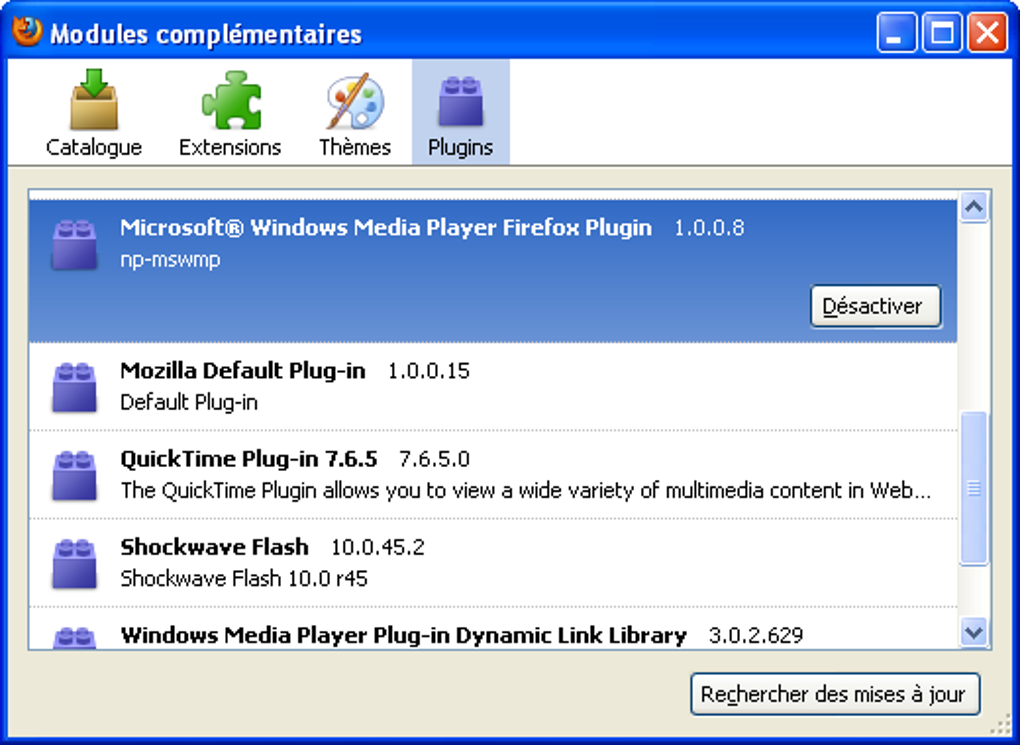
Installing the Windows Media Player Plugin involved a relatively straightforward process, although detailed guides were often needed to navigate the intricacies of Firefox plugin management. This highlights the evolution of browser extension management: modern browsers usually handle extensions through more user-friendly interfaces.
The installation typically involved downloading the plugin file and then adding it to Firefox through the browser’s plugin management settings. This process varied slightly depending on the version of Firefox being used. Unlike the more streamlined installation processes of today’s browser extensions, the plugin’s installation required a more technical understanding of browser configuration.
Once installed, the plugin would ideally integrate seamlessly with Windows Media Player, allowing users to control playback functions without leaving the browser. However, the success of this integration depended on the proper configuration of both the plugin and Windows Media Player.
Limitations and Obstacles
The Windows Media Player Plugin, despite its innovative concept for its time, faced several significant limitations:
-
64-bit Firefox Incompatibility: Perhaps its most crucial limitation was the lack of support for 64-bit versions of Firefox. This significantly restricted its usability, as 64-bit browsers became increasingly prevalent. This incompatibility stemmed from the underlying architecture of the plugin, which was not designed to function within the 64-bit environment of the newer Firefox versions.
-
Discontinued Plugin Support: Mozilla, the company behind Firefox, gradually phased out support for NPAPI (Netscape Plugin API) plugins, the technology on which the Windows Media Player Plugin relied. This decision, made to improve security and performance, ultimately rendered the plugin obsolete. This marked a significant shift in the browser landscape, with a move away from traditional plugins in favor of more secure and standardized web technologies.
-
Limited Cross-Browser Compatibility: The plugin was specifically designed for Firefox and did not offer compatibility with other web browsers. This limited its reach and utility for users preferring alternative browsers such as Chrome, Safari, or Opera.
-
Dependence on Windows Media Player: The functionality of the plugin was entirely contingent on having Windows Media Player installed and properly configured on the user’s system. This created a dependency that wasn’t always reliable, and problems with Windows Media Player could directly impact the functionality of the plugin.
These limitations underscore the ephemeral nature of plugin-based solutions in the continuously evolving world of web technologies. The shift towards standardized web technologies and improved security measures rendered plugins like the Windows Media Player Plugin largely obsolete.
Alternatives and Modern Solutions
The obsolescence of the Windows Media Player Plugin necessitates exploring modern alternatives for integrating music playback into a web browsing experience. Several compelling alternatives exist:
-
Web-Based Music Players: Modern streaming services like Spotify, Apple Music, YouTube Music, and others offer seamless integration with web browsers. These services offer rich functionality, extensive music libraries, and are readily accessible through any web browser.
-
HTML5 Audio Players: Modern web browsers support HTML5 audio elements, allowing developers to embed audio players directly into websites. These players are generally simpler than dedicated music player applications but offer a basic level of control over playback.
-
Browser Extensions: While not exactly replacing the functionality of the Windows Media Player plugin, modern browser extensions can offer similar benefits. Extensions allowing for media player control or enhancing media playback features can provide a more tailored listening experience. However, choosing reputable extensions from trusted sources is vital to maintain browser security.
-
Dedicated Music Player Applications: For users who prefer a dedicated music player, numerous applications like VLC Media Player, iTunes (macOS), and others offer robust features and excellent compatibility across various operating systems. These applications can still be used alongside web browsing without the need for browser plugins.
These alternatives demonstrate the significant evolution in music listening and web technology. The reliance on browser plugins has drastically diminished, replaced by more streamlined and integrated solutions.
User Reviews and Feedback
User reviews highlight the plugin’s strengths and weaknesses. Positive reviews often praise its simplicity and convenience, particularly for users who preferred the interface of Windows Media Player. These users appreciate the direct integration within the browser, allowing them to manage their music without alt-tabbing.
However, negative reviews frequently cite the incompatibility issues with newer Firefox versions, lack of support for 64-bit systems, and the overall obsolescence of the plugin as its primary drawbacks. These reviews reflect the frustrations users experienced when the plugin became unusable due to browser updates and changing plugin support policies.
The overall user sentiment underscores the importance of considering the lifespan and compatibility of any software solution, particularly in the dynamic realm of web technologies.
Conclusion
The Windows Media Player Plugin represents a snapshot of a bygone era in browser technology. While it provided a functional solution for integrating music playback into Firefox for a period, its limitations – stemming primarily from the shift away from NPAPI plugins and the prevalence of 64-bit systems – ultimately led to its obsolescence.
The plugin’s legacy serves as a valuable reminder of the rapid pace of technological advancement and the need for software to adapt to evolving standards. Modern alternatives provide far superior integration, broader compatibility, and enhanced security, highlighting the significance of adopting current web technologies and best practices. The Windows Media Player Plugin may be a relic of the past, but its story illuminates the crucial role of continuous development and adaptation in the ever-changing world of software and web applications.
File Information
- License: “Free”
- Version: “1.0.0.8”
- Latest update: “May 10, 2022”
- Platform: “Windows”
- OS: “Windows Vista”
- Language: “English”
- Downloads: “329.6K”
- Size: “318.90 KB”


