
Finding your Windows product key can be a frustrating experience, especially when you need to reinstall your operating system or troubleshoot activation issues. This guide delves into the Windows Product Key Viewer, a free utility designed to simplify this process. We’ll explore its functionality, advantages, disadvantages, and alternatives, providing a complete overview for users seeking a solution for retrieving their Windows product keys.
Understanding Windows Product Keys and Their Importance
A Windows product key is a unique 25-character alphanumeric code that verifies the legitimacy of your Windows installation. This code acts as a digital signature, confirming that your copy of the operating system hasn’t been used on more devices than permitted by the Microsoft Software License Terms. While Windows 10 and later versions often utilize digital licenses for automatic activation, eliminating the need for manual key entry during initial setup, older operating systems and reinstallations still require this key. Losing your product key can lead to significant difficulties in reactivating your system, making the retrieval process crucial.
The product key is not readily visible within the Windows operating system itself. Traditionally, it’s found on the installation media (such as a CD or DVD) or on the proof of purchase documentation. However, these sources can be easily misplaced or damaged, leading to the need for alternative methods of retrieval. This is where utilities like the Windows Product Key Viewer become essential tools.
Introducing Windows Product Key Viewer: A Simple Solution
Windows Product Key Viewer, developed by RJL Software, is a lightweight, portable application designed for a single purpose: retrieving your Windows product key. It offers a straightforward approach to accessing this critical information without requiring complex technical knowledge or installation procedures. Its simplicity is a key advantage, making it accessible to a wide range of users, regardless of their technical expertise.
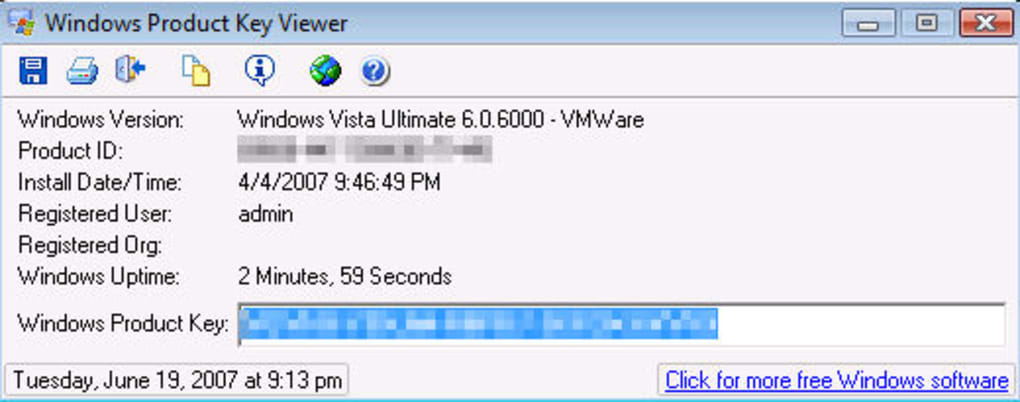
The program’s functionality extends beyond simply displaying the product key. It also provides valuable supplemental system information, including:
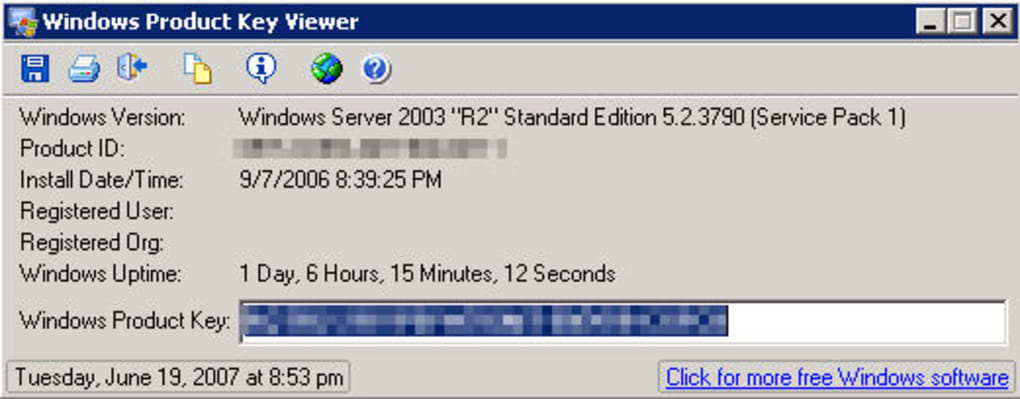
- Full Windows version: This detail specifies the precise edition of Windows installed (e.g., Windows 10 Home, Windows 11 Pro).
- Service packs: This information lists any installed service packs, which are cumulative updates that enhance the operating system’s functionality and security.
- Product ID: A unique identifier associated with your specific Windows installation.
- Installation date and time: The precise date and time when Windows was initially installed on the system.
- Registered user: The name associated with the Windows license, if available.
- VMware and organization: Details about the virtualization environment (if applicable) and the organization to which the license may be registered.
- Current Windows uptime: The duration since the current Windows session commenced.
This comprehensive system information can be invaluable for troubleshooting, support requests, and general system management.
How Windows Product Key Viewer Works and Its Ease of Use
The Windows Product Key Viewer’s strength lies in its simplicity. It’s a portable application, meaning it doesn’t require installation. Users can simply download the executable file and run it directly. This eliminates the need for cumbersome installation processes and reduces the risk of conflicts with other software on the system.
Upon execution, the program immediately scans the system and retrieves the necessary information. The product key is clearly displayed alongside the other system details. Users can then easily copy the product key to a text file for safekeeping or print a hard copy for physical record-keeping. This simple, direct approach makes the process accessible even for users with minimal technical expertise.
The utility’s compatibility extends to a broad range of Windows operating systems, including Windows 95, 98, ME, NT, 2000, 2003, XP, Vista, 7, 8, 2008, and 10. This broad compatibility makes it a versatile tool applicable across various Windows versions.
Advantages and Disadvantages of Windows Product Key Viewer
Advantages:
- Simplicity: Its user-friendly interface and straightforward functionality make it accessible to all users.
- Portability: No installation is required, making it quick and easy to use.
- Comprehensive Information: It provides not only the product key but also crucial system details.
- Wide Compatibility: Supports a wide range of Windows operating systems.
- Freeware: The software is freely available without any licensing costs.
Disadvantages:
- Limited Functionality: The program’s focus on solely retrieving the product key and system information restricts its overall functionality. It’s not a versatile utility with multiple applications.
- One-Time Use: Many users find the tool beneficial primarily for its ability to store product key details for safekeeping. Its subsequent use becomes less frequent, reducing its long-term value.
- No Additional Features: Unlike more comprehensive system utilities, this tool doesn’t offer advanced features like system cleaning, optimization, or performance monitoring.
Alternatives to Windows Product Key Viewer
Several alternative applications offer similar functionality or extend beyond basic product key retrieval. Here are a few notable examples:
- ProduKey: A widely used tool known for its ability to retrieve product keys for various Microsoft applications, not just Windows.
- IOGenie Windows Key Finder: Another popular option that focuses on efficiently identifying the Windows activation key.
- Other System Information Tools: Many comprehensive system information tools often include product key retrieval as one of their features. However, these tools may be more complex than the Windows Product Key Viewer.
Choosing the best alternative depends on individual needs. If the primary requirement is solely product key retrieval, then simpler tools like Windows Product Key Viewer are sufficient. If more extensive system information or additional functionality is desired, then a more comprehensive system utility might be more suitable.
Conclusion
The Windows Product Key Viewer is a valuable tool for users who need to easily access their Windows product key and essential system information. Its simplicity, portability, and compatibility with various Windows versions make it an accessible option for a wide range of users. While its limited functionality might not suit all users, its ease of use and single-purpose design effectively address its core function. Ultimately, the choice of which product key retrieval tool to use depends on individual needs and preferences, with the Windows Product Key Viewer offering a straightforward and efficient solution for those primarily seeking their Windows product key. Weighing the advantages and disadvantages alongside available alternatives will help users make an informed decision that aligns with their specific requirements.
File Information
- License: “Free”
- Version: “1.07”
- Latest update: “January 24, 2023”
- Platform: “Windows”
- OS: “Windows 8”
- Language: “English”
- Downloads: “21.5K”


