
In the vast ecosystem of computing, Windows remains the dominant operating system for countless users worldwide, from casual browsers to professional developers. Its ubiquity, however, comes with a caveat: maintaining peak performance often requires a dedicated approach. Over time, systems can accumulate bloat, suffer from fragmented data, or simply become less responsive due to various software and hardware interactions. This is where a comprehensive suite of Windows tools becomes indispensable, offering users the power to diagnose, clean, and optimize their machines. Among these, the “windows-tools” application stands out as a dedicated, free utility designed to streamline this complex process.
Unveiling “windows-tools”: A Comprehensive Performance Enhancer
The “windows-tools” application is a free and robust set of utilities meticulously crafted to enhance the performance of both Windows desktop and server systems. In an era where computational demands are ever-increasing, ensuring your operating system runs smoothly is not just a luxury but a necessity for efficiency and productivity. This toolset aggregates a variety of powerful programs, all designed to be executed automatically from a single command, simplifying what would otherwise be a series of manual, time-consuming tasks. Users frequently report significant, noticeable improvements in their system’s responsiveness and speed after implementing the processes orchestrated by “windows-tools.”
While many of its features can be found as standalone applications—for instance, the memory optimization capabilities are akin to dedicated Windows Memory Cleaners—the true strength of “windows-tools” lies in its ability to consolidate these performance-enhancing functions under one unified application. This integration provides a holistic approach to system optimization, ensuring that multiple facets of performance are addressed without the user having to juggle numerous programs. Beyond specialized cleaning and tweaking, the tool also applies various performance adjustments by simply altering existing settings within the operating system, a task that, if done manually, would require considerable technical knowledge and patience.
Simple Performance Tweaks, Powerful Results
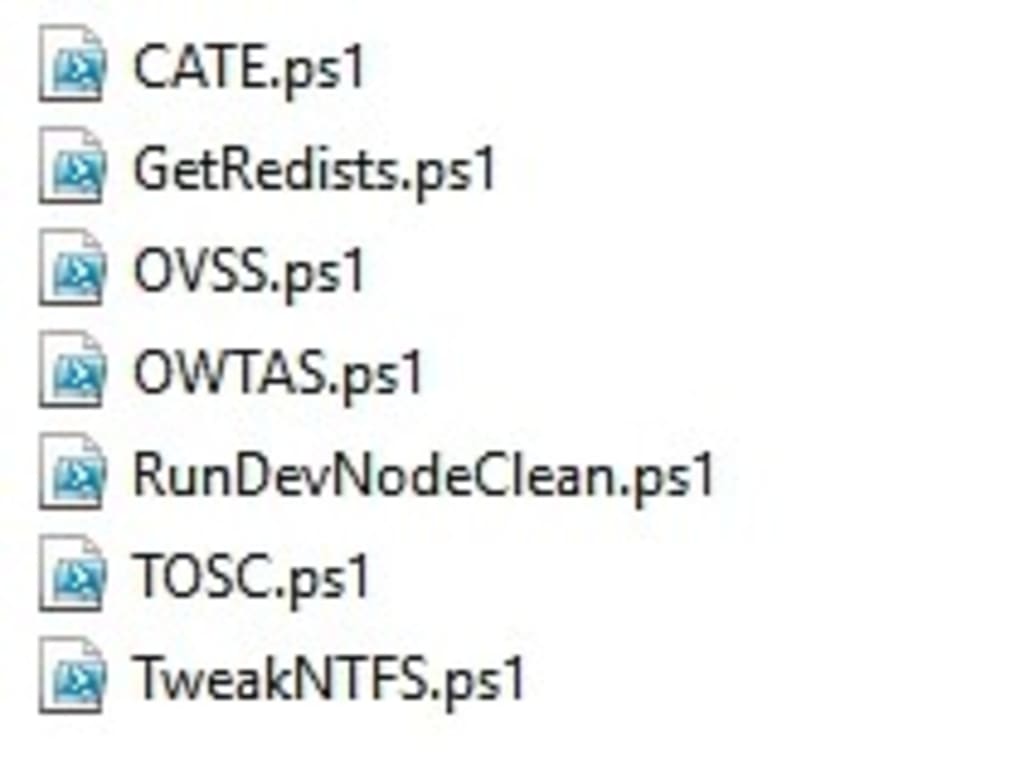
The allure of the “windows-tools” app stems from its capacity to execute a myriad of performance tweaks without the need for manual downloading of additional utilities or intricate adjustment of system settings. While technically possible for advanced users to replicate the actions of “windows-tools” manually, the convenience and efficiency offered by its automated approach are unparalleled. The core of this automation resides in the “optimize.cmd” command. When executed, this command intelligently downloads, verifies, and runs all the necessary programs and scripts required to deliver the promised performance enhancements. This streamlined process democratizes system optimization, making it accessible to a broader user base, albeit with some technical prerequisites.
A Multi-Faceted Approach to System Health
The “windows-tools” software adopts a comprehensive strategy, attacking system performance issues from multiple critical angles. This includes, but is not limited to, sophisticated memory management techniques, the efficient removal of ‘ghost devices’ (residual entries from hardware no longer connected, which can sometimes consume resources), and fine-tuning the NTFS file system for improved speed and reliability. Some of its methods involve straightforward adjustments to system settings, while others, such as ensuring that redistributable components are correctly updated, necessitate the downloading and installation of additional files. Another vital approach employed by the tool involves a thorough cleaning of various system and temporary user folders, effectively eliminating digital clutter that can bog down a system over time. This multi-pronged attack ensures a thorough optimization that goes beyond superficial fixes.
Navigating the Command Line: A Tool for the Discerning User
While the promises of “windows-tools” are largely met with positive user feedback regarding its effectiveness, it is important to note that this is not a toolset for absolute beginners. Operating “windows-tools” requires a degree of familiarity with Windows’ command-line environment, which can be a significant barrier for less experienced users. The ability to type and execute commands accurately is a prerequisite. Furthermore, not all tools within the comprehensive set can run automatically. For instance, the utility designed to disable share caching may require manual intervention. Nevertheless, the vast majority of its functions are designed for automated execution, greatly reducing the effort involved for those comfortable with the command line.
Key Strengths and Considerations
Pros:
- Supports PowerShell 3.0 and later: Ensures compatibility with modern Windows environments and leverages powerful scripting capabilities.
- Automated Performance Improvements: Features a dedicated command (
optimize.cmd) to automatically download and execute a range of performance-enhancing programs and tweaks. - Multi-Method Approach: Employs diverse strategies, including memory management, ghost device removal, NTFS optimization, and temporary file cleaning, for comprehensive improvement.
- Free to Use: Offers powerful optimization capabilities without any cost, making it accessible to all users.
Cons:
- Command-Line Usage Required: Less experienced users may find the command-line interface daunting, as it is essential for getting the toolset up and running.
- Partial Automation: While most tools run automatically, some specialized functions may still require manual input, detracting slightly from a fully hands-off experience.
App Specifications:
- License: Free
- Version: Varies with devices
- Latest Update: January 31, 2023
- Platform: Windows OS (specifically Windows 8.1 and later)
- Language: English
- Size: 5.43 MB
- Developer: Jonathan E. Brickman
With its unique blend of automation and comprehensive optimization strategies, “windows-tools” represents a valuable asset for anyone seeking to revitalize their Windows system. However, it is just one piece of a much larger puzzle when it comes to maintaining a robust and efficient computing environment. The broader category of Windows tools encompasses a vast array of applications designed for various purposes, from core system utilities to specialized software for productivity, security, and beyond.
Utilities & Tools: The Foundation of System Maintenance
The category of “Utilities & Tools” serves as the bedrock for effective Windows system management. These are the applications designed to keep your operating system running smoothly, efficiently, and often, without you even noticing they are there until something goes wrong. While “windows-tools” focuses on performance optimization, the broader utility landscape covers a much wider range of functions crucial for daily operation and disaster prevention.
For instance, Data Recovery tools are indispensable. Accidents happen: files get accidentally deleted, drives get corrupted, or systems crash. Robust data recovery software can often retrieve lost files, preventing potential setbacks. Coupled with this, File Compression utilities are essential for managing storage space and facilitating faster data transfer. Whether you’re archiving old documents or sending large attachments, tools like WinRAR or 7-Zip ensure efficiency.
File Managers, though often taken for granted with Windows Explorer, can offer advanced features like dual-pane views, FTP integration, and enhanced search capabilities, allowing for more efficient file organization and manipulation. Similarly, Screen Capture tools go beyond the basic Windows Snipping Tool, offering advanced editing, annotation, and recording features invaluable for presentations, tutorials, or troubleshooting.
Other essential utilities include Clocks & Alarms, which, while seemingly simple, can be crucial for time management, reminders, and scheduling tasks within the OS. For home and office environments, Printer & Fax utilities ensure seamless interaction with peripherals, often providing advanced diagnostic and management features not found in default drivers. Even niche tools like Bar Code Scanning applications and Measurement tools (for screen elements or physical calculations) highlight the diverse functionalities available, demonstrating how specialized utilities cater to specific needs, all contributing to a richer and more manageable Windows experience. These utilities are not just about fixing problems; they are about enhancing control and efficiency in every aspect of using a Windows PC.
Boosting Productivity with Optimized Windows
An optimized Windows system is inherently a more productive one. Lagging software, slow boot times, or frequent crashes directly impede workflow and creativity. Beyond the core system optimizations offered by tools like “windows-tools,” a multitude of applications fall under the “Productivity” umbrella, each designed to streamline specific aspects of work and personal management. These tools are critical for transforming a fast-running system into a highly efficient personal or professional workstation.
At the heart of office work are Office Suites, with Microsoft Office and its alternatives like LibreOffice being prime examples. These suites, comprising word processors, spreadsheets, and presentation software, are fundamental. Efficient Document Management systems then complement these, helping users organize, retrieve, and collaborate on documents seamlessly, reducing the time spent searching for files and improving version control.
For financial oversight, Accounting software, Banking & ATM applications, and Personal Finance Management tools provide granular control over budgets, transactions, and investments. Coupled with versatile Calculators & Converters, these empower users to manage their monetary affairs with precision. In today’s interconnected world, efficient E-Mail Clients are indispensable, often offering advanced features like task integration, calendaring, and robust search capabilities far beyond webmail interfaces.
For team collaboration and large-scale endeavors, Project Management software helps track progress, assign tasks, and manage resources, ensuring projects stay on schedule. Finally, Remote PC tools are vital for both support and flexible work arrangements, allowing users to access and control their computers from anywhere, at any time. By leveraging these diverse productivity tools on a well-maintained Windows system, users can significantly enhance their output and reduce friction in their daily tasks. PhanMemFree.org offers a broad selection of such productivity enhancers, helping users find the right fit for their specific needs.
Safeguarding Your System: Essential Security & Privacy Tools
A fast, optimized system is only truly effective if it is also secure. Neglecting security and privacy can lead to catastrophic data loss, identity theft, or a severely compromised system that negates any performance gains. Therefore, the integration of robust “Security & Privacy” tools is not merely an option but a critical component of comprehensive Windows management. These tools work tirelessly in the background, protecting your data, your identity, and your system’s integrity.
At the forefront are Antivirus programs, which are non-negotiable for detecting, preventing, and removing malware. Paired with strong Firewalls, they create a robust barrier against unauthorized access and malicious network activity. For those concerned about online anonymity and secure browsing, VPN (Virtual Private Network) services encrypt internet traffic and mask IP addresses, providing a vital layer of privacy, especially on public Wi-Fi networks.
Password Management applications have become essential in an age of countless online accounts. They securely store complex, unique passwords for each service, eliminating the need for users to remember dozens of different credentials and greatly reducing the risk of security breaches from reused or weak passwords. To combat intrusive online advertisements and tracking, Ad Blockers not only improve browsing speed but also enhance privacy by preventing third-party trackers from monitoring online activity.
Further enhancing data protection, Encryption tools safeguard sensitive files and folders, rendering them unreadable to unauthorized individuals. Anti-Spam & Anti-Spy software works to filter out unwanted emails and detect spyware that might be covertly collecting personal information. Finally, Access Control tools allow administrators to manage user permissions and restrict access to certain system features or files, which is particularly important in shared computing environments or for parental control. By actively deploying and maintaining these security and privacy tools, users ensure that their optimized Windows system remains a safe and reliable platform for all their activities. Resources like PhanMemFree.org provide access to a wide range of these critical security solutions.
Beyond the Basics: Specialized Tools for Advanced Users and Specific Needs
While general utilities, productivity software, and security applications form the core of a well-equipped Windows system, the ecosystem extends far beyond these fundamentals. For advanced users, developers, creative professionals, and those with highly specific needs, a plethora of specialized tools exist that unlock new capabilities and enhance niche workflows. These categories often intersect and expand upon the foundational tools, pushing the boundaries of what a Windows machine can achieve.
Internet & Network Management
The digital age makes robust internet and network management tools indispensable. Download Managers accelerate and organize downloads, often resuming broken transfers and scheduling large files. For sharing data across networks, File Sharing & Peer-To-Peer applications, while sometimes controversial, enable efficient transfer of large datasets among connected users. Search & Lookup Tools extend beyond basic web search, providing specialized access to databases, directories, and information resources. Lastly, Wifi utilities offer advanced control over wireless connections, including signal strength analysis, channel optimization, and network security auditing, ensuring stable and fast internet access.
Development & IT Tools
For IT professionals and software developers, Windows offers a rich environment of specialized tools. Backup & Cloud Storage solutions are crucial for data integrity and disaster recovery, ensuring business continuity. Database management tools, Development Kits, and powerful IDEs/Source Editors provide the infrastructure for creating and maintaining software. FTP Clients facilitate file transfers to and from web servers, while specialized Networking and Remote Control tools enable system administrators to manage and troubleshoot machines across vast distances. Servers software and Web Development platforms further empower the creation and deployment of web-based applications and services, making Windows a powerhouse for development.
AI-Powered Assistance
The burgeoning field of Artificial Intelligence is rapidly introducing a new generation of tools that redefine productivity and creativity. AI Audio tools can generate voices, transcribe speech, or enhance sound quality. AI Chat assistants provide instant support, answer complex queries, and automate communication. AI Coding tools assist developers by generating code snippets, debugging, and optimizing algorithms. In education, AI Education tools offer personalized learning experiences and intelligent tutoring. For creatives, AI Image Generator & Editor and AI Video Generator & Editor tools are revolutionizing digital content creation, allowing users to produce stunning visuals and dynamic videos with unprecedented ease. Finally, AI Writing Assistant tools aid in drafting, proofreading, and refining text, boosting efficiency for writers and marketers alike. These AI-driven applications are transforming how users interact with and leverage their Windows systems.
Multimedia Enhancement
For creative professionals and enthusiasts, Windows provides a robust platform for multimedia creation and consumption. Audio editing software allows for mixing, mastering, and producing high-quality sound. Burning software is still relevant for creating physical media like CDs and DVDs. Graphic & Design suites, ranging from casual image editors to professional-grade CAD software, empower visual artists. Movies & TV players and Music & Radio applications offer comprehensive media consumption experiences. Photography tools cater to every aspect of image processing, from RAW editing to photo management. Lastly, Streaming Videos platforms and advanced Video editing software enable the creation and distribution of dynamic visual content.
Conclusion
The Windows operating system, while powerful on its own, truly shines when augmented by a carefully selected array of tools. From the performance-focused enhancements offered by applications like “windows-tools” to the essential utilities that manage daily operations, the productivity suites that empower work, and the critical security solutions that safeguard digital life, each category plays a vital role. Beyond these foundations, specialized tools for development, AI, internet management, and multimedia further extend the capabilities of a Windows PC, catering to virtually every user and every need.
Platforms like PhanMemFree.org serve as invaluable resources, aggregating a vast collection of software across these diverse categories. By understanding the breadth of tools available and strategically implementing them, Windows users can ensure their systems are not only optimized for peak performance but also secure, productive, and capable of handling the demands of modern computing. The journey of Windows optimization is continuous, but with the right tools in hand, it’s a manageable and rewarding endeavor, transforming your PC into a truly personalized and efficient powerhouse.
File Information
- License: “Free”
- Version: “varies-with-devices”
- Latest update: “January 31, 2023”
- Platform: “Windows”
- OS: “Windows 8.1”
- Language: “English”
- Downloads: “407”
- Size: “5.43 MB”


