
The Windows Updates Downloader (WUD) is a free utility designed for advanced users who prefer meticulous control over their Windows update process. Unlike the automatic update system built into Windows, WUD empowers users to manually select and install updates, offering a level of granularity often absent from the standard Windows experience. This approach allows for a more deliberate and informed approach to system updates, potentially mitigating risks associated with unforeseen conflicts or issues arising from automatic updates.
Understanding the Need for Selective Updates
The default Windows update mechanism, while convenient for many, can sometimes lead to unexpected problems. Automatic updates, while intended to enhance security and performance, may introduce bugs, conflicts with existing software, or even system instability. For example, a poorly tested update might render certain applications malfunctioning or cause unexpected behavior. The history of Windows updates includes instances where automatic updates have temporarily disabled crucial software components, highlighting the potential for disruption.
Windows Updates Downloader addresses these concerns by allowing users to actively review the available updates before installation. This proactive approach allows for better risk assessment and helps users avoid potential issues stemming from hastily deployed updates. By providing a list of available updates, WUD allows users to selectively choose only those updates deemed necessary or safe for their system configuration. This level of control becomes particularly valuable for users with specialized hardware, custom software configurations, or those who prioritize stability over immediate access to the newest features.
How Windows Updates Downloader Works: A Detailed Look
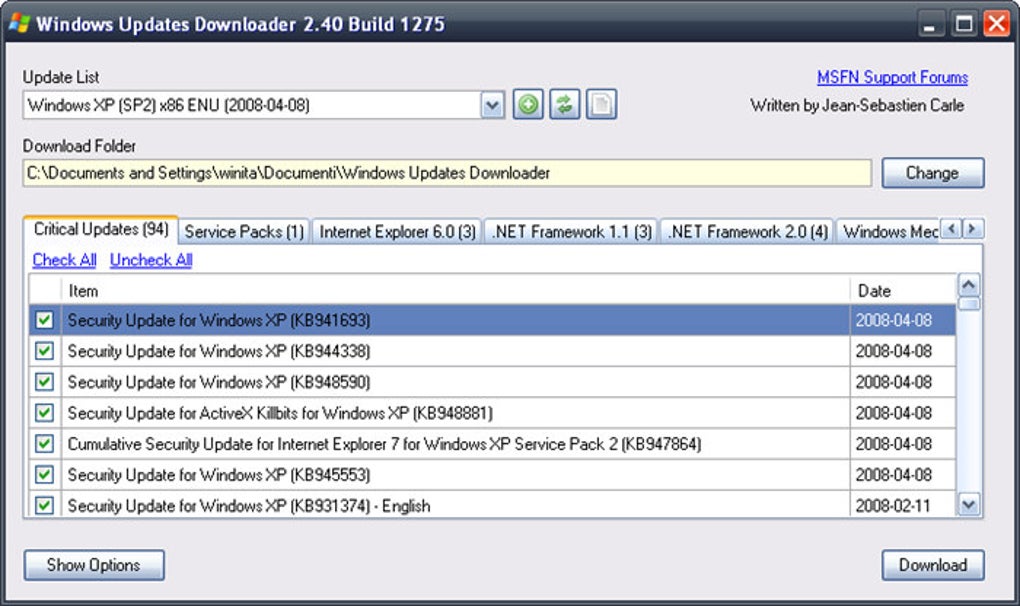
WUD operates by providing a comprehensive list of available Windows updates. This list allows users to examine the details of each update, including its purpose, size, and associated security or feature enhancements. Instead of blindly accepting every update offered by Windows Update, WUD empowers users to make informed decisions based on their specific needs and system configuration.
This selective process can be incredibly beneficial in avoiding conflicts with existing software. For instance, a specific update might be incompatible with an older driver or application, leading to instability or malfunctions. By carefully reviewing the update list and identifying potential conflicts, WUD users can proactively prevent such issues. This proactive approach contrasts with the automatic update system, where compatibility issues might only surface after the update is installed and the system has been disrupted.
The application’s functionality is not limited to merely displaying a list of updates. It also provides the means to download the selected updates. This download process is controlled by the user, allowing for better bandwidth management and scheduling of updates. Instead of consuming bandwidth automatically at inconvenient times, the user has control over when the downloads are initiated. This feature is especially valuable for users with limited internet access or those who prefer to download updates during periods of lower network activity.
Beyond Downloading: The Importance of External Tools
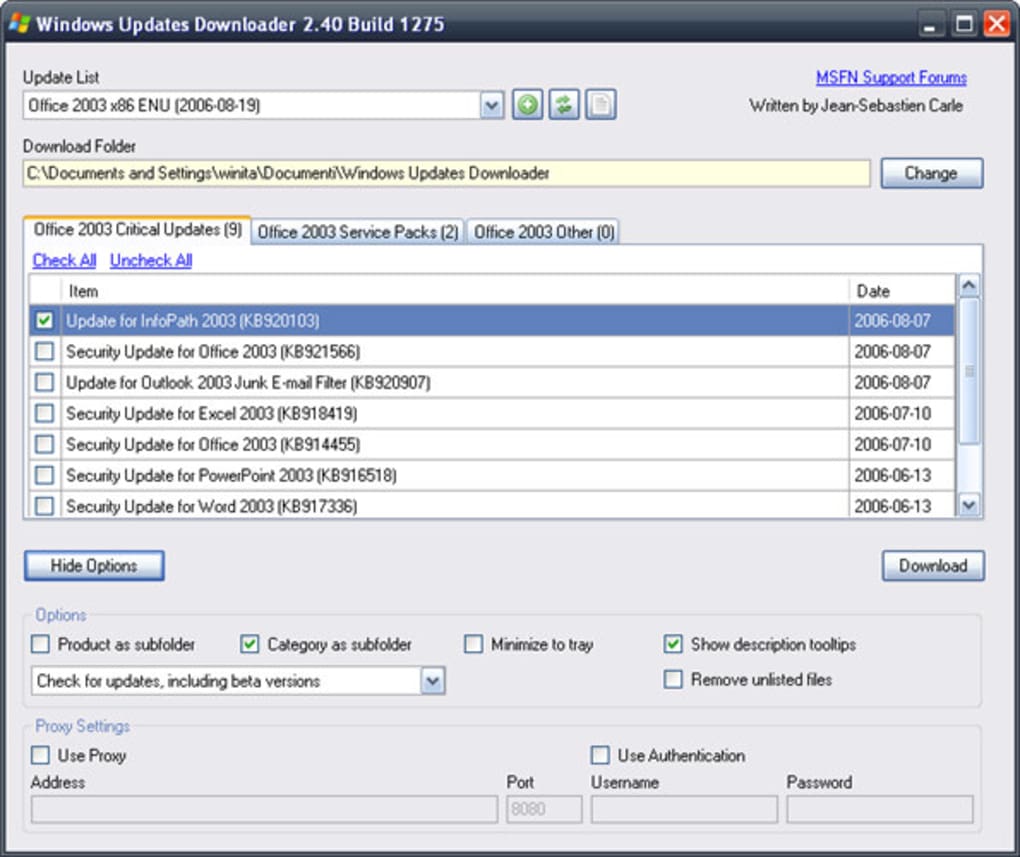
WUD’s primary role is to download the selected updates. However, WUD does not, on its own, install the updates. This separation of downloading and installing is a deliberate design choice that reinforces the principle of user control and meticulous management. Installing updates often requires additional tools, highlighting the need for advanced technical proficiency to effectively use this program.
The necessity of external tools for installation underscores the fact that WUD is not a convenience tool for casual users. Instead, it caters to those with extensive technical knowledge and a deep understanding of the Windows operating system and update processes. For instance, a common tool used in conjunction with WUD is nLite, a utility that allows for customized installation of Windows updates. Nlite enables users to integrate updates directly into their Windows installation, minimizing system disruption and enhancing stability.
The use of external tools such as nLite also allows for more fine-grained control over the update process, allowing experienced users to create custom installation packages that tailor the Windows update to their specific needs. This feature can be particularly important for users who want to integrate updates without needing to reboot their system or those who want to incorporate updates into system images for cloning or deployment.
Advantages and Disadvantages: Weighing the Pros and Cons
Pros:
- Granular Control: WUD provides unparalleled control over the update process, allowing users to select only the updates they require.
- Risk Mitigation: By carefully selecting updates, users can significantly reduce the risk of introducing bugs, conflicts, or system instability.
- Informed Decision-Making: The detailed update list allows users to make informed decisions about which updates to install.
- Bandwidth Management: Downloading updates on-demand grants more control over internet usage and minimizes interruptions.
- Customizable Installation: When coupled with tools like nLite, WUD enables advanced customization of the update process.
Cons:
- Technical Expertise Required: WUD is not user-friendly for those lacking a strong understanding of Windows update management. It demands a high level of technical expertise.
- Additional Tools Needed: Installing the downloaded updates requires additional tools, increasing the complexity of the process.
- Limited Support: WUD’s development appears to have stagnated, meaning that official support is likely unavailable. This can pose a challenge if unexpected issues arise during the update process.
- Not Suitable for Casual Users: WUD’s complexity and requirement for additional tools make it unsuitable for casual or less technically proficient users. The default Windows Update mechanism remains a better option for such users.
- Potential for Errors: Incorrectly managing updates with WUD can potentially lead to system instability or data loss, emphasizing the importance of user knowledge and caution.
Alternatives and Comparisons
Several alternative tools offer various approaches to Windows update management. Some provide a more streamlined user interface, while others focus on automation or specific update tasks. Comparing these tools requires considering their individual strengths and weaknesses, including ease of use, features, and system requirements.
While WUD offers highly granular control, some alternative tools might prioritize automation and ease of use. This trade-off between control and convenience is central to the choice between WUD and other update management tools.
Conclusion: Is Windows Updates Downloader Right for You?
Windows Updates Downloader offers a powerful and flexible approach to managing Windows updates, especially for users who require granular control and prefer a proactive approach to system maintenance. However, its complexity and dependence on external tools make it unsuitable for casual users. WUD’s strength lies in its ability to empower technically proficient individuals to manage their updates with precision and minimize the risk of unforeseen issues. The decision of whether to use WUD depends heavily on the user’s technical expertise, risk tolerance, and overall comfort level with managing system-level updates. For those comfortable working with command-line interfaces and external tools, and who prioritize complete control over their update process, WUD can be a valuable tool. For all others, the default Windows Update mechanism offers a more convenient, albeit less granular, solution.
File Information
- License: “Free”
- Version: “2.50.1002”
- Latest update: “January 31, 2023”
- Platform: “Windows”
- OS: “Windows Vista”
- Language: “English”
- Downloads: “147K”
- Size: “256.05 KB”


