
Windows XP, despite its age, holds a nostalgic place in the hearts of many computer users. Its distinctive visual style, particularly its iconic interface elements, remains instantly recognizable. For those seeking to recapture that classic Windows XP aesthetic, or simply curious about a piece of computing history, Windows XP Icons offers a straightforward way to bring those familiar visuals to your modern desktop. This software provides a collection of the original Windows XP icons, allowing users to replace their current icons with the classic look and feel. While not a full-fledged operating system emulator, it offers a simple yet effective method for personalization and a trip down memory lane.
Installation and Usage
The installation process for Windows XP Icons is remarkably straightforward. The small file size ensures a quick download and minimal impact on system resources. The software is designed for ease of use, even for individuals with limited technical expertise. Once downloaded, the installation process typically involves a few simple clicks, with minimal configuration required. The software’s intuitive design makes it accessible to users of all skill levels. After installation, users can quickly browse and select the desired icons to replace their existing ones. The application’s simplicity eliminates the need for extensive manuals or tutorials.
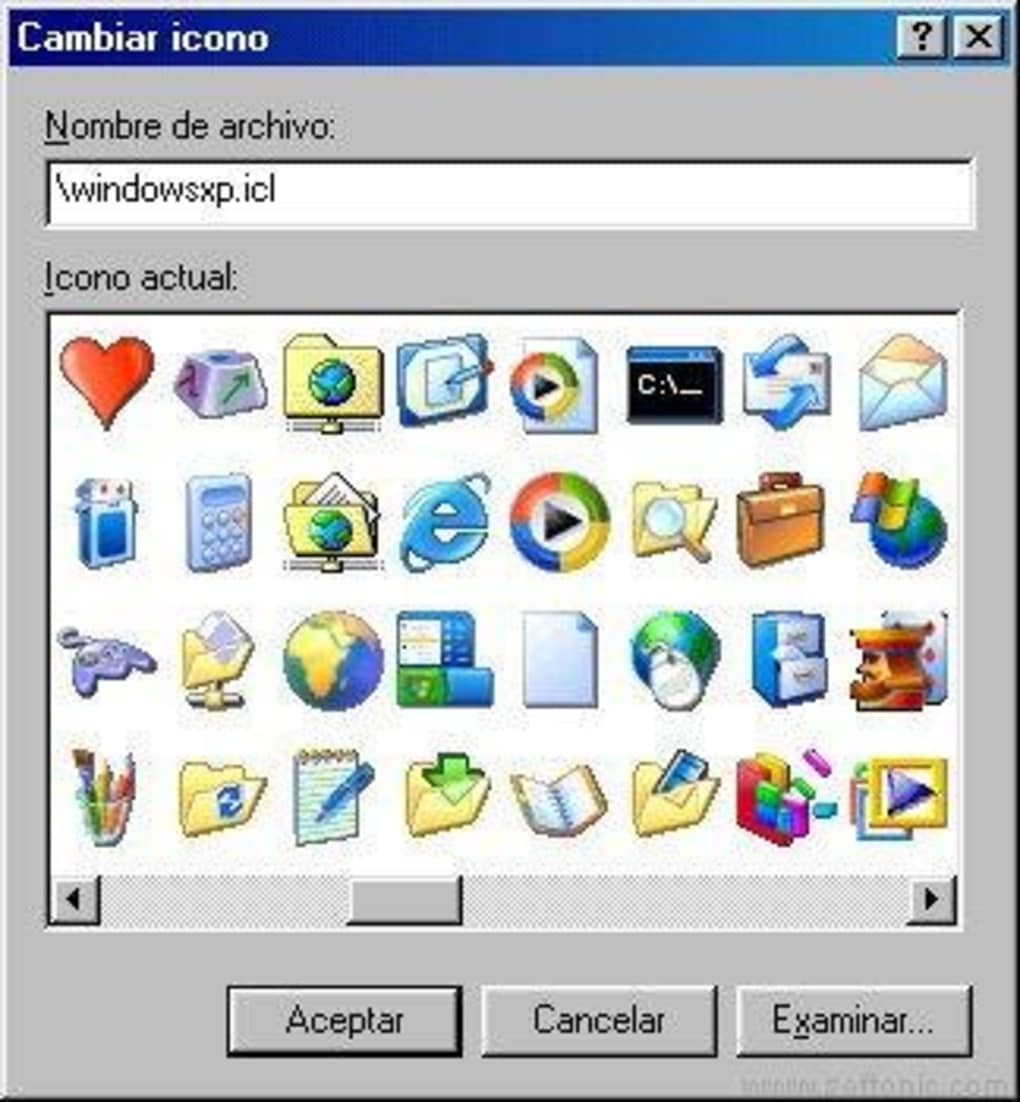
The application’s core function revolves around replacing existing system icons with the provided Windows XP equivalents. The user interface is clean and uncluttered, allowing for easy navigation and selection. No complex menus or settings obscure the primary function of the application. The program focuses solely on delivering the classic Windows XP icon set to the user’s system.
Icon Variety and Quality
While not offering an extensive range beyond the core Windows XP icon set, the application provides a comprehensive collection of the essential system icons. These encompass common elements such as folders, documents, drives, and various program shortcuts. The quality of the icons themselves is consistent with the original Windows XP release, offering a crisp and clear representation of the classic design. The icons have been faithfully reproduced, maintaining the characteristic visual style of the original operating system. Users can expect a high-fidelity recreation of the nostalgic visuals.
The software focuses on accuracy rather than expanding on the original icon set. This ensures that users get a faithful recreation of the Windows XP experience. This selective approach keeps the software lightweight and prevents unnecessary bloat, which is beneficial for users with limited storage space or slower machines.
System Compatibility and Performance
Windows XP Icons demonstrates excellent compatibility with a range of older Windows operating systems, including Windows 95 and subsequent versions. This broad compatibility extends its usability to a significant segment of computer users who might still be using older systems. Its minimal system requirements are another key advantage, ensuring smooth operation even on machines with less processing power and limited RAM. The software is designed to be lightweight, ensuring it doesn’t significantly impact system performance. This design philosophy prioritizes responsiveness and smooth integration, even on older hardware.
This lightweight nature also contributes to the program’s fast startup and minimal resource consumption. Users can expect the application to load quickly and operate efficiently without hindering other applications or processes. This focus on efficiency distinguishes it from more resource-intensive desktop customization applications. The low impact on system resources is a crucial aspect of its user-friendly design.
Alternatives and Comparisons
Numerous alternative desktop customization applications exist, offering a wider range of customization options, including icon packs beyond the Windows XP set. Some may provide more advanced features such as theming engines, wallpaper integration, or specialized icon sets for specific programs. However, the simplicity and focused nature of Windows XP Icons is its strength. It provides a clear and straightforward way to achieve a specific visual goal: replicating the iconic Windows XP aesthetic. While other programs offer broader capabilities, Windows XP Icons excels in its simplicity and efficiency in delivering a nostalgic experience.
The lack of extensive customization options is not a drawback for users specifically seeking the original Windows XP icons. In fact, this simplicity contributes to the program’s ease of use and prevents feature overload. This deliberate limitation ensures users aren’t overwhelmed by unnecessary options, streamlining the process of achieving their desired look.
User Feedback and Reviews
User reviews reflect a mixture of positive and negative experiences. Some users express satisfaction with the program’s ability to faithfully recreate the Windows XP icon set, highlighting the nostalgia factor and ease of use. Others have reported compatibility issues or encountered problems with the icons not appearing correctly. These reports often stem from differing system configurations or potential conflicts with other desktop customization software. These negative experiences, while valid, should be viewed in the context of the program’s age and the potential for compatibility challenges with modern operating systems.
Nonetheless, the preponderance of positive feedback points to the program’s ability to successfully deliver its core function for many users. This demonstrates the value of its straightforward approach to desktop customization, catering directly to users seeking that specific nostalgic visual experience. It’s important for potential users to be aware of the potential compatibility issues, but the positive experiences outweigh the negative, particularly for users with compatible systems.
Conclusion: A Nostalgic Trip for Windows Users
Windows XP Icons serves as a simple yet effective tool for those seeking to evoke the classic Windows XP visual style on their current computers. The program’s straightforward interface, lightweight design, and focused functionality make it a user-friendly solution for achieving a nostalgic aesthetic. Its compatibility with older Windows versions is a valuable feature, broadening its appeal to a wider range of users. While it may lack the advanced features of other desktop customization software, its strengths lie in its simplicity and efficient delivery of the core Windows XP icon set. The program provides a delightful trip down memory lane for those who appreciate the distinctive visual identity of Windows XP. For users seeking a quick and easy way to personalize their desktop with the iconic Windows XP icons, this application delivers on its promise.
File Information
- License: “Free”
- Version: “0.7.6”
- Latest update: “June 27, 2025”
- Platform: “Windows”
- OS: “Windows NT”
- Language: “English”
- Downloads: “12.2K”
- Size: “555.14 KB”


