
WinfrGUI is a free utility program designed to simplify the process of recovering lost files on Windows operating systems. Developed by Aomei, this Windows utility offers a graphical user interface (GUI) for the command-line based Windows File Recovery tool, making it accessible to users who may not be comfortable with command-line interfaces. This significantly improves the usability of Windows’ built-in file recovery capabilities, providing a more intuitive and user-friendly experience compared to navigating the command prompt.
Understanding Windows File Recovery and the Need for WinfrGUI
Accidental deletion of files is a common occurrence, often leading to frustration and data loss. While numerous third-party data recovery applications are available, many overlook the powerful file recovery tool already integrated into Windows: Windows File Recovery. This native utility boasts a robust feature set and is readily accessible as it’s built into the operating system, eliminating the need for additional downloads or purchases. However, its command-line interface presents a significant barrier to entry for the average user. The complexity of command-line syntax makes the tool challenging and potentially intimidating for those lacking technical expertise.
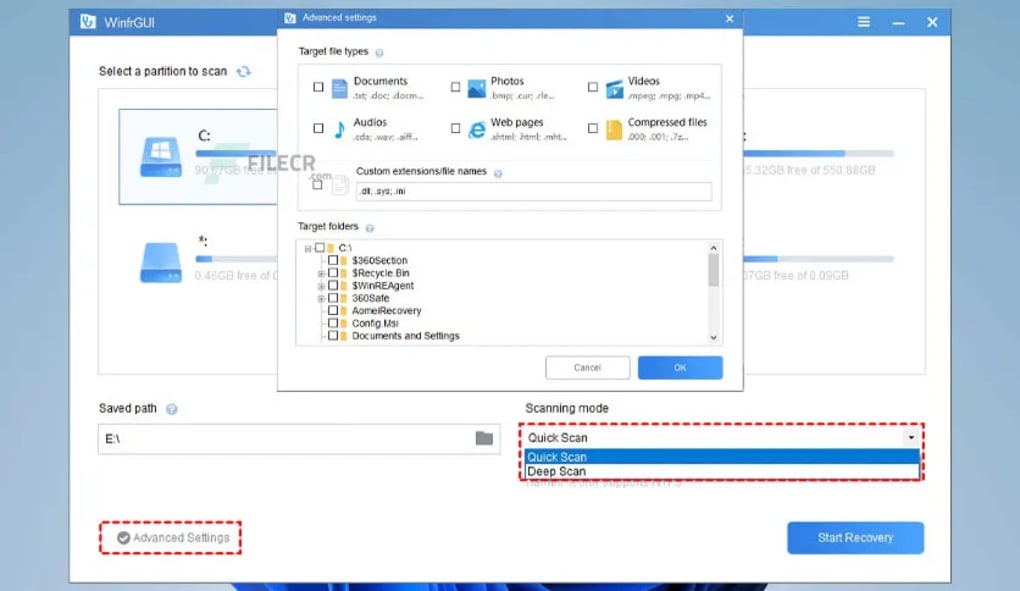
This is where WinfrGUI fills a critical gap. By providing a straightforward GUI, WinfrGUI transforms the powerful, yet complex, Windows File Recovery tool into a user-friendly application. It acts as a bridge, connecting the sophisticated functionality of Windows File Recovery with the simplicity and ease of use expected by most computer users. No longer do users need to wrestle with confusing terminal commands; instead, they can navigate a visually appealing and intuitive interface to recover their lost files.
Key Features and Functionality of WinfrGUI
WinfrGUI’s primary function is to provide a visually appealing and easy-to-use alternative to the command-line interface of Windows File Recovery. This translates to several key advantages:
- Simplified Data Recovery Process: The GUI eliminates the need for users to understand and type complex command-line instructions. The process is streamlined, reducing the learning curve and allowing for quick and efficient file recovery. Users simply select their target drive, choose a scan type, and let WinfrGUI do the work.
-
Quick and Deep Scan Options: WinfrGUI provides users with the ability to choose between a Quick Scan and a Deep Scan. A Quick Scan is faster but may not recover all deleted files, while a Deep Scan is more thorough but takes significantly longer to complete. This flexibility allows users to tailor their scan to their specific needs and time constraints.
-
Broad Storage Device and File Type Support: WinfrGUI works with a wide range of storage devices, including SSDs (Solid State Drives), HDDs (Hard Disk Drives), and memory cards. Its compatibility extends to a diverse array of file types, ranging from common document formats to multimedia files and compressed archives (such as zip files). This broad support ensures that users can attempt recovery for a variety of lost data.
-
Preventive Measures: While not directly involved in data recovery, the program’s existence promotes a greater awareness of the importance of data backup and prevention of accidental deletion. The ease of use that WinfrGUI offers encourages users to explore the native Windows File Recovery tool, thereby improving data management practices.
-
Speed and Efficiency: Built upon the efficiency of Windows File Recovery, WinfrGUI inherits its speed and processing power. The GUI simply streamlines the interaction, not the underlying recovery process itself. This ensures fast recovery times without compromising the depth of the search.
Advantages and Disadvantages of Using WinfrGUI
As with any software, WinfrGUI presents both advantages and disadvantages:
Advantages:
-
Ease of Use: The primary advantage is the simplified user experience. The intuitive GUI makes file recovery accessible to users of all technical skill levels.
-
Free and Accessible: WinfrGUI is a free program, making it a cost-effective solution for data recovery.
-
Built on a Powerful Native Tool: It leverages the already robust capabilities of Windows File Recovery, ensuring a high chance of successful recovery.
-
Fast and Efficient: The program’s speed and efficiency make it a practical choice for time-sensitive situations.
Disadvantages:
- Windows 10 and 11 Compatibility Only: Currently, WinfrGUI only supports Windows 10 and 11. Users of older Windows versions cannot benefit from this application. This limits its reach to a specific segment of Windows users.
Comparison with Other Data Recovery Software
WinfrGUI stands out from other data recovery software by focusing on simplicity and accessibility. While other programs like Recuva and Disk Drill offer comprehensive features and robust recovery capabilities, they often present users with complex interfaces and numerous settings. This complexity can be overwhelming for non-technical users, potentially leading to errors or unsuccessful recovery attempts. WinfrGUI, on the other hand, prioritizes user-friendliness, making it an ideal choice for users who want a straightforward and easy-to-use data recovery tool. It fills a niche by providing a user-friendly gateway to the sophisticated functionality of Windows’ built-in recovery mechanism.
Its simplicity, however, comes at the cost of some advanced features found in professional-grade data recovery software. Users seeking highly specialized tools or advanced analysis capabilities might find WinfrGUI’s functionality limited.
Conclusion: Is WinfrGUI the Right Choice for You?
WinfrGUI provides a valuable service by making the powerful Windows File Recovery tool accessible to a wider audience. Its intuitive GUI significantly reduces the complexity of data recovery, empowering users of all technical skill levels to attempt file recovery with ease. If you are a Windows 10 or 11 user who needs a simple, free, and efficient way to recover accidentally deleted files, WinfrGUI is a strong contender. However, users requiring advanced features or support for older Windows versions should consider alternative data recovery software options. For the average user, however, WinfrGUI offers a compelling solution for a common problem: accidental data loss. Its ease of use and integration with a powerful native Windows tool make it a valuable addition to any Windows user’s toolkit.
File Information
- License: “Free”
- Version: “1.0.0”
- Latest update: “May 2, 2022”
- Platform: “Windows”
- OS: “Windows 10”
- Language: “English”
- Downloads: “4.8K”
- Size: “3.85 MB”


