
WinISO is a veteran in the world of ISO image file management, boasting over a decade of service since its initial release in 2001. This powerful utility provides a comprehensive suite of tools for handling ISO and other disc image formats, simplifying complex tasks and making them accessible to both novice and experienced users. From creating and editing ISO images to burning them to physical media, WinISO offers a streamlined and efficient workflow. This article delves into the capabilities of WinISO, exploring its key features and benefits, and comparing it to alternative software solutions.
Core Functionality: Mastering ISO Image Files
WinISO’s strength lies in its versatile approach to ISO image manipulation. It goes beyond simple creation and burning, offering a range of features designed to streamline the entire process. This includes:
-
ISO Creation: WinISO allows users to easily create ISO images from scratch, adding files and folders as needed. This is particularly useful for backing up data, creating bootable disks, or distributing software. The intuitive interface guides users through the process, making it accessible even to those unfamiliar with ISO image files. The software provides options for customizing the ISO image, such as specifying the file system (e.g., FAT32, NTFS) and compression level.
-
ISO Editing: Unlike many simpler ISO tools that only allow the creation of new images, WinISO provides powerful editing capabilities. Users can directly edit existing ISO files, adding, deleting, or renaming files and folders within the image without the need for extraction and re-creation. This feature significantly improves workflow efficiency, saving time and effort in managing large ISO files. The editing process mirrors the familiar file explorer interface, providing ease of use and intuitive navigation.
-
ISO Conversion: WinISO excels as a universal disc image converter. It seamlessly translates between various formats, including ISO, BIN, and others. This flexibility is crucial for users working with diverse software or hardware that may require specific image formats. The conversion process is fast and reliable, ensuring data integrity and a seamless transition between different file types. This eliminates the need for multiple conversion tools, streamlining the overall workflow.
-
ISO Burning: The ability to burn ISO images directly to CDs, DVDs, and Blu-ray discs is a core function of WinISO. The software integrates seamlessly with disc drives, providing a simple and straightforward burning process. This eliminates the need for additional burning software, creating a unified workflow for image creation, editing, and burning. WinISO also provides options for verifying the burned disc to ensure data integrity, preventing data loss and ensuring the reliability of the final product.
-
ISO Mounting: WinISO allows users to mount ISO image files as virtual drives. This is particularly helpful for testing software or accessing files within an ISO image without the need to burn it to a physical disc. Mounted images function like any other drive, allowing seamless access to their contents through the operating system’s file explorer. This feature is essential for developers, testers, and users who frequently work with ISO images.
-
Bootable Disc Creation: For users needing to create bootable media, WinISO’s ability to generate bootable CDs, DVDs, and Blu-ray discs is invaluable. This simplifies the process of creating installation media for operating systems or other software requiring a bootable disc. The software guides users through the process of selecting the appropriate boot files and configuring the bootable media, ensuring a smooth and successful creation.
WinISO’s Interface and Usability
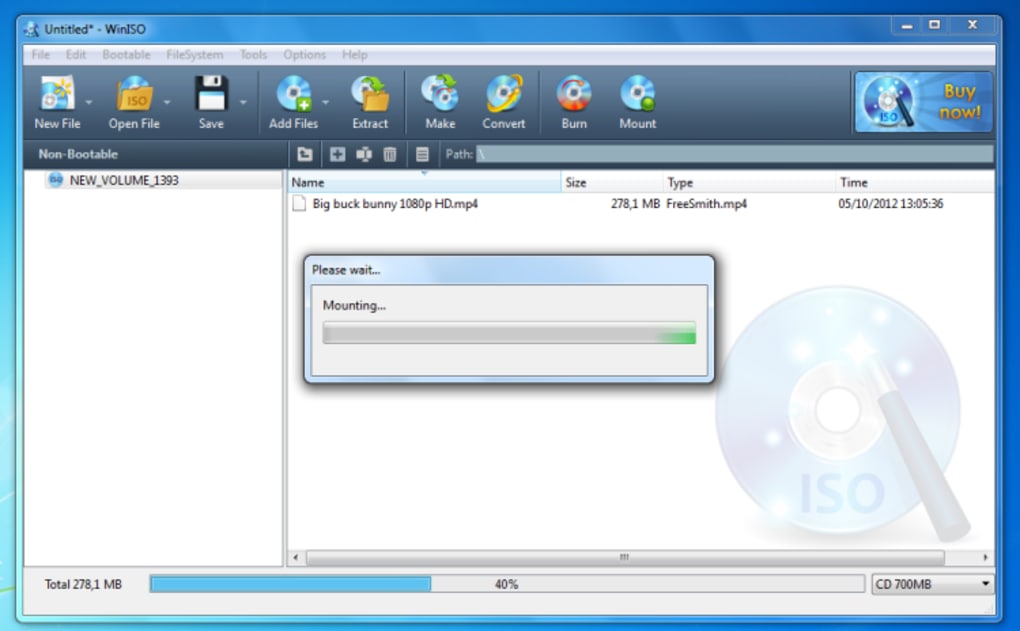
WinISO is renowned for its clean, intuitive interface. Even users with limited experience in ISO manipulation find the software easy to navigate and use. The straightforward design minimizes the learning curve, allowing users to quickly master the core functionalities. The software’s user-friendly interface complements its powerful features, creating a seamless user experience.
WinISO Standard 6 and Beyond
The release of WinISO Standard 6 marked a significant improvement in performance and usability. The developers focused on optimizing the operational interface, enhancing speed and simplifying the workflow. This version represents a culmination of years of refinement, integrating user feedback and incorporating the latest technological advancements. The improved user interface ensures a faster learning curve and smoother operation. The ongoing development of WinISO demonstrates the commitment of its creators to provide users with a continuously improving and feature-rich application.
Comparison with Alternative Software
While WinISO stands as a strong contender in the ISO image file utility market, several alternatives exist, each with its own strengths and weaknesses. A comparative analysis helps in understanding the unique advantages offered by WinISO:
-
DAEMON Tools Lite: Known for its virtual drive mounting capabilities, DAEMON Tools Lite focuses primarily on mounting various image formats. While it lacks some of WinISO’s extensive editing and creation features, it excels in managing virtual drives and mounting images quickly.
-
Alcohol 52%: A more feature-rich option, Alcohol 52% provides a wider range of functionalities, including image creation, burning, and virtual drive management. However, it can be less intuitive for novice users than WinISO’s streamlined interface.
-
Magic ISO Maker: This program focuses on ISO creation, editing, and conversion, providing a comparable feature set to WinISO. The choice between the two often boils down to personal preference regarding interface and workflow.
- Free ISO Creator/Converters: Numerous freeware and open-source tools cater to simpler ISO tasks, such as conversion or burning. However, these typically lack the comprehensive editing capabilities and overall user-friendliness of a professional package like WinISO.
WinISO differentiates itself through its balance of powerful features, user-friendly interface, and comprehensive functionality. While alternatives provide specific functionalities, WinISO consolidates them within a single, elegantly designed package.
Conclusion: A Powerful Tool for ISO Management
WinISO’s enduring popularity and continued development underscore its value as a robust and reliable ISO image file utility. Its intuitive interface makes it accessible to users of all levels, while its comprehensive feature set caters to both casual users and power users. The ability to create, edit, convert, burn, and mount ISO images within a single, streamlined application makes WinISO a highly efficient and valuable tool for anyone working with disc images. Whether creating bootable media, backing up data, or managing software installations, WinISO provides a powerful and user-friendly solution. Its longevity in the market, coupled with ongoing development and improvement, cements its position as a leading choice for ISO image management.
File Information
- License: “Trial version”
- Latest update: “February 4, 2025”
- Platform: “Windows”
- OS: “Windows 95”
- Language: “English”
- Downloads: “113.6K”
- Size: “7.01 MB”


