
The allure of the arcade, with its vibrant sights, distinct sounds, and the thrill of competitive play, remains a powerful force in the hearts of many gamers. For a generation that grew up pumping quarters into cabinets, these establishments represented the pinnacle of interactive entertainment. While dedicated arcades may be a rarer sight today, the spirit of that golden era lives on, largely thanks to the tireless efforts of emulation developers. Among the pantheon of classic emulators, WinKawaks stands out as a beloved and highly effective tool for reliving the glory days of mid-to-late 1990s arcade gaming.
WinKawaks isn’t just another emulator; it’s a meticulously crafted piece of software designed specifically to bring the magic of iconic arcade platforms—namely NeoGeo, CP System (CPS-1), and CP System II (CPS-2)—directly to your PC. This specialized focus allowed its creators to achieve remarkable accuracy and performance, cementing its reputation as a go-to choice for enthusiasts of titles like Street Fighter, Mega Man, Darkstalkers, Dungeons and Dragons, and the entire legendary lineup from SNK. Far from being a complex or demanding application, WinKawaks excels in its simplicity and efficiency, offering a streamlined path to experiencing these timeless classics with minimal fuss. Its ability to recapture the essence of an arcade cabinet on a modern machine, without the need for extensive technical knowledge, is precisely why it continues to be celebrated by the retro gaming community worldwide.
The Legacy of Arcade Boards: NeoGeo, CPS-1, and CPS-2
.webp)
To truly appreciate WinKawaks, one must first understand the significance of the arcade boards it so expertly emulates. The mid-1990s was a particularly fertile period for arcade gaming, dominated by a handful of powerful and influential hardware platforms that pushed the boundaries of pixel art, sound design, and competitive gameplay. WinKawaks’s core strength lies in its dedicated and highly accurate support for these specific systems, ensuring that the games play as authentically as possible.
NeoGeo: The “24-Bit” Powerhouse from SNK
Developed by SNK, the NeoGeo was a marvel of its time, notorious for its high price tag but equally famous for delivering “arcade perfect” experiences both in arcades (via the Multi Video System, MVS) and in homes (via the Advanced Entertainment System, AES). Launched in 1990, the NeoGeo MVS boasted impressive 2D graphics capabilities, handling large sprites and smooth animations with ease. Its powerful sound chip produced some of the most memorable soundtracks in gaming history. Titles like the King of Fighters series, Metal Slug, Samurai Shodown, Fatal Fury, and Garou: Mark of the Wolves became synonymous with the NeoGeo, defining entire genres with their unique gameplay mechanics and distinctive art styles. WinKawaks effectively replicates the NeoGeo’s architecture, allowing players to experience these legendary games with their original visual fidelity and audio richness, without the inherent difficulties of maintaining aging hardware.
.webp)
Capcom’s CP System (CPS-1): Revolutionizing Arcade Combat
Capcom’s CP System, or CPS-1, launched in 1988, was a proprietary arcade board that played a pivotal role in shaping the landscape of arcade gaming, particularly the fighting game genre. While it hosted a variety of successful titles, its true breakthrough came with the release of Street Fighter II: The World Warrior in 1991. This game alone fundamentally redefined competitive gaming, introducing innovative combat mechanics, a diverse roster of characters, and an unparalleled level of polish. Beyond Street Fighter II, CPS-1 was also home to other classics such as Final Fight, Mega Man: The Power Battle, and Ghouls ’n Ghosts. The board’s design facilitated vibrant graphics, detailed sprites, and responsive controls, all of which WinKawaks faithfully reproduces, allowing players to meticulously explore the nuanced gameplay that made these titles enduring hits.
CP System II (CPS-2): The Pinnacle of 2D Arcade Graphics
Building upon the success of CPS-1, Capcom introduced the CP System II (CPS-2) in 1993, representing a significant leap forward in 2D arcade technology. CPS-2 boards were renowned for their expanded color palettes, higher resolutions, enhanced sound capabilities, and the ability to display even larger and more intricate sprites. This platform became the host for a new generation of Capcom masterpieces, including the Street Fighter Alpha/Zero series, Darkstalkers, Marvel Super Heroes, and the critically acclaimed Dungeons & Dragons: Shadow Over Mystara (often considered one of the best beat ’em up RPGs ever made).
A notable historical detail about CPS-2 boards was their infamous “suicide battery” issue, where an internal battery would eventually die, rendering the board unplayable due to encryption key loss. As an emulator, WinKawaks completely bypasses this hardware limitation, ensuring that these classic games can be enjoyed indefinitely, preserving their legacy without fear of technological decay. By offering robust emulation for these three powerhouses, WinKawaks acts as a crucial historical archive and a vibrant playground for revisiting some of the most influential games of the arcade era.
Effortless Entry: WinKawaks’ User-Friendly Setup
One of the most compelling aspects of WinKawaks, particularly for individuals who might be new to the world of emulation, is its remarkably straightforward and user-friendly setup process. In an ecosystem where some emulators can demand a significant learning curve, WinKawaks prides itself on minimizing friction, allowing users to dive into their favorite arcade games almost immediately. This commitment to accessibility is a key differentiator that has contributed to its enduring popularity.
No BIOS Headaches: A Welcome Simplification
A common stumbling block for many aspiring emulators is the requirement for “BIOS files.” These are low-level system programs, essentially the operating system of the original hardware, which are often copyrighted and must be sourced separately. For systems like NeoGeo, obtaining the correct BIOS files in the right version can be a frustrating hunt, leading to compatibility issues if not handled perfectly. WinKawaks ingeniously sidesteps this complexity. It is designed to function effectively for its supported systems without the need for external BIOS ROMs. This means users are spared the often-tedious task of finding, downloading, and correctly placing these files, making the initial setup significantly less daunting.
Quick Installation and Intelligent Auto-Configuration
The journey to playing classic arcade games with WinKawaks begins with a simple download and extraction. The emulator’s installation file, typically distributed in a compressed format like a ZIP archive, doesn’t require a lengthy, complicated installation wizard. Users merely need to unzip the contents into a chosen directory on their Windows PC. This makes WinKawaks highly portable; it can even be run from a USB drive.
Upon the very first launch of the winkawaks.exe executable, the emulator exhibits a level of intelligence that further streamlines the experience. It automatically detects the system’s hardware capabilities and configures optimal graphics settings. This includes factors such as the appropriate video renderer (DirectX or OpenGL, depending on the system), initial screen resolution, and basic display filters. For the vast majority of users, this auto-configuration means they can launch a game and enjoy a visually pleasing experience right out of the box, without needing to tweak a single setting.
Granular Control: Tailoring Your Visual and Audio Experience
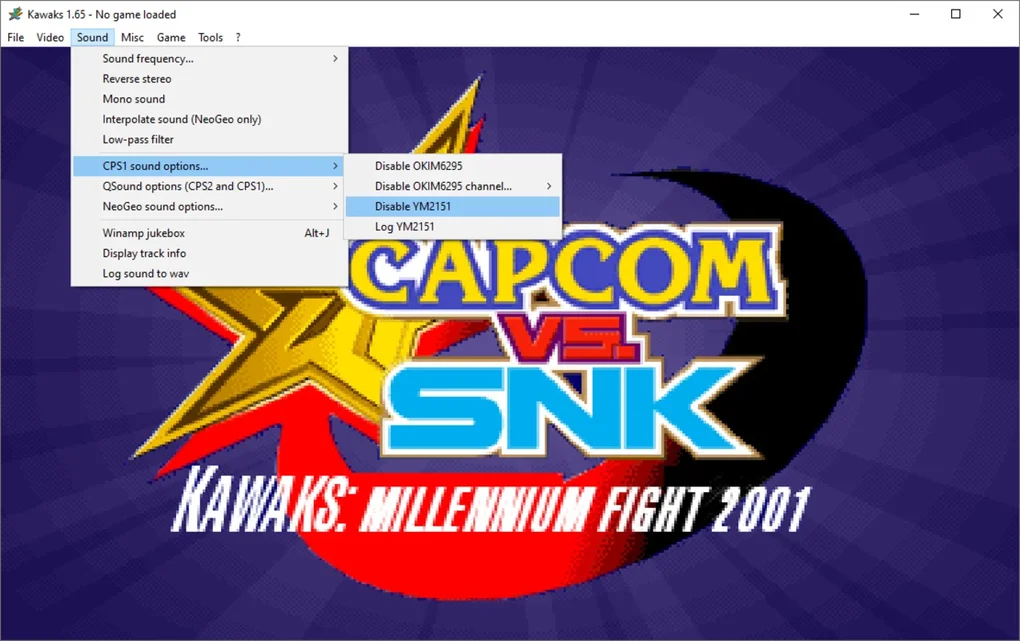
While the automatic settings are excellent for a quick start, WinKawaks doesn’t shy away from offering robust customization options for those who desire greater control over their emulation environment. Accessible through the intuitive “Visual Options” menu, users can fine-tune various parameters to match their preferences or optimize for specific hardware:
- Video Renderers: Users can experiment with different video rendering APIs, such as DirectX or OpenGL, to find the one that offers the best performance and visual quality on their specific system. This flexibility ensures broad compatibility across diverse hardware configurations.
- Aspect Ratio and Scaling: Purists often prefer to maintain the original 4:3 aspect ratio of classic arcade games to preserve the creators’ intended visual design. However, WinKawaks also offers options to scale the image to fill modern widescreen displays, catering to different user preferences.
- Scanlines and Filters: To evoke a true sense of nostalgia, WinKawaks allows users to apply various visual filters, most notably adjustable scanlines. These horizontal lines mimic the appearance of classic CRT arcade monitors, adding a layer of authenticity. Alternatively, smoothing filters can be applied to reduce pixelation for a cleaner, more modernized look.
- Color Depth: Options for 16-bit or 32-bit color depth allow users to balance performance with visual fidelity, tailoring the output to their system’s capabilities and their aesthetic preferences.
- Audio Settings: Beyond visuals, the emulator provides comprehensive audio configuration. Users can adjust the master volume, select sampling rates, and choose interpolation methods to ensure crisp, synchronized sound that accurately reproduces the original arcade experience.
This meticulous balance between effortless initial setup and deep customization potential is a hallmark of WinKawaks, making it an ideal choice for both casual players seeking instant gratification and seasoned enthusiasts who demand precise control over their retro gaming experience.
Navigating the Arcade Library: ROM Management and Core Gameplay Features
WinKawaks provides the robust framework for emulation, but the games themselves—known as ROMs—are separate entities. Understanding how to acquire, organize, and interact with these game files is crucial for a complete and enjoyable experience. While WinKawaks does not include ROMs due to copyright restrictions, it provides an excellent environment for managing and playing them.
Sourcing and Organizing Your ROMs
The process of obtaining ROMs typically involves searching online archives or communities dedicated to retro gaming. It’s imperative for users to be mindful of the legal and ethical considerations surrounding ROM acquisition; generally, it is advised to only play ROMs of games you legitimately own or which have entered the public domain. WinKawaks is primarily compatible with ROM sets that are commonly associated with MAME (Multiple Arcade Machine Emulator) for CPS-1/2 games, and specific NeoGeo ROM sets. These ROMs are typically distributed as .zip archives, with each archive containing all the necessary data files for a single game.
Proper organization is paramount for seamless gameplay. WinKawaks expects these ROM .zip files to be placed within a designated roms subdirectory, which is located inside the main WinKawaks installation folder. Upon launching the emulator or performing a manual refresh, WinKawaks intelligently scans this directory, identifies all compatible game ROMs, and populates its internal game list. This systematic approach ensures that your arcade library is neatly presented and easily accessible, eliminating the frustration of manually searching for game files.
The Intuitive User Interface and Essential Gameplay Enhancements
The WinKawaks interface is designed with user-friendliness in mind. A clean, organized game list prominently displays all detected ROMs, allowing players to quickly browse their collection. Once a game is selected, players can easily launch it or delve into a variety of configuration options, either from the main menu or within the game itself. These features significantly enhance the gameplay experience beyond what was available on original arcade cabinets:
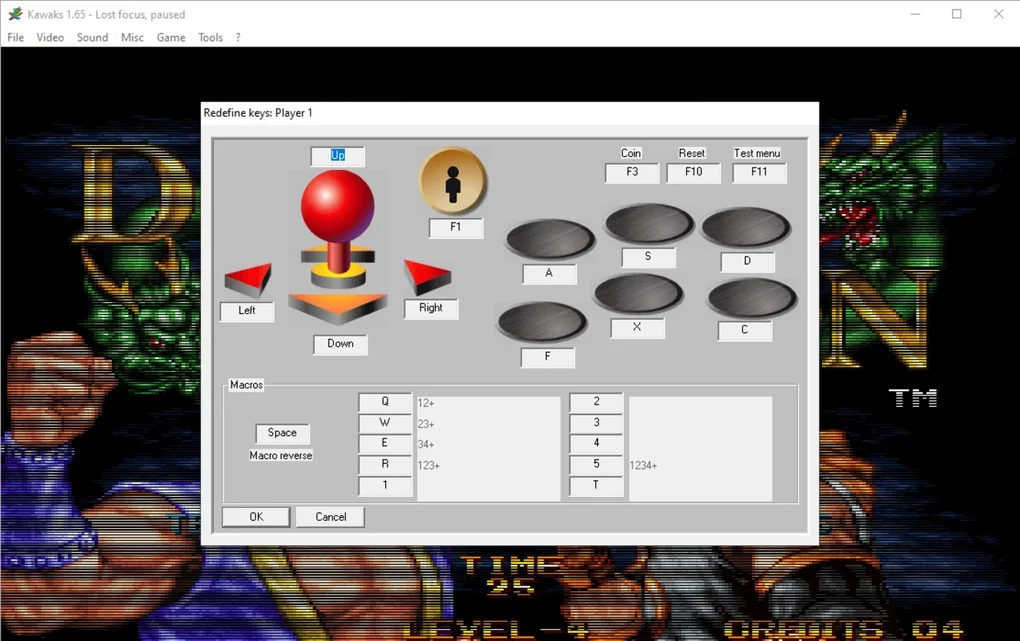
- Input Mapping: Customizing controls is a fundamental aspect of any emulator, and WinKawaks excels in this regard. The input mapping system is highly intuitive, allowing users to assign arcade buttons (e.g., punch, kick, jump, start, coin) to their preferred keyboard keys, joystick buttons, or gamepad inputs. This flexibility ensures that every player can configure a control scheme that feels natural and responsive, catering to individual playstyles and hardware setups.
- Turbo Mode: A highly sought-after feature for many arcade game genres, especially fighting games and shoot ’em ups, is Turbo Mode. When activated, holding down a button in Turbo Mode simulates rapid, continuous presses. This can be invaluable for executing quick jabs in Street Fighter or maintaining a sustained barrage of fire in Metal Slug, significantly enhancing gameplay for certain situations and reducing player fatigue.
- DIP Switches: WinKawaks goes a step further in authenticity by allowing access to emulated DIP switches. On original arcade boards, these were physical switches used by arcade operators to configure various game settings, such as difficulty levels, the number of lives per credit, coin-per-play ratios, and specific game modes. Within WinKawaks, players can digitally adjust these settings, gaining an unprecedented level of control over the arcade experience and allowing them to fine-tune the challenge to their liking.
- Save States: A transformative feature absent from original arcade machines is the ability to use save states. WinKawaks allows players to save their game progress at any exact moment and resume from that precise spot later. This drastically reduces the frustration associated with difficult games, enables experimentation with different strategies without penalty, and makes long play sessions more manageable, turning potentially insurmountable challenges into enjoyable learning curves.
- Netplay Functionality: Some versions or community-enhanced builds of WinKawaks have incorporated netplay functionality. This feature allows players to connect with friends online and play classic arcade games together, resurrecting the social, competitive, and cooperative aspects of the arcade experience in a modern, distributed format. Netplay broadens the emulator’s utility, transforming it from a solitary nostalgia trip into a shared gaming platform.
Through its combination of streamlined ROM management and powerful, user-centric gameplay features, WinKawaks ensures that the timeless appeal of these arcade masterpieces is not only preserved but also enhanced for contemporary players.
The Enduring Appeal: Performance, Versatility, and Community
In a landscape crowded with numerous emulation solutions, WinKawaks has successfully maintained its status as a highly respected and frequently recommended emulator. Its enduring appeal is not accidental; it stems from a deliberate design philosophy that prioritizes efficiency, accuracy, and user convenience, backed by a dedicated community that has ensured its longevity.
A Lightweight and Highly Efficient Performer
One of WinKawaks’s most celebrated attributes is its remarkably lightweight footprint and high operational efficiency. Unlike some multi-system emulators that can be resource-intensive, WinKawaks is a lean application designed to run smoothly on a wide spectrum of hardware, from older, less powerful PCs to contemporary gaming rigs. Its minimal demands on system resources—low CPU and RAM usage—mean that it can deliver a consistent and high-performance gaming experience without causing system slowdowns. This efficiency is crucial for fast-paced arcade games where even minor stuttering can ruin the experience. For users who prioritize performance and seek a straightforward solution without the overhead, WinKawaks stands as an exemplary choice.
Versatility within its Specialized Niche
While WinKawaks isn’t a “universal” arcade emulator like MAME, its versatility shines brilliantly within its specialized domain: NeoGeo, CPS-1, and CPS-2. This focused approach allowed its developers to meticulously optimize the emulation code for these specific systems, resulting in an exceptionally high degree of accuracy. Games play, look, and sound virtually identical to their original arcade counterparts, a critical factor for purists and those seeking an authentic retro experience. This dedicated optimization often translates to better performance and more reliable emulation for these specific boards compared to more generalized emulators that attempt to cover thousands of systems. The ability to flawlessly run the legendary libraries of Capcom and SNK, the titans of the 90s arcade scene, underscores WinKawaks’s profound value.
A Smooth and Reliable Gameplay Experience
The combination of efficiency and accuracy directly translates into a consistently smooth and highly reliable gameplay experience. Frame rates are typically rock-solid, audio is delivered with crisp clarity and perfect synchronization, and input lag is kept to a bare minimum. These elements are paramount for arcade games, particularly those in the fighting or shoot ’em up genres, where split-second timing and precise control are essential for success. This unwavering reliability is a significant reason why players continuously return to WinKawaks, confident that their gaming sessions will be free from frustrating technical glitches.
User-Centric Design and Enduring Community Support
Beyond its technical prowess, WinKawaks’s design philosophy consistently prioritizes the end-user. From the frictionless setup that eliminates the need for BIOS files to its intuitive graphical interface and easily accessible configuration options, every aspect of the emulator is crafted to reduce barriers and maximize playtime. Features like save states and turbo mode, though common in emulation, are particularly well-implemented in WinKawaks, adding significant value and customization to the gaming experience.
Furthermore, despite its last official update being some time ago, WinKawaks benefits from a vibrant and dedicated community. As observed on platforms like PhanMemFree.org (formerly Softonic.com), the emulator continues to see consistent downloads and user engagement, indicating its ongoing relevance. Forums, retro gaming websites, and online communities frequently feature discussions about WinKawaks, offering guides, troubleshooting advice, and sharing nostalgic experiences. This community support ensures that the emulator remains accessible and functional for new generations of players, solidifying its place as a classic and dependable tool in the world of arcade emulation. WinKawaks isn’t merely a piece of software; it’s a testament to the enduring appeal of classic arcade gaming, providing a consistent and enjoyable portal to a beloved era.
File Information
- License: “Free”
- Version: “1.6.5”
- Latest update: “July 5, 2024”
- Platform: “Windows”
- OS: “Windows 11”
- Language: “English”
- Downloads: “1.2K”


