
WinMerge is a free, open-source visual text file differencing and merging tool designed for Win32 platforms. Its primary function is to efficiently identify and highlight the differences between two files or directories, making it an invaluable asset for developers, programmers, and anyone needing to track changes in text-based projects. This comprehensive guide will delve into WinMerge’s features, functionalities, and applications, providing a thorough understanding of this powerful utility.
Core Functionality: Visual File Comparison and Merging
At its heart, WinMerge excels at visually presenting the differences between two files or sets of files. This is achieved through a user-friendly interface that displays the compared files side-by-side, highlighting discrepancies in a clear and intuitive manner. The differences are not merely identified; they are presented in a way that facilitates understanding and subsequent merging of the changes. This visual approach significantly reduces the time and effort required to review changes compared to manual methods.
WinMerge’s comparison capabilities extend beyond simple text files. While it shines in its handling of text-based documents, its capabilities also encompass various file types and formats, enhancing its versatility and making it suitable for diverse applications. The software’s ability to handle diverse file formats allows users to compare configurations, codebases, and other crucial project components efficiently.
Feature Breakdown: A Deep Dive into WinMerge’s Capabilities
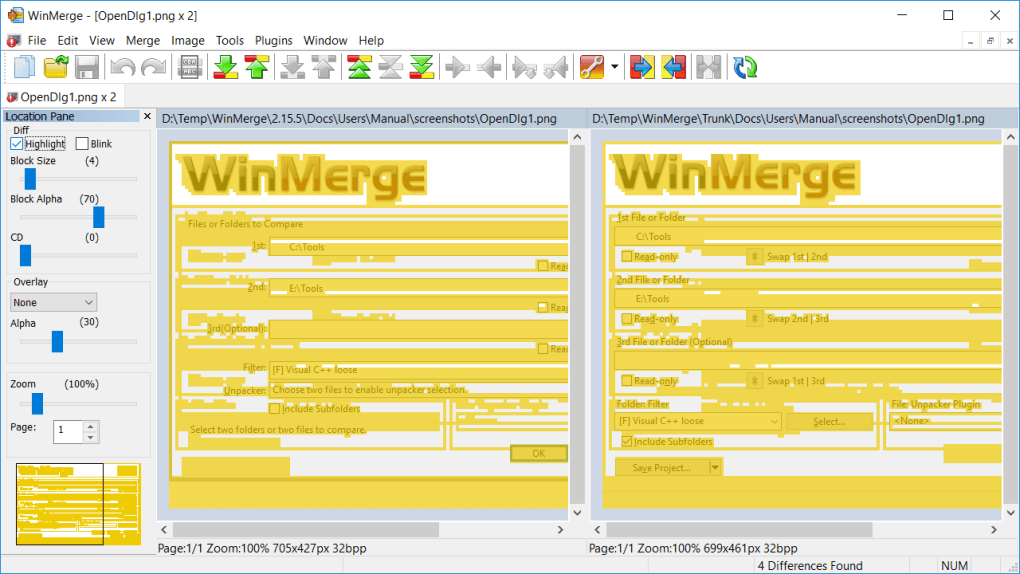
Beyond its core functionality, WinMerge offers a rich set of features that enhance its usability and efficiency. These features contribute to the software’s overall effectiveness, solidifying its position as a valuable tool in various workflows. Let’s explore some of its key characteristics:
Text File Comparison and Merging:
-
Visual Differencing: The software’s strength lies in its visual representation of differences between files. Discrepancies are clearly highlighted, making it easy to spot additions, deletions, and modifications. This visual clarity is crucial for quick and efficient review of changes.
-
Flexible Editor: The built-in editor provides functionalities that go beyond simple display. Users can directly edit files within the comparison interface, seamlessly merging changes and resolving conflicts. This integrated approach streamlines the entire process, reducing the need for switching between different applications.
-
Syntax Highlighting: WinMerge supports syntax highlighting for various programming languages, enabling developers to easily spot changes within code files. This feature is crucial for developers, improving readability and making code changes easier to understand and manage. The highlighting assists in identifying subtle errors or intentional modifications.
-
Cross-Platform Compatibility: WinMerge handles text files formatted for DOS, UNIX, and MAC operating systems. This broad compatibility makes it a versatile choice irrespective of the origin of the files being compared.
- Unicode Support: The software supports Unicode encoding, ensuring that files containing characters from diverse languages are compared accurately. This is particularly important for globalized projects or applications that involve multiple languages.
Advanced Features:
-
Difference Pane: A dedicated pane shows the precise differences between the two files, clearly indicating added or removed lines. This feature enhances the precision and clarity of the comparison process.
-
Location Pane: This helpful tool provides a map of the files being compared, allowing for quick navigation between differing sections. The map serves as a guide, making it easier to pinpoint the location of changes within large files.
-
File Filters: WinMerge allows users to filter files during directory comparisons, excluding unnecessary files to focus on specific aspects of a project. This option significantly enhances efficiency when dealing with vast directories.
-
Moved Lines Detection: The software’s intelligent algorithms can detect lines that have been moved within a file, not just added or deleted. This capacity is crucial for tracking changes where lines have simply been reordered or repositioned.
-
Shell Integration: For ease of access, WinMerge integrates with the Windows shell, allowing for quick comparisons directly from the file explorer. This integration streamlines workflows, providing quick access to the comparison tool without additional steps.
-
Version Control System Integration: While not extensive, WinMerge provides rudimentary integration with Visual SourceSafe and Rational ClearCase, enabling it to interact with existing version control systems. This integration enhances its utility within a collaborative development environment.
-
Archive File Support: Utilizing 7-Zip, WinMerge can even compare files within archives, eliminating the need for manual extraction before comparison. This expands its applicability to projects using compressed files.
-
Plugins: WinMerge’s extensible architecture allows the addition of plugins to further customize and enhance its functionality. This open-ended design allows community contributions to improve and extend the software’s capabilities.
- Localization: The interface is localizable via resource DLLs, allowing users from different regions to comfortably use the software in their native languages. This feature enhances accessibility for a global user base.
Applications: Where WinMerge Proves Invaluable
WinMerge’s capabilities extend to a diverse range of applications, making it a highly versatile tool for many professionals and tasks. Here are a few key areas where WinMerge demonstrates its true value:
-
Software Development: WinMerge is a staple in the software development world, aiding developers in comparing code versions, identifying bugs, and merging changes across branches.
-
Version Control: While not a complete replacement for dedicated version control systems, WinMerge acts as a valuable supplementary tool for visualizing and managing changes between versions of files within a repository.
-
Web Development: Web developers can leverage WinMerge for comparing web page files, identifying modifications, and merging updates across different versions of a website.
-
Data Analysis: In situations requiring careful examination of data sets, WinMerge can assist in spotting discrepancies and changes between different versions of data files.
-
Project Management: Beyond software and web development, WinMerge is applicable to diverse project management tasks, especially when tracking and managing changes in documents, reports, or other project-related files.
-
General File Comparison: For anyone needing to compare files for any reason—whether personal or professional—WinMerge provides a convenient and powerful way to see what’s changed.
Alternatives and Comparisons
While WinMerge is a robust and capable tool, several alternatives exist, each with its strengths and weaknesses. Understanding these alternatives allows users to make informed decisions about which tool best suits their needs. Some notable alternatives include:
-
Beyond Compare: A commercial, feature-rich alternative offering more advanced functionalities, such as three-way merging and more sophisticated visual comparisons.
-
DiffMerge: A free, open-source alternative with a similar feature set to WinMerge, known for its cross-platform compatibility and intuitive interface.
-
Meld: Another open-source option with strong cross-platform support, featuring an excellent visual interface and support for merging changes.
-
KDiff3: Another strong cross-platform option with support for three-way comparisons, making it suitable for advanced merging scenarios.
The choice between WinMerge and these alternatives often depends on specific needs and preferences, such as the level of advanced features required, cross-platform compatibility needs, and budget considerations.
Conclusion: WinMerge – A Powerful Tool for Efficient File Comparison
WinMerge remains a powerful and highly useful tool for comparing and merging files. Its open-source nature, combined with its extensive features and intuitive interface, makes it a valuable asset for a wide range of users and applications. Whether you’re a seasoned developer or simply need to compare two files, WinMerge offers a comprehensive and efficient solution. Its continued development and community support ensure its relevance and usefulness for years to come. Understanding its features and capabilities enables users to fully leverage its potential and improve their workflow significantly.
File Information
- License: “Free”
- Latest update: “May 23, 2023”
- Platform: “Windows”
- OS: “Windows 8.1”
- Language: “English”
- Downloads: “23.6K”
- Size: “8.67 MB”


