
WinSnap is a lightweight screenshot utility designed for Windows operating systems. While not brimming with advanced features like some of its competitors, its simplicity and ease of use make it a compelling choice, especially for users who prioritize a straightforward, efficient workflow. This review delves into WinSnap’s capabilities, highlighting its strengths and weaknesses to help you determine if it’s the right screenshot tool for your needs.
User Interface and Functionality
WinSnap boasts a clean, uncluttered interface. The main window presents a large preview area, allowing you to immediately view the captured screenshot and apply any desired effects before saving. This intuitive design minimizes the learning curve, making it accessible to even novice users. The program supports a range of capture methods, enabling you to quickly grab full-screen images, specific windows, or custom-selected regions. A comprehensive set of hotkeys further streamlines the capture process, allowing for rapid screenshots without disrupting your workflow.
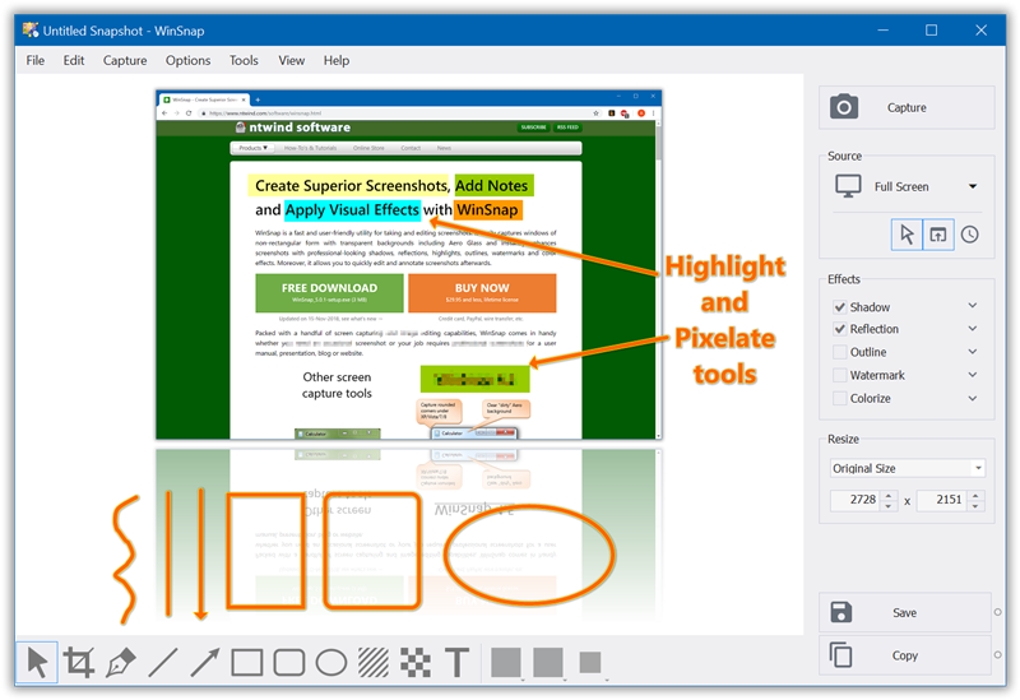
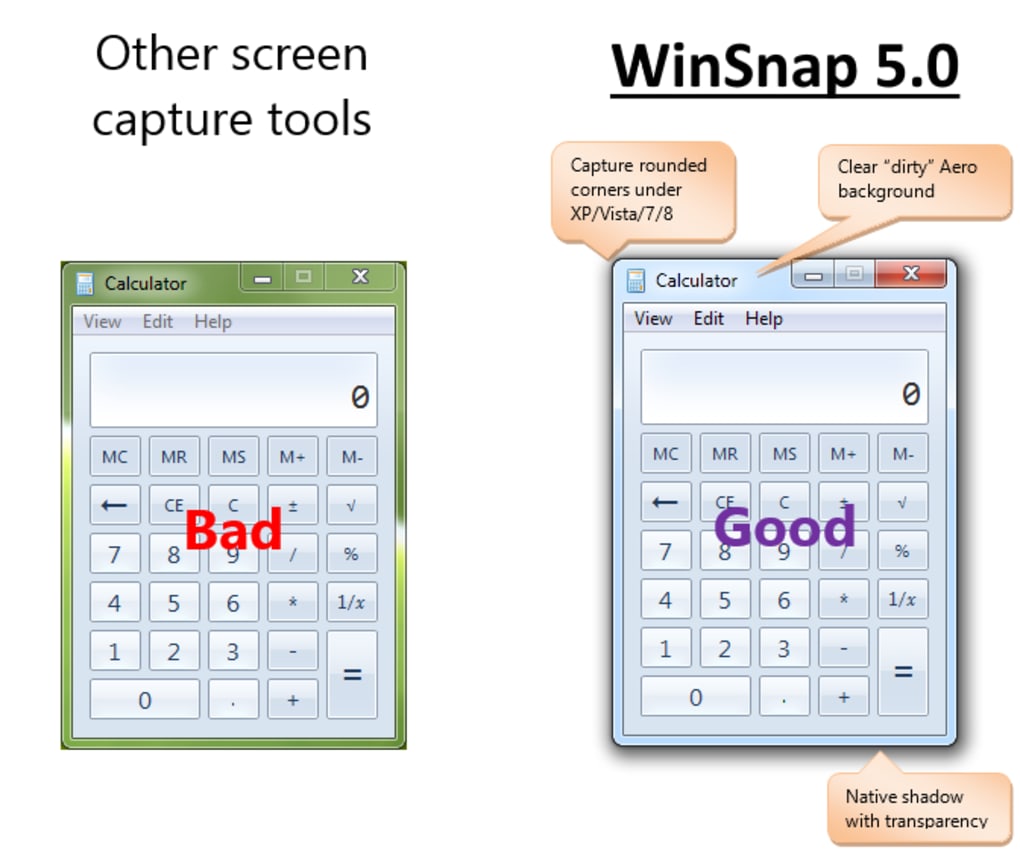
The program’s configuration options, while not as extensive as some professional-grade tools, offer sufficient control over the capture process and output. Users can adjust settings such as including or excluding the mouse cursor, adding a delay before capture (particularly useful for capturing menus that require a moment to fully expand), and fine-tuning effects like contours, watermarks, and drop shadows. This level of customization allows for a degree of personalization, catering to individual preferences and specific capture needs. Notably, WinSnap is optimized for compatibility with various Windows versions, effectively handling rounded window corners and transparent borders even on older operating systems.
Features and Capabilities: A Deeper Dive
WinSnap shines in its ability to capture non-rectangular windows with ease. This feature often proves crucial when dealing with applications or windows that have irregular shapes or transparent elements. The program smoothly handles the capture of such elements, ensuring that the final image accurately reflects the source content without distortion or artifacts. Furthermore, the seamless integration of various effects and image enhancements allows for immediate post-processing without the need to switch to a separate image editor. While these effects are not overly sophisticated, they provide sufficient options for basic image adjustments and enhancements, thus reducing the need for additional software.
The software also supports a range of image formats, including popular options like JPEG, PNG, and GIF. This flexibility makes it easy to save screenshots in the format best suited for your intended use, ensuring compatibility across different applications and platforms. The inclusion of automated saving features enhances the efficiency of the capture process, enabling users to configure automatic saving based on various parameters. This is particularly beneficial for users who frequently take multiple screenshots, as it eliminates the need for manually saving each capture.
While WinSnap’s capabilities are geared towards simplicity and efficiency, it might lack the advanced features present in some more comprehensive screenshot utilities. For instance, it might not offer extensive annotation tools, automated image editing features, or robust OCR capabilities. These omissions could be a drawback for users who require advanced editing features beyond basic adjustments and effects. Despite this, the program’s streamlined focus on straightforward capture and basic editing makes it a practical choice for many users.
Comparison with Alternative Software
Several other screenshot tools compete with WinSnap in the market. Among the most prominent are Snagit, MWSnap, and LightShot. Each of these alternatives presents a unique set of features and capabilities.
Snagit, often regarded as a more powerful and feature-rich option, boasts a vast array of tools for capturing and editing screenshots. It includes advanced annotation tools, screen recording functionality, and seamless integration with various cloud storage services. However, this increased functionality comes at the cost of a steeper learning curve and a higher price point.
MWSnap, on the other hand, offers a more lightweight approach similar to WinSnap, focusing on streamlined capture and basic editing. While it might lack the visual appeal and advanced features of WinSnap, it often provides a reliable and efficient solution for capturing standard screenshots.
LightShot, a popular choice known for its simplicity and speed, prioritizes quick and easy screenshot capture. While it offers basic editing features, its focus remains on rapid capture, making it ideal for users who prioritize speed over extensive editing capabilities.
The choice between WinSnap and these alternatives depends heavily on individual needs and preferences. Users requiring only a simple and efficient screenshot tool may find WinSnap perfectly adequate, while those needing advanced editing or annotation features might benefit from more comprehensive options like Snagit.
Strengths and Weaknesses
Strengths:
- User-friendly interface: WinSnap’s intuitive design makes it extremely easy to use, even for beginners.
- Efficient capture: The program provides quick and straightforward capture of various screen elements.
- Basic editing capabilities: Its included effects and adjustments offer sufficient options for simple image enhancements.
- Lightweight and fast: WinSnap’s small size and efficient operation ensure minimal impact on system resources.
- Support for various image formats: The program allows for saving in numerous formats, including JPEG, PNG, and GIF.
- Optimized for various Windows versions: WinSnap effectively handles diverse screen resolutions and window designs across various operating systems.
Weaknesses:
- Limited advanced features: Compared to professional-grade alternatives, WinSnap lacks extensive annotation tools, advanced editing functions, and screen recording capabilities.
- Trial version watermark: The trial version includes a noticeable watermark on captured images, hindering usability for professional purposes.
- Relatively fewer configuration options: While customizable, the available settings might not provide the granularity desired by experienced users.
Conclusion
WinSnap offers a compelling solution for users seeking a simple, efficient, and user-friendly screenshot utility. Its streamlined design and intuitive interface make it a great option for novice users who prioritize ease of use and quick capture. However, its lack of advanced features might deter more experienced users or those who require advanced editing capabilities. If you need a tool solely for capturing screenshots without extensive post-processing, WinSnap is a strong contender. However, if you require advanced editing, screen recording, or annotation tools, exploring alternative software with more comprehensive feature sets might be necessary. Ultimately, the best choice depends on your specific needs and workflow preferences.
File Information
- License: “Trial version”
- Latest update: “February 4, 2025”
- Platform: “Windows”
- OS: “Windows Vista”
- Language: “English”
- Downloads: “12.9K”
- Size: “3.67 MB”


