
Managing multiple applications simultaneously can quickly become a frustrating juggling act. The desktop, once a clean slate, transforms into a chaotic jumble of overlapping windows, each vying for attention. Finding the specific window you need amidst this digital clutter can feel like searching for a needle in a haystack. WinSplit Revolution offers a powerful and elegant solution to this pervasive problem, providing a seamless and intuitive way to organize and manage your open windows, transforming your multitasking experience from a struggle into a streamlined workflow.
Streamlining Your Digital Workspace: A Single-Click Solution
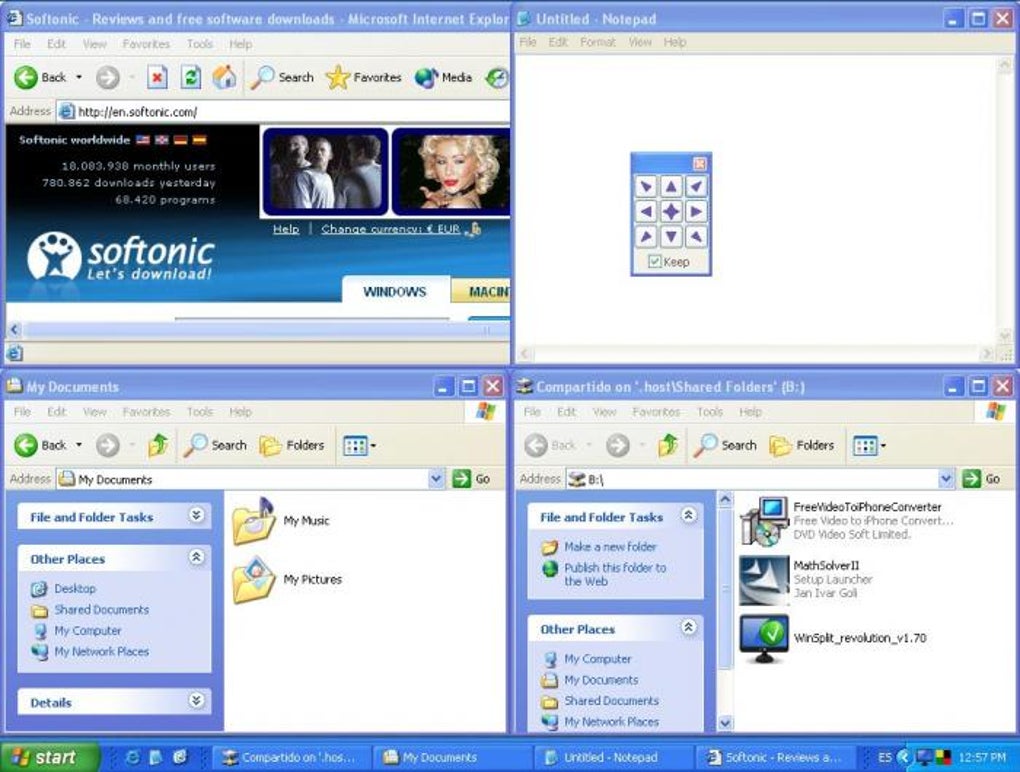
WinSplit Revolution is a lightweight, system tray resident utility that empowers you to efficiently arrange your windows, maximizing your screen real estate and minimizing visual distractions. Its core function lies in its ability to automatically arrange open applications with a single click, instantly decluttering your desktop and improving your focus. This click-and-arrange functionality is deceptively powerful; it effortlessly organizes windows, preventing overlaps and ensuring easy access to every application. The tool’s intuitive design means that even users with minimal technical experience can quickly master its features and reap its productivity-enhancing benefits.
The application’s core functionality goes beyond simple window organization. It allows for a variety of arrangement styles, enabling users to customize their desktop layout to precisely match their individual workflow needs. Whether you prefer a clean, grid-like arrangement or a more flexible, freeform layout, WinSplit Revolution offers the adaptability to meet your preferences. This customizability is a key feature that sets it apart from simpler window management tools, catering to a wide range of user needs and preferences.
Beyond the Click: Unleashing the Power of Keyboard Shortcuts
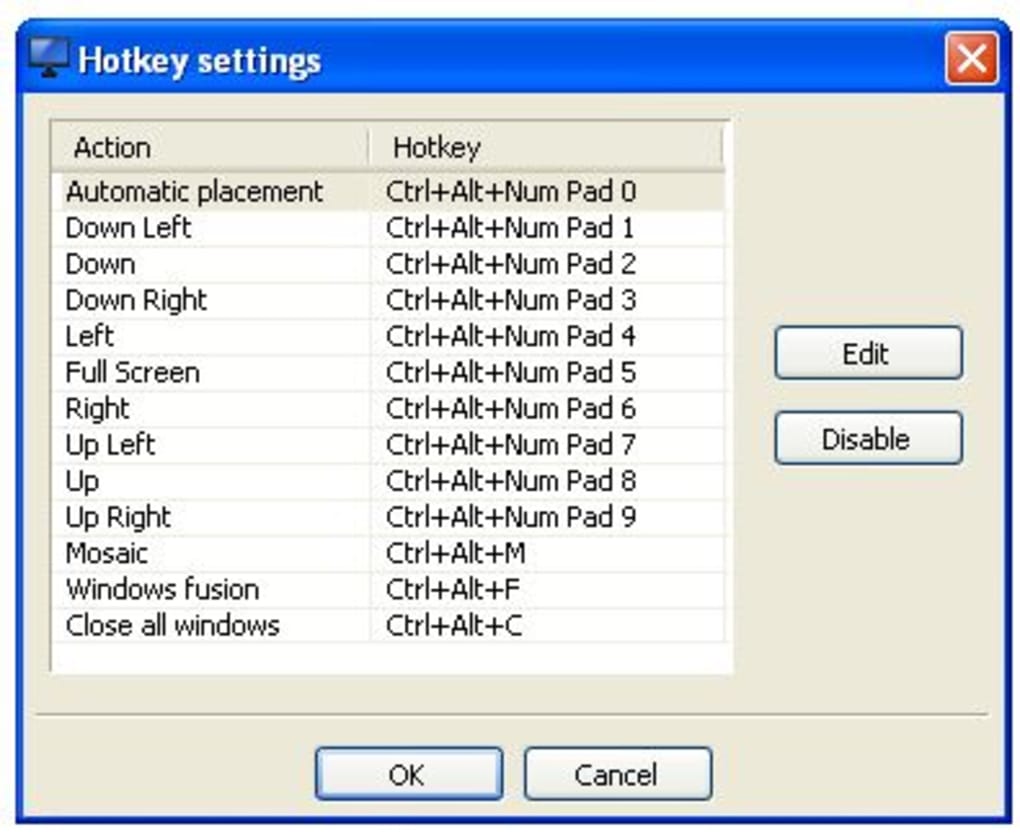
While the single-click functionality provides a convenient and accessible way to manage windows, WinSplit Revolution’s true power lies in its extensive use of keyboard shortcuts. These shortcuts provide a rapid and efficient method for organizing windows, allowing for near-instantaneous adjustments to your desktop layout without ever needing to reach for your mouse. This keyboard-centric approach drastically reduces the time spent juggling windows, allowing users to maintain their focus on the task at hand. The time saved through this efficient organization translates directly to increased productivity and reduced frustration.
The keyboard shortcuts aren’t just about speed; they are designed for intuitive use. The shortcuts themselves are carefully selected and logically grouped, minimizing the learning curve and allowing for rapid mastery. Users quickly learn to instinctively navigate their window arrangements, reacting to their workflow needs with swift and accurate adjustments. This streamlined interaction keeps the user engaged in their work, without the interruptions caused by tedious mouse-driven window manipulation.
One particularly noteworthy feature is the “Mosaic” option. This unique arrangement style displays all open windows in an Exposé-like view, offering a bird’s-eye perspective of all your active applications. This allows for quick identification of the desired window, facilitating a smoother transition between tasks. The “Mosaic” mode is particularly useful when dealing with a large number of open windows, as it provides an easily digestible overview of your entire digital workspace.
Addressing User Feedback and Continuous Improvement
The developers of WinSplit Revolution demonstrate a clear commitment to user experience and continuous improvement. Version 11.044.3(126), as noted in the release notes, addresses several critical issues and includes significant enhancements. The developers actively address user-reported bugs and implement solutions to improve the overall user experience. This responsiveness to user feedback is indicative of a dedication to producing a high-quality, reliable, and user-friendly product.
Specific improvements mentioned in the release notes include fixing bugs related to saved settings, installer language detection, and the update/uninstall process. These seemingly minor fixes have a significant impact on the overall user experience, ensuring a smooth and hassle-free interaction with the software. The inclusion of a “Cleanup Tool” to resolve potential issues during updates demonstrates a proactive approach to resolving problems and preventing user frustration. This attention to detail showcases the developers’ commitment to providing a stable and robust application.
User Reviews: A Testament to WinSplit Revolution’s Effectiveness
User reviews consistently praise WinSplit Revolution’s effectiveness in managing multiple windows, particularly on larger monitors. Users highlight its ease of use and its significant impact on their productivity. The positive feedback underlines the value and utility of the application, confirming its ability to effectively address the challenges of multitasking in a modern, multi-application work environment.
One reviewer succinctly describes WinSplit Revolution as “Simply the best!”, a testament to its intuitive design and efficient functionality. Another review emphasizes the software’s value for high-resolution screens, highlighting its ability to effectively utilize every pixel on the display. These testimonials demonstrate that WinSplit Revolution delivers on its promise of providing a seamless and efficient solution to window management.
The overwhelmingly positive user reviews speak to the software’s success in improving users’ productivity and workflow. The consistent praise for its ease of use, combined with its impactful features, highlights its effectiveness as a tool for streamlining multitasking and enhancing overall user experience.
Comparing WinSplit Revolution to Alternative Applications
While several alternative window management applications exist, WinSplit Revolution distinguishes itself through its unique combination of intuitive design, powerful keyboard shortcuts, and the highly effective “Mosaic” view. Alternatives, such as GridMove, AutoSizer, and Sizer, offer varying levels of functionality, often focusing on specific aspects of window management. GridMove, for example, focuses on organizing windows into grid-based arrangements, while AutoSizer optimizes window sizes. Sizer, on the other hand, offers more granular control over window resizing.
However, WinSplit Revolution’s integrated approach, combining automatic arrangement, precise keyboard controls, and the innovative “Mosaic” view, sets it apart. This comprehensive approach provides a more versatile and adaptable solution than many alternative applications. The combination of features caters to a wider range of user needs and preferences, making it a powerful and flexible tool for diverse multitasking workflows.
The competitive landscape highlights WinSplit Revolution’s strengths. While other apps may excel in specific areas, WinSplit Revolution’s well-rounded feature set, combined with its intuitive design and strong user feedback, establishes it as a leading contender in the window management category.
Conclusion: A Must-Have Utility for Efficient Multitasking
In a world of increasing multitasking demands, WinSplit Revolution stands out as an essential tool for anyone who works with multiple applications simultaneously. Its simple yet powerful features, combined with its commitment to user experience and continuous improvement, make it a must-have utility for enhancing productivity and streamlining workflows. The ease of use, combined with the speed and efficiency provided by the keyboard shortcuts and the innovative “Mosaic” view, transforms the often frustrating experience of multitasking into a seamless and productive process. Whether you’re a casual user or a power user, WinSplit Revolution offers a significant improvement to your digital workspace management.
File Information
- License: “Free”
- Latest update: “May 16, 2011”
- Platform: “Windows”
- OS: “Windows Vista”
- Language: “English”
- Downloads: “88.4K”
- Size: “1.57 MB”


