
In an era increasingly dominated by streaming and digital downloads, the physical media collection, particularly Blu-ray discs, still holds immense value for cinephiles, collectors, and those who cherish superior audio-visual fidelity. However, physical discs are susceptible to damage, scratches, and degradation over time, posing a constant threat to one’s cherished movie library. This is where specialized software like WinX Blu-ray Decrypter steps in, offering a robust solution for preserving these invaluable assets. Developed by Digiarty Software Inc., this professional-grade tool is designed to decrypt and back up Blu-ray discs, ensuring that your high-definition content remains accessible and protected for years to come.
WinX Blu-ray Decrypter is more than just a simple copying utility; it’s a sophisticated piece of software engineered to tackle the complex copy protection schemes inherent in commercial Blu-ray discs. It allows users to create digital backups of their legally owned Blu-ray movies, converting them into versatile M2TS video files or complete Blu-ray folders. This process not only safeguards against physical disc damage but also offers greater flexibility in how and where you can enjoy your movies, liberating them from the confines of a physical player. As we delve deeper, we will explore the intricate functionalities of WinX Blu-ray Decrypter, its place within the broader software landscape, and why it remains a vital tool for enthusiasts looking to secure their digital legacy.
Understanding Multimedia Software and Blu-ray Decryption
The realm of multimedia software encompasses a vast array of applications designed to create, edit, play, and manage various forms of digital media, including audio, video, and graphics. From sophisticated video editing suites to simple media players, these tools enhance our interaction with digital content. Within this expansive category, specialized applications like WinX Blu-ray Decrypter carve out a niche by addressing specific user needs related to media management and preservation.
Blu-ray technology, upon its introduction, promised unparalleled visual and audio quality, delivering movies in stunning high definition. However, alongside this technological leap came advanced digital rights management (DRM) and copy protection measures, primarily AACS (Advanced Access Content System) and BD+ (Blu-ray Disc Plus). These protections were implemented by content creators and studios to prevent unauthorized duplication and distribution of copyrighted material. While understandable from a commercial standpoint, these protections also inadvertently complicate the legitimate act of backing up legally purchased physical media.
For many users, backing up their Blu-ray collection isn’t about piracy; it’s about practical necessity. A favorite movie disc might get scratched by a child, lost during a move, or simply wear down from repeated use. Having a digital backup provides peace of mind, ensuring that the content remains accessible regardless of the physical disc’s fate. Furthermore, digital backups offer convenience, allowing users to store their movies on hard drives, media servers, or compatible devices, bypassing the need for a physical disc every time they want to watch a film. This is where the decryption capability of WinX Blu-ray Decrypter becomes indispensable. It serves as a bridge between the protected physical format and a flexible digital one, all while maintaining the original quality that Blu-ray is known for.
The core function of this application lies in its ability to effectively remove these copy protections. It’s built to handle contemporary encryption standards, including AACS MKB v25 and BD+, which are crucial for accessing the raw video and audio streams. Once decrypted, the content can then be copied and formatted into a user-friendly digital file, such as an M2TS video, or replicated as a Blu-ray folder structure. This conversion ensures compatibility with a wide range of media players and systems, expanding the utility of your Blu-ray collection beyond dedicated disc players.
The process undertaken by WinX Blu-ray Decrypter, while technical, is streamlined for the average user. It’s categorized under “Multimedia” due to its direct interaction with video content, and more specifically under “Burning” or “Disc Utilities” given its role in handling physical discs and preparing content for digital storage or potential re-burning. Its purpose aligns with the broader goal of multimedia software: empowering users to manage and enjoy their digital content as they see fit, within legal and ethical boundaries.
The Role of Utilities in Digital Preservation
Utility software plays a foundational role in maintaining the health, efficiency, and longevity of digital systems and data. These tools perform specific, often behind-the-scenes, tasks that enhance overall computing experience and provide critical functionalities not typically found in core operating systems. From file managers and data recovery tools to system cleaners and encryption software, utilities are diverse, yet all share the common goal of making digital life more manageable and secure.
In the context of digital preservation, utilities are paramount. Data recovery software, for instance, can retrieve accidentally deleted files or information from damaged drives, acting as a last line of defense against data loss. File compression tools help optimize storage space and facilitate faster transfers, contributing to efficient data archiving. Backup utilities, a cornerstone of preservation, automate the process of creating copies of important data, safeguarding against hardware failures, cyber-attacks, or accidental deletions.
WinX Blu-ray Decrypter fits squarely within this category of indispensable utilities, albeit with a specific focus on optical media. Its function to decrypt and backup Blu-ray discs is a specialized form of data management and preservation. For individuals with extensive Blu-ray libraries, these discs represent not just entertainment, but also a significant investment. Protecting this investment from the inevitable wear and tear of physical media is a practical application of digital preservation principles.
Consider the lifecycle of a physical Blu-ray disc. It’s handled, exposed to dust, moisture, and temperature fluctuations, and can easily suffer cosmetic or structural damage that renders it unplayable. By using a utility like WinX Blu-ray Decrypter, users can extract the pristine digital content from their discs before such damage occurs. This proactive approach transforms a perishable physical asset into a durable digital file, which can then be stored on robust storage solutions like network-attached storage (NAS) devices, external hard drives, or even cloud services (though ensuring sufficient bandwidth and storage for large Blu-ray files is important).
Furthermore, the output formats supported by WinX Blu-ray Decrypter – M2TS video files or Blu-ray folders – are designed for longevity and compatibility. M2TS, a container format used for Blu-ray discs, maintains high quality and is widely supported by various media players and editing software. Creating a Blu-ray folder replicates the original disc structure, allowing for easy playback with software players that can simulate a physical Blu-ray drive. This ensures that even as technology evolves, the core content remains accessible and playable using standard software tools.
Thus, WinX Blu-ray Decrypter serves as a critical utility for safeguarding one’s media collection. It’s not merely about copying; it’s about digital archiving, ensuring that the valuable entertainment stored on fragile physical discs can endure indefinitely in a more resilient digital format. Its specialized function contributes significantly to the broader landscape of personal digital preservation, empowering users to take control of their media assets.
Unpacking WinX Blu-ray Decrypter: Features and Benefits
WinX Blu-ray Decrypter stands out in the crowded software market due to its specific focus and powerful capabilities in handling Blu-ray disc encryption. At its core, it’s engineered to overcome the formidable copy protection measures that safeguard commercial Blu-ray releases, enabling users to create personal backups. This section will delve into its key features and the tangible benefits they offer to users.
The primary and most crucial feature of WinX Blu-ray Decrypter is its ability to decrypt robust Blu-ray copy protections. This includes advanced schemes such as AACS (Advanced Access Content System) up to MKB v25 and BD+ (Blu-ray Disc Plus). AACS is a DRM system used for Blu-ray and HD DVD, employing encryption keys to control access to content. BD+ is a virtual machine embedded in the disc, executing code to further obfuscate and protect the content, making it particularly challenging to bypass. WinX Blu-ray Decrypter’s continuous updates, at least during its active development phase, ensured it could keep pace with these evolving protections, a vital aspect for any decrypter. The original description specifies support for “AACS MKB v25,” indicating its capability to handle a significant generation of these protections.
Once decrypted, the software facilitates the backup of Blu-ray content into two primary formats:
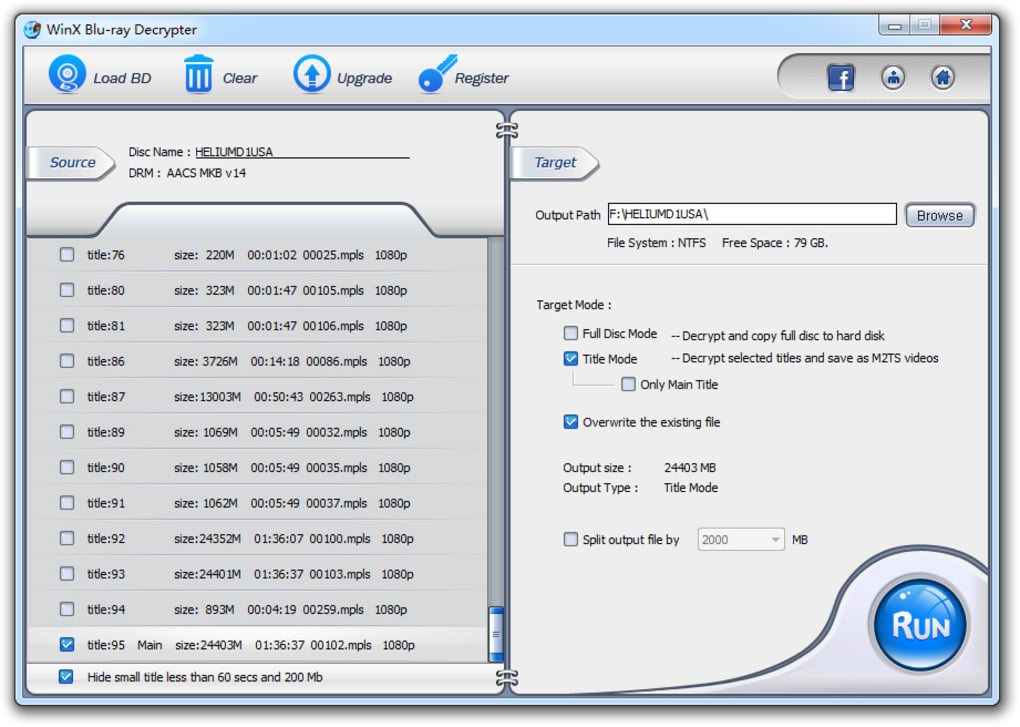
- M2TS Video File: This is a container format used for multiplexing audio, video, and other streams on Blu-ray discs. By converting the entire disc into a single M2TS file, WinX Blu-ray Decrypter creates a highly compatible and manageable digital file. This format preserves the original high-definition video and multi-channel audio, making it ideal for direct playback on media players or for further processing. Its compatibility with operating systems like Windows 7 Media Player was a key selling point, demonstrating its integration with common desktop environments.
- Blu-ray Folder (BDMV Folder): For users who prefer to maintain the original disc structure, including menus, chapters, and all supplementary content, the Blu-ray folder backup mode is invaluable. This option replicates the entire BDMV (Blu-ray Disc Movie) folder structure onto your hard drive. This folder can then be played back by software Blu-ray players that support folder playback, offering an experience very close to playing the physical disc itself, without the need for the disc.
A significant benefit of WinX Blu-ray Decrypter is its support for high-quality audio systems. Blu-ray discs are renowned not only for their visual fidelity but also for their immersive audio tracks. The software is designed to preserve original audio systems like DTS (Digital Theater Systems), E-AC3 (Enhanced AC-3), MLP (Meridian Lossless Packing), and TrueHD (Dolby TrueHD). This means that when you back up your Blu-ray, you’re not just getting the video; you’re retaining the multi-channel, lossless, or high-bitrate audio that contributes significantly to the cinematic experience. This commitment to preserving the original audio effect ensures that the digital backup is as faithful as possible to the source material.
The software also offers two distinct backup modes to cater to different user needs:
- Full Disc Blu-ray Backup: As the name suggests, this mode copies the entire content of the Blu-ray disc, including the main movie, menus, extra features, audio tracks, and subtitles. This is perfect for those who want a complete digital clone of their physical disc.
- Title Copy Mode: For users who only want the main movie or specific titles, this mode allows for selective copying. This is particularly useful for saving storage space and directly getting to the desired content without navigating menus or extras.
An incredibly valuable benefit, as highlighted by user reviews, is the software’s ease of use and fast decryption speed. Despite the complex underlying technology, the interface is designed to be intuitive, enabling even novice users to perform backups with minimal effort. This user-friendly approach, combined with cutting-edge technologies that accelerate the decryption process, makes WinX Blu-ray Decrypter a highly efficient tool. Users have consistently praised its power in decrypting protections, its ability to maintain HD image quality, and its straightforward operation.
Finally, the output compatibility of the decrypted files is extensive. The M2TS files and Blu-ray folders created by WinX Blu-ray Decrypter can be played on a wide array of popular media players, including VLC, DAPlayer, KMPlayer, MPlayer, SPlayer, and others. This ensures that users are not locked into a proprietary playback ecosystem and can enjoy their backed-up content on their preferred software. This universal compatibility adds to the flexibility and long-term utility of the digital backups.
In summary, WinX Blu-ray Decrypter provides a robust, user-friendly, and high-fidelity solution for Blu-ray owners. Its ability to overcome advanced copy protections, coupled with its support for full disc or title-specific backups and preservation of original audio/video quality, makes it an essential utility for anyone looking to safeguard and enjoy their precious Blu-ray collection in the digital domain.
Navigating Digital Rights Management and Copy Protection
Digital Rights Management (DRM) and copy protection technologies are integral components of the modern media industry, designed to control access to copyrighted content and prevent unauthorized duplication. For Blu-ray discs, the primary DRM systems are AACS (Advanced Access Content System) and BD+ (Blu-ray Disc Plus). While these systems are intended to protect intellectual property, they often create challenges for consumers who wish to exercise their legitimate rights, such as backing up legally purchased content for personal use.
AACS is a complex standard developed by a consortium of companies including IBM, Intel, Microsoft, Panasonic, Sony, Toshiba, Walt Disney Company, and Warner Bros. It uses cryptographic keys to encrypt the content on Blu-ray and HD DVD discs. When a licensed player attempts to play a disc, it uses a unique device key to decrypt the title keys, which then unlock the content. The system includes provisions for revocation, where if a specific player or device key is found to be compromised (i.e., used in an unauthorized way, often for decryption), its key can be revoked, preventing it from playing future AACS-protected content. This dynamic and evolving nature of AACS means that decryption software must constantly be updated to handle new “MKB” (Media Key Block) versions. WinX Blu-ray Decrypter, by supporting “AACS MKB v25,” demonstrated its capability to handle a significant iteration of this protection.
BD+ is another layer of protection, particularly challenging because it’s essentially a small virtual machine program embedded on the Blu-ray disc itself. This program executes code that can check the integrity of the playback device, modify data streams, and even introduce deliberate errors that only a BD+ compliant player can correct. If a non-compliant device tries to play the disc, the BD+ code will either introduce playback glitches or prevent playback altogether. Its dynamic nature means that each disc can have a slightly different BD+ code, requiring decryption tools to be highly adaptable.
The existence of these robust protections necessitates specialized software like WinX Blu-ray Decrypter for legitimate backup purposes. From a legal standpoint, many jurisdictions, including the United States under Section 107 of the Copyright Act (fair use) and other countries with similar provisions, recognize the right of consumers to make personal copies of content they legally own, primarily for archival or time-shifting purposes. However, the Digital Millennium Copyright Act (DMCA) in the U.S. and similar anti-circumvention laws globally often complicate this right by making it illegal to bypass technological protection measures (TPMs), even for otherwise legal activities. This creates a legal gray area, which makes the explicit purpose of tools like WinX Blu-ray Decrypter, which is to “back up their legally owned Blu-ray,” particularly important to highlight. Users should always be aware of the laws in their specific region regarding circumventing copy protection.
WinX Blu-ray Decrypter directly addresses this challenge by providing the technical means to bypass these TPMs, not for piracy, but for enabling personal archival. It abstracts away the complexity of AACS and BD+, presenting a simple interface for users to achieve their backup goals. By doing so, it serves an important function in the digital ecosystem, empowering consumers to safeguard their investments in physical media in a world increasingly moving towards digital-only purchases where physical ownership and backup rights are sometimes less clear. This capability ensures that a legally purchased Blu-ray disc can have a long and secure digital life, independent of the fragility of the physical medium.
User Experience and System Compatibility
Beyond its powerful decryption capabilities, the success and popularity of WinX Blu-ray Decrypter also hinge significantly on its user experience and broad system compatibility. A powerful tool is only truly effective if it is accessible and reliable for its target audience.
From the perspective of user experience, WinX Blu-ray Decrypter has been designed with simplicity in mind. The original article highlights it offers an “incredibly easy-to-use solution.” This ease of use is frequently echoed in user reviews, such as one stating, “easy to use and fast to decrypt.” Despite the complex technical processes occurring in the background – like deciphering AACS MKB v25 and BD+ protections – the front-end interface remains intuitive. Typically, users would insert their Blu-ray disc, select their desired output format (M2TS video or Blu-ray folder), choose their backup mode (full disc or title copy), and initiate the decryption and copying process. This straightforward workflow minimizes the learning curve, making the software approachable for individuals who may not possess advanced technical knowledge.
Performance is another critical aspect. User feedback specifically praises the software for being “fast to decrypt.” This efficiency is vital, given that Blu-ray discs contain a vast amount of data, and the decryption process itself is computationally intensive. The integration of “cutting-edge technologies,” as mentioned in the product description, suggests optimizations for speed and resource management. A rapid decryption process means less waiting time for users, allowing them to quickly create their backups and resume enjoying their media.
In terms of system compatibility, WinX Blu-ray Decrypter is specifically designed for the Windows OS. The description explicitly lists “Windows XP” as a supported platform, indicating that it was developed to function across various generations of Microsoft’s operating system. While Windows XP is an older OS, its mention implies that the software would likely also be compatible with newer versions of Windows (e.g., Windows 7, 8, 10, and potentially 11, though this would need verification for the latest versions given its last update date). This broad compatibility ensures that a wide range of PC users can leverage the software without significant hardware or OS upgrade requirements. The application’s size is also relatively modest at 5.85 MB, suggesting it’s not a heavy application that would strain system resources.
The developer, Digiarty Software Inc., is a well-known entity in the multimedia software space, particularly for video conversion and DVD/Blu-ray tools. Their reputation adds a layer of trust and reliability to the WinX brand. They often develop a suite of related programs, as indicated by “More programs (31)” in the original context, suggesting expertise in the field.
Regarding output compatibility, a significant benefit is that the resulting M2TS files can be played on a variety of popular media players. The original content lists VLC, DAPlayer, KMPlayer, MPlayer, and SPlayer. This versatility is crucial, as it allows users to integrate their backed-up content into their existing media consumption ecosystems without needing specialized or proprietary players. Whether streaming to a smart TV via a media server, playing directly on a PC, or transferring to a compatible mobile device (though a user review expressed a desire for direct Android conversion, suggesting M2TS might need further conversion for mobile), the digital files offer superior flexibility compared to physical discs.
It’s important to note the software is provided as a trial version. This model allows prospective users to test its functionalities and ensure it meets their specific needs before committing to a purchase. The language of the software is English, making it accessible to a vast global audience, though other language options for the marketing materials and website were available on PhanMemFree.org, indicating a broader reach for the developer’s products.
Despite its last update being February 23, 2012, which means it might not handle the absolute latest Blu-ray copy protections, WinX Blu-ray Decrypter, during its active life cycle, was lauded for its effectiveness. The user reviews, even from 2012, highlight its consistent performance, with one user exclaiming it was “freaking good to decrypt BD encryptions” and “just what I was looking for!” This feedback underscores its strong reputation for delivering on its core promise: providing a simple, fast, and effective way to decrypt and back up Blu-ray discs while preserving high-definition quality.
Conclusion: Securing Your Digital Legacy with WinX Blu-ray Decrypter
In a rapidly evolving digital landscape, the value of physical media like Blu-ray discs, with their superior quality and tangible ownership, continues to resonate with many users. However, the inherent fragility of optical discs and the restrictive nature of digital rights management technologies pose significant challenges to their long-term preservation. WinX Blu-ray Decrypter emerges as a pivotal solution in this context, offering a reliable and user-friendly means to protect and extend the life of your cherished Blu-ray collection.
Throughout this guide, we’ve explored how WinX Blu-ray Decrypter effectively bridges the gap between physical media and digital convenience. Its ability to meticulously decrypt advanced copy protections such as AACS MKB v25 and BD+ ensures that legally owned content can be successfully liberated from its protective shell. By offering versatile output formats like high-quality M2TS video files or complete Blu-ray folders, the software empowers users to create faithful digital replicas that retain the original audio and visual fidelity, including support for sophisticated audio systems like DTS and TrueHD.
The importance of such a utility extends beyond mere copying; it’s about digital preservation. In an age where digital content is often licensed rather than truly owned, and streaming services can remove titles at will, having a personal, durable backup of your media library offers unparalleled security and control. WinX Blu-ray Decrypter acts as a proactive measure against disc damage, data loss, and technological obsolescence, ensuring that your cinematic investments remain accessible for future enjoyment.
User satisfaction, as evidenced by positive reviews, consistently points to the software’s ease of use, efficient performance, and robust decryption capabilities. Its compatibility with the Windows operating system and its output’s wide playability across various media players further solidify its position as an accessible and practical tool. Developed by Digiarty Software Inc., a reputable name in multimedia utilities, WinX Blu-ray Decrypter reflects a commitment to providing effective solutions for media management.
While the software’s last update might prompt consideration for the very newest Blu-ray releases, its core functionality and historical effectiveness make it a testament to the ongoing need for tools that empower consumers to manage their digital assets. For anyone looking to safeguard their Blu-ray collection from the ravages of time and physical wear, and to enjoy their movies with enhanced flexibility, WinX Blu-ray Decrypter offers a powerful and comprehensive solution. It’s more than just a decrypter; it’s a guardian of your high-definition memories, ensuring your legally owned Blu-rays can thrive in the digital age. For more information on this and other essential utilities, you can often find resources on sites like PhanMemFree.org.
File Information
- License: “Trial version”
- Version: “3.4.1”
- Latest update: “February 23, 2012”
- Platform: “Windows”
- OS: “Windows XP”
- Language: “English”
- Downloads: “17.8K”
- Size: “5.85 MB”


