
WinX DVD Ripper Platinum is a popular software application designed to rip DVDs and convert their contents into various digital formats. This review will delve into its features, performance, ease of use, and overall value, examining both its strengths and weaknesses based on user feedback and technical analysis. We’ll also compare it to alternative software options and consider its place in the broader landscape of DVD ripping utilities.
Feature Set and Functionality
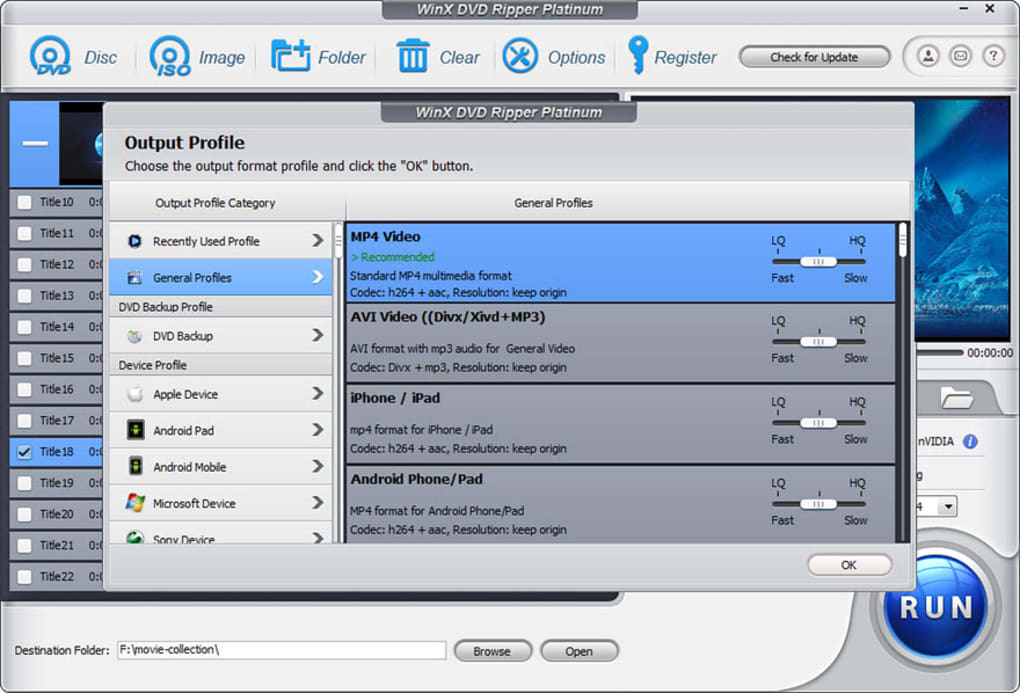
WinX DVD Ripper Platinum boasts a comprehensive suite of features aimed at providing users with versatile DVD ripping capabilities. Its core function is to convert DVD content into a range of digital formats, including AVI, MPG, and numerous others commonly compatible with computers, smartphones, and portable media players. The software supports a wide array of video codecs and resolutions, allowing users to customize the output to suit their specific needs and devices.
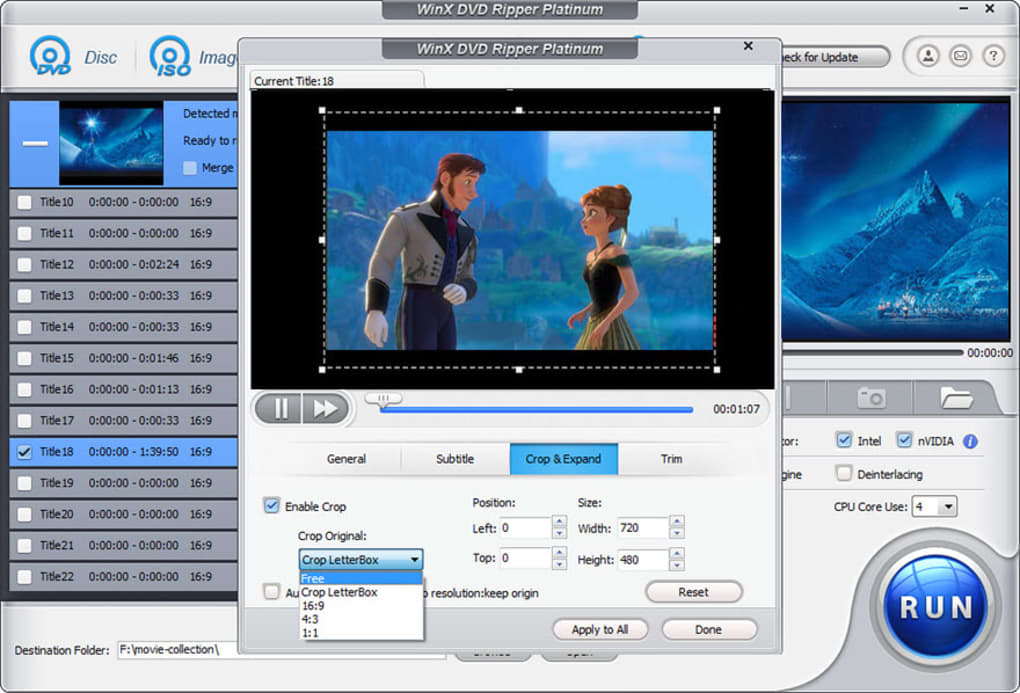
Beyond basic ripping, WinX DVD Ripper Platinum offers several advanced features that enhance its functionality. Users can select specific portions of a DVD to rip, enabling the extraction of individual chapters, scenes, or trailers, without needing to convert the entire disc. This selective ripping feature is useful for saving storage space and time. Furthermore, the software typically allows for the customization of output parameters, such as video bitrate, audio quality, and frame rate, permitting users to fine-tune the balance between file size and video quality.
However, some user reviews indicate limitations in the audio conversion capabilities. The sound conversion might be restricted to MP3 format, leaving out other, possibly preferred, audio codecs. The absence of a built-in video player is another drawback mentioned by users. While this is not a critical flaw, it can be a minor inconvenience for users seeking an all-in-one solution for playback and conversion.
User Interface and Ease of Use
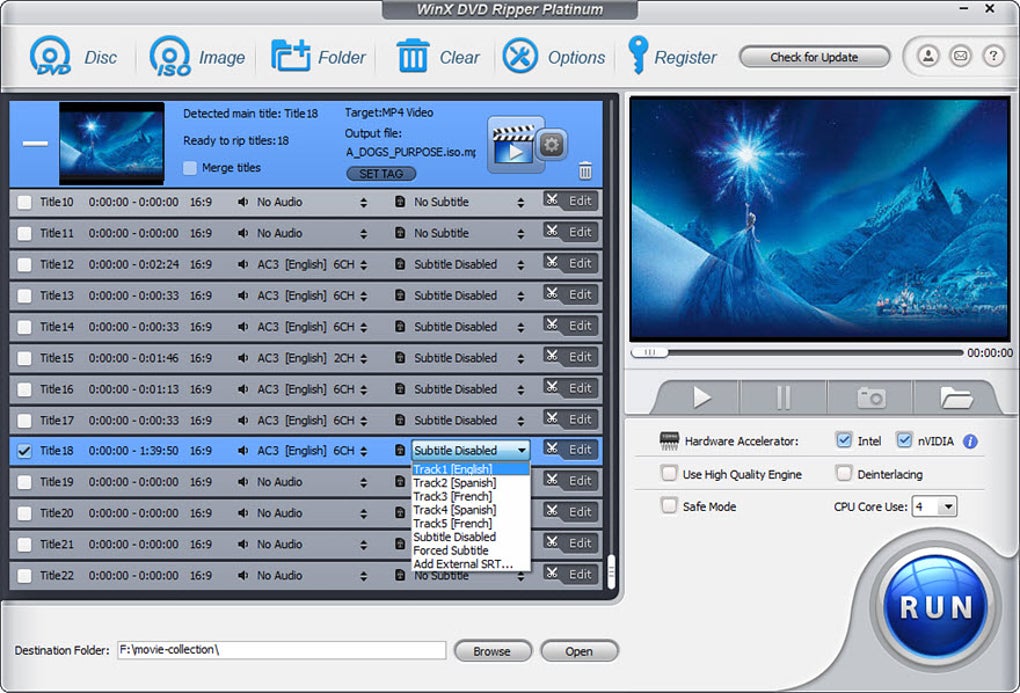
WinX DVD Ripper Platinum is generally praised for its intuitive user interface. The software is designed to be user-friendly, making the DVD ripping process accessible even to those with limited technical expertise. The clean layout and straightforward navigation make it easy to select input sources, choose output formats, customize settings, and initiate the ripping process.
The simple, step-by-step procedure minimizes the technical knowledge required. Users can typically accomplish basic DVD ripping tasks quickly and efficiently using default settings. However, for advanced users who require more control over conversion parameters, the software offers extensive customization options. These options, while potentially daunting for novices, provide experienced users with the flexibility to fine-tune output quality and file size.
Performance and Speed
The speed of conversion is a crucial factor in evaluating DVD ripping software. WinX DVD Ripper Platinum’s performance varies based on factors such as hardware specifications (CPU, RAM, and hard drive speed), DVD content complexity (video and audio compression), and chosen output settings.
While some users report satisfactory ripping speeds, others have noted that the process can be slow, especially when handling larger DVDs or when selecting high-quality output settings. In some instances, users have experienced conversion times exceeding two hours for a standard-length DVD. This slow performance could be a significant drawback for users prioritizing fast processing. Optimizing settings to balance speed and quality might be necessary to mitigate this issue.
Pricing and Licensing
WinX DVD Ripper Platinum offers a dual pricing model. A free version is available, but it’s often limited in functionality, with possible restrictions on the output formats and features. The full-fledged version typically requires a purchase. User reviews highlight concerns about the true cost of the software, suggesting that what’s advertised as “free” or “cheap” often requires additional, unexpected payments for upgrades or expanded functionality after minor software releases. Such practices lead to considerable frustration among customers who feel misled by the initial pricing.
Comparison with Alternative Software
WinX DVD Ripper Platinum faces competition from several alternative DVD ripping programs. Software like VLC Media Player, HandBrake, and MakeMKV provide similar DVD ripping capabilities. These alternatives often differ in their feature sets, performance, user interfaces, and pricing models.
VLC Media Player, a versatile and popular media player, includes basic DVD ripping functionality. It’s free and open-source, but its ripping features may lack the advanced customization options of WinX DVD Ripper Platinum. HandBrake, another free and open-source option, is known for its strong compression algorithms and ability to produce high-quality output files. It offers significant control over output parameters but may have a steeper learning curve than WinX DVD Ripper Platinum. MakeMKV is a popular choice for creating exact copies of DVDs, focusing on preserving the original quality and structure.
The choice between WinX DVD Ripper Platinum and alternative options often depends on individual needs and priorities. Users seeking a straightforward and user-friendly interface with a wide range of supported formats might find WinX DVD Ripper Platinum appealing. However, users who prioritize speed, extensive customization options, or free and open-source software may find alternative options like HandBrake or MakeMKV more suitable.
Customer Support and User Reviews
Customer support is an essential aspect of any software purchase. However, user reviews reveal significant concerns regarding WinX DVD Ripper Platinum’s customer service. Many users report negative experiences with technical support, describing it as inadequate, unresponsive, and unhelpful. Such feedback casts a significant shadow on the overall user experience. The deceptive marketing practices, misleading free versions, and lackluster customer support collectively undermine the software’s reputation.
Conclusion
WinX DVD Ripper Platinum offers a relatively user-friendly interface and a wide range of supported output formats, making it accessible to users with varying levels of technical expertise. However, its performance inconsistencies, concerning pricing practices, and questionable customer support raise serious concerns. Potential users should carefully weigh the software’s advantages against its significant drawbacks before deciding whether to install it. Exploring alternative, free, and open-source solutions might be a more prudent approach for users seeking reliable and cost-effective DVD ripping capabilities. The availability of superior, free alternatives offering comparable functionality and robust customer support makes the value proposition of WinX DVD Ripper Platinum questionable.
File Information
- License: “Free”
- Latest update: “July 8, 2025”
- Platform: “Windows”
- OS: “Windows XP”
- Language: “English”
- Downloads: “71.7K”
- Size: “33.20 MB”


