
WinX MediaTrans presents itself as a streamlined alternative to iTunes for managing your iPhone or iPad’s media content. This review delves into its features, performance, and overall user experience, comparing it to competing software and evaluating its strengths and weaknesses. We’ll examine its speed, ease of use, unique capabilities, and any potential drawbacks to provide a comprehensive assessment for potential users.
Streamlined Media Management: A User-Friendly Interface?
WinX MediaTrans boasts a user-friendly interface designed for intuitive navigation. The goal is to simplify the often-complex process of managing photos, videos, music, and other files on iOS devices. While the initial setup might present a slight learning curve for some users, the general consensus points towards a clean and straightforward design that allows for efficient management of media. The application avoids the convoluted menus and settings that can plague other similar applications, focusing on a minimalist approach that prioritizes ease of access to core functionalities. However, the simplicity might feel restrictive for power users seeking highly customizable options. Ultimately, the effectiveness of the user-friendly design depends heavily on individual user experience and preferences.
Speed and Performance: Lightning-Fast Transfers?
One of WinX MediaTrans’s key selling points is its advertised high-speed transfer capabilities, particularly for large files such as 4K videos. The software leverages hardware acceleration technologies like Intel QSV and Nvidia NVENC to significantly boost transfer speeds. User reports generally support these claims, highlighting the noticeable speed improvement compared to other iPhone/iPad management software. The ability to transfer 100 4K photos in mere seconds is a compelling argument, showcasing its efficiency in handling large media libraries. However, actual performance may vary depending on the device’s processing power, the connection speed between the device and the computer, and the size and number of files being transferred. While it’s generally faster than many alternatives, users should manage expectations accordingly based on their specific hardware and network conditions.
Beyond Basic Transfers: Advanced Features and Capabilities
WinX MediaTrans goes beyond simple file transfers, offering several advanced features designed to enhance the user experience. These features aim to address common frustrations associated with managing iOS devices.
Music Management: More Control Over Playlists
The application provides more robust music management options than many competitors. Users can create, modify, delete, and rebuild playlists with greater flexibility. This granular control allows for a personalized music experience, surpassing the limitations of simpler file transfer utilities. The ability to easily add and manage individual songs adds to the overall control offered by the software.
Photo Backup: Flexible and Efficient
WinX MediaTrans offers considerable flexibility in backing up photos from your iPhone or iPad. Users can selectively export photos based on date (day, month, year), or opt to back up all photos at once. This tailored approach ensures that users can manage their photo backups effectively, choosing to back up specific events or periods as needed. This contrasts with some applications that force an all-or-nothing approach to photo backups.
Video Management: Intelligent Handling of 4K and HD Content
The software’s video management capabilities stand out, particularly its intelligent handling of 4K and 1080p HD videos. The ability to automatically convert videos to iOS-compatible formats simplifies the process of syncing videos with your iPhone or iPad, eliminating the need for manual format conversion. Moreover, WinX MediaTrans features size reduction capabilities for large video files, reducing file size by up to 50% without significant quality loss, saving valuable storage space on your iOS device. The software also includes automatic video rotation, addressing potential orientation issues that might arise from video recordings.
File Storage: Turning Your iPhone into a USB Drive
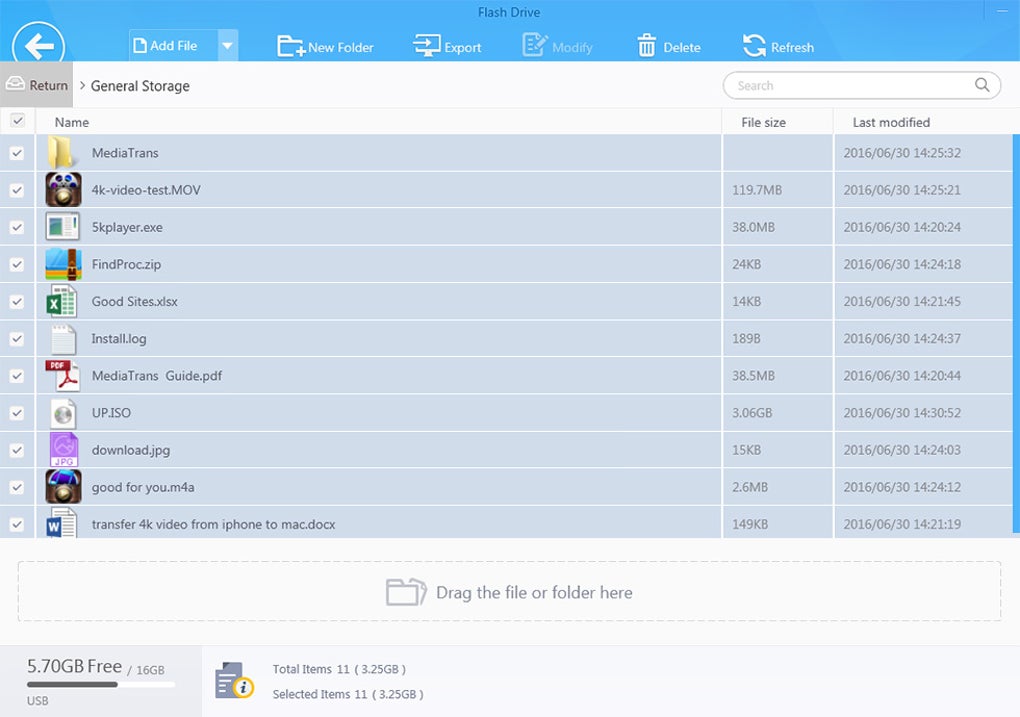
A unique feature of WinX MediaTrans is its capability to transform your iOS device into a virtual USB drive. This allows for the storage of various file types, including Word documents, Excel spreadsheets, PDF files, and other documents. This functionality expands the use of the iOS device beyond its typical media and app storage roles, effectively turning it into a portable storage device. This feature increases the practicality of the software, especially for users who frequently need to transfer documents and files between their PC and iOS device.
Comparison with Other iPhone/iPad Management Software
WinX MediaTrans competes with several other software applications designed for iPhone and iPad media management. Compared to iTunes, WinX MediaTrans offers a significant speed advantage and a more user-friendly interface. The program is faster and more efficient in handling large media files, providing a more streamlined workflow. Other alternatives like iPhotoTrans, Aiseesoft FoneTrans, EaseUS MobiMover Free, and iExplorer each offer unique functionalities. However, WinX MediaTrans’s combination of speed, advanced video management tools, and flexible music organization sets it apart from many of its competitors. The ability to function as a virtual USB drive is also a unique selling point that increases its overall utility.

Drawbacks and Limitations
While WinX MediaTrans offers many benefits, it is not without its drawbacks. The initial setup procedure can be slightly more complex than some competing applications, potentially posing a challenge for less tech-savvy users. Backing up all your data, especially large media libraries, requires a significant amount of storage space. The absence of automatic scheduled backups is another limitation, requiring users to manually initiate backups. Furthermore, WinX MediaTrans doesn’t support all mobile devices, although it does support a wide range of Apple devices.
Conclusion: A Powerful Tool with Some Caveats
WinX MediaTrans is a powerful tool that offers a fast, user-friendly alternative to iTunes for managing media on your iPhone or iPad. Its impressive speed, particularly for large video files, is a significant advantage. The inclusion of advanced features like flexible music and photo management, intelligent video handling, and the virtual USB drive function significantly enhances its utility. However, the absence of automatic backups and the initial setup complexities could be deterrents for some users. The need for substantial storage space for backups is another factor to consider. Ultimately, whether WinX MediaTrans is the right choice depends on your individual needs and priorities. If speed and advanced features are paramount, it’s a strong contender. However, users looking for a fully automated solution or a simpler, more straightforward setup might consider exploring alternative options.
File Information
- License: “Trial version”
- Latest update: “December 29, 2023”
- Platform: “Windows”
- OS: “Windows 8.1”
- Language: “English”
- Downloads: “8.3K”
- Size: “48.96 MB”


