
WipeFile is a free, powerful, and easy-to-use Windows utility designed for the permanent deletion of files and folders. Unlike simply moving files to the Recycle Bin, which leaves them vulnerable to recovery, WipeFile employs multiple data wiping methods to ensure complete and unrecoverable deletion. This ensures that sensitive information is irretrievably removed from your hard drive, protecting your privacy and security. This comprehensive guide explores WipeFile’s features, functionality, and how it stacks up against alternative solutions.
Understanding the Need for Secure File Deletion
In today’s digital world, the simple act of deleting a file doesn’t always guarantee its complete removal. Deleted files often remain on your hard drive, residing in unallocated space until overwritten by new data. This leaves them susceptible to recovery through various data recovery tools, potentially exposing sensitive personal information, financial records, or confidential business documents.
The risk is amplified when dealing with sensitive data like financial documents, medical records, or legal agreements. Even seemingly innocuous files can reveal personal information when pieced together, making secure deletion crucial for privacy protection.
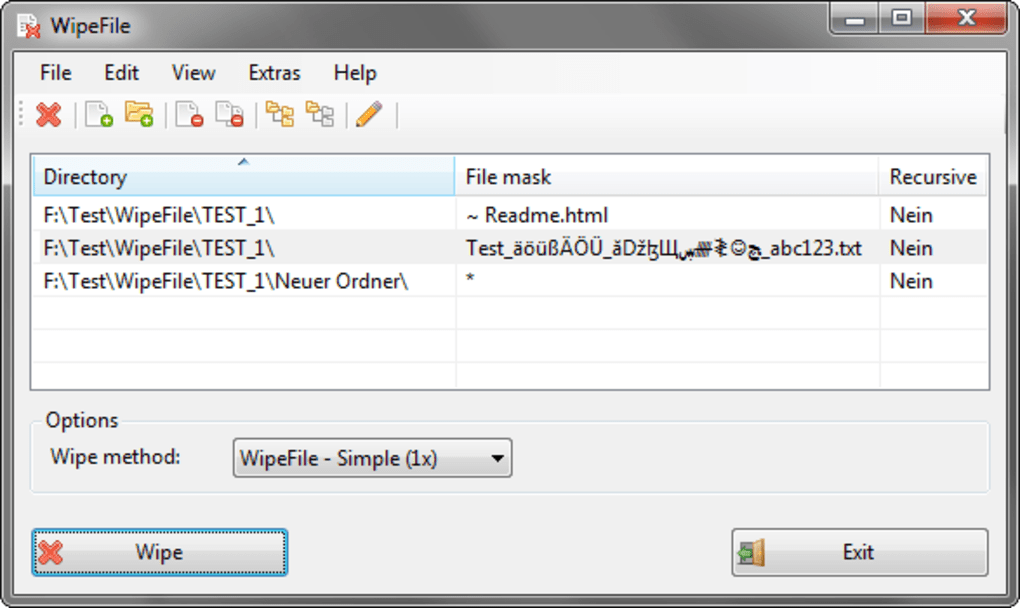
WipeFile addresses this critical need by providing a robust solution for permanently removing files and folders, leaving no trace behind for recovery attempts.
WipeFile’s Key Features and Functionality
WipeFile distinguishes itself through its simplicity and power combined. Its straightforward interface belies its sophisticated functionality, making it accessible to both novice and experienced users. Here’s a breakdown of its core features:
-
Multiple Wiping Methods: WipeFile offers a range of data wiping methods, ranging from single overwrites to multiple passes. These methods, often based on standards used by government agencies like the US Department of Defense, the US Air Force, and NATO, guarantee varying levels of data destruction. The more passes employed, the more difficult it becomes for data recovery tools to reconstruct the deleted information. This flexibility allows users to choose a method that best suits their security needs and time constraints. Options range from a quick single overwrite to more rigorous methods involving up to 35 overwrites, effectively rendering the data unrecoverable.
-
User-Friendly Interface: While initially launching in German, the language can easily be changed to English via the program’s settings (Extras > Sprache/Language). The interface is intuitive and straightforward. Users simply select the files or folders they wish to delete, choose a wiping method, and click the “Wipe” button. The entire process is typically completed within a minute, making it efficient and convenient.
-
File Masking for Folders: This crucial feature allows users to specify file types for deletion within a folder. This prevents accidental deletion of important files while effectively removing only targeted files, such as temporary files or specific document types. This level of control enhances precision and minimizes the risk of unintended data loss.
-
Seamless Windows Explorer Integration: WipeFile integrates seamlessly with Windows Explorer, providing a convenient context menu option. This allows users to securely delete files and folders directly from the Explorer window, streamlining the workflow and eliminating the need to open a separate application. The integration simplifies the process, making secure deletion a natural extension of standard file management.
-
Fast Processing: The deletion process is remarkably quick, typically taking less than a minute, regardless of the chosen wiping method or file size. This efficiency ensures a minimal disruption to the user’s workflow.
Comparison with Alternative Secure Deletion Tools
Several other secure deletion tools exist, each with its strengths and weaknesses. WipeFile distinguishes itself by offering a compelling balance of power, ease of use, and a generous feature set. Let’s look at some alternatives:
-
Eraser: Eraser is a well-known and respected secure deletion tool. It offers a similar range of wiping methods to WipeFile but can be slightly more complex to use for new users. It might be preferred by advanced users who need more detailed configuration options, but its steeper learning curve could be a barrier for some.
-
Hardwipe: Hardwipe focuses on secure deletion but may lack the sophisticated features and user-friendly interface offered by WipeFile. Its focus on simplicity may suit some users, while others might prefer the more comprehensive options available in WipeFile.
-
Freeraser: Freeraser acts as an alternative recycle bin for sensitive files. While providing a layer of security, its wiping methods might not be as extensive or robust as those in WipeFile. It offers a different approach, focusing on a managed temporary storage for sensitive files before permanent deletion, rather than directly offering multiple wiping methods.
While these alternatives provide secure deletion capabilities, WipeFile stands out due to its combination of powerful wiping methods, intuitive interface, and seamless Windows Explorer integration. This creates a user experience that’s both efficient and secure.
Addressing Limitations and Potential Improvements
While WipeFile offers many advantages, some areas for improvement exist:
-
Lack of English Documentation: Although the application itself is available in English, the absence of comprehensive English documentation might be a minor inconvenience for some users. While the application is intuitive enough to use without extensive documentation, a user manual would enhance the overall experience and potentially attract a wider audience.
-
Limited Platform Support: Currently, WipeFile is solely available for Windows. Expanding its support to other operating systems like macOS or Linux could significantly broaden its appeal and user base.
Conclusion: WipeFile – A Reliable Choice for Secure Deletion
WipeFile provides a reliable and user-friendly solution for permanently deleting files and folders. Its multiple wiping methods, seamless Windows Explorer integration, and intuitive interface make it a powerful yet easy-to-use tool for protecting sensitive data. While some minor improvements like comprehensive English documentation and broader operating system support could be beneficial, WipeFile effectively addresses the critical need for secure file deletion, providing users with confidence in the permanent removal of sensitive information. Its ease of use makes it an excellent choice for both novice and experienced users seeking a reliable solution for protecting their privacy and security. The strong emphasis on data security, coupled with its efficient performance, makes WipeFile a valuable addition to any Windows user’s toolkit.
File Information
- License: “Free”
- Latest update: “May 23, 2023”
- Platform: “Windows”
- OS: “Windows XP”
- Language: “English”
- Downloads: “23.4K”
- Size: “121.97 KB”


