
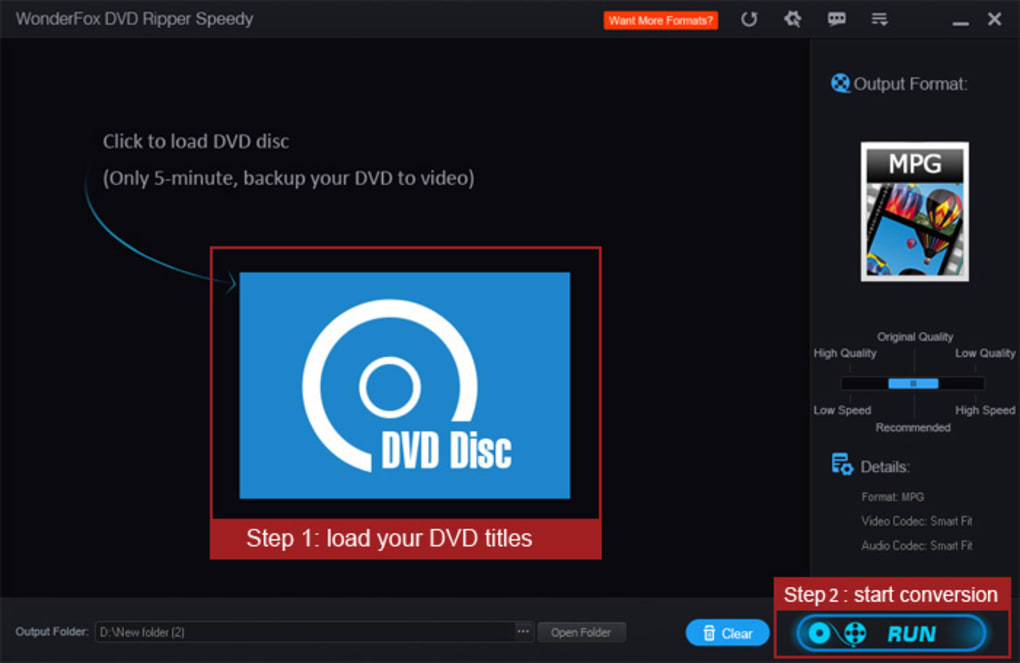
WonderFox Free DVD Ripper Speedy is a free video software designed to rip DVD files quickly and efficiently, delivering the best possible output quality. Leveraging its instant DVD decryption and exclusive rapid encoding GRVE-2 technologies, this application boasts impressive ripping speeds, often completing the process within five minutes. This speed is achieved without compromising the quality of the output video, ensuring a complete and accurate reproduction of your DVD content, free from issues like missing keyframes, quality loss, redraw problems, or unexpected crashes. The program effectively reduces file size, freeing up valuable storage space on your device.
Rapid Ripping and Quality Preservation
The core strength of WonderFox Free DVD Ripper Speedy lies in its exceptional speed. The software is engineered to convert entire movies and TV series to MPG format, preserving the original soundtrack and subtitles. This swift processing time, often under five minutes for an entire DVD, sets it apart from many competitors. However, this remarkable speed doesn’t come at the cost of video quality. The software utilizes advanced algorithms to ensure that the output video maintains the same high quality as the original DVD source material. Users can expect a faithful reproduction of their cherished DVD movies and shows without noticeable degradation.
The program’s efficiency extends beyond mere speed. Its intelligent encoding ensures that the final output is optimized for size without compromising visual fidelity. This feature is particularly beneficial for users with limited storage capacity or those who frequently transfer files between devices. The combination of speed and quality preservation positions WonderFox Free DVD Ripper Speedy as a highly effective solution for DVD backup and conversion needs.
Essential Editing Capabilities for Enhanced Video Output
Beyond its primary function of DVD ripping, WonderFox Free DVD Ripper Speedy offers a basic suite of video editing tools. These tools allow users to fine-tune their DVD videos before conversion, resulting in a more personalized and enjoyable viewing experience. The program supports several essential editing features, empowering users to enhance their videos effectively. These capabilities include:
-
Subtitle Management: Easily add or remove subtitles from your DVD videos. This feature is particularly helpful for users who prefer different language options or want to eliminate subtitles altogether.
-
Cropping and Clipping: Precisely crop and clip sections of your videos. This allows users to remove unwanted parts of the video, such as black bars or unnecessary scenes, focusing on the most relevant segments.
-
Special Effects: While the range of effects may be limited compared to professional editing software, the inclusion of basic effects allows for simple enhancements and adjustments to the visual appearance of the video.
-
Parameter Customization: WonderFox Free DVD Ripper Speedy allows adjustments to crucial video and audio parameters, providing a level of control that goes beyond simple ripping. Users can modify settings such as video resolution, bitrate, aspect ratio, frame rate, and sample rate. This empowers users to optimize their videos for various playback devices and viewing scenarios.
-
Audio Volume Control: A built-in volume booster allows precise adjustment of the audio levels, ensuring that the audio track is neither too loud nor too soft for optimal listening.
-
Smart Fit Profile: For users less familiar with video parameters, the software offers a “smart fit” profile. This streamlined option automatically optimizes settings for the chosen output format, simplifying the conversion process.
These editing features contribute significantly to the program’s overall usability and allow users to customize their output, tailoring it to their specific needs and preferences. While the editing functionalities are not as extensive as professional-grade editing software, they offer a convenient and sufficient toolkit for basic video enhancements.
Limitations and Considerations: Beyond the Free Version
While WonderFox Free DVD Ripper Speedy provides a robust free offering, there are certain limitations. The most significant limitation is the restricted output format: MPG. While this is a versatile format, users seeking to convert their DVDs to other popular formats such as MP4, MKV, MOV, or AVI will need to upgrade to the paid version, WonderFox DVD Ripper Pro.
This restriction primarily affects users who require compatibility with a wider range of devices and players. The free version is perfectly adequate for those who only need to convert to MPG or create ISO image and DVD folder backups. For users who require broader format support, the upgrade to the Pro version is a necessary step to unlock this functionality.
The free version is genuinely effective for its intended purpose: fast and high-quality ripping to MPG. However, users should be aware of this limitation before relying on the software for extensive format conversion needs. The choice between the free and Pro versions ultimately depends on individual requirements and preferences.
Comparing WonderFox Free DVD Ripper Speedy with Alternatives
WonderFox Free DVD Ripper Speedy competes in a crowded market of DVD ripping software. Many other free and paid options exist, each with its own strengths and weaknesses. The free options generally lack the speed and quality assurance found in WonderFox Free DVD Ripper Speedy, often compromising either ripping time or video fidelity. Paid software usually offers more features and broader format support, but these come at a cost.
The competitive landscape highlights the unique position of WonderFox Free DVD Ripper Speedy. Its strength lies in its optimal balance of speed and quality within the free software segment. While more extensive feature sets are available through paid alternatives, few free options can match its performance. The decision to choose WonderFox Free DVD Ripper Speedy over competing alternatives depends on the user’s prioritization of speed, quality, and features. If the primary focus is rapid, high-quality conversion to MPG, WonderFox Free DVD Ripper Speedy proves to be a highly effective and efficient solution.
In conclusion, WonderFox Free DVD Ripper Speedy stands as a valuable tool for users seeking a fast, reliable, and quality-preserving method for ripping DVDs. Its impressive speed, coupled with essential editing capabilities, makes it a strong contender in the free DVD ripping software market. While the limitations regarding output formats exist, its strengths in speed and quality make it an excellent choice for users who primarily need MPG conversion or ISO/DVD folder backup. However, users seeking broader format support should consider upgrading to the Pro version to unlock the full range of functionalities.
File Information
- License: “Free”
- Latest update: “June 16, 2025”
- Platform: “Windows”
- OS: “Windows 8.1”
- Language: “English”
- Downloads: “9.6K”


