
WonderFox Free HD Video Converter Factory presents itself as a versatile multimedia tool designed for quick and easy video file conversion. This review delves into its features, performance, and overall user experience, comparing it to similar software and highlighting its strengths and weaknesses.
User Interface and Functionality
One of the most striking aspects of WonderFox Free HD Video Converter Factory is its user-friendly interface. Unlike some video converters that can feel cluttered and confusing, this software boasts a clean, well-organized layout. All functions are clearly displayed, making navigation intuitive even for novice users. The process, from file selection to format choice, is remarkably straightforward, requiring minimal technical expertise. Users can easily select output formats from a comprehensive list, catering to a wide array of devices, including popular brands like Apple, Samsung, and Sony. The software’s ability to support over 300 file formats addresses virtually any compatibility concern.
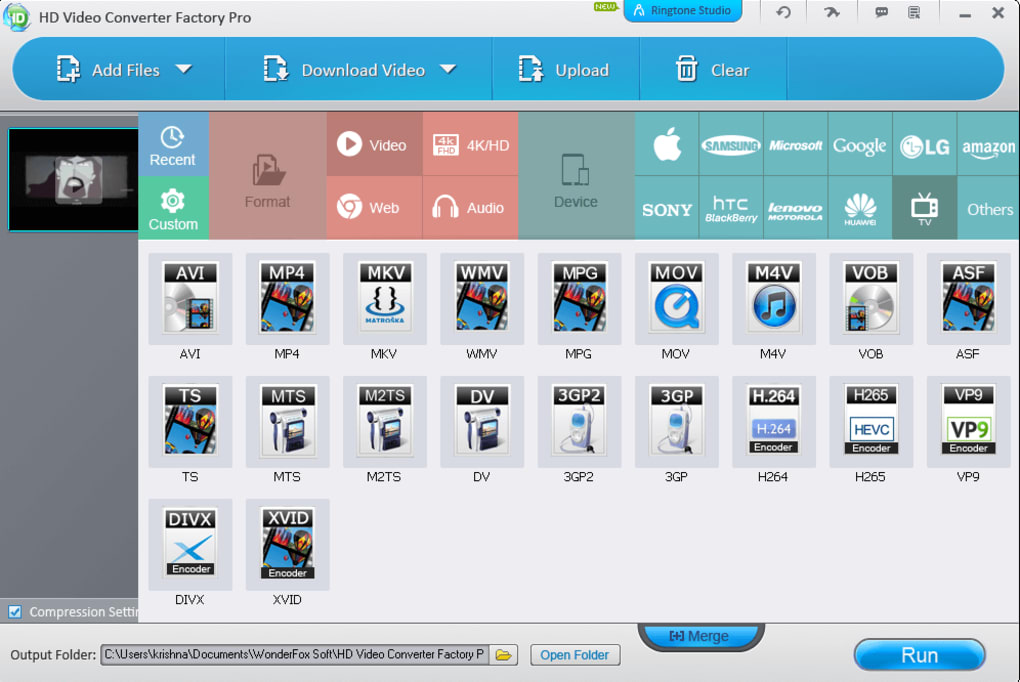
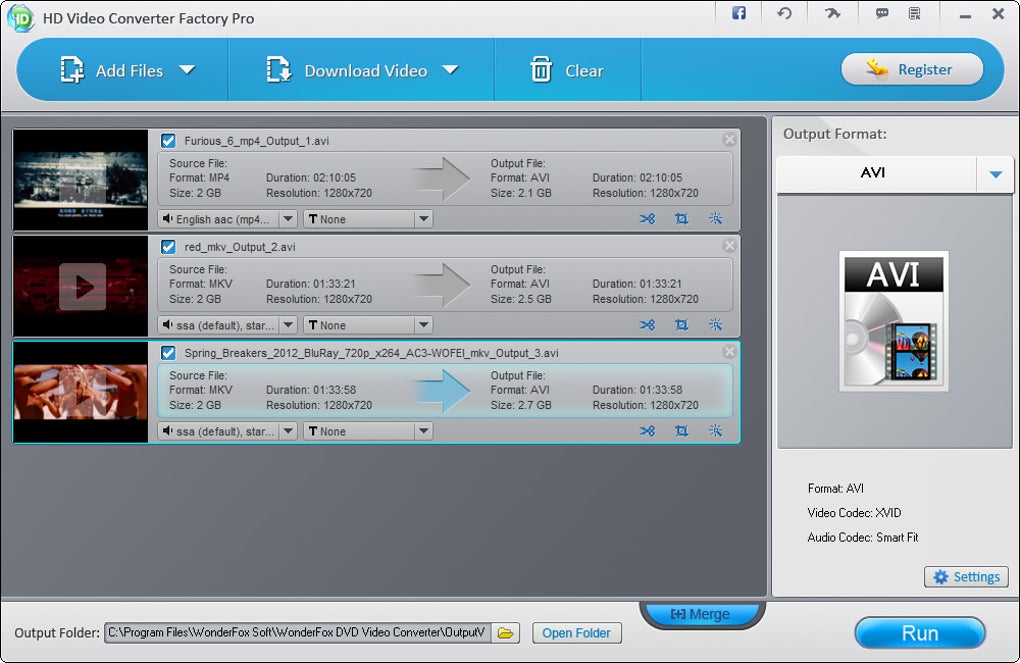
This simplicity extends beyond basic conversion. The program efficiently integrates several additional functionalities, significantly enhancing its value proposition. The integrated download feature, directly accessible from the menu bar, allows users to download videos from platforms like YouTube (though the supported platforms are not extensively listed). The downloaded videos can then be seamlessly converted to the desired format without requiring separate steps. This streamlined workflow saves considerable time and simplifies the overall process, making it a highly efficient solution for users needing both download and conversion capabilities.
Video Editing Capabilities
While primarily a video converter, WonderFox Free HD Video Converter Factory incorporates basic video editing tools. Users can perform essential edits such as cutting, trimming, and merging multiple video clips. Adjustments to audio and video resolution are also readily available, allowing for some level of output optimization. While the software doesn’t offer advanced editing features comparable to professional-grade software like Adobe Premiere Pro or DaVinci Resolve, the included capabilities suffice for many common editing tasks. This integrated editing functionality eliminates the need for switching between multiple programs, further enhancing the software’s convenience. The simplicity of these tools makes them accessible to users who may not have prior video editing experience, contributing to the program’s overall user-friendliness.
Performance and Speed
WonderFox Free HD Video Converter Factory is praised for its speed and efficiency in video conversion. The software utilizes advanced High-Definition (HD) video conversion technology, along with CPU and GPU acceleration, resulting in faster processing times compared to some competitors. The support for Multi-CPU and Hyper Threading further optimizes performance, particularly beneficial for users with high-end hardware configurations. This translates into significant time savings, especially when dealing with large or high-resolution video files. However, user reviews highlight potential performance issues when converting UHD (Ultra High Definition) files, suggesting that processing speed may decline with extremely high-resolution input. While generally efficient, users expecting seamless conversion of massive UHD files might encounter noticeable slowdowns.
Limitations and Potential Drawbacks
Despite its strengths, WonderFox Free HD Video Converter Factory has certain limitations. The software’s video editing capabilities, while convenient for basic tasks, lack the sophistication of dedicated video editing software. Users needing advanced features like color grading, keyframing, or complex effects will need to look elsewhere. Furthermore, while the software supports downloading videos from online streaming platforms, the list of compatible platforms isn’t explicitly comprehensive. The lack of a detailed list might leave some users uncertain about its compatibility with their preferred streaming services. Another potential drawback is the reported performance slowdown during the conversion of very high-resolution videos. While the software is generally fast, users with 4K or 8K files might find the processing time significantly longer than anticipated.
Comparison to Other Software
Several comparable video converter applications exist, each with its own strengths and weaknesses. Format Factory, often cited as a free alternative, is frequently mentioned in comparisons. While both offer a broad range of supported formats and basic editing capabilities, WonderFox’s interface is generally considered more intuitive and user-friendly. However, users seeking more advanced video editing features might find professional-grade applications like Adobe Premiere Pro or DaVinci Resolve more suitable, although these applications come with a price tag and a steeper learning curve. The choice between these options depends on the user’s specific needs and technical proficiency.
Conclusion
WonderFox Free HD Video Converter Factory presents a compelling option for users seeking a straightforward, efficient, and user-friendly video conversion solution. Its clean interface, comprehensive format support, integrated download functionality, and basic editing tools make it a convenient all-in-one package. While its lack of advanced editing features and potential performance issues with UHD files might deter power users, its ease of use and speed make it an excellent choice for casual users and those needing a simple and effective video conversion and download solution. The balance of functionality, simplicity, and speed makes this software a noteworthy contender in a crowded market. The streamlined workflow and intuitive interface are its greatest assets, ensuring a positive user experience even for those without extensive technical knowledge. Before downloading, users should carefully consider their specific needs and expectations to determine if this software aligns with their requirements. The reported occasional slowdown for UHD files should also be kept in mind. Overall, WonderFox Free HD Video Converter Factory offers a solid, free solution for common video conversion tasks.
File Information
- License: “Free”
- Latest update: “March 13, 2025”
- Platform: “Windows”
- OS: “Windows 95”
- Language: “English”
- Downloads: “144K”
- Size: “132.15 MB”


