
Wondershare Free AllMyTube Downloader is a software application designed to simplify the process of downloading and converting videos from various online platforms. While the internet offers a plethora of video downloaders, AllMyTube distinguishes itself through a combination of user-friendly design, convenient features, and a streamlined workflow. This review delves into the strengths and weaknesses of Wondershare Free AllMyTube Downloader, providing a detailed analysis of its functionality, ease of use, and overall effectiveness.
Ease of Use and Interface Design
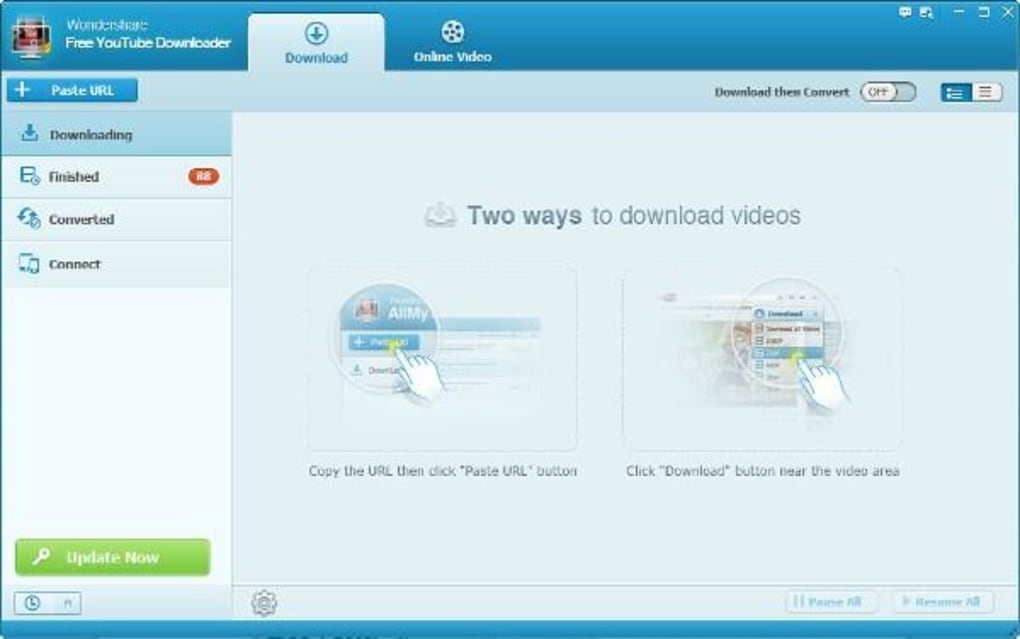
One of AllMyTube’s most significant advantages lies in its intuitive interface. The program presents a clean and uncluttered layout, making it immediately accessible even to users with limited technical expertise. The primary functions are clearly displayed, eliminating the need for extensive navigation or searching through complex menus. The download process is remarkably simple. Users can either paste the video URL directly into the application, or utilize the built-in browser to navigate to the desired video and initiate the download with a single click. This straightforward approach significantly reduces the time and effort required to acquire online videos.

The integrated browser further enhances the user experience, removing the need to switch between different applications. This streamlined workflow keeps the download process contained within the AllMyTube environment, preventing interruptions and simplifying the overall experience. The software intelligently detects the video format and automatically selects appropriate settings for optimal download quality and compatibility. This automated process removes the guesswork and ensures a seamless download experience for users of all technical levels.
However, the help feature is reportedly difficult to locate, which could present a minor hurdle for users encountering unexpected issues. More prominently placed and easily accessible documentation would significantly improve the user experience, allowing quick resolution to problems without requiring extensive searches or external assistance.
Downloading and Conversion Capabilities
Wondershare Free AllMyTube Downloader supports a wide range of video-sharing websites, ensuring compatibility with most popular platforms. The program efficiently handles videos from YouTube, Google Video, Yahoo Video, AOL Video, Metacafe, and numerous other Flash-based video sites. This broad compatibility makes AllMyTube a versatile tool capable of fulfilling the diverse video downloading needs of a wide range of users. The ability to download videos in batches further enhances its efficiency, allowing for simultaneous downloads of multiple videos without compromising speed or performance. The software also boasts an auto-detect feature, automatically downloading videos currently playing in the integrated browser, thereby streamlining the download process even further.
The conversion capabilities of AllMyTube are equally noteworthy. It efficiently converts downloaded videos into various formats, including FLV, AVI, MPG, WMV, and MP4. This versatility ensures compatibility with a wide range of devices and players, allowing users to enjoy their downloaded videos on diverse platforms without encountering playback issues. The ability to transfer converted videos seamlessly to mobile devices further enhances the overall utility of the program.
Despite these strengths, certain limitations exist. The number of restrictions imposed by the software has been criticized by some users as a potential drawback. While the exact nature of these restrictions isn’t specified in the provided text, they could relate to download limits, file size constraints, or other usage parameters. A more detailed understanding of these restrictions is crucial for users to make an informed decision about whether the software aligns with their individual needs and expectations.
Additional Features and Functionality
Beyond its core download and conversion capabilities, AllMyTube incorporates several additional features that enhance its overall utility. A built-in player allows users to preview downloaded videos directly within the application, eliminating the need for external media players. This functionality is particularly useful for confirming the successful download and verifying the quality of the downloaded video before transferring it to other devices. The inclusion of a video download history helps prevent duplicate downloads, saving storage space and avoiding unnecessary downloads of previously acquired videos.
The ability to manage downloaded videos effectively is another key strength of the software. AllMyTube provides organizational tools, allowing users to efficiently manage their video libraries. This capability is especially helpful for users with large collections of downloaded videos, ensuring easy access and efficient organization of downloaded content.
Performance and System Requirements
The provided text does not offer detailed information on AllMyTube’s performance characteristics, such as download speeds or system resource utilization. A deeper analysis of the software’s performance on different hardware configurations and internet connection speeds would be valuable for prospective users. Similarly, information on the minimum system requirements, including operating system compatibility and processor specifications, is absent. Providing this detailed information will help ensure that potential users can determine the compatibility of the software with their systems before downloading and installing the application.

Comparison with Alternative Software
The provided text mentions several alternative video downloaders, including Vividl Video Downloader, Tipard Video Downloader, Wondershare vDownloader, and several others. However, it lacks a comparative analysis of these alternatives, failing to highlight the key distinctions between AllMyTube and its competitors. A comprehensive comparison would enable prospective users to assess the advantages and disadvantages of each application, ultimately aiding them in selecting the most suitable video downloader for their specific needs. Such a comparison should encompass factors like ease of use, supported platforms, conversion capabilities, additional features, and performance characteristics.
Conclusion
Wondershare Free AllMyTube Downloader presents a compelling solution for downloading and converting online videos. Its intuitive interface, streamlined workflow, and broad compatibility make it an accessible and versatile tool for users of all skill levels. The software’s additional features, such as the built-in player and video download history, further enhance its overall utility. However, the lack of detailed information on performance, system requirements, and a comparison with alternative applications limits the scope of this review. Addressing these shortcomings would greatly strengthen the evaluation, providing a more comprehensive and informative assessment of Wondershare Free AllMyTube Downloader. Furthermore, clarifying the nature of the reported restrictions would allow for a more nuanced and balanced appraisal of its capabilities and limitations. Despite these limitations, AllMyTube remains a viable option for users seeking a straightforward and efficient video downloading and conversion solution.
File Information
- License: “Trial version”
- Latest update: “May 24, 2023”
- Platform: “Windows”
- OS: “Windows 8”
- Language: “English”
- Downloads: “16.4K”
- Size: “994.92 KB”


