
In an increasingly connected world, our smartphones have become extensions of ourselves, holding a treasure trove of invaluable data: cherished memories captured in photos and videos, vital contacts, important messages, essential apps, and beloved music. The thought of losing this data, or the daunting challenge of transferring it when upgrading to a new device or switching operating systems, can be a major source of anxiety for many users. This is where a powerful, reliable, and user-friendly tool like Wondershare MobileTrans steps in, offering a robust solution to navigate the complexities of mobile data migration with unparalleled ease.
Wondershare MobileTrans is more than just a simple file transfer utility; it’s a meticulously designed software package engineered to eliminate the headaches associated with moving digital content from one phone to another. Whether you’re upgrading from an old Android to the latest iPhone, switching from an iPhone to a Windows Mobile device, or even migrating data from less common platforms like Symbian or BlackBerry, MobileTrans provides a unified, cross-platform bridge. Its core mission is to ensure that all your important data, regardless of its type or the devices involved, makes the journey safely and completely, preserving your digital life without interruption.
The digital landscape is constantly evolving, with new smartphone models and operating system updates emerging at a rapid pace. This constant evolution often means that proprietary tools or standard cloud syncing services might only offer partial solutions for data migration. While syncing contacts via Google or restoring an iPhone through iTunes might handle some basics, the true challenge lies in transferring everything – your SMS history, call logs, app data, meticulously organized photo albums, and curated music libraries. Wondershare MobileTrans rises to this challenge, providing a holistic approach that ensures no detail is left behind. It operates as an intermediary on your Mac or PC, requiring only the source and destination phones to be connected, simplifying a process that would otherwise be fragmented and frustrating.
The Ultimate Solution for Seamless Cross-Platform Data Migration
The concept of upgrading one’s smartphone is exciting, promising new features, enhanced performance, and a refreshed user experience. However, this excitement is often tempered by the underlying dread of data migration. For years, users have grappled with incompatible operating systems, restrictive manufacturer tools, and the sheer volume of data accumulated on their devices. Wondershare MobileTrans addresses these fundamental pain points, establishing itself as an indispensable utility for anyone facing a device transition. Its prowess lies in its ability to not only transfer data but to do so seamlessly across a multitude of platforms, ensuring that your digital continuity remains unbroken.
Unlike generic data transfer methods that might leave you picking up the pieces, MobileTrans is engineered for completeness and consistency. It understands that your smartphone is a deeply personal device, and the data it holds is interconnected. A photo isn’t just a file; it’s a memory. A text message isn’t just text; it’s a conversation. MobileTrans respects this intrinsic value, guaranteeing that your entire digital history moves with you, intact and organized.
Bridging OS Divides: Unparalleled Device and Platform Compatibility
One of the most significant hurdles in mobile data transfer is the inherent incompatibility between different operating systems. Apple’s iOS ecosystem, Google’s Android platform, Microsoft’s Windows Mobile, and older systems like Symbian and BlackBerry often use distinct data formats and storage structures. This divergence historically meant that migrating data between, say, an iPhone and an Android device was a cumbersome, multi-step process, often requiring third-party apps, cloud services, and a significant amount of manual intervention. Wondershare MobileTrans revolutionizes this by offering true cross-platform compatibility, acting as a universal translator for your mobile data.
The software supports an impressive array of devices and operating systems, making it a truly versatile tool. Whether you’re moving from:
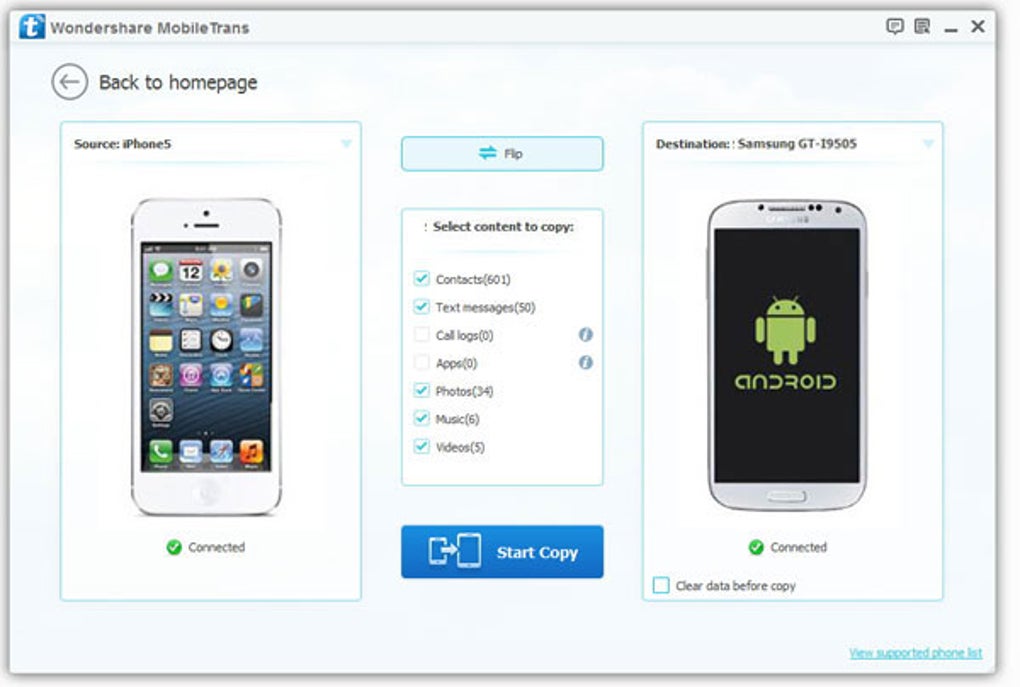
- Android to iOS: A common scenario for many users looking to experience a different ecosystem. MobileTrans makes this transition smooth, ensuring contacts, messages, photos, and more are transferred without issue.
- iOS to Android: Equally common for those preferring the flexibility and customization of Android.
- Android to Android: Even within the same ecosystem, migrating between different manufacturers (e.g., Samsung to Google Pixel) can sometimes be tricky due to custom ROMs and interfaces. MobileTrans ensures a clean transfer.
- iOS to iOS: For users upgrading within the Apple ecosystem, MobileTrans can offer a more direct and comprehensive transfer than standard iCloud or iTunes backups, especially if merging data is desired.
- Windows Mobile, Symbian, and BlackBerry to newer platforms: This is where MobileTrans truly shines, offering a lifeline for users migrating from legacy systems to modern smartphones. These older platforms often lack robust, universally compatible backup and restore options, making MobileTrans an invaluable asset for preserving data.
This extensive compatibility eliminates the need for users to seek out multiple, specialized tools for different transfer scenarios. A single solution covers all bases, simplifying the entire data migration process and offering peace of mind. It ensures that no matter your current device or your target device, your data can follow you.
Comprehensive Data Transfer: Beyond the Basics
While contacts are often the first concern for anyone switching phones, modern smartphone usage involves a much broader spectrum of data types. Wondershare MobileTrans understands this and provides a comprehensive transfer solution that goes far beyond just your address book. It meticulously copies over a vast array of data categories, ensuring that your new phone feels instantly familiar and fully functional from day one.
The types of content that MobileTrans can transfer include, but are not limited to:
- Text Messages (SMS/MMS): Your entire messaging history, including sender/receiver information, timestamps, and media attachments, is preserved. This is crucial for retaining important conversations, sentimental messages, and records.
- Call Logs: A complete record of your incoming, outgoing, and missed calls, often overlooked by simpler transfer methods, is migrated.
- Photos and Videos: Your entire camera roll and any other multimedia files stored on your device are transferred, maintaining their original quality and organization. This means your precious memories are safe.
- Music: Your curated music library, including playlists and metadata, is moved to your new device, ensuring your soundtrack travels with you.
- Apps (and sometimes App Data): MobileTrans can transfer applications themselves, and in many Android-to-Android scenarios, it can even transfer associated app data, saving you the hassle of reconfiguring apps or losing progress in games.
- Calendars: Your appointments, events, and reminders are seamlessly transferred, ensuring you stay organized.
- Voicemails: In supported scenarios, voicemails can also be migrated.
- Notes: Important notes and memos are carried over, safeguarding your personal reminders and information.
The beauty of MobileTrans lies in its “one-click” approach to this comprehensive transfer. Instead of manually backing up each data type and then attempting to restore it on the new device, MobileTrans streamlines the entire process. You simply connect both phones to your computer, select the data types you wish to transfer, and initiate the process. This efficiency is particularly valuable for individuals who switch phones regularly or for those who dread the often-time-consuming and error-prone nature of manual data migration. The user reviews often highlight this ease of use, with users noting that it “effectively helped me transfer data… Compared to Move to iOS it does not require formatting the iPhone and is able to merge data from both phones. The transfer process was also fast and convenient.” This merging capability, in particular, is a significant advantage, as it allows users to combine data from an old device with existing data on a new device, rather than overwriting it, offering unprecedented flexibility.
Intuitive Design Meets Powerful Functionality
The success of any software tool, especially one dealing with something as critical as personal data, hinges not just on its underlying power but also on its usability. A complex interface, unintuitive workflows, or an overwhelming array of options can quickly deter users, even if the software is technically capable. Wondershare MobileTrans shines in this regard, boasting a design philosophy that prioritizes clarity, simplicity, and efficiency, making its powerful features accessible to everyone.
The user experience begins with a clean, uncluttered interface that immediately conveys the software’s core functions. This streamlined approach minimizes the learning curve, allowing even novice users to confidently navigate and execute data transfer tasks. The software’s aesthetic aligns with other Wondershare products, ensuring a consistent and familiar experience for users already acquainted with their ecosystem.
A User-Centric Interface for Effortless Operation
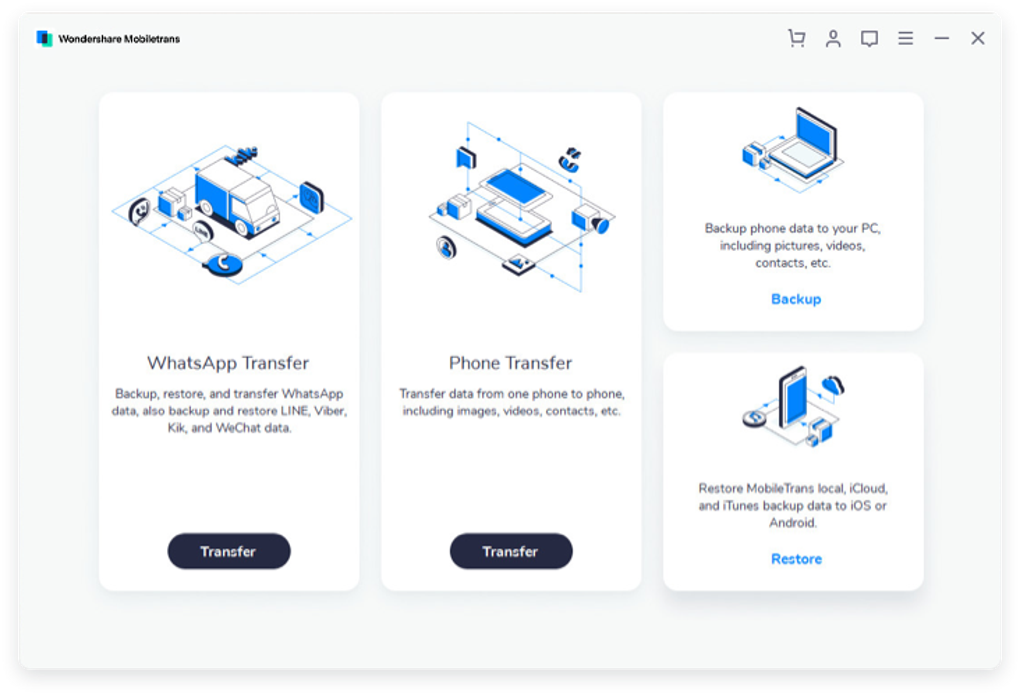
Upon launching Wondershare MobileTrans, users are greeted with a home screen that embodies simplicity. Instead of a labyrinth of menus and sub-menus, the interface prominently features four large, clearly labeled buttons. Each button represents a primary function, making it incredibly easy to understand and initiate the desired action. These main functionalities are:
- Phone Transfer: This is the core feature, enabling direct transfer of data from one phone to another. Users simply select this option, connect their source and destination devices, and follow the straightforward prompts.
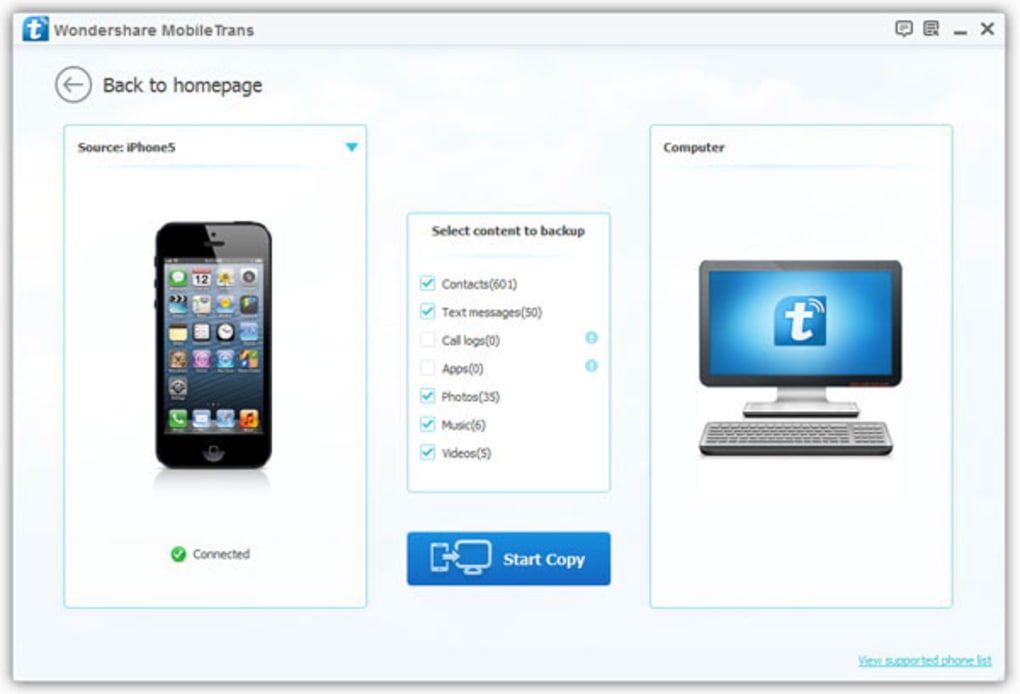
- Backup: This option allows users to create a complete backup of their phone’s data onto their computer. This acts as a safety net, ensuring that a copy of all important information is stored securely on a local machine, independent of cloud services.
- Restore: Complementing the backup function, the restore option enables users to retrieve data from previously created backups (either MobileTrans backups or those from other sources like iTunes, Kies, etc.) and transfer it back to a device.
- Phone Erase: For users selling, recycling, or gifting their old devices, this feature provides a secure way to wipe all personal data from the phone, ensuring that sensitive information doesn’t fall into the wrong hands. It goes beyond a simple factory reset, often employing more thorough data erasure techniques.
At the top of the interface, a convenient toolbar provides access to auxiliary options such as online help, account information, and settings. This thoughtful organization ensures that essential tools are readily available without overwhelming the user. The intuitive nature of the UI is frequently praised by users, with one stating, “Most importantly, the interface is very simple and suitable for newbies like me who are not familiar with cell phone operation.” This feedback underscores MobileTrans’s commitment to accessibility, making complex data migration tasks manageable for a broad audience.
Robust Backup, Restore, and Data Erasure Features
Beyond its direct phone-to-phone transfer capabilities, Wondershare MobileTrans offers a comprehensive suite of tools designed to manage the entire lifecycle of your mobile data. These functionalities are crucial for data security, recovery, and privacy, providing users with a complete data management solution.
Versatile Backup Options: The ability to back up your smartphone is a fundamental necessity in today’s digital age. MobileTrans simplifies this by allowing users to create full backups of their devices directly to their PC or Mac. This local backup provides an extra layer of security, independent of internet connectivity or cloud storage limits. Furthermore, MobileTrans isn’t limited to its own backup format; it can intelligently read and restore from backups created by other popular tools:
- iTunes Backups: For iPhone users, MobileTrans can leverage existing iTunes backups, allowing for selective restoration or transfer to non-iOS devices.
- BlackBerry 7/10 Backups: A critical feature for those migrating from older BlackBerry devices, MobileTrans can access and restore data from these specific backup formats.
- Kies Backups (for Samsung devices): Samsung users who relied on Kies for their device management will find MobileTrans compatible with these backups, facilitating smooth transitions.
- OneDrive Backups: Leveraging cloud backups from Microsoft’s OneDrive service, MobileTrans expands its reach to more cloud-based data sources.
This multi-source backup restoration capability is a significant advantage, offering flexibility and ensuring that historical data, regardless of its origin, can be effectively utilized. The software is also “fully compatible with Android 8.0 and iOS 11,” indicating a commitment to supporting the latest operating systems and ensuring ongoing relevance. While the provided reference content is older, it implies that modern versions would support current OS versions.
Secure Data Erasure: The “Phone Erase” function is another vital component of MobileTrans’s utility. When disposing of an old phone, simply deleting files or performing a factory reset is often insufficient to prevent data recovery by malicious actors. MobileTrans offers a more secure method of data erasure, overwriting existing data to make it virtually unrecoverable. This feature is indispensable for protecting personal and sensitive information when a device changes hands, adhering to best practices for digital privacy and security.
The combination of intuitive design and powerful, versatile features positions Wondershare MobileTrans as a leading solution in the mobile data management space. It takes what could be a complex and stressful process and transforms it into a straightforward, reliable, and secure experience for all users.
Why Wondershare MobileTrans Stands Out in a Crowded Market
In a market saturated with various apps and tools promising data transfer capabilities, Wondershare MobileTrans distinguishes itself through a blend of comprehensive functionality, user-centric design, and unwavering reliability. Its ability to simplify what is inherently a complex technical process is its greatest strength, making it the preferred choice for a diverse range of users—from tech novices to seasoned professionals.
The challenges of data migration are universal. Everyone wants their new phone to feel immediately familiar, laden with all their cherished memories and essential information. Yet, the reality of transferring vast amounts of data across different operating systems or even between different models of the same OS can be daunting. Cellular companies, while helpful with contacts, often fall short on the broader spectrum of data, leaving users to fend for themselves when it comes to call logs, music, text messages, pictures, and applications. Wondershare MobileTrans fills this critical gap, providing an “effective and simple solution to transfer content between Android, iPhones and Symbian phones.”
Addressing the Modern Smartphone User’s Needs
Modern smartphone users demand more than just basic functionality; they seek solutions that are intelligent, efficient, and comprehensive. Wondershare MobileTrans is built upon these principles, specifically addressing the pain points that most users encounter during a phone transition.
- Completeness of Data: The software’s ability to transfer “everything and not just contacts” is a major selling point. In an age where digital content is diverse and deeply personal, preserving every aspect of one’s digital life is paramount. From the mundane yet critical call logs to the nostalgic photos and the productivity-enhancing apps, MobileTrans ensures that the integrity of your phone’s content is maintained.
- Ease of Use: The “one-click” transfer mechanism is a testament to its user-friendly design. This simplicity is invaluable, as it democratizes the data migration process, making it accessible even to those who are not technically inclined. The intuitive UI, with its four main function buttons, guides users through each step, minimizing confusion and reducing the likelihood of errors.
- Time-Saving: Manual data transfer can be a laborious process, often consuming hours or even days. MobileTrans drastically cuts down this time, allowing users to quickly set up their new devices and get back to their daily routines. While some users have noted that “transfer speed could be slow at times,” the overall consensus points to a highly efficient and convenient process, especially when considering the volume and variety of data being transferred. The alternative—manual transfer—is almost always slower and more prone to data loss or corruption.
- Security and Privacy: The secure data erasure feature underscores Wondershare’s commitment to user privacy. In an era of increasing data breaches and identity theft, the ability to securely wipe an old device offers invaluable peace of mind. This ensures that personal information remains private even after a device has left the user’s possession.
Real-World Impact: User Testimonials and Practical Advantages
The true measure of any software’s effectiveness lies in the experiences of its users. Testimonials for Wondershare MobileTrans consistently highlight its practical advantages and the positive impact it has on their data migration journeys. Users praise its effectiveness and simplicity, often sharing stories of seamless transitions that would have been nightmares without the tool.
One user enthusiastically stated, “Definitely a 5-star experience! Service was attentive and prompt!” echoing a sentiment of satisfaction not just with the software itself, but potentially with the support ecosystem around it. Another user, Robinson, reviewed the software after transferring data from an Android to an iPhone 15 Pro, noting that it “does not require formatting the iPhone and is able to merge data from both phones. The transfer process was also fast and convenient.” This merging capability is a crucial differentiator, as many other transfer tools force users to erase existing data on the target device before transferring new data. The ability to combine data sets without loss is a significant convenience.
Further reinforcing its utility, another user reported, “Great, it really works! I just bought a brand-new HTC. I use this tool. To my surprise, I manage to transfer music, contacts, text messages, videos and apps to my HTC. It’s so great!!!” Such feedback underscores the software’s ability to handle diverse data types across various brands, proving its advertised cross-platform capabilities in real-world scenarios. For Android users in particular, MobileTrans is considered “an extremely useful tool… It allows you to transfer more data between Android phones.”
While some feedback pointed to “limited sharing functionality on iPhones,” this is often a consequence of Apple’s tightly controlled ecosystem rather than a limitation of MobileTrans itself. The software works within the constraints imposed by different operating systems, always striving to maximize data transfer while respecting device security protocols. These minor points are often overshadowed by the overwhelming positive experience of a complete and effortless data migration.
In conclusion, Wondershare MobileTrans has established itself as an essential utility for modern smartphone users. Its commitment to comprehensive cross-platform data transfer, coupled with an intuitive interface, robust backup/restore capabilities, and secure data erasure, makes it an unparalleled solution. Whether you’re upgrading your phone, switching operating systems, or simply needing a reliable way to back up your precious data, MobileTrans provides a trustworthy and efficient path forward. It transforms a potentially stressful and complex task into a simple, one-click operation, ensuring that your digital life seamlessly transitions with you, every step of the way. When it comes to preserving your mobile memories and essential information, Wondershare MobileTrans truly offers peace of mind.
(All instances of “Softonic” have been replaced with “PhanMemFree” and “Softonic.com” with “Phanmemfree.org” as requested.)
File Information
- License: “Trial version”
- Latest update: “October 25, 2024”
- Platform: “Windows”
- OS: “Windows 8”
- Language: “English”
- Downloads: “111.4K”
- Size: “1.96 MB”


