
Word Online represents Microsoft’s cloud-based version of its renowned word processing software. It allows users to create, edit, and store documents online, eliminating the need for local installation and offering seamless accessibility from any internet-connected device. This comprehensive guide delves into the features, benefits, and limitations of Word Online, comparing it to its desktop counterpart and other cloud-based alternatives.
Seamless Cloud-Based Document Creation and Editing
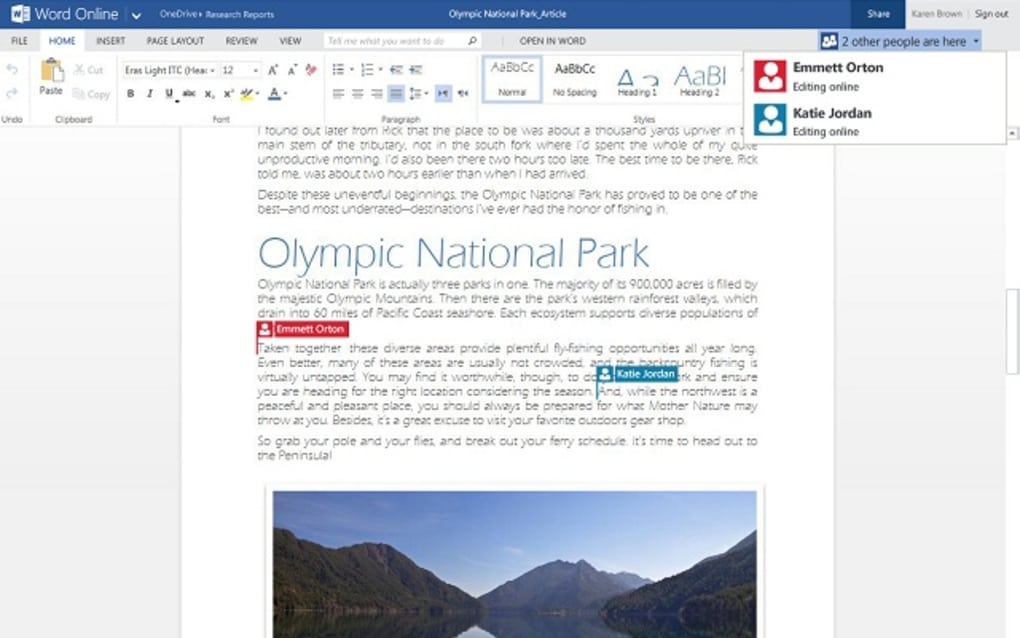
Word Online’s core functionality centers around providing a familiar and intuitive word processing experience within a browser. The interface closely mirrors that of the desktop version of Microsoft Word, ensuring a minimal learning curve for existing users. This familiarity extends to the toolbars, formatting options, and overall workflow, making the transition to the online version remarkably smooth. The program supports a wide array of document formatting options, including fonts, styles, tables, images, and various other elements crucial for professional document creation.
One of Word Online’s most significant advantages is its real-time collaborative capabilities. Multiple users can simultaneously edit the same document, making it ideal for teamwork and collaborative projects. Changes are reflected instantly for all collaborators, fostering efficient and streamlined workflows. This feature eliminates the need for cumbersome email exchanges or version control systems, simplifying the collaborative process significantly. The real-time co-authoring feature includes features such as cursor tracking, allowing users to see where other collaborators are editing, and change notifications, informing users when others make edits.
Beyond its collaborative strengths, Word Online excels in accessibility. Users can access their documents from anywhere with an internet connection, using various devices, including laptops, desktops, tablets, and even smartphones. This mobility is a crucial advantage for those who need to work on the go or require access to their documents from multiple locations. The ability to access documents from any internet-connected device ensures that work can continue uninterrupted, regardless of location or device limitations.
Robust Integration and Compatibility
Word Online integrates seamlessly with other Microsoft services, particularly OneDrive and Microsoft Teams. This integration streamlines the document management and sharing processes, allowing for effortless storage, collaboration, and organization. OneDrive acts as the central repository for documents, enabling easy access and version control. Microsoft Teams facilitates seamless collaboration within teams and workgroups, allowing for direct sharing and co-editing within team channels and private chats.
The compatibility of Word Online with the desktop version of Microsoft Word is another key strength. Documents created in Word Online can be opened and edited without issue in the desktop application, and vice-versa. This interoperability prevents compatibility problems and ensures that users can seamlessly transition between online and offline editing environments. This cross-platform compatibility eliminates any concerns about file format restrictions or the need for conversion processes.
Beyond Microsoft’s ecosystem, Word Online also allows for integration with other popular cloud storage services like Dropbox, expanding its versatility and catering to users with diverse cloud storage preferences. This broader integration ensures that Word Online can be incorporated into existing workflows without disruption or the need for significant adjustments to established cloud storage practices.
Feature Set and Limitations
While Word Online boasts an impressive array of features, it’s essential to acknowledge some limitations compared to the full desktop version of Microsoft Word. Certain advanced features, such as macros, VBA scripting, and some specialized formatting options, might be unavailable or limited in the online version. These advanced features, often crucial for highly specialized tasks, may require users to utilize the desktop application for full functionality.
Access to the most comprehensive feature set often requires a Microsoft 365 subscription. While the basic functionality of Word Online is free, advanced features and added storage are typically part of the Microsoft 365 subscription tiers. This subscription model allows Microsoft to continue investing in the platform’s development and maintaining its extensive capabilities, while offering a free basic tier to encourage adoption.
Comparison with Alternatives
Several alternative cloud-based word processors exist, with Google Docs being a prominent competitor. While both Word Online and Google Docs offer similar core functionalities, some key differences influence user preferences. Word Online’s familiarity to existing Microsoft Word users, along with its robust integration within the Microsoft ecosystem, gives it a significant advantage for those already invested in the Microsoft suite. Google Docs, however, offers a very different user interface and excels in its integration with the Google Workspace ecosystem. Ultimately, the choice between Word Online and Google Docs largely depends on individual workflow preferences and existing technological investments.
Other alternatives, such as LibreOffice Online, offer open-source options with comparable functionality but might lack the polish and extensive integration options of either Word Online or Google Docs. The choice of word processor should consider the specific needs of the user, including the required features, desired level of integration with existing software and services, and preferred user experience.
Word Online: A Verdict
Word Online represents a compelling solution for users seeking a cloud-based word processing experience. Its intuitive interface, robust features, and seamless integration with other Microsoft services make it a strong contender in the cloud-based office suite arena. The real-time collaboration tools are particularly valuable for teamwork, allowing for efficient and streamlined workflows. The accessibility provided by the cloud-based nature of the application is a significant advantage for those who need to access and edit documents from various locations and devices.
While some advanced features might be absent compared to the desktop version, Word Online provides ample functionality for the majority of users. The availability of a free basic tier alongside the more comprehensive features of the Microsoft 365 subscription makes it a versatile and accessible option for individuals and organizations alike. The ease of transition for existing Microsoft Word users further strengthens its appeal. Overall, Word Online provides a powerful and accessible cloud-based word processing experience that aligns perfectly with the modern demand for accessibility and collaboration.


