
Word search puzzles, with their grids of letters and hidden words, can be both engaging and frustrating. The challenge lies in efficiently locating words often obscured amongst a sea of seemingly random characters, a task that can consume significant time and effort, especially with larger puzzles. This comprehensive guide explores Word Search Solver, a free utility designed to alleviate the difficulty and accelerate the process of completing word search puzzles. We will delve into its features, functionality, advantages, and limitations, offering a complete picture of this helpful tool.
Understanding Word Search Solver’s Functionality
Word Search Solver is a straightforward application designed to simplify the often tedious task of solving word search puzzles. Its primary function is to identify and highlight the locations of specified words within a given word search grid. This eliminates the need for manual searching, allowing users to focus on the enjoyment of the puzzle rather than the labor-intensive process of finding the solutions. The application supports two primary input methods, catering to diverse user preferences and puzzle acquisition methods:
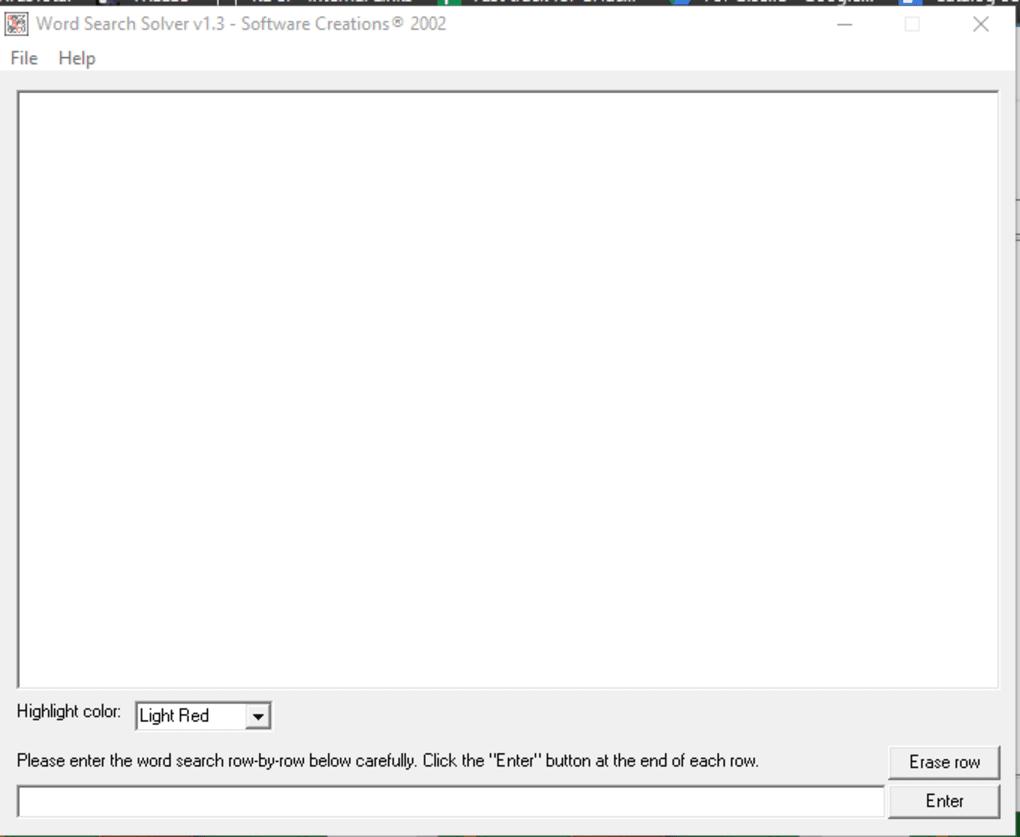
Input Methods: Scanning vs. Manual Entry
The first method involves scanning a physical word search puzzle. Users can capture an image of their puzzle and then convert it into a text (.txt) file. This text file, representing the puzzle’s letter grid, can then be uploaded directly into Word Search Solver. This method is ideal for users who have printed word search puzzles or those who prefer a tangible puzzle experience.
The second method allows for manual entry of the puzzle’s content. Users can directly input the letters of the puzzle into the application, row by row, replicating the word search grid on the application interface. While this method requires more time and manual effort upfront, it offers flexibility for those who do not have physical puzzles to scan or prefer to input their puzzles directly without intermediary steps. This method also allows for custom puzzle creation and inputting digital puzzles that were not printed on paper.
Processing and Highlighting Solutions
Once the puzzle data has been inputted—either through scanning or manual entry—users provide the list of words they need to find. The application then analyzes the puzzle grid, searching for each word in all eight possible directions (horizontally, vertically, and diagonally, both forwards and backwards). This comprehensive search ensures that no word is missed, regardless of its orientation within the puzzle.
Upon completion of the search, the application highlights the identified words directly on the displayed puzzle grid. By default, these words are highlighted in red, though users can customize the highlight color using a dropdown menu, which offers a degree of personalization and enhances the user experience. The application is designed to handle puzzle sizes up to 100x100, easily accommodating even the most challenging and extensive word search grids.
User Interface and Ease of Use
Word Search Solver boasts a clean and intuitive interface, prioritizing simplicity and ease of use. The majority of the application window is dedicated to displaying the word search grid itself, ensuring clarity and readability. The control elements for inputting puzzle data and specifying words to search for are neatly located at the bottom of the window, avoiding clutter and distraction from the main puzzle area.
The process of using the application is remarkably straightforward. Upon launching, users are presented with a clear choice between uploading a .txt file or manually entering the puzzle’s contents. This clear guidance ensures that users can quickly begin solving their puzzles without encountering unnecessary complexity. After inputting the puzzle, the designated input fields allow for easy entry of the words to be searched, followed by a prompt to begin the search process. The subsequent highlighting of the words provides immediate and clear visual feedback, guiding users to the solutions without any additional interpretation or processing.
Advantages and Disadvantages
Advantages: Speed, Efficiency, and Scalability
One of the most significant advantages of Word Search Solver is its ability to drastically reduce the time required to solve word search puzzles. Manual searching, particularly in larger puzzles, can be incredibly time-consuming and prone to errors. Word Search Solver automates this process, providing immediate and accurate results. The application’s capacity to handle puzzles up to 100x100 squares expands its utility significantly. It caters to users of all skill levels and puzzle complexities, offering a valuable tool for both casual puzzle enthusiasts and experienced solvers. The simple interface makes the software accessible to users regardless of their technical expertise.
Disadvantages: Limited Functionality and Manual Input Drawbacks
While Word Search Solver excels in its primary function of locating words within a word search grid, it lacks advanced features present in some other puzzle-solving applications. Currently, the software only highlights words individually, and the process does not offer a “find all” option. This can be somewhat cumbersome for users who need to identify many words within a puzzle. Additionally, while the dual input methods (scanning and manual input) provide flexibility, manual entry can be particularly time-consuming, especially for large puzzles. The application’s reliance on user-provided data (either scanned or manually entered) might introduce errors if the data is not accurately captured or inputted.
Word Search Solver: A Practical Tool for Puzzle Enthusiasts
Word Search Solver offers a practical solution for anyone seeking to simplify the process of solving word search puzzles. Its intuitive interface, efficient searching algorithm, and ability to handle large puzzles make it a valuable tool for both casual and dedicated puzzle solvers. While the lack of advanced features and the potential for manual input errors represent limitations, these are offset by the significant time savings and increased efficiency provided by the application. The application is a worthwhile tool for those who value speed and convenience in their puzzle-solving endeavors. Its ease of use and straightforward functionality make it a user-friendly option, contributing to an overall positive user experience. The software’s free availability makes it accessible to a wide range of users, further enhancing its value proposition. For users who prioritize speed, accuracy, and convenience in solving word search puzzles, Word Search Solver presents a compelling and useful solution.
File Information
- License: “Free”
- Version: “1.2”
- Latest update: “July 15, 2022”
- Platform: “Windows”
- OS: “Windows NT”
- Language: “English”
- Downloads: “1.9K”
- Size: “9.44 KB”


