In an increasingly interconnected world, the ability to communicate across linguistic divides is more crucial than ever. For speakers of English and Urdu, a powerful tool has emerged to bridge this gap: the Wordinn English to Urdu Dictionary. Developed by WordInn, this free application for Windows provides a robust and accessible solution for anyone looking to translate, understand, and learn between these two widely spoken languages. Available for download on platforms like PhanMemFree, it stands as a testament to the power of digital resources in fostering linguistic understanding and cultural exchange.
The need for a reliable English to Urdu dictionary is multifaceted. English, as a global lingua franca, is essential for international business, education, and scientific research. Urdu, the national language of Pakistan and one of the official languages of India, boasts a rich literary tradition and is spoken by millions across South Asia and the diaspora. For students, professionals, travelers, and anyone engaged in cross-cultural interactions, having immediate access to accurate translations can be invaluable. The Wordinn English to Urdu Dictionary steps into this vital role, offering a convenient, efficient, and entirely free pathway to mastering this linguistic duality.
This article delves into the core aspects of the Wordinn English to Urdu Dictionary, exploring its features, benefits, technical specifications, and its place within the broader ecosystem of language and translation tools. We will examine why this particular application has become a go-to resource for many, and how its design and availability contribute to a more interconnected linguistic landscape.
The Bridge Between Languages: Understanding Wordinn English to Urdu Dictionary
Language is the cornerstone of human civilization, enabling the transmission of knowledge, culture, and emotion. When two distinct linguistic worlds meet, a bridge is often required to facilitate understanding. For the English and Urdu speaking communities, Wordinn English to Urdu Dictionary serves as that essential bridge, offering a seamless and intuitive translation experience right from your Windows desktop.
What is Wordinn English to Urdu Dictionary?
At its core, Wordinn English to Urdu Dictionary is a dedicated software application designed specifically for Windows operating systems, enabling users to look up English words and retrieve their corresponding Urdu meanings. Developed by WordInn, it falls under the category of ‘Languages & Translation’ tools, a segment of software that plays a critical role in global communication and learning. The fact that it is a free application significantly lowers the barrier to entry, making high-quality linguistic assistance available to a broader audience without any financial commitment.
The importance of such a tool cannot be overstated. For millions around the world, English is the language of opportunity and global engagement, while Urdu holds deep cultural and personal significance. Students pursuing education in English-medium institutions in Urdu-speaking regions often grapple with technical jargon and complex concepts, where a quick reference can clarify ambiguities. Professionals working in international contexts, writers, researchers, and even casual users who wish to understand content in either language will find the Wordinn dictionary an indispensable companion. It empowers users to decipher unfamiliar terms, expand their vocabulary, and articulate their thoughts more precisely, fostering clarity in communication and enriching their linguistic journey.
Key Features and Functionality
While the reference content provides only a high-level overview, a well-designed digital dictionary like Wordinn English to Urdu Dictionary typically incorporates several key features to ensure an effective and user-friendly experience. These features are crucial for facilitating quick lookups and comprehensive understanding.
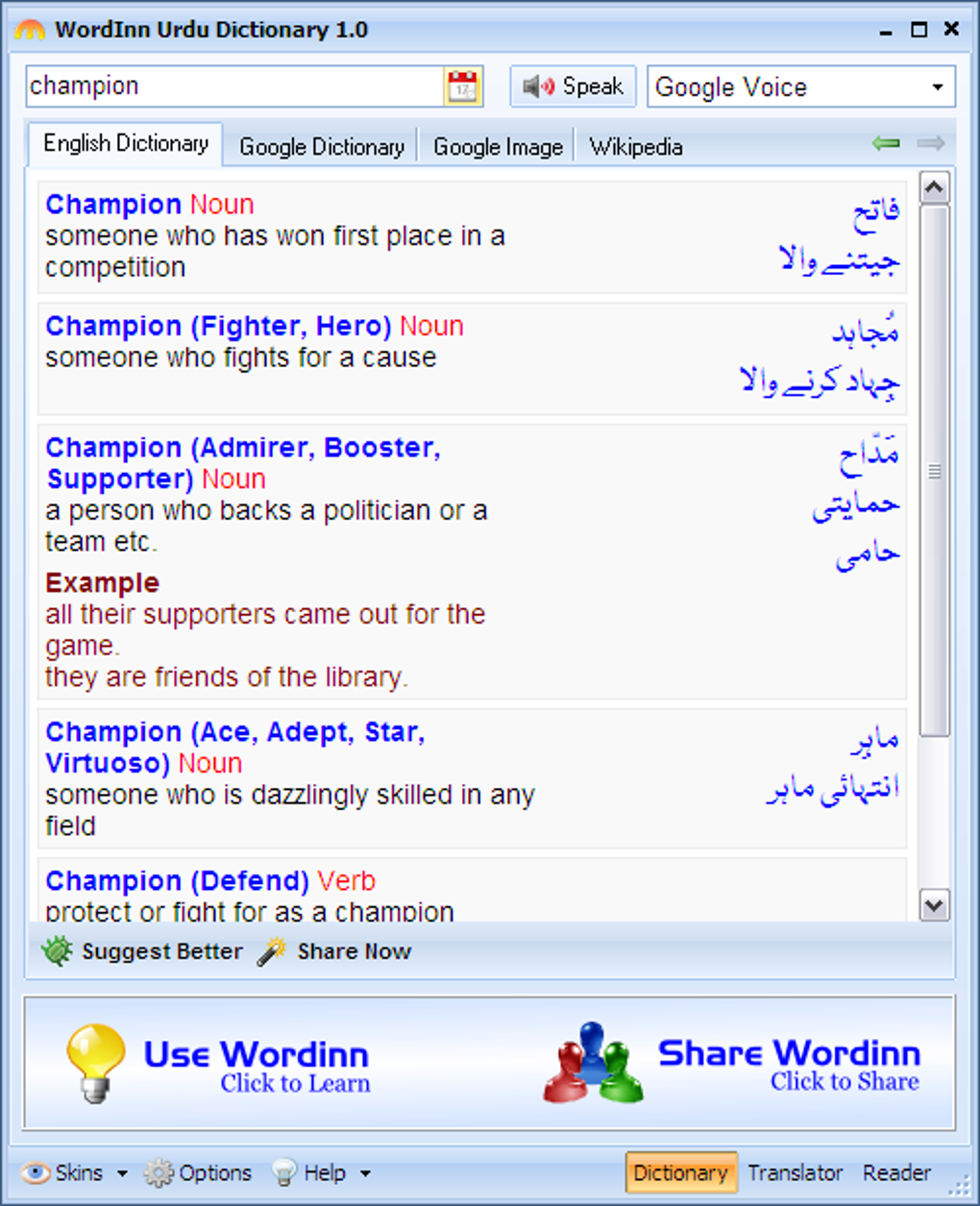
One of the most fundamental aspects is its direct English to Urdu translation capability. Users can simply type an English word into a search bar, and the dictionary will instantly display its Urdu equivalents. This instant lookup functionality is paramount, as it allows for rapid information retrieval, saving valuable time compared to flicking through pages of a physical book. The speed and efficiency of digital dictionaries are among their primary advantages.
Another presumed but vital feature for any respectable dictionary is offline accessibility. Given that users might not always have an internet connection, especially students in various learning environments or individuals traveling, the ability to access the full dictionary database without an active internet connection is a significant benefit. This ensures that the linguistic bridge remains functional regardless of network availability, providing uninterrupted learning and translation support.
For enhanced comprehension, dictionaries often include multiple meanings and contextual usage examples. A single English word can have several Urdu translations depending on the context. A comprehensive dictionary will present these different meanings, perhaps categorized, and ideally provide example sentences in both English and Urdu. This helps users grasp the nuances of vocabulary and apply the translated words correctly in various situations, thereby improving both their understanding and their command of the language.
Pronunciation guides are also highly beneficial, especially for learners. While not explicitly mentioned, an ideal digital dictionary might offer audio pronunciations for English words, and possibly transliterated Urdu pronunciations to aid non-native speakers. Correct pronunciation is a critical component of language learning, enabling effective spoken communication.
Furthermore, a well-designed dictionary should offer a user-friendly interface. This implies a clean layout, intuitive navigation, and search suggestions that appear as the user types. The goal is to minimize effort and maximize the efficiency of finding information. The application’s small size (12.63 MB) suggests that it is lightweight and designed to be efficient, which often correlates with a streamlined user interface that focuses on core functionality without unnecessary clutter. This ensures that even users with basic computer literacy can navigate the application with ease, making it truly accessible.
Why Choose Wordinn? Benefits for Users
The market for language tools is vast, encompassing everything from basic online translators to comprehensive academic dictionaries. In this crowded landscape, Wordinn English to Urdu Dictionary stands out, particularly due to its specific focus and user-centric approach. Its benefits extend beyond mere translation, impacting language acquisition, communication efficacy, and overall user convenience.
Accessibility and Cost-Effectiveness
Perhaps the most compelling reason to choose Wordinn English to Urdu Dictionary is its free nature. In a world where educational resources often come with a hefty price tag, a high-quality, free dictionary is a game-changer. This cost-effectiveness makes it incredibly accessible to a broad demographic, including:
- Students: From primary school to university, students often require constant access to dictionaries. The free availability of Wordinn removes a financial burden, ensuring that every student with a Windows device can have a reliable language tool. This is particularly impactful in regions where educational resources may be scarce or expensive.
- Budget-Conscious Individuals: Not everyone can afford subscription-based language services or expensive physical dictionaries. Wordinn offers a professional-grade solution without any financial outlay, democratizing access to linguistic knowledge.
- Casual Users and Enthusiasts: For those who occasionally need to look up a word, or individuals pursuing language learning as a hobby, a free tool is ideal as it doesn’t require an investment for sporadic use.
Moreover, the ease of download from platforms like PhanMemFree further enhances its accessibility. The simple process ensures that users can acquire and install the application quickly, without navigating complex purchasing procedures or licensing agreements. This straightforward access contributes significantly to its appeal and widespread adoption.
Enhancing Language Proficiency and Communication
Beyond simple word-for-word translation, Wordinn English to Urdu Dictionary plays a pivotal role in enhancing overall language proficiency. By providing accurate and contextually relevant Urdu equivalents for English words, it empowers users to:
- Expand Vocabulary: Regular use helps users encounter new words and their meanings, systematically building their lexicon in both languages.
- Improve Reading Comprehension: When encountering unfamiliar words in an English text, a quick lookup in Wordinn can clarify their meaning, allowing the user to understand the entire passage more thoroughly. Similarly, for English speakers learning Urdu, it can help them understand Urdu texts.
- Refine Writing Skills: By offering precise Urdu translations, the dictionary assists users in choosing the most appropriate words for their written communication, leading to greater clarity, accuracy, and eloquence in documents, emails, and academic papers.
- Facilitate Spoken Communication: While primarily a text-based dictionary, understanding word meanings is foundational to effective spoken communication. Knowing the correct Urdu term for an English concept can significantly aid conversations and presentations.
- Support Academic and Professional Growth: For individuals pursuing studies or careers that require proficiency in both English and Urdu, the dictionary acts as a constant companion, ensuring they can navigate complex terminology and concepts with confidence. This is particularly relevant in fields like law, medicine, engineering, and academia, where precise language use is paramount.
The ability of Wordinn to bridge the understanding gap directly contributes to more effective communication, reducing misunderstandings and fostering smoother interactions between individuals from different linguistic backgrounds.
Convenience and Portability
In the digital age, convenience is a highly prized commodity. Wordinn English to Urdu Dictionary, as a desktop application, offers significant advantages in terms of convenience and portability (within the context of a laptop or desktop).
- Instant Access: Unlike physical dictionaries that require physical retrieval and manual searching, a digital dictionary is always just a few clicks away on a Windows desktop. This instant access is invaluable for quick lookups during reading, writing, or studying.
- Seamless Integration with Workflow: For professionals and students who spend hours on their computers, having the dictionary readily available alongside other applications means they don’t have to break their workflow to consult a separate resource. It integrates seamlessly into their digital environment.
- No Physical Bulk: A digital dictionary eliminates the need to carry heavy physical books. The entire lexicon is contained within a small software package, making it an ideal solution for remote learning, traveling professionals, or anyone who prefers a minimalist workspace. The application’s compact size of 12.63 MB reinforces this benefit, ensuring it consumes minimal storage space on the user’s device.
- Future-Proofing: Digital dictionaries can be updated more easily than printed ones, allowing developers to add new words, refine definitions, or correct errors. While the reference indicates an update in May 2024, the potential for ongoing improvements adds to its long-term value.
The convenience offered by Wordinn English to Urdu Dictionary significantly enhances the user experience, transforming what was once a laborious task into a swift and effortless one.
Technical Specifications and User Experience
Understanding the technical underpinnings and anticipated user experience of an application like Wordinn English to Urdu Dictionary is crucial for potential users. These details inform expectations about performance, compatibility, and ease of use. The information provided on platforms like PhanMemFree gives us a solid foundation for this assessment.
System Requirements and Installation
The Wordinn English to Urdu Dictionary is designed for broad compatibility within the Windows ecosystem, ensuring that a vast majority of users can run the application without issues. According to its specifications:
- Operating System Compatibility: “Wordinn English To Urdu Dictionary works on Windows 7 and above.” This is a significant detail, indicating that the developer, WordInn, has ensured compatibility with a wide range of Windows versions, from the still-used Windows 7 to the more modern Windows 10 and 11. This broad support minimizes compatibility headaches for users and makes the dictionary accessible even on older hardware.
- Version and Updates: The current version of the software is 1.1, with the latest update noted on May 16, 2024. Regular updates, even minor ones, suggest ongoing maintenance by the developer, which can include bug fixes, performance enhancements, or even database additions. While the PhanMemFree review mentions they “have not had the opportunity to check it yet” since the May 16th publication, the presence of an update date implies active development or at least prior revisions.
- Lightweight Application: With a size of just 12.63 MB, Wordinn English to Urdu Dictionary is remarkably lightweight. This has several implications:
- Fast Download: Users can download the application quickly, even on slower internet connections.
- Minimal Storage Footprint: It takes up very little space on a hard drive, which is beneficial for devices with limited storage capacity, such as older laptops or tablets running Windows.
- Low System Resource Usage: A smaller application generally translates to lower consumption of RAM and CPU resources, ensuring that it runs smoothly without slowing down the user’s computer, even when multiple other applications are open.
The installation process is typically straightforward for free Windows applications downloaded from reputable platforms like PhanMemFree. Users would generally download an executable file and follow a few simple prompts, making the setup process accessible even for less tech-savvy individuals. The “Free Download for Windows” button prominently featured indicates a direct and uncomplicated acquisition path.
User Interface and Performance
While specific screenshots or detailed descriptions of the Wordinn English to Urdu Dictionary’s user interface are not provided in the reference, we can infer certain characteristics based on common practices for language tools and its stated purpose.
- Intuitive and Clean Interface: A dictionary application’s primary goal is to provide quick and accurate information. Therefore, a good UI would prioritize a clean, uncluttered design with a prominent search bar. Users should be able to type a word and immediately see its translation without navigating through complex menus or intrusive advertisements (especially for a free app).
- Efficient Search Functionality: The core of any digital dictionary lies in its search capability. It should offer instant search results, perhaps with auto-suggestions as the user types, to speed up the lookup process. Fast rendering of results is crucial for a smooth user experience.
- Readability: The display of dictionary entries – the English word, its part of speech, and the Urdu translations – should be clear, with legible fonts and proper formatting to ensure easy readability. If multiple meanings are presented, they should be well-organized and clearly delineated.
- Stable Performance: Given its small size and focus, the application is expected to be stable and reliable, minimizing crashes or freezes. This ensures a consistent and frustration-free experience for the user, especially during intensive study or work sessions. The fact that it works on Windows 7 and above suggests a stable architecture that has been tested across different OS versions.
The absence of detailed user reviews on PhanMemFree (at the time the reference was generated, as it states “Be the first to leave your opinion!”) means we cannot directly quote user feedback on its UI or performance. However, the basic information suggests a pragmatic design focused on efficiency and accessibility, which are hallmarks of successful utility applications.
Community and Support
The presence of a “Rate it!” and “Report Software” feature on PhanMemFree highlights the role of user community feedback. Even for a free application, user engagement is vital for its longevity and improvement.
- User Feedback for Improvement: The call to “leave us a comment or rate it on our website” on PhanMemFree is an invitation for users to contribute to the app’s evolution. User reviews can provide valuable insights to the developer, WordInn, regarding features to add, bugs to fix, or areas for improvement in the dictionary’s database or interface. This iterative feedback loop is essential for refining any software product.
- Developer Responsiveness: While specific developer support channels aren’t listed, the fact that WordInn is clearly identified as the developer suggests a professional backing. Any robust free application usually has some form of support, even if it’s primarily through community forums or occasional updates based on feedback.
- Trust and Security: PhanMemFree’s security status check, including scanning files with over 50 leading antivirus services, provides a layer of trust for users. The “Clean” status means “it’s extremely likely that this software program is clean,” which is critical for encouraging downloads and ensuring user safety. This commitment to security enhances the overall user experience by fostering confidence in the software.
The combination of clear technical specifications, an anticipated user-friendly design, and a mechanism for community feedback points towards a well-conceived and maintained utility that aims to serve its users effectively.
The Broader Landscape of Language Tools
While Wordinn English to Urdu Dictionary carves out a niche with its specific language pair and free model, it exists within a vibrant and diverse ecosystem of language and translation software. Understanding this broader landscape helps to position Wordinn and appreciate its unique value proposition.
Wordinn in Context: Comparing with Other Language & Translation Tools
The “Top downloads Languages & Translation for Windows” section on PhanMemFree showcases a variety of tools, each with different functionalities and target audiences. Comparing Wordinn with some of these helps to illustrate its specific strengths and areas where other tools might complement it:
- QTranslate: This tool allows users to “Translate words to any language.” QTranslate is a multi-language translator, often integrated with various online translation services. While versatile for general translation needs across many languages, it might not offer the deep, curated dictionary entries specific to English-Urdu that Wordinn does. Wordinn’s strength lies in its specialized English-to-Urdu dictionary database, which is likely optimized for that specific pair.
- DeepL: Positioned as “Your New Language Translation Alternative,” DeepL is renowned for its highly accurate, AI-powered machine translation across a good number of major languages. It excels at translating entire sentences, paragraphs, or even documents with remarkable fluency. While excellent for contextual translation, DeepL might not function as a traditional dictionary for single-word lookups in the same structured, definitional way that Wordinn would. Furthermore, while it supports many languages, its Urdu support might not be as robust or its dictionary as specialized as Wordinn’s.
- ScreenTranslator: This tool can “Transcribe any text on the screen instantly,” focusing on OCR (Optical Character Recognition) and translation of text directly visible on the user’s screen. It’s a fantastic utility for translating text in images, videos, or non-selectable UI elements. However, it’s a different use case from a traditional dictionary; it translates existing text rather than providing definitional lookups for user-entered words.
- The Merriam-Webster Dictionary and Thesaurus: This represents the classic dictionary model, offering comprehensive definitions, synonyms, and antonyms for English words. While invaluable for English language users, it does not provide direct English-to-Urdu translation. Wordinn fills the gap for users who specifically need to bridge English with Urdu.
Wordinn English to Urdu Dictionary occupies a valuable position as a dedicated, free, and lightweight dictionary for a specific, important language pair. It’s not trying to be a multi-language machine translator or an OCR tool; instead, it focuses on doing one thing exceptionally well: providing English to Urdu word translations. Its value lies in its specialization and accessibility, making it an ideal choice for users whose primary need is direct word-for-word translation between English and Urdu. Other tools might offer broader capabilities, but Wordinn provides a focused and efficient solution for its target audience.
The Future of Digital Dictionaries
The landscape of digital language tools is constantly evolving, driven by advancements in artificial intelligence, natural language processing, and user expectations. The future of digital dictionaries, including specialized ones like Wordinn English to Urdu Dictionary, will likely see several trends:
- AI Integration for Contextual Understanding: While Wordinn likely offers direct translations, future versions or similar tools might integrate more sophisticated AI to provide highly contextualized translations, suggesting the best Urdu equivalent based on the surrounding English sentence or phrase.
- Enhanced Pronunciation Features: Moving beyond basic audio, future dictionaries might offer pronunciation comparison tools, allowing users to record their pronunciation and receive feedback, or even integrate phonetic and phonological analyses.
- Integration with Learning Platforms: Digital dictionaries could become more integrated with language learning apps and platforms, offering flashcard generation, vocabulary quizzes, and personalized learning paths based on lookup history.
- Cross-Platform Availability: While Wordinn is currently Windows-specific, the trend is towards cross-platform applications (web, mobile, desktop) to cater to users across all their devices.
- Community-Driven Content: User-generated content, such as example sentences or idiomatic expressions, moderated by language experts, could enrich dictionary entries further.
- Accessibility Features: Advanced features for users with disabilities, such as improved screen reader compatibility, voice input for searching, and customizable display options, will continue to be important.
For Wordinn English to Urdu Dictionary, continued updates and perhaps even new feature additions based on user feedback (as encouraged by PhanMemFree) could ensure its relevance in this dynamic environment. Its foundation as a free, dedicated tool gives it a strong starting point for future growth and adaptation. The persistent demand for accurate and accessible language resources ensures that tools like Wordinn will continue to play a crucial role in facilitating global communication and learning.
Conclusion
The Wordinn English to Urdu Dictionary stands out as a highly valuable and accessible resource for anyone seeking to bridge the linguistic gap between English and Urdu. As a free, dedicated Windows application developed by WordInn, it offers a straightforward and efficient solution for thousands of students, professionals, and language enthusiasts across the globe. Its commitment to providing accurate English to Urdu translations directly on the desktop addresses a critical need for seamless communication and enhanced language proficiency.
From its easy installation on Windows 7 and above to its compact 12.63 MB size, the dictionary is designed with user convenience in mind. Its free availability on platforms like PhanMemFree democratizes access to high-quality linguistic assistance, making it an indispensable tool for those who cannot afford or prefer not to invest in paid alternatives. By providing immediate access to word meanings, it facilitates deeper understanding, enriches vocabulary, and supports both academic pursuits and professional endeavors.
In a world that increasingly values multilingualism and cross-cultural understanding, tools like the Wordinn English to Urdu Dictionary are more important than ever. It acts not just as a repository of words, but as a facilitator of knowledge and connection, empowering users to confidently navigate the complexities of two rich and diverse languages. For anyone requiring a reliable, free, and convenient English to Urdu translation companion on their Windows device, the Wordinn English to Urdu Dictionary is an exemplary choice, solidifying its position as a cornerstone in the digital language learning landscape.
File Information
- License: “Free”
- Version: “1.1”
- Latest update: “May 16, 2024”
- Platform: “Windows”
- OS: “Windows 10”
- Downloads: “3.5K”
- Size: “12.63 MB”