
WordWeb is a free English dictionary and thesaurus application designed for quick and easy access to definitions, synonyms, and related words. Its streamlined interface and convenient features make it a valuable tool for writers, students, and anyone seeking to expand their vocabulary or clarify word meanings. This review delves into the functionality, features, and overall user experience of WordWeb, examining its strengths and weaknesses.
Seamless Integration and Quick Access
One of WordWeb’s standout features is its seamless integration into the user’s workflow. The application offers quick access through a system tray icon and a customizable hotkey combination (default: Ctrl+Alt+W). This allows users to instantly search for word definitions without interrupting their current task. This immediate access is a significant advantage, especially for writers who frequently need to look up words while composing text. The speed and ease of access significantly reduce the time spent searching for definitions, keeping the writing process flowing smoothly. The application also remembers your search history, allowing you to easily access previously looked-up words using convenient side arrows. This feature further enhances efficiency, making it simple to revisit terms without retyping them.
Comprehensive Word Database and Search Refinement
WordWeb boasts a substantial online dictionary containing over 240,000 words, regularly updated by the developers. While it doesn’t rely on a well-known dictionary like Webster’s, its expansive database provides a comprehensive resource for most vocabulary needs. The quality of the definitions appears accurate and thorough, offering clear explanations and helpful examples. Beyond simple definitions, WordWeb allows users to refine their searches using filters for specific word categories such as nouns, verbs, adjectives, and adverbs. This precision searching is beneficial for understanding nuanced word usage and identifying appropriate parts of speech. Furthermore, the option to display pronunciation, usage examples, and even offensive or vulgar words provides users with a full understanding of the word’s context and connotations. The inclusion of pronunciation guides is particularly useful for improving speaking skills and understanding the correct way to pronounce unfamiliar words. The option to filter for offensive words offers control over the type of content displayed, allowing for a customized experience depending on the user’s needs.
Exploring Word Relationships: Beyond Simple Definitions
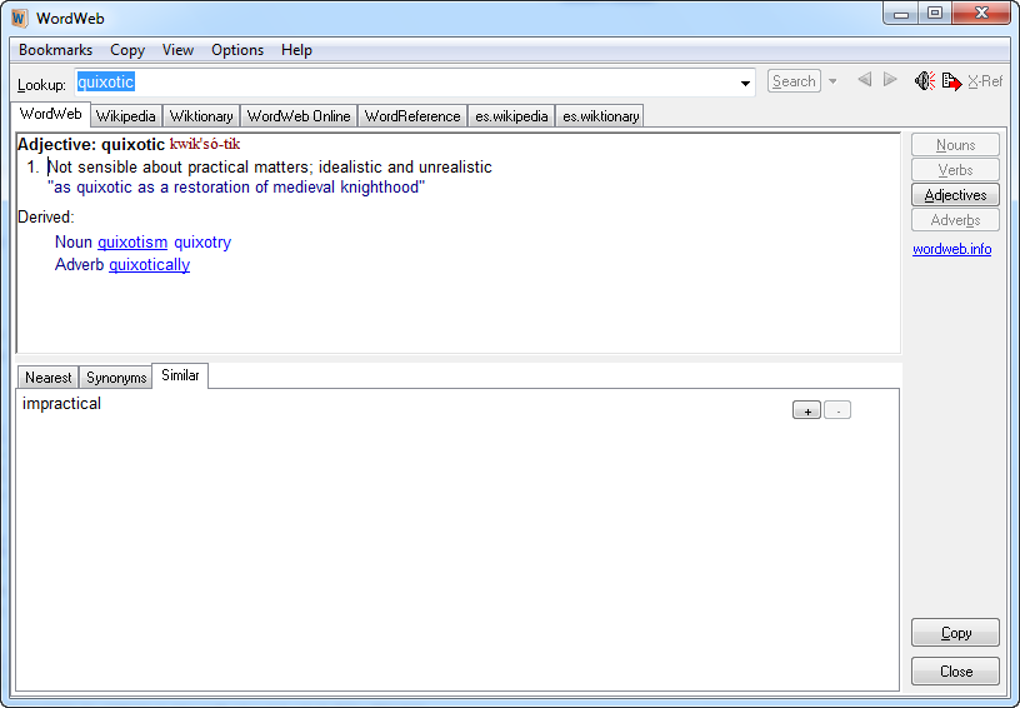
WordWeb goes beyond simply providing definitions; it actively helps users explore the intricacies of language. The application offers several result tabs designed to reveal the relationships between words:
-
Nearest: This tab displays the words immediately preceding and following the searched term in the dictionary. This feature is helpful in understanding the lexical field surrounding a particular word and identifying its position within the broader language system.
-
See Also: This tab provides a list of related words. This helps users expand their vocabulary by connecting the searched term to conceptually similar words and phrases. This feature is particularly beneficial for writers looking to enhance their expression through the use of synonyms and related terms.
-
Similar: This tab presents words that share some similarities in meaning but have slight differences in connotation or usage. This is valuable for discerning subtle distinctions in vocabulary and choosing the most precise word for a given context.
-
Types: This tab shows the different categories or sub-types that a word belongs to. For instance, if searching for the word “solid,” the “Types” tab may list “plastic,” “crystal,” or “block” as sub-types. This categorization enhances comprehension by providing a hierarchical structure to understanding vocabulary.
-
Type of: This tab is a variation of the “Types” tab, offering a different perspective on the word’s categorization. The function mirrors the “Types” tab but could provide a different breakdown depending on the word.
These different views on word relationships are invaluable for building vocabulary and understanding the subtle nuances of language. They provide a more comprehensive understanding of a word than a simple definition can offer. These features are especially helpful for those wishing to enhance their writing skills by using a wider range of vocabulary.
User Experience and Interface
WordWeb’s interface is remarkably intuitive and user-friendly. Its clean design ensures that the focus remains on the word definitions and related information, minimizing distractions. The simple and straightforward design makes the application accessible to users of all technical skill levels. The ease of use is a strong selling point for WordWeb, particularly for users who may be less comfortable with complex software interfaces. The immediate access via hotkeys and system tray integration further improves the user experience by minimizing interruptions to the user’s workflow.
Strengths and Weaknesses
Strengths:
- Rapid Access: The system tray icon and hotkey functionality provide incredibly fast access to definitions.
- Comprehensive Database: The extensive dictionary and thesaurus offer a wealth of information.
- Versatile Search Options: The ability to filter by word type, show pronunciation, and reveal related words enhances the search process.
- Intuitive Interface: The simple and straightforward design is easy to navigate and use.
- Regular Updates: The developer’s commitment to regular updates ensures the dictionary remains current and relevant.
- Free to Use: The software is entirely free, making it an accessible tool for everyone.
Weaknesses:
- Lack of Association with Established Dictionaries: While the dictionary is comprehensive, its lack of association with a widely recognized authority (like Merriam-Webster or Oxford) might raise questions about its definitive nature for some users. However, the comprehensive nature of the definitions and the constant updating suggest accuracy.
- Limited Offline Functionality: The reliance on an online dictionary means WordWeb may not be suitable in situations without an internet connection. The inability to work offline significantly restricts its usefulness in areas without reliable internet access.
Conclusion
WordWeb offers a compelling blend of functionality, ease of use, and a comprehensive word database. Its ability to provide rapid access to word definitions and related information sets it apart from other dictionary and thesaurus applications. While its lack of offline functionality and reliance on a non-established dictionary source are minor drawbacks, the overall user experience and comprehensive nature of the application make it a valuable tool for anyone looking to enhance their vocabulary and improve their writing. The strong focus on quick access and the intuitive interface contribute to its high usability. Its unique features exploring word relationships provide insights beyond simple definitions, making it a valuable asset for both novice and experienced language users.
File Information
- License: “Free”
- Latest update: “March 7, 2025”
- Platform: “Windows”
- OS: “Windows 2000”
- Language: “English”
- Downloads: “1.4M”
- Size: “28.38 MB”


