
Wox is a free, full-featured launcher application for Windows operating systems. It streamlines file and web searching, offering a significantly improved user experience compared to traditional operating system search functions. Its lightweight design ensures minimal impact on system performance, while its extensive plugin support allows for customization and extended functionality. This comprehensive guide will delve into the various aspects of Wox, exploring its features, benefits, and limitations.
Understanding Wox: More Than Just a Launcher
Wox transcends the capabilities of a simple application launcher. While its primary function is to quickly access files, programs, and web pages, its power lies in its versatility and extensibility. Imagine a central hub for all your digital tasks – that’s the essence of Wox. It acts as a unified interface for launching applications, finding files across your drives, performing web searches, and accessing a wealth of plugins designed to enhance its core functionality. For users who manage numerous files, programs, and online resources, Wox offers an unparalleled level of efficiency and organization. Its intuitive interface makes it accessible to both novice and experienced computer users, ensuring a seamless and productive workflow.
Key Features and Functionality
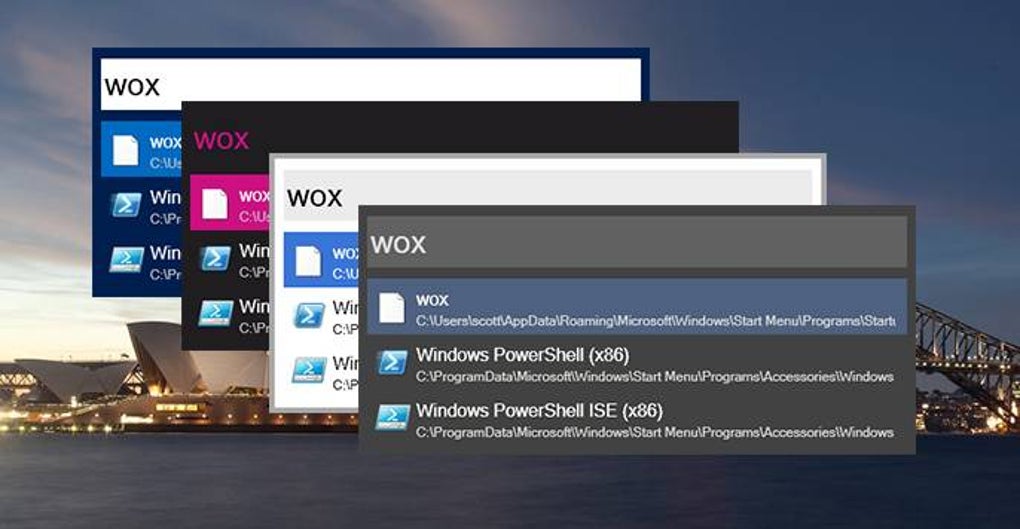
At its core, Wox provides lightning-fast access to your files and applications. Simply press the default hotkey (Alt + Space) to bring up the command bar, and start typing. Wox intelligently suggests matches, displaying relevant programs, files, and web pages as you type. This instant search capability vastly reduces the time spent navigating through folders and menus.
Beyond the basic search functionality, Wox offers a range of compelling features:
-
Extensive Plugin Support: Wox’s true strength lies in its extensive library of plugins. These add-ons expand its functionality to encompass a wide range of tasks, from controlling media playback to managing your to-do list. The plugin system allows users to tailor Wox to their specific needs and workflows, creating a highly personalized and efficient digital workspace.
-
Customizable Hotkeys: The default Alt + Space hotkey can be customized to suit individual preferences. This ensures that the launcher integrates seamlessly into existing keyboard shortcuts, optimizing workflow and minimizing disruptions.
-
Intuitive User Interface: Wox’s clean and uncluttered interface prioritizes ease of use. The minimal design ensures that the focus remains on the search functionality, preventing distraction and promoting efficiency. Navigation is straightforward, even for those unfamiliar with similar applications.
-
Advanced File Searching: Wox’s search capabilities extend beyond simple filename matching. It can index file contents, allowing for searches based on keywords within documents or other file types. This significantly improves the speed and accuracy of locating specific information within large datasets.
-
Web Search Integration: Wox seamlessly integrates with popular search engines like Google, Bing, and DuckDuckGo. Simply prefix your search query with the engine’s name (e.g., “google weather”) to initiate a web search directly from the launcher.
-
Plugin Management: The built-in plugin manager simplifies the process of installing, updating, and removing plugins. This feature provides a centralized location for managing all extensions, ensuring easy access and convenient organization.
-
File Location and Link Access: Wox not only identifies files but also displays their location and provides quick access to file links. This removes the need for manual navigation through file explorers, saving valuable time and effort.
-
Compact Configuration Menu: The configuration menu allows users to fine-tune various aspects of Wox, customizing settings to optimize its performance and integration with the user’s workflow. This includes options for modifying hotkeys, managing plugins, and adjusting search behavior.
Wox in Action: Real-World Applications
Wox’s versatility makes it applicable across a broad spectrum of tasks and professions. Consider these scenarios:
-
Software Developers: Wox can quickly launch IDEs, code editors, terminals, and other development tools, streamlining the coding process. Plugins can further enhance this functionality by providing code snippets, version control integration, or task management features.
-
Writers and Journalists: Wox can be used to access research materials, reference documents, and writing tools. The ability to quickly search for specific information is invaluable in fast-paced writing environments.
-
Students: Wox can help students manage their assignments, research materials, and online resources. Quick access to digital textbooks, lecture notes, and online learning platforms can significantly improve academic productivity.
-
Office Professionals: Wox can streamline office workflows by providing rapid access to essential applications, files, and online tools. Its ability to search through documents and retrieve information efficiently can enhance productivity in various office settings.
Advantages and Disadvantages of Wox
Advantages:
- Speed and Efficiency: Wox significantly accelerates access to files, applications, and web resources, saving considerable time and effort.
- Customizability: The extensive plugin support allows users to tailor Wox to their specific needs and preferences.
- Intuitive Interface: The clean and user-friendly design makes Wox accessible to users of all technical skill levels.
- Lightweight and Resource-Efficient: Wox consumes minimal system resources, ensuring minimal impact on computer performance.
- Free to Use: Wox is available as a free download, making it an accessible and affordable solution for users seeking improved productivity.
Disadvantages:
- Limited Search Capabilities (without plugins): While powerful, the built-in search functionality may have limitations compared to dedicated search tools, especially when dealing with complex search queries or specific file types. The addition of plugins generally alleviates this.
- Reliance on Plugins: While plugins extend functionality, they also add a layer of complexity and potential instability. Poorly designed or outdated plugins can negatively impact Wox’s performance.
- Learning Curve (for advanced features): Although generally intuitive, mastering advanced features and plugin utilization may require some learning and experimentation.
Conclusion: Is Wox Right for You?
Wox is a powerful and versatile launcher that can significantly improve productivity for a wide range of users. Its speed, customizability, and intuitive interface make it a compelling alternative to traditional operating system search functions. While some limitations exist, particularly concerning the initial search capabilities without plugins, these are largely mitigated by the extensive plugin library. If you’re looking for a way to streamline your workflow and access your digital resources more efficiently, Wox deserves serious consideration. Its free availability and ease of use make it a worthwhile tool to explore.
File Information
- License: “Free”
- Latest update: “July 12, 2023”
- Platform: “Windows”
- OS: “Windows 10”
- Language: “English”
- Downloads: “3.3K”
- Size: “36.86 MB”


