
In the dynamic landscape of office productivity software, where behemoths like Microsoft Office often dominate the conversation, alternatives that offer robust functionality without the hefty price tag are highly sought after. WPS Office 2019 emerges as a compelling contender in this space, presenting itself as a free, compact, and highly capable office suite designed to boost productivity for students, professionals, and home users alike. Developed by WPS Office Software, this suite packages four essential applications—Writer, Presentation, Spreadsheets, and a PDF editor—into a single, streamlined solution. While it shares many superficial similarities with its more established counterparts, WPS Office 2019 carves out its own niche by prioritizing accessibility, efficiency, and broad file compatibility, making it a viable choice for a wide spectrum of users.
At its core, WPS Office 2019 aims to provide a comprehensive set of tools for everyday document creation, data management, presentations, and PDF handling. Its design philosophy revolves around offering familiar interfaces and functionalities that minimize the learning curve for those transitioning from other office environments. However, its strengths lie not just in imitation but in its unique advantages, such as its exceptionally small installer package and a commitment to broad compatibility with various file formats. This detailed review will delve into the features, benefits, and limitations of WPS Office 2019, providing a holistic understanding of its position in today’s competitive software market.
Unpacking the WPS Office 2019 Suite: Core Applications and Functionality
WPS Office 2019 is not merely a collection of standalone programs; it’s an integrated suite where each application is designed to complement the others, offering a seamless workflow. The four primary components address the most common productivity needs, each mirroring the capabilities of industry-standard tools but with a distinct WPS touch.
WPS Writer: Your Word Processing Powerhouse
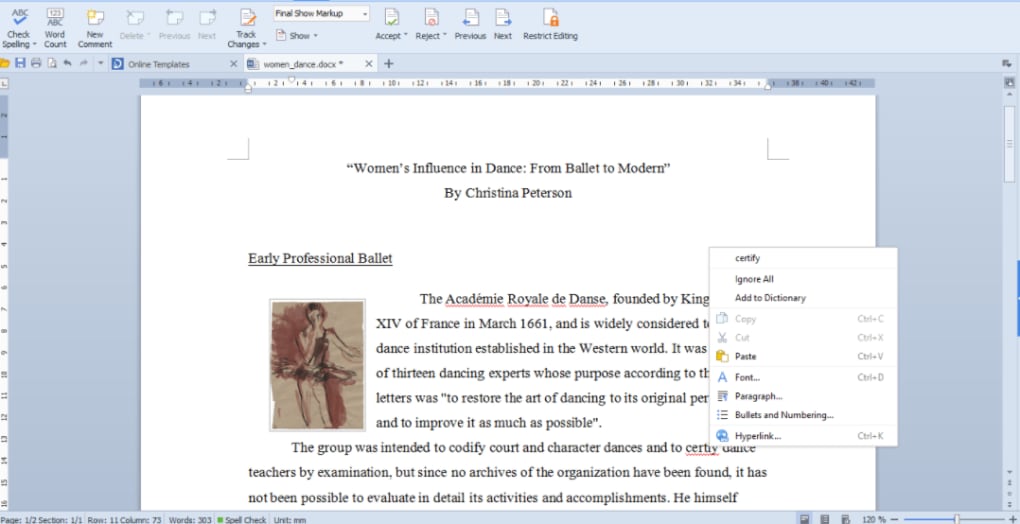
WPS Writer stands as the suite’s answer to Microsoft Word, providing a feature-rich environment for creating, editing, and formatting text documents. From simple memos to complex reports, Writer offers a comprehensive set of tools necessary for professional document production. Users will find familiar interface elements, including a ribbon-style menu, which makes navigation intuitive.
The program supports a wide array of document formatting options, including various fonts, paragraph styles, page layouts, and table insertions. A significant advantage of WPS Writer is its robust compatibility with Microsoft Word documents (DOC, DOCX), allowing users to open, edit, and save files without encountering significant formatting issues. This interoperability is crucial for collaborative environments or when sharing documents with users of other office suites.
Beyond basic text, WPS Writer excels in handling various media and objects within documents. It allows users to seamlessly work with PNG and JPG images, integrate charts, and embed tables directly into their text content. This functionality is particularly useful for creating visually rich documents, such as brochures, newsletters, or academic papers that require a mix of text and graphics. Users can easily insert, resize, and position these elements, giving them considerable control over their document’s visual appeal.
However, one notable limitation within WPS Writer, as highlighted by user feedback and software reviews, is the absence of an integrated spell-checking functionality. While many operating systems and browsers offer their own spell-checking features that might partially mitigate this, having it built directly into the word processor is a standard expectation and its omission can be a minor inconvenience for some users, potentially leading to more manual proofreading or reliance on external tools.
WPS Presentation: Crafting Impactful Slideshows
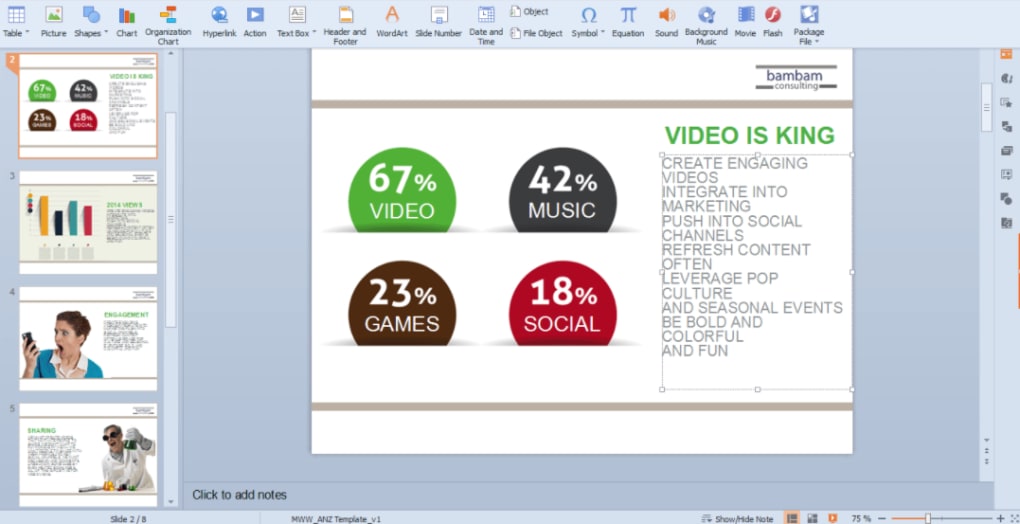
For anyone needing to convey information visually, WPS Presentation offers a powerful and intuitive platform. Comparable to Microsoft PowerPoint, this application allows users to create dynamic and engaging slideshows for academic lectures, business proposals, or personal projects. It supports a variety of slide layouts, design themes, transitions, and animations, enabling users to customize their presentations to great effect.
WPS Presentation handles all standard presentation file formats, including those generated by Microsoft PowerPoint (PPT, PPTX). This ensures that users can confidently open and edit existing presentations or create new ones that will be viewable by a broad audience, regardless of their chosen office software. The ability to embed images, charts, and multimedia elements directly into slides further enhances its utility, allowing for comprehensive and compelling visual narratives. The application aims to make the process of crafting impactful slideshows straightforward, empowering users to focus on their message rather than wrestling with complex software.
WPS Spreadsheets: Mastering Data and Analytics
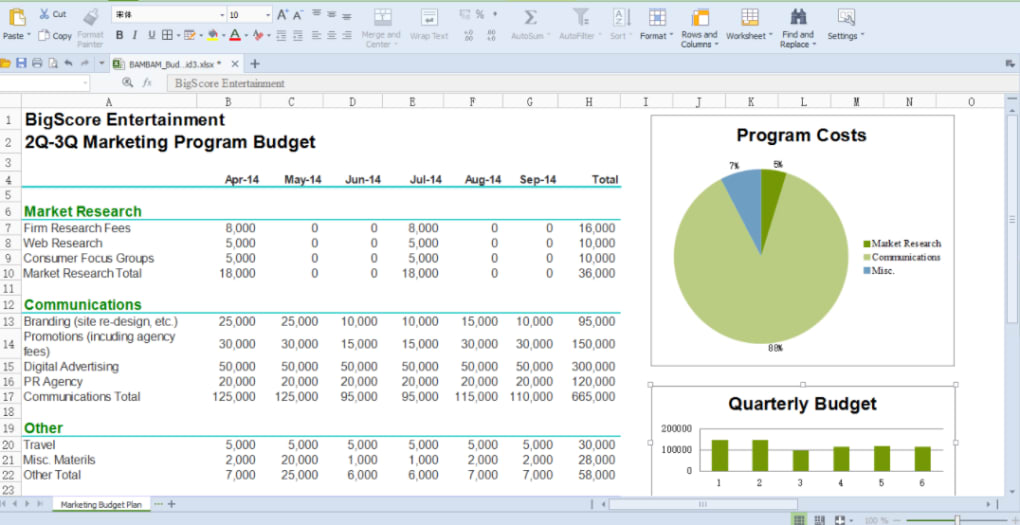
WPS Spreadsheets is the suite’s robust solution for data organization, analysis, and visualization, directly competing with Microsoft Excel. It provides a comprehensive environment for handling numerical data, performing complex calculations, and generating insightful reports. The interface is familiar to anyone who has used a spreadsheet application, featuring rows, columns, and a wide array of functions and formulas.
The program boasts high compatibility with XLS and CSV files, including content that uses macros, which is a significant advantage for users who frequently work with complex datasets or financial models. It offers an extensive library of formulas and functions, enabling users to perform everything from basic arithmetic to advanced statistical analysis. Beyond raw data, WPS Spreadsheets includes powerful tools for data presentation, such as diverse table formatting options, PivotTables for data summarization, and a wide variety of built-in charts (bar, line, pie, scatter, etc.) to visualize trends and patterns. These features collectively make WPS Spreadsheets an indispensable tool for financial analysis, scientific data processing, business planning, and everyday data management.
WPS PDF: Beyond Basic Document Viewing
A significant differentiator for WPS Office 2019 compared to some other free office suites is its inclusion of a dedicated PDF editor. While many suites offer the ability to export documents to PDF, WPS Office 2019 provides tools for both reading and editing PDF files. This functionality elevates it from a mere document viewer to a more comprehensive solution for modern office tasks.
Users can open, view, annotate, and even make basic edits to PDF documents. This is invaluable in workflows where PDF files are frequently used for sharing final documents, contracts, or forms. The ability to directly interact with PDFs within the same suite that handles word processing and spreadsheets simplifies document management and reduces the need for additional, often costly, third-party PDF software. This integration significantly boosts productivity by streamlining the process of reviewing and finalizing documents, offering a complete office solution.
The Strategic Advantages of Choosing WPS Office 2019
WPS Office 2019’s appeal extends beyond its individual applications, rooted in several strategic advantages that make it a compelling choice for a diverse user base. These advantages address common pain points associated with office software, such as system resource consumption, cost, and interoperability.
Compact Size, Maximum Efficiency
One of the most touted benefits of WPS Office 2019 is its remarkably small installer package, which typically measures less than 200MB. In an era where software installations can often consume gigabytes of storage, this compact footprint is a significant advantage. This small size translates into several practical benefits:
- Rapid Installation: The installation process is quick and efficient, getting users up and running in a matter of minutes.
- Minimal System Resource Consumption: A smaller installer often indicates a lighter application, which means WPS Office 2019 tends to be less demanding on system resources (RAM, CPU) compared to its more resource-intensive competitors. This makes it an excellent choice for older computers or systems with limited specifications, ensuring smooth performance even when running multiple applications simultaneously.
- Storage Efficiency: For users with limited hard drive space, particularly on laptops or solid-state drives, the minimal storage requirement of WPS Office 2019 is a distinct plus.
This “small, compact, and flexible” design philosophy ensures that the suite can be easily deployed and used across a wide range of hardware configurations without compromising performance.
Broad Compatibility and Seamless Transition
A critical factor for any office suite is its ability to handle various document formats, especially those from dominant platforms. WPS Office 2019 excels in this regard, offering extensive compatibility that facilitates a seamless transition for users accustomed to other software.
The suite is “fully compatible” with Microsoft Office formats, including Word (DOC, DOCX), Excel (XLS, XLSX), and PowerPoint (PPT, PPTX), as well as plain text (TXT). This means users can confidently open, edit, and save files created in Microsoft Office without worrying about loss of formatting or data integrity. This level of compatibility is essential for collaboration, ensuring that documents can be exchanged freely between different software environments.
Furthermore, WPS Office 2019 boasts high compatibility with popular cloud-based and open-source formats. It can effectively work with Google Docs, Google Sheets, Google Slides, Adobe PDF, and even OpenOffice formats. This broad support makes it an incredibly versatile tool, reducing friction when interacting with documents from various sources. The promise that “transitioning from other office apps easy” is largely fulfilled, allowing users to leverage their existing document libraries without conversion hurdles.
Enhanced Features for Productivity
Beyond the core functionality, WPS Office 2019 integrates several features designed to streamline workflows and enhance overall productivity. These additions contribute to a more efficient and user-friendly experience:
- Drag-and-Drop Tool: This intuitive feature allows users to easily move text, images, and other objects within and between documents, simplifying content organization and design.
- Docer Templates: WPS Office 2019 provides access to “thousands of useful and practical templates” through its Docer platform. These templates cover a wide range of categories, from business reports and presentations to personal resumes and academic papers, allowing users to “jump start your project” without starting from scratch.
- Section Navigation: For longer documents, efficient navigation is key. This feature allows users to quickly jump to different sections, improving document review and editing.
- Multiple Document Tabs: Similar to web browsers, WPS Office 2019 supports multiple document tabs within a single application window. This allows users to “View Multiple Documents” simultaneously and switch between them effortlessly, reducing clutter on the desktop and improving multitasking.
- Collaboration Tools: In today’s interconnected world, collaboration is paramount. WPS Office 2019 includes features that facilitate teamwork, allowing multiple users to work on documents, though the exact extent of these tools (e.g., real-time collaboration vs. tracking changes) would require deeper investigation beyond the provided text.
- Password Protection: Security is a major concern for sensitive documents. The ability to add password protection ensures that confidential information remains private.
- Mail Merge: A valuable tool for creating personalized letters, labels, and envelopes for mass distribution, enhancing efficiency for marketing and administrative tasks.
- Save To PDF: While it includes a PDF editor, the ability to directly save any document from Writer, Presentation, or Spreadsheets to PDF format is a fundamental and frequently used feature.
These features collectively contribute to a more powerful and versatile office suite, demonstrating WPS Office 2019’s commitment to delivering a comprehensive user experience.
Navigating the Trade-offs: Limitations and Considerations
While WPS Office 2019 offers numerous advantages, it is not without its limitations. Understanding these potential drawbacks is crucial for users to determine if the suite aligns with their specific needs and workflow. The concept of a “free alternative, at a cost” accurately encapsulates these trade-offs.
The Cost of “Free”: In-App Advertisements
One of the most significant points of contention for users of the free version of WPS Office 2019 is the presence of in-app advertisements. When connected to the internet, these ads load within the applications. While ads are a common monetization strategy for free software, they can negatively impact the user experience in several ways:
- Resource Consumption: Loading advertisements consumes system resources, potentially making the programs “slower” or less responsive, especially on older or less powerful machines. This contradicts the suite’s otherwise lean and compact design.
- Distraction: Advertisements can be a visual distraction, interrupting the flow of work and hindering concentration.
- Data Usage: For users with limited internet data plans, the loading of ads can contribute to increased data consumption, which might be an unexpected “cost” for a free application.
While WPS Office offers premium versions that remove these ads, their presence in the free version is a trade-off users must accept for the otherwise robust functionality.
File Compatibility Challenges: OpenDocument Formats
Despite its broad compatibility with Microsoft Office and Google Docs formats, WPS Office 2019 reportedly “encounters problems with OpenDocument formats,” specifically those used by LibreOffice and OpenOffice. This limitation can be a significant hurdle for users who frequently interact with documents created in these open-source office suites.
OpenDocument Format (ODF) is an ISO/IEC international standard for electronic office documents, and its support is crucial for interoperability within the open-source community and for governments and organizations that mandate its use. The inability to reliably open, edit, or save ODF files without formatting issues can lead to workflow disruptions, data loss, or the need for external conversion tools. For users embedded in an ecosystem that heavily relies on LibreOffice or OpenOffice, this compatibility gap might make WPS Office 2019 a less suitable choice.
A Focused Suite: Absence of Niche Applications
WPS Office 2019 is undeniably comprehensive in its core offerings (word processing, presentations, spreadsheets, and PDF). However, compared to more extensive suites like Microsoft Office, it has limitations in the breadth of its applications. As the reference content points out, “most similarities end there since WPS does not have other apps, such as those for database management (Microsoft Access) or email client (Microsoft Outlook).”
This focused approach means that users requiring integrated database solutions, a dedicated email client within their office suite, or other specialized tools (like desktop publishing, project management, or note-taking applications often bundled with larger suites) will need to seek separate software solutions. While this narrower scope contributes to its compact size and efficiency, it means WPS Office 2019 may not be a complete “one-stop shop” for all productivity needs, especially for business users with diverse software requirements.
Specific Feature Gaps
Beyond the broader absence of applications, certain specific feature gaps can also be noted. As mentioned earlier, the lack of an integrated spell-checking functionality in WPS Writer is a practical inconvenience. While not a deal-breaker for everyone, it represents a departure from the expected standard in modern word processors. Users might need to rely on system-level spell-checkers or manually review their work more meticulously. These specific omissions, though minor individually, contribute to the overall experience and can affect user satisfaction.
WPS Office 2019 in the Modern Productivity Landscape
In the contemporary digital workspace, where flexibility, cost-effectiveness, and robust functionality are paramount, WPS Office 2019 stands as a compelling choice for many. Its strengths position it as a formidable alternative, while its limitations inform specific user considerations.
An Economical and Practical Alternative
WPS Office 2019 primarily appeals to individuals and small businesses looking for an “economical office suite alternative” or simply a “free alternative to Microsoft Office.” Its value proposition is clear: deliver most of the essential office functionalities—word processing, spreadsheets, slideshows, and PDF editing—without the recurring subscription costs or high upfront purchases associated with premium suites.
For students, freelancers, and home users, the “free and compact solution” that can “deliver most of the requirements” for daily tasks is incredibly attractive. It allows them to produce professional-quality documents and presentations without breaking the bank, democratizing access to powerful productivity tools. The high compatibility with Microsoft Office formats ensures that these users can seamlessly interact with a predominantly Microsoft Office-centric world.
Continual Development and Support
Even though it’s referred to as WPS Office 2019, the software has seen continuous updates, demonstrating ongoing development and support from WPS Office Software. The latest update, as per the provided information, was on July 11, 2023, for version 11.2.0.11134. This commitment to regular updates ensures that the software remains secure, stable, and incorporates performance improvements and bug fixes. The significant number of downloads—95.8K in total and 17.5K in the last month (as of the reference data)—attests to its popularity and active user base, further reinforcing its relevance in the market. This sustained engagement signals a healthy ecosystem and a reliable long-term solution.
User Feedback and Market Perception
User reviews, such as “great software! very much helpful. user-friendly and efficient,” consistently highlight the suite’s positive attributes, particularly its ease of use and effectiveness. Its user-friendly interface and familiar layout contribute significantly to its positive reception.
WPS Office 2019 positions itself effectively against alternatives. While it may not fully replicate the expansive ecosystem of Microsoft 365 or the collaborative depth of Google Workspace, it provides a strong, standalone desktop experience. For those considering open-source options like Apache OpenOffice or LibreOffice, WPS Office 2019 offers a more polished and often more familiar interface, though with the trade-off in OpenDocument format compatibility. For users whose primary concern is compatibility with Microsoft Office documents, WPS Office 2019 is often seen as superior to many open-source alternatives.
In essence, WPS Office 2019 has carved out a distinct identity as a free, lightweight, yet powerful office suite that addresses the core productivity needs of a vast user segment. It strikes a balance between functionality and accessibility, making it a viable and often preferred choice for many seeking a high-quality, no-cost alternative.
Conclusion
WPS Office 2019 stands as a testament to the fact that high-quality productivity software doesn’t necessarily need to come with a high price tag. With its suite of four core applications—Writer, Presentation, Spreadsheets, and a PDF editor—it provides robust functionality that rivals many premium offerings for everyday tasks. Its greatest strengths lie in its exceptionally small installer package, making it light on system resources and quick to install, and its impressive compatibility with a broad spectrum of file formats, particularly those from Microsoft Office, Google Docs, and Adobe PDF. The inclusion of features like Docer templates, collaboration tools, and multiple document tabs further enhances its appeal, offering a comprehensive and efficient user experience.
However, users considering WPS Office 2019 should also be mindful of its limitations. The presence of in-app advertisements in the free version can be a minor distraction and consume resources. More critically, its reported difficulties with OpenDocument formats might pose challenges for users who frequently interact with LibreOffice or OpenOffice files. Furthermore, those requiring a broader suite of applications, such as a dedicated email client or database management system, might find WPS Office 2019’s focused scope somewhat limiting compared to more extensive ecosystems.
Despite these minor drawbacks, WPS Office 2019 represents a phenomenal achievement in accessible productivity software. It offers a user-friendly, feature-rich, and highly compatible solution that caters to the vast majority of office-related requirements for both personal and professional use. For individuals and businesses seeking to optimize their workflow without incurring significant software costs, WPS Office 2019 presents itself as a highly commendable, practical, and effective choice in the modern productivity landscape. It serves as a strong reminder that powerful tools can indeed be free and flexible, making advanced productivity accessible to everyone.
(Note: “Softonic” has been replaced with “PhanMemFree” and “Softonic.com” with “Phanmemfree.org” as requested.)
File Information
- License: “Free”
- Latest update: “July 11, 2023”
- Platform: “Windows”
- OS: “Windows 10”
- Language: “English”
- Downloads: “109.4K”
- Size: “5.00 MB”


