
WPS Office is a free and versatile office suite designed to boost productivity across various platforms. This review delves into its features, capabilities, and overall performance, comparing it to other popular office suites like Microsoft Office. We’ll explore its strengths and weaknesses, helping you determine if it’s the right choice for your individual or business needs.
Feature-Rich Functionality: Beyond the Basics
WPS Office stands out from other free office suites due to its comprehensive range of features, mirroring many of the functionalities found in paid counterparts. At its core, it comprises three main applications: Writer (word processor), Presentation (slide creator), and Spreadsheets (spreadsheet software). Each application boasts a robust set of tools designed for both everyday tasks and more complex projects.
Writer: This word processing application provides a familiar interface for users accustomed to Microsoft Word. It supports a wide array of formatting options, including fonts, styles, tables, images, and more. Beyond basic text editing, Writer offers advanced features like:
- Track Changes: Ideal for collaborative projects, this feature allows multiple users to edit a document simultaneously, tracking individual contributions and making revisions easier to manage.
- Templates: A library of pre-designed templates streamlines the creation of various documents, from letters and resumes to reports and brochures. This saves significant time and effort for users.
- OCR (Optical Character Recognition): This powerful feature enables users to convert scanned images and PDFs containing text into editable documents. This is particularly useful for digitizing hard copies of documents.
- PDF Conversion: Users can easily export their documents as PDFs, ensuring document security and ensuring compatibility across different devices and operating systems.
- Tabbed Viewing: Similar to many modern web browsers, WPS Writer allows users to work on multiple documents simultaneously using a tabbed interface, improving workflow efficiency.
- Extensive Compatibility: WPS Writer maintains high compatibility with Microsoft Word files (.doc, .docx), ensuring seamless file transfer and collaboration with users of different office suites.
Presentation: WPS Presentation offers a user-friendly environment for creating visually engaging presentations. Features comparable to Microsoft PowerPoint include:
- Animation and Transitions: Add dynamic effects to slides, making presentations more captivating and memorable.
- Charting and Graphing: Easily incorporate various types of charts and graphs to visualize data effectively.
- Image and Media Integration: Insert images, videos, and audio files to enrich presentations.
- Template Library: Access a range of pre-designed templates to expedite the creation process and ensure a professional look.
- Presenter View: This feature provides a separate view for the presenter, displaying the current slide, next slide, speaker notes, and a timer.
Spreadsheets: The WPS Spreadsheet application provides an intuitive platform for data analysis and management. It offers functionality equivalent to Microsoft Excel, including:
- Formula Support: Utilize a vast library of formulas and functions for calculations and data manipulation.
- Charting and Graphing: Visually represent data through various chart and graph types.
- Data Filtering and Sorting: Organize and manage large datasets efficiently.
- Pivot Tables: Analyze data from various perspectives to gain insights and identify trends.
- Extensive Formatting Options: Customize the appearance of spreadsheets for clarity and professionalism.
Cross-Platform Compatibility and Accessibility
WPS Office isn’t limited to desktop computers. It’s designed to be a truly cross-platform application, available on various operating systems, including Windows, macOS, Android, and iOS. This consistency ensures that users can access and edit their documents from any device, fostering seamless workflow and productivity regardless of location.
The mobile versions of WPS Office retain most of the key features found in the desktop versions, making it an extremely versatile option for those who frequently work on the go. This compatibility extends to cloud storage integration, allowing users to synchronize their files across all devices. With an internet connection, documents are readily accessible from anywhere, promoting real-time collaboration and enhanced flexibility.
System Requirements and Performance
One of the significant advantages of WPS Office is its relatively low system requirements. This means it can run smoothly on older or less powerful machines, making it an accessible option for users with limited resources. Unlike some resource-intensive office suites, WPS Office maintains a good level of responsiveness and doesn’t significantly impact system performance. This efficiency is a critical factor for users who rely on their devices for multiple tasks.
A Free Alternative to Paid Office Suites: Is it a Worthy Competitor?
WPS Office serves as a compelling free alternative to commercial office suites like Microsoft Office. While it may lack some of the highly specialized features found in premium packages, it excels in providing a comprehensive set of tools necessary for everyday office tasks. The intuitive interface and user-friendly design contribute to its ease of use. The inclusion of multiple languages further broadens its appeal to a global user base.
For businesses, WPS Office offers a cost-effective solution without compromising on functionality. The ability to collaborate on documents seamlessly, thanks to its cross-platform compatibility and cloud integration, makes it a valuable asset. The light system requirements also mean reduced infrastructure costs, further enhancing its attractiveness for businesses of all sizes.
However, WPS Office may not be ideal for users who need very specialized features, such as advanced data analysis tools or extremely complex graphic design options found in some premium suites. For such users, a paid alternative might be more suitable.
User Experience and Interface
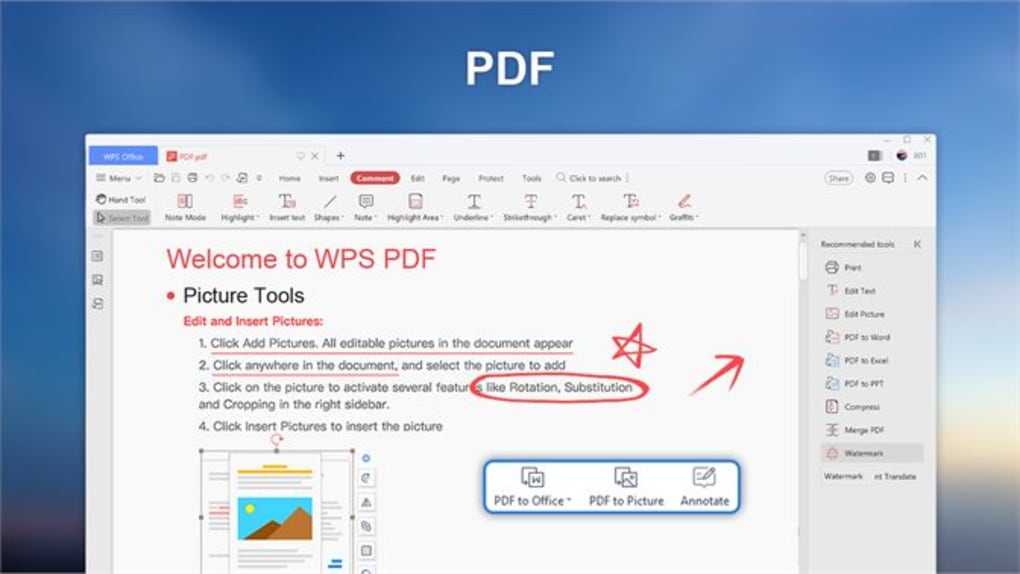
WPS Office features a ribbon-style interface that is both intuitive and familiar to users of other office suites. The layout is well-organized, placing commonly used tools in easily accessible locations. This minimizes the learning curve and enables users to quickly become proficient with the application. The clean and uncluttered design enhances the overall user experience, promoting efficient document creation and editing. Navigation between different applications and features is smooth and straightforward.
The application’s multi-language support reflects a commitment to inclusivity, making it accessible to a wider audience. This adaptability caters to a global user base and enhances its global reach.
Security and Privacy
While WPS Office is a free application, it is important to be mindful of the potential security implications associated with free software. While the application itself undergoes security checks, it’s crucial to download WPS Office only from reputable sources, like the official WPS Office website, to minimize the risk of malware or unwanted bundled software. Always review the software’s privacy policy to understand how your data is handled.
Regularly updating the application to the latest version is also essential in ensuring that you benefit from the latest security patches and bug fixes.
Conclusion
WPS Office effectively bridges the gap between free and paid office suites. Its feature-rich functionality, cross-platform compatibility, user-friendly interface, and minimal system requirements make it a compelling choice for various users, ranging from students and individuals to businesses and organizations. While it might not offer every bell and whistle found in high-end commercial software, it provides a more-than-adequate solution for most productivity needs. If you’re searching for a reliable, free, and versatile office suite, WPS Office warrants serious consideration. Its combination of accessibility and performance makes it a strong contender in the competitive world of office software.
File Information
- License: “Free”
- Version: “1.0”
- Latest update: “July 15, 2022”
- Platform: “Windows”
- OS: “Windows 11”
- Language: “English”
- Downloads: “48.6K”


