
XLS Viewer is a free, third-party application designed for viewing and editing XLS files on Windows operating systems. Unlike relying on Microsoft Office or online converters, XLS Viewer provides a standalone solution for accessing and manipulating spreadsheet data directly on your PC or laptop. This comprehensive guide explores its features, advantages, limitations, and alternatives.
Key Features and Functionality
XLS Viewer offers a straightforward approach to working with XLS files. Its core functionality revolves around the ability to open, view, edit, and save XLS spreadsheets without requiring the installation of Microsoft Excel or similar software. The program boasts a user interface remarkably similar to Microsoft Excel, providing a familiar experience for users accustomed to working with spreadsheet applications. This intuitive design minimizes the learning curve, enabling users to quickly navigate the program and access their spreadsheet data efficiently.
The application’s lightweight design contributes significantly to its fast download and installation times. It places minimal strain on the CPU, ensuring smooth operation even on older systems. This efficiency is particularly beneficial for users with limited system resources or those working with multiple applications simultaneously. The small footprint also reduces the overall storage space required on your computer.
Beyond simple viewing, XLS Viewer permits editing capabilities, allowing users to modify existing spreadsheet data. This functionality is a significant advantage over many other purely view-only solutions. Users can make changes to cell content, format text, and save their modifications directly within the application. However, it’s crucial to understand that while this offers editing capabilities, it may not encompass the full range of features offered by a comprehensive spreadsheet program like Microsoft Excel.
Compatibility is another significant aspect of XLS Viewer. While originally designed to function with older versions of Windows (Windows 95/NT/98/Me/2000/XP/Vista), the application’s backward compatibility with later systems, including Windows 10, through its compatibility troubleshooter, extends its utility to a wide array of users. The only requirement is the presence of Microsoft .NET Framework 2.00 or higher. The combination of broad OS support and minimal system requirements contributes to its widespread accessibility.
Advantages of Using XLS Viewer
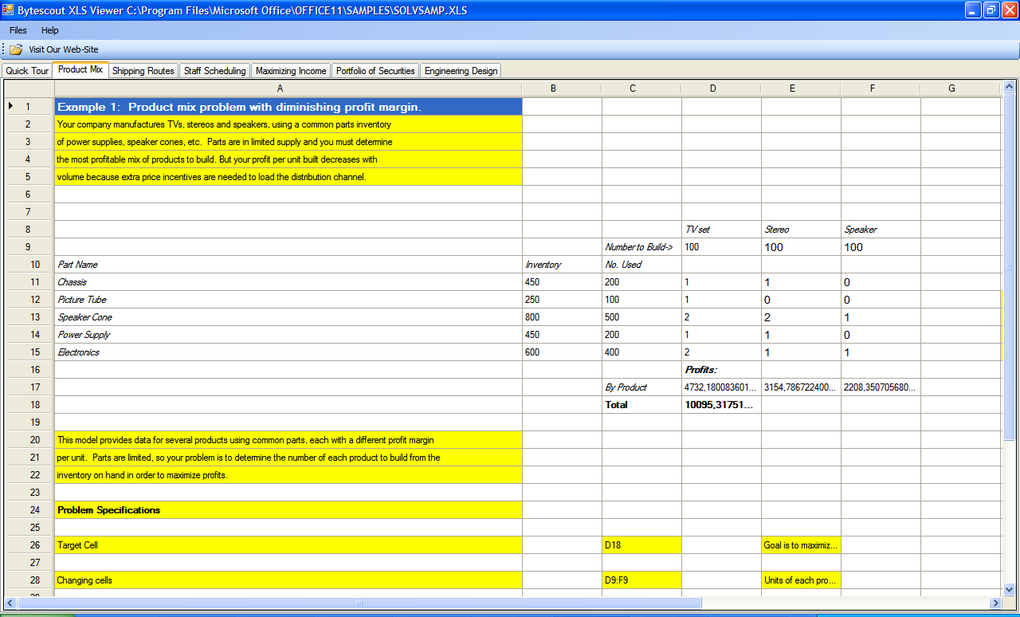
The advantages of employing XLS Viewer over alternative methods are multifold:
-
Offline Access: XLS Viewer operates independently of an internet connection. Unlike cloud-based solutions or online converters, users can access and modify their XLS files without needing an active internet connection. This characteristic is invaluable in situations where internet access is unreliable or unavailable.
-
Security: By keeping your spreadsheets on your local machine, you maintain greater control over your data’s security. Uploading sensitive information to online converters introduces potential risks, such as data breaches or unauthorized access. XLS Viewer mitigates this risk by keeping your data entirely on your personal computer.
-
Ease of Use: The user-friendly interface, mimicking the design of Microsoft Excel, makes the program intuitive and easy to navigate, even for users with limited experience in spreadsheet software. The familiar layout reduces the learning curve and allows for a quick transition for users already comfortable with Excel-like applications.
-
Speed and Efficiency: XLS Viewer’s small footprint and efficient design ensure fast download, installation, and operation. It avoids the delays associated with uploading and downloading files from online services or the resource-intensive nature of large spreadsheet programs.
-
Cost-Effectiveness: As a freeware application, XLS Viewer presents a cost-effective solution for viewing and editing XLS files. This is particularly beneficial for individuals and small businesses seeking a budget-friendly alternative to expensive commercial spreadsheet software.
Limitations of XLS Viewer
While XLS Viewer offers numerous advantages, it’s crucial to acknowledge its limitations:
- Limited Functionality: Unlike comprehensive spreadsheet programs such as Microsoft Excel, XLS Viewer lacks advanced features, such as complex formulas, charts, macros, and pivot tables. Its functionality is primarily focused on basic spreadsheet viewing and editing. Users requiring these advanced features will need to use a more robust spreadsheet application.
-
Font Changes on Saving: A reported drawback is that the fonts within the spreadsheet may be altered upon saving using XLS Viewer. This necessitates double-checking the formatting after saving to ensure accuracy and consistency.
-
Absence of Calculation Capabilities: A notable limitation is the absence of calculation capabilities. Users cannot create or modify formulas within the application. This significantly limits the program’s utility for tasks involving numerical analysis, calculations, or data manipulation.
Alternatives to XLS Viewer
For users needing more advanced functionalities than XLS Viewer offers, several viable alternatives exist:
-
Microsoft Excel: The industry-standard spreadsheet application provides comprehensive features but requires a license.
-
LibreOffice Calc: A powerful open-source alternative to Microsoft Excel, offering a wide range of features and comparable functionality.
-
Google Sheets: A cloud-based spreadsheet application that allows for collaborative work and accessibility from various devices.
-
Free XLSX Viewer: Another free option, offering comparable functionality to XLS Viewer, potentially with different features or interface.
System Requirements and Installation
XLS Viewer’s compatibility extends to a wide range of Windows operating systems, including Windows 95, NT, 98, Me, 2000, XP, Vista, and, with the use of compatibility tools, Windows 10. The only prerequisite is having Microsoft .NET Framework 2.00 or a higher version installed. The installation process itself is typically quick and straightforward, reflecting the application’s lightweight design.
User Reviews and Feedback
User reviews highlight XLS Viewer’s strengths, primarily its speed, small size, and ease of use for simple spreadsheet viewing and basic edits. However, some users point out the limitations concerning calculation functionalities and potential font issues after saving. This mix of positive and negative feedback underscores the need to carefully consider individual needs and expectations before using the application. The absence of widespread, readily available user reviews may reflect the program’s niche position as a simple spreadsheet viewer and not a primary or replacement spreadsheet application.
Conclusion
XLS Viewer fills a specific niche by providing a lightweight and free solution for viewing and performing basic edits on XLS files without the need for extensive software or an internet connection. While it does not replace fully featured spreadsheet programs like Microsoft Excel or LibreOffice Calc, it offers a valuable alternative for users who primarily need to view and make simple modifications to spreadsheets, prioritizing ease of use, speed, and security over advanced functionality. It is important to be aware of the limitations mentioned before installing and using the program to avoid potential frustration or unexpected behaviors. Users with more complex needs will be better served by dedicated spreadsheet applications offering a wider array of features and capabilities.
File Information
- License: “Free”
- Latest update: “October 29, 2024”
- Platform: “Windows”
- OS: “Windows 7”
- Language: “English”
- Downloads: “311.9K”
- Size: “77.74 MB”


