
XMail is a robust and versatile email server designed for both internet and intranet environments. This detailed guide explores its features, functionality, and potential applications, making it easier to understand why XMail remains a popular choice for various users and organizations. We’ll examine its technical specifications, user experience, and how it compares to other email client options available on the market.
XMail’s Core Features and Functionality
XMail’s strength lies in its comprehensive feature set, designed to cater to a wide range of user needs and technical expertise. Key features include:
-
SMTP, POP3, and Finger Server Support: The core protocols for email communication (SMTP for sending, POP3 for receiving) are all built-in, ensuring seamless compatibility with virtually any email client. The inclusion of a finger server allows for querying user information, though this feature is less prevalent in modern email systems.
-
Multi-Domain Management: XMail’s ability to handle multiple domains simplifies email management for organizations with separate departments or brands, consolidating email infrastructure for increased efficiency.
-
Eliminating the Need for System Accounts: A significant advantage for system administrators is that XMail doesn’t necessitate creating separate system accounts for each email user. This reduces administrative overhead and simplifies user account management.
-
Robust Spam Protection: Effective spam filtering is crucial for any email server, and XMail incorporates several layers of protection. These include Real-time Blackhole Lists (RBLs), Reputation-based Blacklists, and other mechanisms (ORBS, DUL) to identify and block unwanted emails. Furthermore, custom filtering rules based on IP addresses or specific email addresses add another layer of customization.
-
Secure Authentication Methods: Security is paramount, and XMail offers various authentication methods like PLAIN, LOGIN, CRAM-MD5, and POP3-before-SMTP, providing flexibility and robust security measures to prevent unauthorized access. It also allows for custom authentication methods for greater control.
-
POP3 Account Synchronization: Users can sync their XMail accounts with external POP3 accounts, consolidating all their emails into a single inbox for easier management.
-
Flexible Alias and Domain Aliases: XMail facilitates creating email aliases and domain aliases, allowing for flexibility in email address management and simplifying routing of emails to different users or departments.
-
Custom Mail Processing and Filtering: Advanced users can customize the mail processing pipeline through custom filters. This allows for powerful automation, such as automatic replies, forwarding rules, and sophisticated email sorting based on various criteria.
-
Direct Mail File Delivery: XMail supports the direct delivery of mail files, bypassing standard mail delivery protocols. This functionality can be useful for specific internal processes or automated mail distribution systems.
-
Mailing List Management: The ability to create and manage mailing lists simplifies communication within groups or organizations, facilitating efficient dissemination of information.
-
Remote Administration: XMail offers remote administration capabilities, allowing administrators to manage and monitor the server from a remote location, enhancing convenience and flexibility in server maintenance.
-
Custom Mail Exchangers: Administrators can configure custom mail exchangers to route emails through specific servers, optimizing email delivery routes or complying with organizational security policies.
-
Detailed Logging: Comprehensive logging provides valuable insights into server activity, aiding in troubleshooting and security analysis.
-
Multi-Platform Compatibility: XMail’s multi-platform codebase ensures compatibility across various operating systems, enhancing its adaptability and deployment flexibility.
XMail’s User Experience and Interface
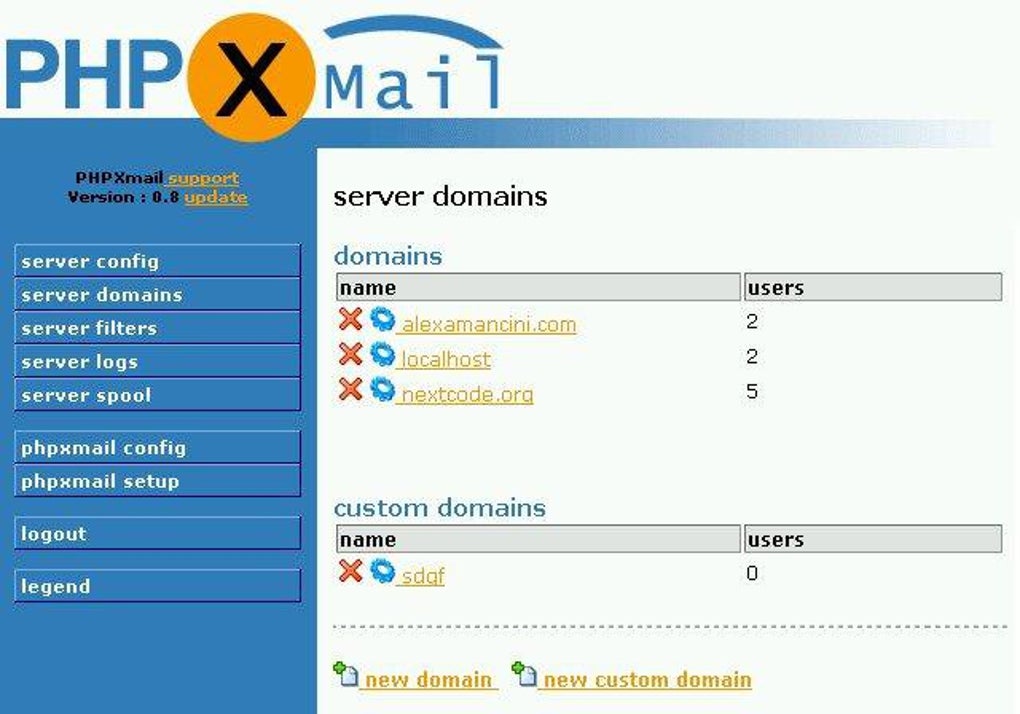
While the provided information doesn’t detail the user interface directly, the focus on robust server-side functionality suggests that XMail’s interface is likely geared towards system administrators. The configuration options and advanced features imply a less user-friendly interface compared to consumer-focused email clients like Outlook or Gmail. It’s more probable that the administrative interface prioritizes functional clarity and precise control over an intuitive, visually appealing design. User-facing aspects would depend on the email client used to access XMail’s services, which could range from simple text-based clients to sophisticated graphical interfaces.
XMail’s Strengths and Weaknesses
Strengths:
- Comprehensive Feature Set: XMail boasts a rich set of features catering to diverse needs, from basic email functionality to sophisticated mail processing and security measures.
- Flexibility and Customization: Its customizable options allow for tailoring the server to specific organizational requirements and individual preferences.
- Robust Security: Multiple authentication methods and spam filtering mechanisms contribute to enhanced security.
- Multi-Domain Support: Ideal for organizations needing to manage multiple email domains within a single infrastructure.
- Cost-Effectiveness: Being free, XMail offers a compelling alternative to commercial email server solutions.
Weaknesses:
- Steeper Learning Curve: The extensive feature set and configuration options can present a steeper learning curve for less technically proficient users.
- Limited User Interface Information: The lack of detailed information on the user interface makes it difficult to assess its user-friendliness.
- Potential for Complexity: The multitude of features might lead to greater complexity in setup and maintenance.
- Community Support: The extent of community support and readily available documentation isn’t specified, which might impact troubleshooting and resolving issues.
- Modern UI/UX Concerns: The lack of details suggests it might not offer the modern user interface and experience found in current email platforms.
XMail Compared to Alternatives
XMail competes with a range of email server software, including commercial offerings like Microsoft Exchange and open-source solutions like Postfix and Sendmail. While commercial solutions often provide robust features, user-friendly interfaces, and dedicated support, they typically come at a cost. Open-source alternatives like Postfix are powerful but often require more technical expertise to configure and manage. XMail’s position lies in offering a balance – a substantial feature set without the financial commitment of a commercial solution, but potentially demanding more technical skills compared to more user-friendly alternatives.
Conclusion
XMail offers a compelling option for users seeking a flexible, feature-rich, and free email server solution. Its extensive features are appealing for administrators needing fine-grained control over their email infrastructure, particularly in environments requiring multiple domains and advanced security measures. However, the potential complexity and steeper learning curve might deter users seeking a simple, easy-to-use email server. A thorough evaluation of your technical expertise and specific needs is crucial to determine whether XMail is the optimal solution for your email management requirements. Future updates and enhancements focusing on improving user interface and documentation could further strengthen its position in the market.
File Information
- License: “Free”
- Latest update: “May 23, 2023”
- Platform: “Windows”
- OS: “Windows 2000”
- Language: “English”
- Downloads: “2.4K”
- Size: “1.66 MB”


