
XnConvert Portable is a free, popular image conversion and editing tool available for Windows. This guide provides a detailed overview of its features, functionality, and how it compares to other image editing software. We’ll explore its strengths, weaknesses, and overall suitability for various user needs.
Understanding XnConvert Portable’s Capabilities
XnConvert Portable stands out as a lightweight yet powerful solution for batch image conversion and editing. Unlike resource-intensive applications like Photoshop, XnConvert prioritizes speed and efficiency, making it ideal for users who need to process large numbers of images quickly without compromising quality. Its portable nature allows users to run the program from a USB drive or any other external storage device without requiring installation, making it exceptionally convenient for those who work on multiple computers or prefer to keep their system drives clean.
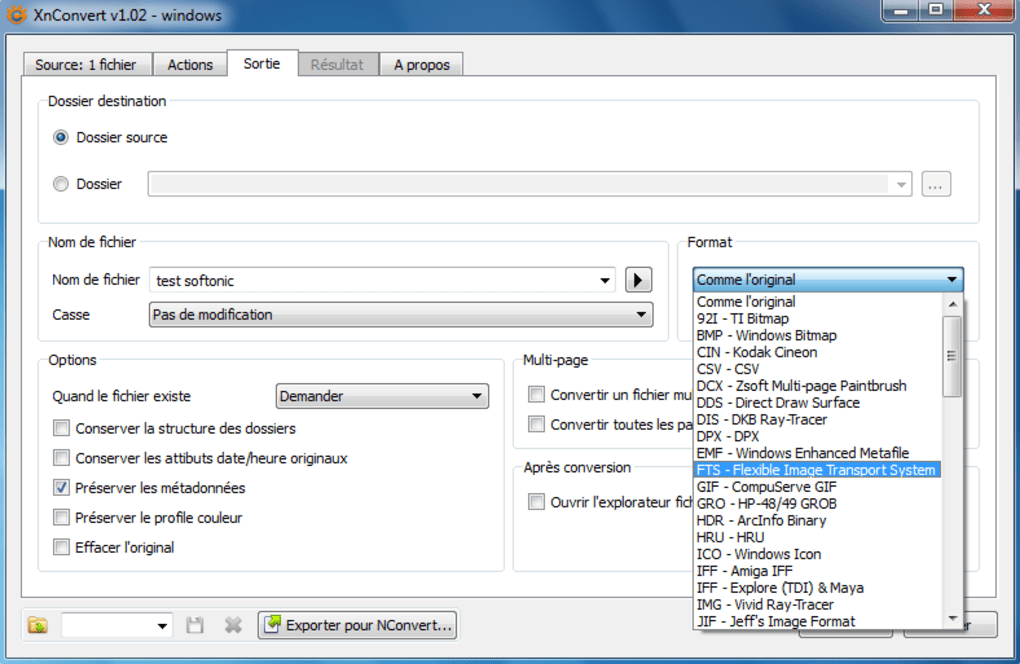
The program’s core functionality centers around image conversion. Users can effortlessly transform images between numerous formats, including JPEG, PNG, GIF, TIFF, BMP, and many more. This flexibility is crucial for tasks like preparing images for web use (optimizing for size and format), archiving large image collections in a consistent format, or preparing images for printing.
Beyond basic conversion, XnConvert offers a surprising array of image editing capabilities. While not as comprehensive as professional-grade software, it provides essential tools for tasks such as resizing, rotating, cropping, and applying basic color adjustments. These features are integrated seamlessly into the conversion workflow, allowing users to perform multiple operations in a single batch process. This streamlines the entire process and reduces the time needed for large-scale image processing.
XnConvert Portable: Features and Functionality in Detail
The intuitive interface simplifies even complex batch operations. Users can select multiple images, specify the desired output format, and choose from a range of settings to fine-tune the conversion process. The options are clearly presented, making it easy to customize the conversion parameters to achieve the desired outcome. These parameters may include:
- Output Format: Choose from a comprehensive list of image formats, each with its associated settings.
- Image Size: Resize images to specific dimensions, maintain aspect ratio, or use percentage-based resizing.
- File Naming: Customize the file names for output images using various schemes, including sequential numbering, date stamps, or custom prefixes.
- Color Space: Convert between different color spaces such as RGB, CMYK, and Grayscale.
- Compression Level: Adjust the compression level for JPEG images to balance file size and image quality.
- Watermark: Add text or image watermarks to protect your intellectual property.
- Metadata Editing: Edit image metadata such as EXIF data, which is particularly valuable for photographers.
- Color Adjustments: Utilize basic color adjustments such as brightness, contrast, saturation, and hue.
- Filters: Apply basic filters for enhancing images (though this capability is not as extensive as dedicated photo editors).
Batch Processing: The Heart of XnConvert Portable
The real strength of XnConvert Portable lies in its batch processing capabilities. Imagine needing to convert hundreds or thousands of images for a website, presentation, or online store. Doing this manually would be incredibly time-consuming and prone to errors. XnConvert’s batch processing eliminates these problems, allowing users to select a folder containing all their images, specify their desired settings, and then initiate the conversion process. The program will then automatically process all the images in the background, leaving the user free to continue with other tasks. The speed and efficiency gained from batch processing make XnConvert Portable an invaluable tool for any task involving large numbers of images.
Comparison to Other Image Editing Software
While XnConvert Portable doesn’t compete directly with professional-grade image editing suites like Adobe Photoshop or GIMP, it carves its own niche by offering a fast, lightweight, and efficient solution for specific tasks. Photoshop and GIMP provide far more extensive editing capabilities, but they come with a significantly higher learning curve and resource demands. XnConvert is the perfect solution when you need quick and easy conversion and basic editing without the complexity or the need for installation.
XnConvert Portable’s Strengths and Weaknesses
Strengths:
- Portability: Its portable nature is a major advantage, allowing for use on multiple computers without installation.
- Speed and Efficiency: XnConvert excels in quickly processing large batches of images.
- Ease of Use: The intuitive interface is straightforward, even for beginners.
- Batch Processing: This feature saves significant time and effort when handling numerous images.
- Wide Format Support: It supports a wide array of image formats, ensuring compatibility with diverse needs.
- Free and Open Source: The software is entirely free to use and distribute, making it accessible to everyone.
Weaknesses:
- Limited Editing Capabilities: Compared to professional software, the editing tools are basic. Advanced users might find them insufficient for complex image manipulations.
- No Non-Destructive Editing: The edits are applied directly to the images, making it impossible to revert changes without having a backup copy.
- Occasional Bugs: While generally stable, occasional bugs or glitches might be encountered, although these are generally addressed through updates.
- Lack of Advanced Features: It lacks advanced features like layers, masks, and advanced selection tools found in more sophisticated image editors.
Who Should Use XnConvert Portable?
XnConvert Portable is an excellent choice for a variety of users, including:
- Web Developers: For preparing images for websites, optimizing for size and format.
- Photographers: For batch processing and basic editing of large numbers of photos.
- Graphic Designers: For simple conversions and quick adjustments.
- Students and Educators: For efficient image handling in educational projects.
- Anyone needing a portable, fast, and efficient image conversion solution: This includes situations where installing software is not possible or desired.
Conclusion: XnConvert Portable – A Valuable Tool
XnConvert Portable fills a critical need in the world of image processing. Its focus on speed, efficiency, and portability makes it a valuable tool for many users. While not a replacement for professional-grade software, its ease of use and powerful batch processing capabilities make it an indispensable addition to anyone’s digital toolkit, particularly those who frequently work with large numbers of images. Its free and open-source nature adds to its appeal, making it an accessible and cost-effective solution for both personal and professional use. Ultimately, XnConvert Portable’s strengths lie in its simplicity, speed, and portability—features that cater perfectly to users who prioritize efficiency and ease of use without sacrificing image quality.


