
In the sprawling digital landscape where visual content reigns supreme, the ability to efficiently manage and optimize images is not merely a convenience but a necessity. From personal photographs shared with loved ones to professional graphics adorning websites and marketing campaigns, images are fundamental to how we communicate and consume information. Yet, the raw, unedited images captured by modern cameras or generated by design software are often far too large – in both physical dimensions and file size – for practical use across various digital platforms. This is where specialized tools like XnResize step in, offering a streamlined solution to a universal problem: image resizing.
XnResize, a free program developed by the renowned XnSoft, carves out its niche as a dedicated and highly efficient utility within the ‘Graphic & Design’ software category for Windows users. Its core mission is deceptively simple: to provide a straightforward, rapid method for adjusting image dimensions and optimizing file sizes without compromising essential visual quality. Published on PhanMemFree on May 28th, 2020, XnResize has since become a reliable companion for individuals and businesses alike who seek to adapt their visual assets for the diverse demands of the internet, email, social media, and local storage. Its lightweight nature, combined with the powerful backing of XnSoft, a developer celebrated for its robust image viewing and processing applications, ensures that XnResize delivers a focused, high-performance experience that stands out in a crowded market of general-purpose image editors.
Understanding XnResize: A Dedicated Tool for Image Optimization
XnResize is fundamentally an image resizer, but its simplicity belies its profound utility in modern digital workflows. At its heart, the application is designed to take one or multiple images and change their pixel dimensions, often in conjunction with file size reduction, to suit specific requirements. This singular focus allows XnSoft to refine the resizing process, ensuring it is as intuitive and efficient as possible for its users.
The lineage of XnResize is significant; it comes from XnSoft, a developer highly regarded in the image processing community for its comprehensive suite of tools, most notably XnView. This heritage instills confidence, suggesting that XnResize benefits from years of experience in handling image formats, optimizing algorithms, and understanding user needs in the graphic and design space. While XnView offers a broader array of features, XnResize distills the resizing capability into a standalone, purpose-built application, making it exceptionally nimble and less resource-intensive.
Being a freeware program, XnResize lowers the barrier to entry for anyone needing to process images. There are no licensing fees, no hidden costs, and no restrictive trial periods. This commitment to accessibility ensures that everyone, from casual users looking to email vacation photos to small business owners optimizing product images for e-commerce, can leverage professional-grade resizing capabilities without financial outlay.
The target audience for XnResize is broad, encompassing anyone who interacts with digital images and needs to adjust their size. Web developers frequently use it to prepare images for websites, ensuring fast loading times and responsive design. Photographers employ it to create web-friendly versions of their high-resolution shots or to prepare images for specific print sizes. Social media managers rely on it to conform images to platform-specific aspect ratios and size limits, maintaining visual integrity across various channels. Even everyday computer users find it invaluable for managing local storage, reducing the footprint of extensive photo libraries, or simply making images suitable for sharing via email or instant messaging.
First introduced on PhanMemFree on May 28th, 2020, XnResize has undergone continuous refinement. The current version, 1.0, last updated on February 1, 2023, reflects XnSoft’s dedication to maintaining and improving the software. This consistent attention ensures compatibility with contemporary operating systems and addresses any performance or security enhancements. The application is primarily developed for Windows, specifically requiring Windows 10 or above, ensuring it integrates seamlessly with the latest iterations of Microsoft’s operating system. While the primary focus is Windows, XnSoft also makes XnResize available for Mac, extending its utility to a wider user base and demonstrating the developer’s commitment to cross-platform accessibility.
A hallmark of XnResize is its incredibly lightweight design. With an installation size of just 16.72 MB, it consumes minimal disk space and system resources. This compact footprint translates to quick installation, rapid launch times, and smooth operation, even on less powerful hardware. Its non-complex nature, as described in its PhanMemFree listing, emphasizes ease of use, making it approachable for novices while still offering sufficient control for more experienced users. The English language interface further enhances its accessibility to a global audience, though XnResize is also available in numerous other languages, catering to a diverse international community. This blend of powerful functionality, ease of access, and efficient design solidifies XnResize’s position as a premier, dedicated tool for image optimization.
The Critical Importance of Image Optimization and Resizing
In today’s visual-centric digital world, the sheer volume and scale of images being created and shared are unprecedented. While high-resolution images are desirable for quality, their raw form often presents significant challenges. Image optimization, particularly through resizing, is therefore not just a technical detail but a fundamental practice that impacts everything from user experience to operational efficiency and storage costs. XnResize directly addresses these critical needs by providing a tool that makes optimization accessible to all.
Web Performance and User Experience: For websites, image size is paramount. Large, unoptimized images are notorious for slowing down page loading times. In an era where users expect instant gratification, even a few seconds of delay can lead to high bounce rates, impacting search engine rankings and overall business success. Search engines like Google prioritize fast-loading websites, making image optimization a crucial SEO factor. XnResize allows webmasters and content creators to reduce image dimensions and file sizes significantly, ensuring that web pages load quickly, providing a smooth and engaging user experience across all devices, including those with slower internet connections. Furthermore, optimized images reduce bandwidth consumption, benefiting both the website host and the end-user by conserving data.
Email Communication Efficiency: Email remains a cornerstone of both personal and professional communication. However, email providers often impose strict limits on attachment sizes. Sending unoptimized, high-resolution photos can quickly exceed these limits, leading to emails being bounced, delayed, or delivered without their attachments. Even if delivered, large attachments can rapidly fill recipients’ inboxes, causing frustration. XnResize provides an easy way to scale down images for email, ensuring that visual content is delivered reliably, promptly, and without creating storage headaches for either sender or receiver. This simple act of resizing contributes to a more professional and efficient email exchange.
Navigating Social Media Requirements: Social media platforms are highly visual, but each platform has its own specific requirements and optimal dimensions for images. A photo perfectly sized for Instagram might be awkwardly cropped on Facebook or distorted on Twitter. Users who upload images that don’t conform to these guidelines often find their visuals automatically, and sometimes poorly, adjusted by the platform, leading to a loss of visual impact or the unintended truncation of important details. XnResize empowers users to prepare their images precisely for each platform – whether it’s a profile picture, a cover photo, a post, or a story – ensuring that their content always looks its best and conveys its intended message without compromise.
Efficient Storage Management: The ever-increasing resolution of digital cameras and smartphones means that a single photograph can easily occupy several megabytes of storage. For individuals accumulating vast photo libraries or businesses managing extensive visual asset databases, this quickly translates into significant storage demands on local hard drives, external storage devices, and cloud services. While storage costs have decreased, managing colossal libraries can still be cumbersome and expensive. XnResize helps in this regard by allowing users to create smaller, more manageable versions of their images for archiving or general use, reserving the original high-resolution files only for specific purposes like large-format printing or intensive editing. This selective optimization significantly reduces storage footprints and streamlines digital asset management.
Balancing Quality for Printing and Digital Display: The considerations for image size differ fundamentally between digital display and physical printing. For digital screens, where resolution is measured in pixels, the goal is often to reduce pixel dimensions and file size while retaining sufficient visual clarity for a comfortable viewing experience. For printing, however, the emphasis shifts to dots per inch (DPI) to ensure sharpness and detail on paper. A common mistake is using oversized images for digital display, leading to slow performance, or conversely, using undersized images for print, resulting in pixelation. XnResize, while primarily focused on reducing pixel dimensions for digital efficiency, empowers users to make informed decisions about image scaling, creating optimal versions for various output needs. Its ability to quickly generate web-optimized versions from high-resolution originals bridges the gap between different media requirements, ensuring versatility and adaptability for all visual content.
Exploring the Features and Functionality of XnResize
While XnResize prides itself on its “not complex” nature, its simplicity is built upon a robust set of features meticulously designed to tackle the multifaceted demands of image resizing. It consolidates essential functionalities into an intuitive interface, making sophisticated image manipulation accessible to a broad user base.
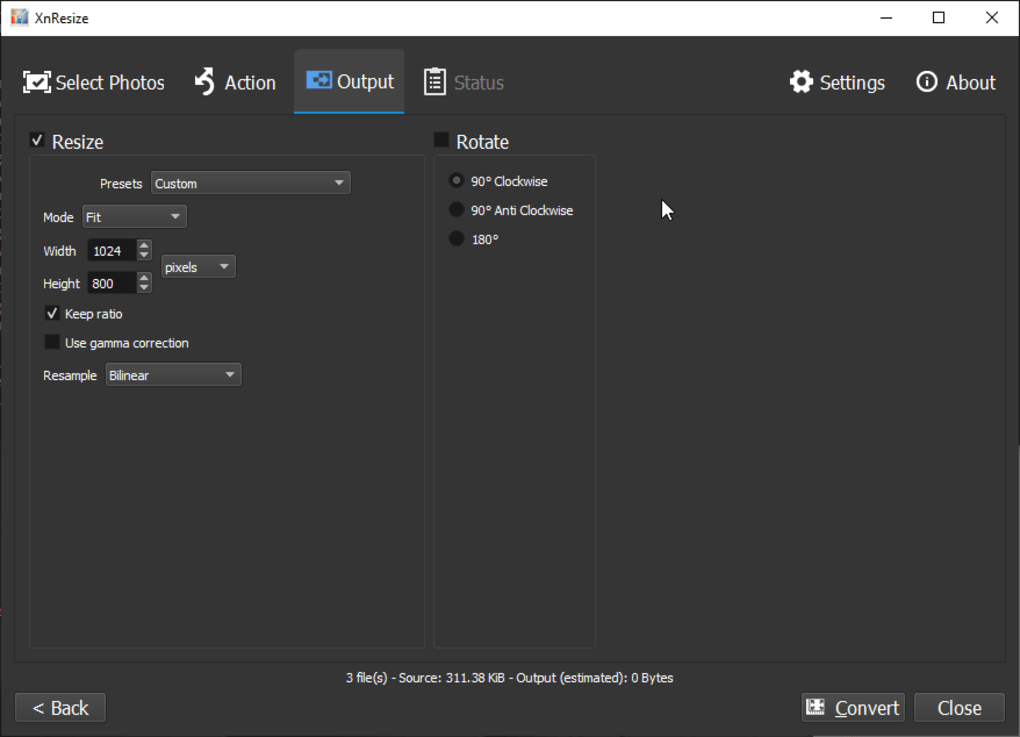
Core Resizing Capabilities: At the heart of XnResize is its precise control over image dimensions. Users can define output sizes using various metrics:
- Pixels: Directly specifying the exact width and height in pixels (e.g., 800x600, 1920x1080).
- Percentages: Scaling images relative to their original size (e.g., 50%, 200%). This is particularly useful for batch operations where images might have different starting dimensions but need to be scaled by the same factor.
- Predefined Resolutions: The software likely includes common presets for web, social media, or standard screen resolutions, streamlining the process for frequent tasks. Crucially, XnResize offers an aspect ratio locking mechanism. This essential feature prevents image distortion during resizing. When enabled, altering one dimension (width or height) automatically adjusts the other to maintain the image’s original proportions, ensuring that photos and graphics remain visually correct and un-stretched.
The quality of resizing is also influenced by interpolation methods. While often handled automatically, effective image resizers like XnResize employ algorithms such as bilinear or bicubic interpolation to create new pixels when scaling an image up or down. These methods intelligently blend pixel data, reducing jagged edges and maintaining smoother transitions, which is vital for preserving visual fidelity, especially when reducing larger images.
Batch Processing: A Cornerstone of Efficiency: Perhaps the most powerful feature of XnResize for anyone dealing with more than a handful of images is its robust batch processing capability. This allows users to:
- Process multiple images simultaneously: Instead of resizing images one by one, users can load an entire folder or a selection of images and apply the same resizing parameters to all of them in a single operation.
- Save immense time: For photographers processing a shoot, web designers preparing a gallery, or marketers optimizing product shots, batch processing transforms hours of tedious work into minutes.
- Maintain consistency: Applying uniform settings across all images ensures a consistent look and feel, which is crucial for branding and professional presentation.
Versatile Output Formats and Quality Control: XnResize supports a wide array of common image formats for output, ensuring compatibility across various platforms and uses. These typically include:
- JPEG: Ideal for photographs, offering adjustable compression levels to balance file size and visual quality. XnResize allows users to fine-tune the JPEG quality slider, providing granular control over the compression ratio.
- PNG: Suitable for images with transparency or sharp edges, like logos and graphics, maintaining lossless quality.
- GIF: Primarily for simple animations or images with a limited color palette.
- BMP, TIFF: Often used for uncompressed or high-quality archival purposes. The ability to select the output format and control compression directly impacts the final file size and image quality, giving users the flexibility to meet specific project requirements.
Intuitive User Interface: True to its promise of being “not complex,” XnResize likely features a straightforward and uncluttered user interface. This would typically include:
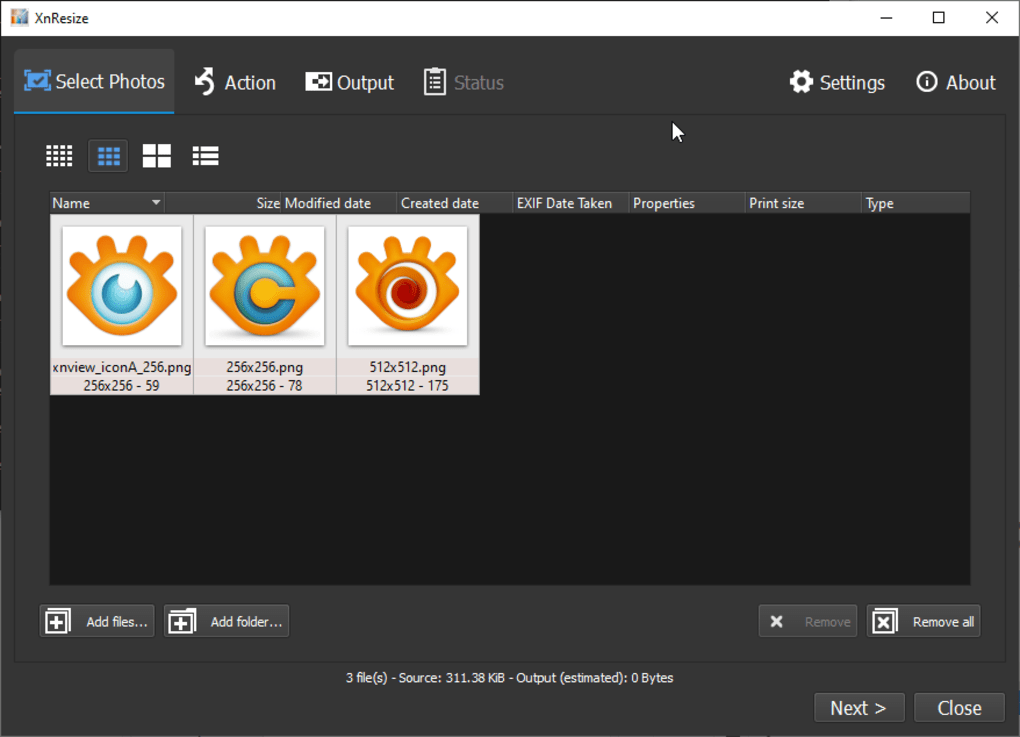
- Drag-and-drop functionality: Users can simply drag images or folders directly into the application window, initiating the processing queue.
- Clear options panel: A well-organized sidebar or main window presents all resizing parameters, output format choices, and destination settings.
- Preview functionality: Many efficient resizers include a live or on-demand preview, allowing users to see the estimated output before committing to the full process, ensuring desired results.
Additional Streamlining Features (Plausible): Based on common practices in similar utilities and XnSoft’s expertise, XnResize may also incorporate features that further enhance workflow efficiency:
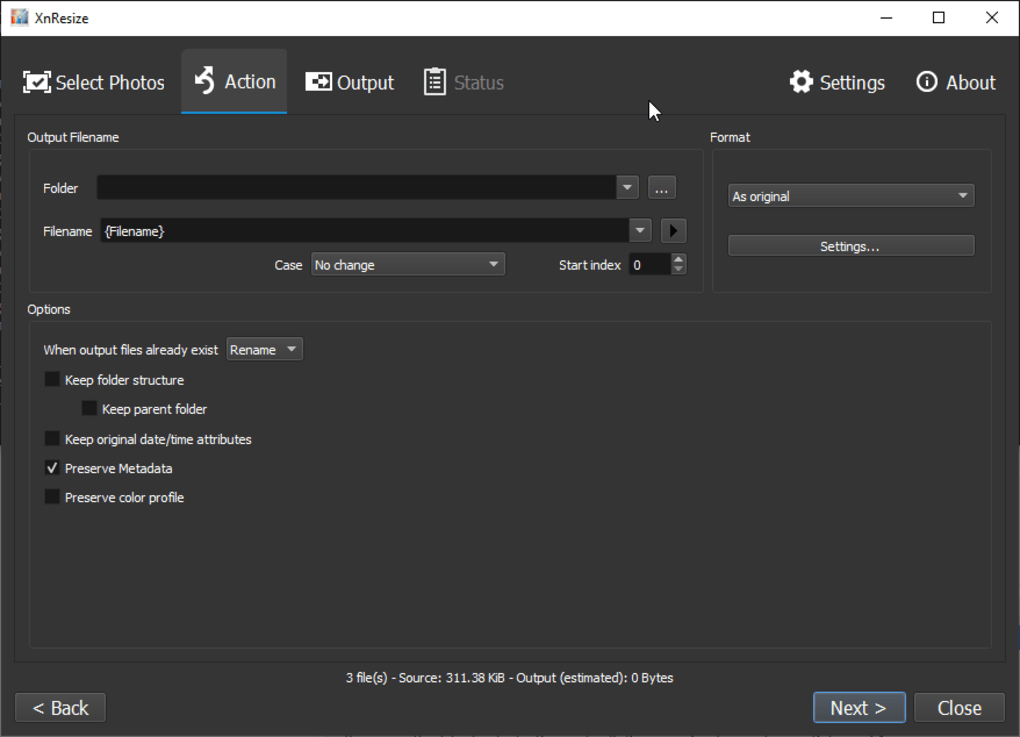
- Batch Renaming: Options to automatically rename processed files using custom templates (e.g., adding suffixes like
_resized, numbering files sequentially, or using original metadata). - Watermarking: For photographers and content creators, the ability to apply a text or image watermark during batch processing is invaluable for protecting intellectual property and branding.
- Metadata Handling: Options to either preserve original image metadata (EXIF data from cameras, copyright information) or strip it away to further reduce file size and protect privacy.
These combined features make XnResize an incredibly efficient and versatile tool, allowing users to quickly and accurately adapt their image assets for any digital context without needing to navigate complex, multi-purpose image editing suites.
XnResize: Performance, Accessibility, and User Experience
The success of any utility software hinges not just on its feature set, but crucially on its performance, how accessible it is to its target users, and the overall experience it delivers. XnResize excels in these areas by adhering to a philosophy of efficiency and user-centric design, making it a standout choice for image resizing.
Unmatched Ease of Use: One of the most compelling aspects of XnResize is its exceptional ease of use. The term “not complex,” as highlighted in its description, is a testament to its design philosophy. For many, the thought of resizing images conjures images of complex photo editors with steep learning curves. XnResize shatters this perception by offering a workflow that is intuitive from the first launch. A typical workflow might involve:
- Opening the application: A quick launch thanks to its lightweight nature.
- Adding images: Users can easily drag and drop single images or entire folders into the program interface.
- Setting parameters: Simple sliders, dropdowns, and input fields allow users to specify desired dimensions, output format, and quality settings. The aspect ratio lock ensures proportions are maintained without fuss.
- Initiating resize: A single click starts the batch processing.
- Saving results: Processed images are saved to a specified destination folder, often with options for renaming. This streamlined process requires minimal technical knowledge, allowing users to achieve professional-looking results quickly, freeing up time for more creative or critical tasks.
Minimal System Requirements: XnResize is designed to be lean and efficient, demanding very little from your system.
- Operating System: It requires Windows 10 or above, ensuring compatibility with modern systems while leveraging current OS capabilities.
- Resource Footprint: Its small installation size (16.72 MB) is a strong indicator of its minimal resource consumption. Unlike larger image manipulation suites that can hog CPU and RAM, XnResize operates smoothly in the background or during active use without slowing down your computer. This makes it ideal for users with older machines or those who need to run multiple applications concurrently.
Multi-language Support for Global Reach: While PhanMemFree’s listing specifies that “you can run it in English,” the broader context provided by the “Program available in other languages” section (listing options like Baixar XnResize, Unduh XnResize, Descargar XnResize, etc.) indicates that XnResize, like many XnSoft products, likely offers multi-language support. This global approach ensures that users from diverse linguistic backgrounds can comfortably navigate and utilize the software in their native tongue, significantly enhancing its accessibility and user satisfaction worldwide.
Accessibility Through Freeware Model: The fact that XnResize is entirely free is a massive advantage. This freeware model ensures:
- Zero cost barrier: Anyone can download and use the software without financial commitment, making professional image optimization available to individuals, small businesses, and non-profits alike.
- No subscription models: Users are not locked into recurring payments, offering peace of mind and long-term cost savings.
- Absence of intrusive elements: Typically, reputable freeware from established developers like XnSoft avoids intrusive advertisements or bundled bloatware, focusing solely on delivering its core functionality clean and effectively.
Security Status and Developer Trust: PhanMemFree emphasizes the security of the software hosted on its platform. For XnResize, the “Security Status” is “Free” and implies a clean bill of health. PhanMemFree’s comprehensive scanning process, involving “more than 50 of the world’s leading antivirus services,” ensures that XnResize is “extremely likely that this software program is clean,” meaning no potential threats have been detected. This robust security vetting builds crucial trust with users, assuring them that they are downloading a safe and reliable application. XnSoft’s long-standing reputation as a developer of clean, functional software further reinforces this confidence.
Community Engagement and Continuous Improvement: While the PhanMemFree entry notes that they haven’t “had the occasion to check it yet” personally, they strongly encourage users to “try it and leave us a comment or value it on our website.” This invitation highlights the value of user feedback for continuous improvement. A vibrant user community providing reviews and suggestions helps developers like XnSoft understand real-world usage patterns, identify potential areas for enhancement, and prioritize future updates. The fact that XnResize, despite being version 1.0, received an update as recently as February 1, 2023, underscores XnSoft’s commitment to ongoing support and refinement, ensuring the tool remains current and effective for its growing user base. This holistic approach to performance, accessibility, and user experience positions XnResize as a highly valuable and reliable asset in any digital toolkit.
Beyond XnResize: Its Place in the Digital Toolkit
In a digital ecosystem teeming with image editing software, from basic built-in tools to professional-grade suites, XnResize carves out a distinct and invaluable niche. Its existence isn’t about competing directly with comprehensive editors like Adobe Photoshop or GIMP; rather, it’s about perfecting a singular, frequently needed function and making it supremely accessible. Understanding where XnResize fits into the broader digital toolkit reveals its true utility and highlights why it remains a relevant choice for so many.
Why Choose XnResize? A Unique Value Proposition: The primary draw of XnResize lies in its dedicated focus. Many image editors offer resizing as one of hundreds of features. While functional, navigating these complex interfaces for a simple resizing task can be inefficient and overwhelming. XnResize strips away the excess, offering a straightforward, intuitive environment solely for altering image dimensions and optimizing file sizes. Its unique selling points include:
- Specialization: It does one thing, and it does it exceptionally well. This specialization allows for highly optimized performance and a user experience tailored precisely for resizing tasks.
- Freeware Status: As a free tool, it eliminates any financial barrier, making it accessible to individuals and organizations regardless of budget.
- Speed and Efficiency: Its lightweight nature and batch processing capabilities mean tasks that might take minutes in a larger editor can be accomplished in seconds with XnResize. This efficiency is critical for users dealing with large volumes of images.
- Simplicity: The “not complex” design ensures that even novices can use it effectively without a steep learning curve, empowering a wider audience to manage their digital images professionally.
Complementary Role with Other Software: XnResize is not meant to be a standalone solution for all image manipulation needs. Instead, it acts as an excellent complementary tool within a larger software ecosystem:
- With Professional Editors: Photographers and graphic designers often use powerful editors like Adobe Photoshop or Affinity Photo for intricate retouching, complex compositions, or advanced color grading. Once these high-resolution masters are created, XnResize steps in as the ideal companion to generate web-optimized, email-friendly, or social media-ready versions quickly, without reopening the heavy-duty editor.
- With File Management Systems: For users with extensive photo archives, XnResize works seamlessly alongside file managers (like Windows File Explorer or dedicated digital asset management software) to quickly process images for storage, sharing, or cloud backup, contributing to better organization and reduced storage footprints.
- Integrated Workflows: Developers can integrate XnResize into their pre-deployment pipelines for websites or applications, ensuring all visual assets are perfectly optimized before going live.
Distinction from Alternatives: The market does offer alternatives, both built-in and third-party. Operating systems often include basic resizing capabilities (e.g., Paint in Windows, Preview in macOS). Online resizing tools are also prevalent. However, XnResize often surpasses these options:
- Built-in OS Tools: Generally lack batch processing, advanced control over output formats, or detailed quality settings.
- Online Resizers: While convenient, they often come with privacy concerns (uploading sensitive images to third-party servers), speed limitations (dependent on internet connection), or feature restrictions (e.g., file size limits for free tiers, watermarks). XnResize, as a desktop application, bypasses these issues, offering offline functionality, higher security, and uninhibited processing power.
- Other Free Desktop Tools: While alternatives like WinTopo3Free, CEKLi PhotoLab, and jfPaint exist (as mentioned in PhanMemFree’s listing), XnResize stands out due to XnSoft’s specialized expertise in image management and the robust, focused feature set it provides for resizing.
Future Prospects: While XnResize remains focused on its core function, its continuous updates suggest a commitment to evolving with user needs. Future versions might explore subtle enhancements without compromising simplicity, such as more sophisticated integration with cloud storage services, expanded batch renaming options, or even basic image enhancement filters (though carefully balanced to maintain its specialized identity).
In conclusion, XnResize is more than just a free application; it’s an indispensable utility for anyone navigating the visually rich digital world. By offering a powerful, accessible, and highly efficient solution for image resizing and optimization, XnResize empowers users to enhance web performance, streamline communication, manage storage, and ensure their visual content consistently looks its best across all platforms. Its place in the digital toolkit is not as a replacement for comprehensive editors but as an essential, complementary tool that streamlines a fundamental task, promoting efficiency and elevating the quality of digital imagery for professionals and casual users alike.
File Information
- License: “Free”
- Version: “1.0”
- Latest update: “February 1, 2023”
- Platform: “Windows”
- OS: “Windows 10”
- Language: “English”
- Downloads: “8.1K”
- Size: “16.72 MB”


