
XnView is a widely popular and highly-rated freeware image viewer and converter known for its versatility, ease of use, and extensive support for a vast array of image formats. This review delves into its features, strengths, weaknesses, and overall suitability for various user needs, comparing it to similar software options and considering user feedback.
XnView’s Extensive Format Support and User-Friendly Interface
One of XnView’s most compelling features is its unparalleled support for over 500 image formats. This broad compatibility extends beyond standard image types like JPEG, PNG, GIF, and TIFF, encompassing less common formats and even some video and audio files such as AVI and MP3. This makes XnView a one-stop shop for viewing and managing a diverse digital media library. Competitors such as IrfanView and FastStone Image Viewer offer similar capabilities but may fall short in the sheer number of supported formats. While the majority of files are seamlessly recognized and displayed, some users have reported instances where files with unusual or altered extensions are not properly identified. This issue, while infrequent, highlights the potential for minor compatibility hiccups. The program’s “Help” file often addresses such problems effectively, offering a valuable resource for troubleshooting. The discrepancy in handling file extensions with similar content (e.g., .LOG vs. .TXT) remains a minor drawback, although not significantly impacting its overall functionality.
The program’s interface boasts a notable strength: its intuitive design. The layout closely resembles the familiar Windows Explorer, making it instantly accessible to users of all technical skill levels. The left-hand panel displays a clear directory structure, while the main window presents a preview of selected files. This clean and efficient design eliminates unnecessary clutter, allowing for smooth and efficient navigation. The preview function effectively displays various file types, including the content of text files and thumbnail images for folders. When dealing with image files, the preview window enables quick visual inspection and selection, while the slideshow feature provides a seamless viewing experience perfect for presentations or casual enjoyment. However, the preview of INI or TXT files is presented simply as an icon rather than an immediate textual preview, a small usability difference that does not detract greatly from overall functionality.
Feature-Rich Functionality for Image Management and Editing
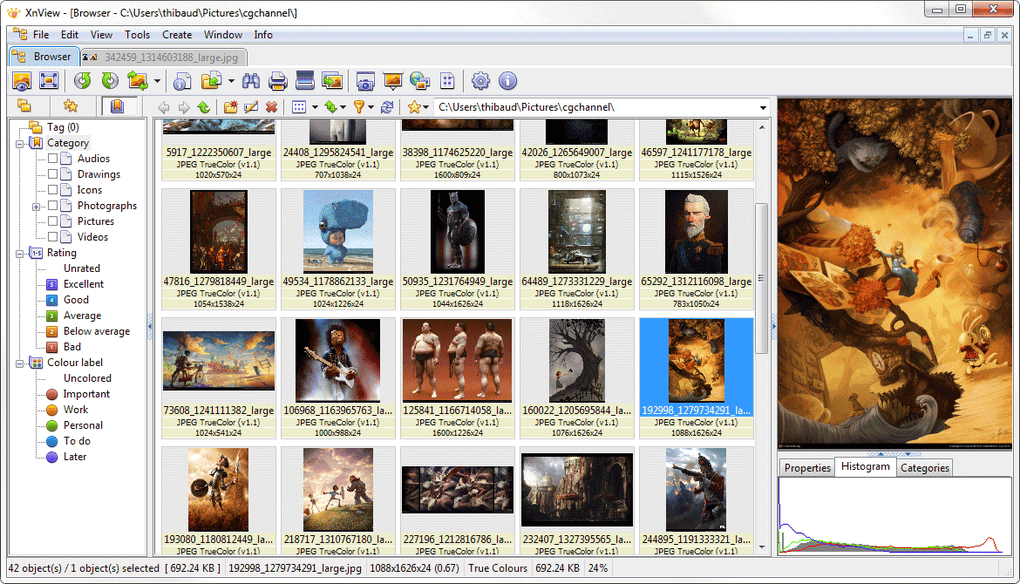
Beyond its viewing capabilities, XnView provides a robust suite of image editing and management tools. This extends beyond simple viewing and includes features such as rotating, cropping, adjusting brightness, contrast, and gamma levels. The software further supports batch processing, a highly valuable feature for users needing to convert or modify numerous files simultaneously. This batch processing functionality supports a variety of output formats including PNG, JPEG, CIN, PCX, ICO, WIA, EXIF, TIFF, GIF, IPTC, and BMP, providing ample flexibility for image conversion needs.
XnView also incorporates a built-in screen capture tool, allowing users to quickly capture screenshots and customize the output resolution of thumbnails. This feature eliminates the need for separate screen capture software, adding to the program’s overall utility. The inclusion of helpful tutorials and a comprehensive “Help” file, easily accessible via hotkeys, further enhances user experience. The program’s FAQ page and online forum provide additional support and resources for troubleshooting. This combination of integrated tools and readily available support makes XnView particularly attractive for users seeking a self-sufficient image management solution.
XnView Portable: Flexibility and Accessibility
XnView’s functionality extends beyond its standard desktop application with the availability of XnView Portable. This portable version allows users to save the program onto a USB drive or external storage device. This flexibility is invaluable for users who frequently work on multiple computers or need to access their image management tools across different devices. The portable version retains the full functionality of the desktop application, offering a consistent experience regardless of the host machine. This portability significantly enhances convenience and accessibility, making XnView a practical choice for diverse user needs and computing environments.
Comparison with Competitors and Overall Assessment
While XnView competes with other popular image viewers and converters like IrfanView, FastStone Image Viewer, and HoneyView, it distinguishes itself through a combination of features. While competitors may offer similar core functionalities, XnView’s broader format support and the inclusion of features such as batch processing and screen capture often provide an advantage. Furthermore, its intuitive interface, coupled with readily available support resources, makes it particularly user-friendly, particularly for users who may not have extensive experience with image editing software.
XnView’s freeware status further solidifies its appeal, making it a cost-effective solution for individual and professional users alike. While some might find the absence of advanced editing capabilities to be a limitation, the program’s focus on user-friendliness, broad format support, and versatility makes it an excellent choice for a wide range of users, from casual users to those with more demanding image management needs. Regional variations such as XnView India, XnView Korea, and XnView Japan cater to specific localization requirements, demonstrating the program’s global reach and adaptability. The compatibility with Windows 11 further underscores its ongoing development and commitment to modern operating systems.
User Reviews and Feedback
User reviews generally reflect positively on XnView’s strengths, frequently highlighting its ease of use, speed, and extensive format support. However, some reviews point to occasional issues with the recognition of files with uncommon extensions or altered file names. This, as mentioned, appears to be a relatively minor drawback. Negative reviews primarily focus on platform compatibility issues, particularly relating to older Mac OS versions. These reviews underscore the importance of checking system requirements before downloading the software. Overall, the vast majority of user feedback is positive, corroborating XnView’s reputation as a reliable and versatile image viewer and converter.
Conclusion
XnView stands out as a highly versatile and user-friendly image viewer and converter. Its extensive format support, intuitive interface, and built-in editing tools make it a valuable asset for users with diverse digital media management needs. The availability of a portable version further enhances its accessibility and flexibility. While minor limitations exist concerning compatibility with certain file extensions, these are often overshadowed by the program’s overall strengths. Its freeware status and strong user feedback collectively position XnView as a compelling and highly recommended choice for individuals and professionals alike.
File Information
- License: “Free”
- Latest update: “March 24, 2025”
- Platform: “Windows”
- OS: “Windows 7”
- Language: “English”
- Downloads: “455.9K”
- Size: “6.29 MB”


